
Pay Upon Invoice (German: Rechnungskauf) is a “buy now, pay later” payment method for German shoppers. The buyer places an order, receives the goods, and pays within 30 days via a payment instruction sent by Ratepay (PayPal’s partner). No PayPal account is needed for the buyer.
Requirements
↑ Back to topFor your store (merchant side)
↑ Back to top| Requirement | Value |
|---|---|
| Store country | Germany (DE) only |
| Store currency | EUR only |
| PayPal account | Business account with PUI capability enabled |
| FraudNet | Must be enabled (auto-enforced when PUI is active) |
For each order (checkout side)
↑ Back to top| Requirement | Value |
|---|---|
| Buyer billing country | Germany (DE) |
| Buyer shipping country | Germany (DE) |
| Order total | Min €5.00 — Max €2,500.00 |
| Products | Physical only — no virtual or downloadable products |
| Buyer age | Must be 18 or older (birth date entered at checkout) |
Setup
↑ Back to topStep 1 – Sign up for PUI with PayPal
↑ Back to topGo to your PayPal account and request the Pay Upon Invoice capability. PayPal will review your account. Once approved, the PUI option will appear in your plugin settings.
Step 2 – Enable PUI in the plugin
↑ Back to top- Go to WooCommerce > Settings > Payments
- Open PayPal Payments settings
- Navigate to the Payment Methods tab
- Find Pay upon Invoice and click Configure
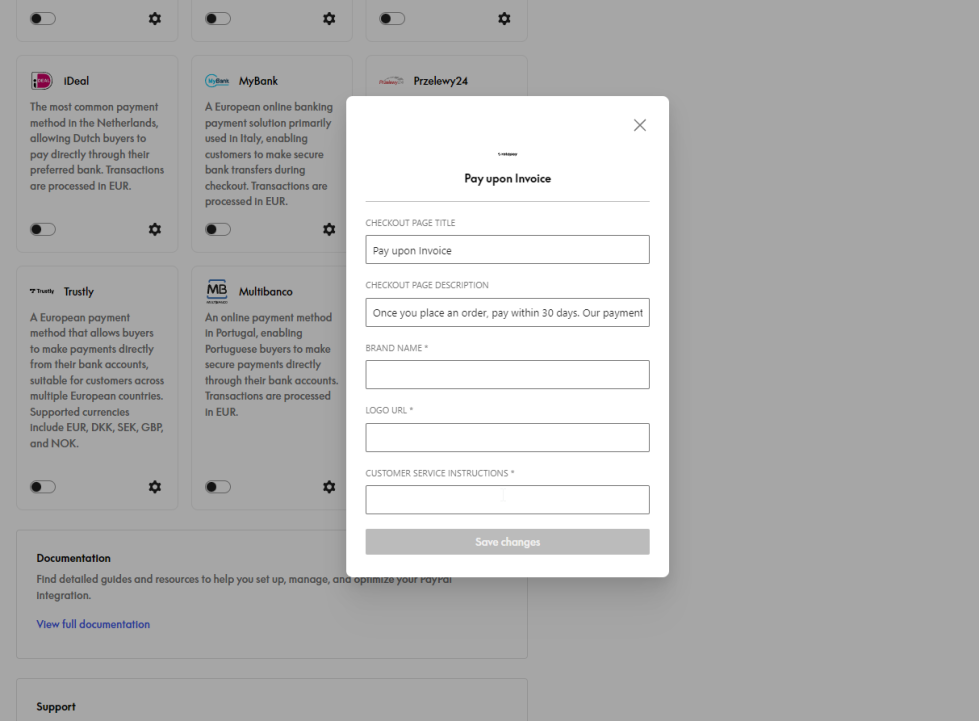
Step 3 – Fill in the required fields
↑ Back to topAll three fields below are required. PUI will not work if any of them is empty.
| Field | What to put |
|---|---|
| Brand Name | Your shop name (max 127 characters). Shown on Ratepay’s payment instructions sent to the buyer. |
| Logo URL | A direct URL to your shop logo image (e.g. https://yourshop.de/logo.png). Shown on Ratepay’s payment instructions. |
| Customer Service Instructions | A short text telling buyers how to contact you (e.g. Contact us at support@yourshop.de). |
Step 4 – Enable FraudNet
↑ Back to topFraudNet is required when PUI is active. The plugin enforces this automatically when PUI is enabled, the FraudNet checkbox is locked on.
How It Works for the Buyer
↑ Back to top- Buyer goes to checkout with physical products, billing and shipping set to Germany.
- “Pay upon Invoice” appears as a payment option.
- Buyer enters their date of birth (required). A phone number field may also appear depending on your settings.
- Buyer places the order.
- The order goes to “On Hold” status in WooCommerce.
- Ratepay sends payment instructions to the buyer by email.
- Buyer pays within 30 days.
Why PUI Does Not Show at Checkout
↑ Back to topIf the payment option is missing at checkout, check these common causes:
| Symptom | Likely cause |
|---|---|
| PUI not visible at all | PayPal account not approved for PUI, or store country is not DE |
| PUI hidden for specific order | Billing or shipping country is not DE |
| PUI hidden for specific order | Order total is below €5 or above €2,500 |
| PUI hidden for specific order | Cart contains a virtual or downloadable product |
| PUI shows but payment fails | Brand Name, Logo URL, or Customer Service Instructions field is empty |
| PUI shows but payment fails | Buyer’s name/address could not be verified by Ratepay |
Refunds
↑ Back to topRefunds are supported and can be processed directly from the WooCommerce order screen, the same as other PayPal payment methods.What are Alternative Payment Methods?