
Pay Upon Invoice (German: Rechnungskauf) is a “buy now, pay later” payment method for German shoppers. The buyer places an order, receives the goods, and pays within 30 days via a payment instruction sent by Ratepay (PayPal’s partner). No PayPal account is needed for the buyer.
Requirements
↑ Back to top- B2C sales only.
- Orders must ship within 7 days of the transaction.
- PayPal asks for a valid VAT ID during sign-up.
- Tax calculation should be on, with at least one German tax rate. Products without a tax class are sent with 0% tax.
- Vouchers, gift cards and other digital goods are not allowed.
For your store (merchant side)
↑ Back to top| Store country | Germany (DE) only. Your PayPal account must also be in Germany. |
|---|---|
| Store currency | EUR only |
| PayPal account | Business account with Pay upon Invoice approved by PayPal |
| Pay upon Invoice settings | Brand name, Logo URL and Customer service instructions filled in |
| FraudNet | Always on in PayPal Payments 4.x; nothing to set up |
For each order (checkout side)
↑ Back to top| Requirement | Value |
|---|---|
| Buyer billing country | Germany (DE) |
| Buyer shipping country | Germany (DE) |
| Order total | Min €5.00 — Max €2,500.00 |
| Products | Physical only — no virtual or downloadable products |
| Buyer age | Must be 18 or older (birth date entered at checkout) |
| Phone number | Required. If your checkout doesn’t ask for one, Pay upon Invoice adds its own Phone field. |
Setup
↑ Back to topStep 1 – Sign up for PUI with PayPal
↑ Back to topGo to your PayPal account and request the Pay Upon Invoice capability. PayPal will review your account. You can also click Sign up on the Pay upon Invoice card in the Overview tab of PayPal Payments. After PayPal approves you, click Refresh in the Features section.
Step 2 – Enable PUI in the plugin
↑ Back to top- Go to WooCommerce › Settings › Payments.
- Open the PayPal Payments settings.
- Go to the Payment Methods tab.
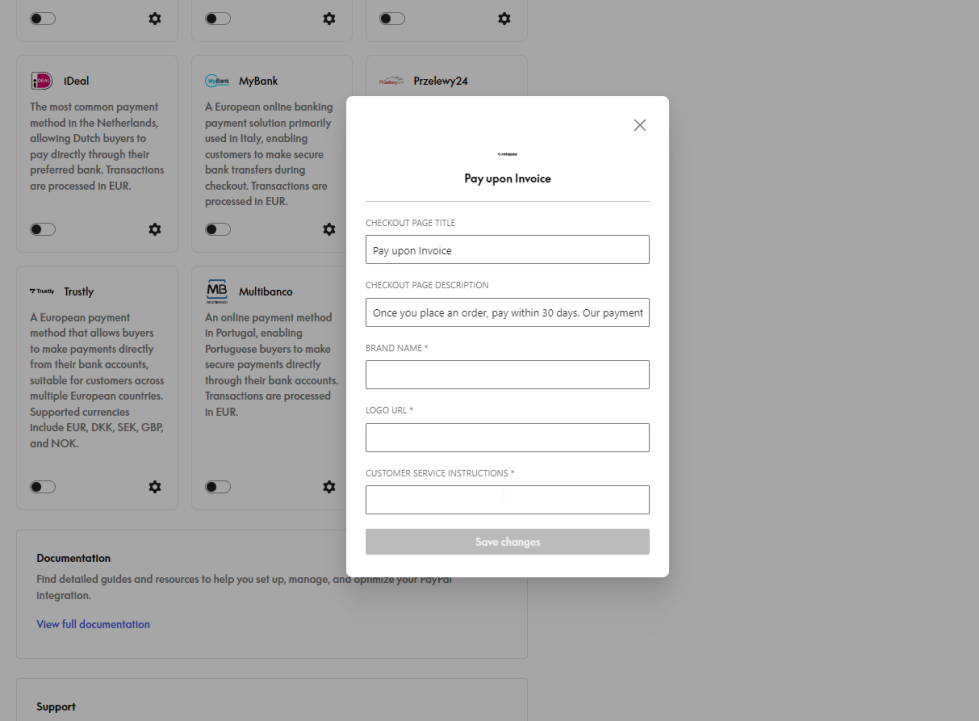
- In the Alternative Payment Methods section, find Pay upon Invoice and click the settings (gear) icon on its card.
- Fill in the fields (Step 3) and click Save changes.
- Turn on the Pay upon Invoice toggle and click Save.
Step 3 – Fill in the required fields
↑ Back to topAll three fields below are required. PUI will not work if any of them is empty.
| Field | What to put |
|---|---|
| Brand name | Your shop name (max 127 characters). Shown on Ratepay’s payment instructions sent to the buyer. |
| Logo URL |
A direct URL to your shop logo image (e.g. https://yourshop.de/logo.png). Shown on Ratepay’s payment instructions.
|
| Customer service instructions |
A short text telling buyers how to contact you (e.g. Contact us at support@yourshop.de).
|
How It Works for the Buyer
↑ Back to top- Buyer goes to checkout with physical products, billing and shipping set to Germany.
- “Pay upon Invoice” appears as a payment option.
- Buyer enters their date of birth (required). A phone number is also required. If your checkout doesn’t already ask for one, Pay upon Invoice adds its own Phone field.
- Buyer places the order.
- The order goes to “On Hold” status in WooCommerce.
- Ratepay sends payment instructions to the buyer by email.
- Buyer pays within 30 days.
What happens after the order is placed
↑ Back to top- The order stays On hold until PayPal’s
PAYMENT.CAPTURE.COMPLETEDwebhook arrives (usually a minute or two). - When it arrives, the order moves to Processing, and the customer email includes the Ratepay payment instructions.
- If the webhook doesn’t arrive within about 5 minutes, the order is set to Failed.
- Resending the processing email resends the payment instructions.
If Pay upon Invoice orders keep moving to Failed after about 5 minutes, PayPal’s confirmation is not reaching your store. Check the webhook status (see Troubleshooting) and make sure WP-Cron and scheduled actions (Tools › Scheduled Actions) are running.
Why PUI Does Not Show at Checkout
↑ Back to topIf the payment option is missing at checkout, check these common causes:
| Symptom | Likely cause |
|---|---|
| PUI not visible at all | PayPal account not approved for PUI, or store country is not DE |
| PUI hidden for specific order | Billing or shipping country is not DE |
| PUI hidden for specific order | Order total is below €5 or above €2,500 |
| PUI hidden for specific order | Cart contains a virtual or downloadable product |
| PUI not visible at all | Brand name, Logo URL, or Customer service instructions is empty, or the Pay upon Invoice toggle is off |
| PUI not visible at all | Store currency is not EUR |
| PUI shows but payment fails | Buyer’s name/address could not be verified by Ratepay |
Refunds
↑ Back to topRefunds are supported and can be processed directly from the WooCommerce order screen, the same as other PayPal payment methods.
Refunds are possible for up to 180 days after the payment.