Product Icon

Payment Gateway Based Fees and Discounts Pro for WooCommerce

Add custom fees or discounts to payment gateways to balance transaction costs, encourage cost-effective payment methods, and maintain transparency at checkout.
Choose a billing option
$49
Save 20%
$98 $78.40

Subscription includes

  • Product updates and improvements
  • Customer support
  • 30-day money-back guarantee

Key Features

  • Apply a global extra fee across all payment gateways in one step to simplify your checkout fee strategy.
    Example: Add a 2% processing fee that automatically applies to every payment method without setting them up individually.
  • Charge fees or offer discounts based on the payment method to balance transaction costs.
    Example: Charge an extra $0.30 for PayPal payments or offer a 2% discount for Direct Bank Transfers.
  • Configure more than one fee for a single payment gateway to cover additional costs.
    Example: Add a $0.30 fee for processing PayPal payments and an additional 3.9% charge for the order total.

  • Add specific fees for certain product categories or exclude them entirely for others.
    Example: Apply a 2% fee for electronics and exclude fees for apparel purchases.

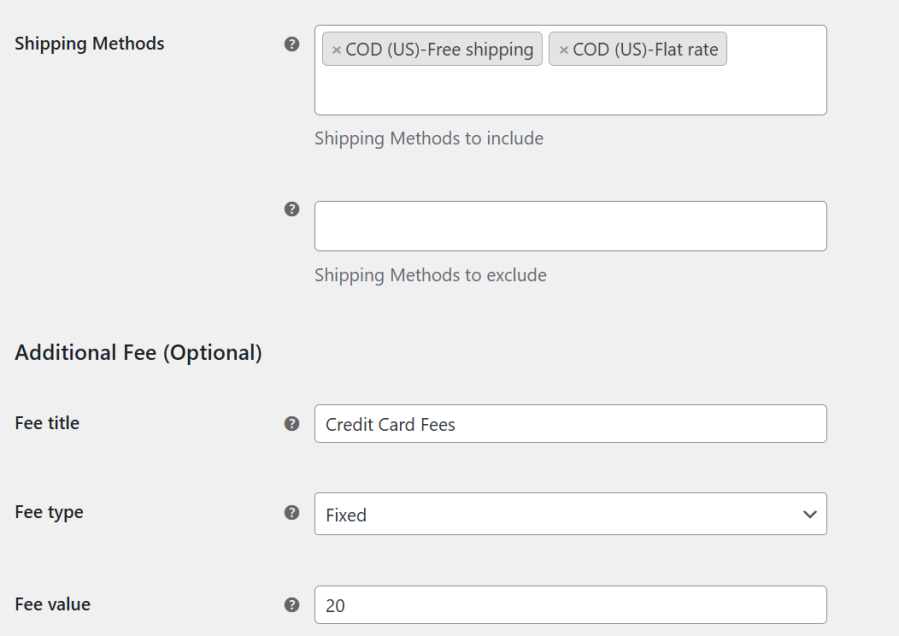
  • Apply payment gateway fees conditionally based on the selected shipping method to fine-tune your checkout costs.
    Example: Add a ₹50 fee for Cash on Delivery only when Flat Rate Shipping is used, and skip it for Free Shipping.
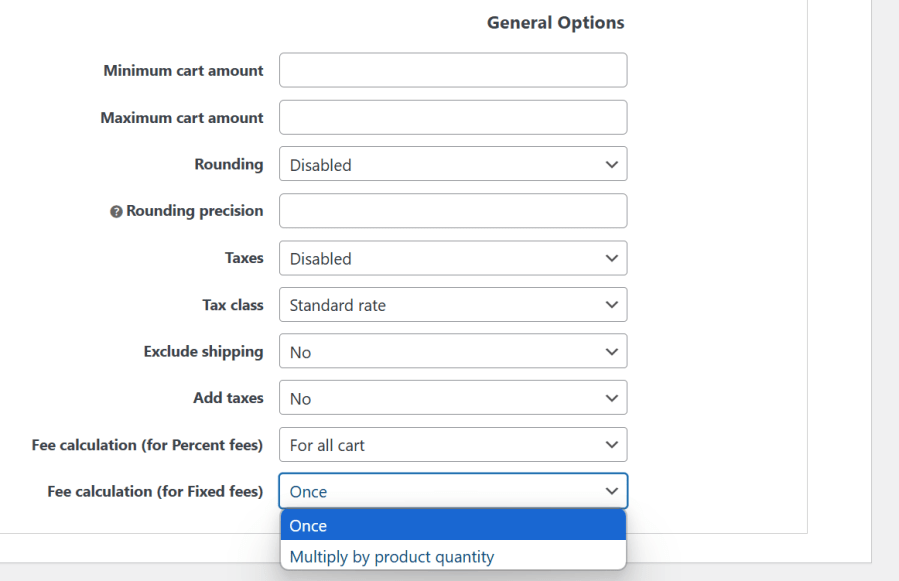
  • Choose whether fixed product-level fees are charged once or multiplied by quantity for more accurate cost control.
    Example: Charge a ₹100 fee per item for fragile goods, so ordering 3 units adds ₹300 instead of just ₹100.
  • Tailor fees to reflect regional transaction costs or currency exchange charges.
    Example: Add a 4.4% fee for non-U.S. payments and 2.9% for U.S.-based transactions.
  • Apply percentage-based fees either on each product or the full cart total when fees are set at the product level.
    Example: Add a 5% handling fee per product for fragile items or apply 5% to the entire cart for bulk orders.
  • Avoid cart abandonment by informing customers of fees upfront on the product page.
    Example: Show “2.5% extra charge applies for PayPal payments” on the product details page.
  • Customize fees as a fixed amount or a percentage of the total order value.
    Example: Apply a 2.5% fee on the total order value for credit card payments or charge a flat $0.50.
  • Avoid discouraging small orders by waiving fees below a set order amount.
    Example: No additional fees for orders under $20.
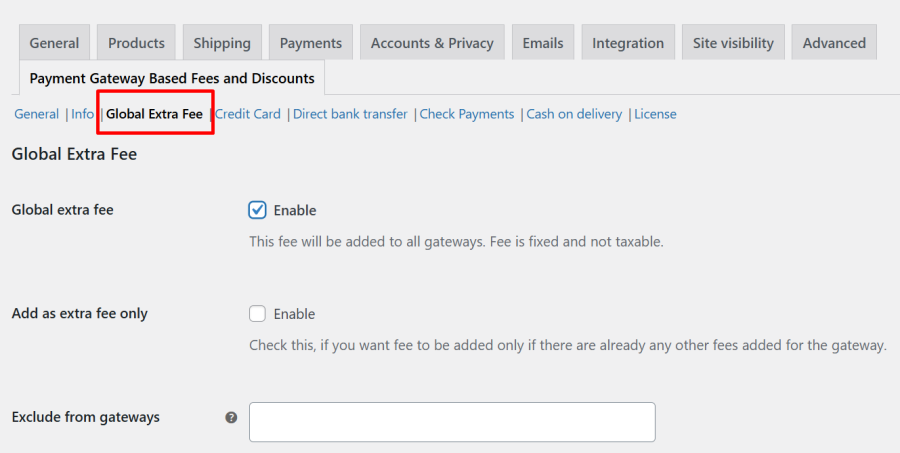
  • Set payment gateway-specific fees or discounts for individual products to handle product-based pricing strategies.
    Example: Add a ₹50 fee for COD only on heavy items, or offer a 5% discount for prepaid orders on select electronics.
  • Set fee limits to keep charges reasonable and predictable.
    Example: Cap the fee at $5 for high-value orders while maintaining a minimum of $1.
  • Ensure some payment methods remain fee-free to encourage their usage.
    Example: No extra charges for Stripe payments while fees apply to others.

  • Apply or skip fees depending on whether a coupon is used during checkout.
    Example: Waive the payment gateway fee if the customer uses a 10% discount coupon.
  • Ensure compliance by applying taxes to gateway fees where required.
    Example: Add a 7% tax to a $2.00 payment gateway fee in applicable regions.
  • Keep gateway fees fair by calculating them only on product costs.
    Example: Apply a 2% fee on the subtotal without including shipping charges in the calculation.

Manage Payment Gateway Charges and Maintain Transparent Pricing

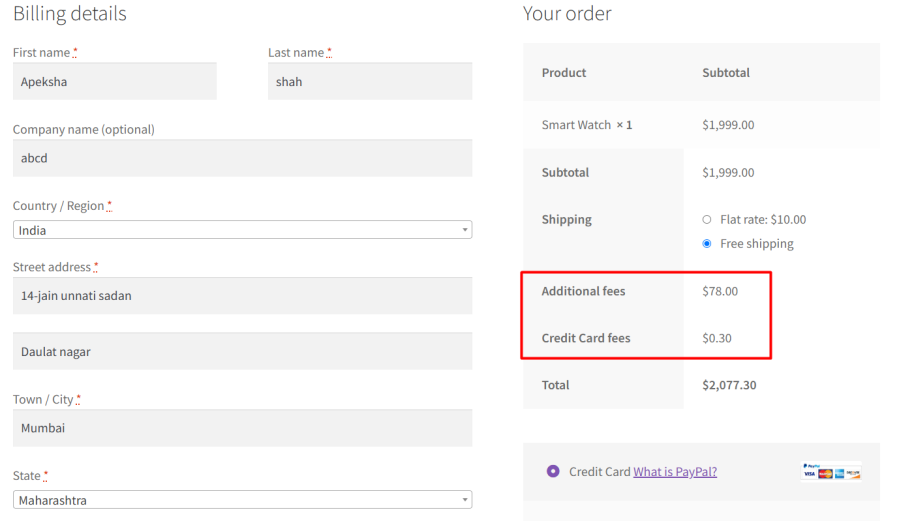
The Payment Gateway Based Fees & Discounts plugin allows you to add extra fees as a fixed amount or a percentage of the cart total. It also lets you offer discounts, acting as cashback, for specific payment gateways. Additionally, it ensures transparency by showing the exact fee amount during checkout.

Add Extra Fees or Discounts for Payment Gateways
 Set Multiple Fees for Each Payment Gateway
Apply Fees Based on Product Categories

Adjust Fees by Customer’s Country or State

Display Transparent Fee Information on Product Pages

Use Fixed or Percentage-Based Fees for Order Totals

Skip Fees for Orders Below a Certain Subtotal

Apply Minimum and Maximum Fee Values


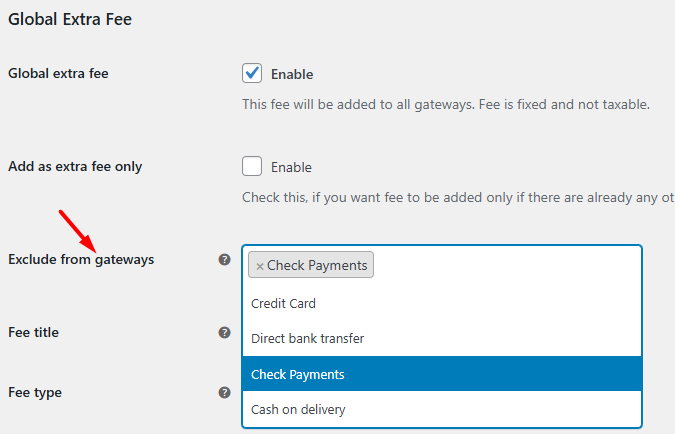
Exclude Certain Gateways from Fees


Enable Fees Based on Coupon Usage

Add Taxes to Payment Gateway Fees

Exclude Shipping Costs from Fee Calculations

Percentage Fee Calculation on Entire Cart or Individual Products When Fees Are Enabled at Product Level

Payment Gateway-Based Fees Per Product
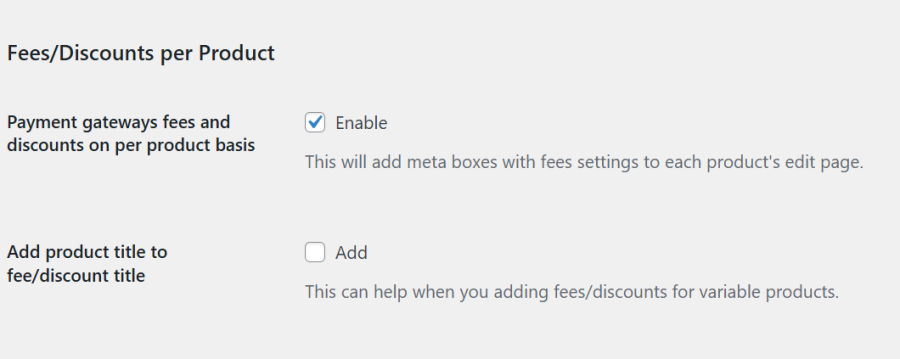
Global Extra Fee to Be Applied to All Respective Payment Gateways
Fixed Fee Calculation: Apply Once or Multiply by Product Quantity at the Product Level
Fee Based on Shipping Methods
Payment Gateway Based Fees and Discounts Free Vs Premium – Full Feature Comparison


Frequently asked questions

Can I charge payment method fees only for specific products?

Yes. You can configure fees or discounts per product, giving you full control over how payment method charges apply to each product in your store.

Can I charge different fees for gateways like Cash on Delivery, Stripe, PayPal, or other third-party payment gateways?

Yes. You can charge different fees or offer discounts for each payment method. For example, you could add a small fee for Cash on Delivery or offer a discount for Stripe or PayPal payments.

Does it work with Variable Products?

Yes, the plugin works with variable products.

Can I display payment gateway fees or discounts on the product page?

Yes.  You can show the payment gateway fees or discount details right on the product page, so customers know exactly what to expect at checkout.

Can I add fixed payment gateway fees or percentage-based payment gateway fees?

Yes! You can charge payment gateway fees either as a fixed amount or as a percentage of the order total.

Can I exclude shipping charges when calculating the total fees?

Yes! You can choose to calculate fees based only on the product total, excluding shipping costs, giving you full control over how fees are applied.

Can I apply taxes to payment gateway fees?

Yes. You can make fees taxable by selecting a tax class. The applicable tax will be automatically added to the payment gateway fees at checkout.

Can I add different fees for different countries for the same payment gateway?

Yes. You can configure different fees for the same payment gateway based on the customer’s billing country. This allows you to charge country-specific fees automatically at checkout.

Can I add more than one fee for the same payment gateway?

Yes. You can create multiple rules for the same payment gateway. For example, one fee can be based on the order total, and another can be based on the customer’s card type. If the conditions for both rules are met, both fees will be applied automatically at checkout.

Can I apply fees based on card type, bank, or issuing country?

Yes! With the Card Rules feature, you can automatically apply fees or offer discounts based on the customer’s card type (Visa, MasterCard, Amex, etc.), bank, or even the card’s issuing country.

Will the fee update automatically when the payment method changes?

Yes! If a customer changes their payment method at checkout, the fee updates automatically. For example, if a fee is added for a credit card and the customer switches to Cash on Delivery, the credit card fee is removed and any fee set to Cash on Delivery payment method, is applied.

Can I avoid charging fees for certain payment gateways?

Yes! You can exclude specific payment methods from adding the extra fees. For example, customers could pay via PayPal without any added charges, while fees would still apply to all other payment gateways.

Can I charge gateway fees only when a coupon is used?

Yes. Fees can be applied only when a coupon is used, allowing you to have more control over discounts and promotions.

Can I apply gateway fees based on shipping method?

 Yes! Fees can be applied depending on the shipping method selected by the customer. For example, you could add a small fee for Express Shipping while keeping Standard Shipping fee-free.

Can I apply payment gateway fees based on order total?

Yes. You can set fees only for orders above or below a certain total. This gives you flexibility for small and large orders.

Can I set minimum and maximum fee amounts for payment gateway fees?

Yes. You can define minimum and maximum payment gateway fees to ensure they don’t get too low or too high, keeping pricing predictable.

Is the plugin compatible with the WooCommerce Block Checkout?

Yes! The plugin works seamlessly with WooCommerce Block Checkout, so you can apply fees or discounts even when your store uses the new checkout blocks page.

Is the plugin compatible with multi-lingual plugins such as WPML?

Yes, our Payment Gateway Based Fees and Discounts Pro plugin is compatible with the WPML translation plugin.

Does your plugin comply with GDPR guidelines?

Yes, We have made every effort to make our plugin compliant to the GDPR guidelines. As a part of compliance, we do not capture any data of end-users and customers without consent.

I have another question

Please fill out this pre-sales form.

Customer reviews

We are accepting reviews for this product, and will display them when we get a few more.

Extension information

  • PHP version required: 7.4
  • Tested with WordPress: 6.9.1
  • Tested with WooCommerce: 10.5.3
  • Requires at least WordPress: 4.4
  • Requires at least WooCommerce: 5.0

Countries

  • Worldwide

Related Products

Price $79 annually
Rated 3.4 out of 5 stars
Price $279 annually
Rated 3.2 out of 5 stars
Price $59 annually
Rated 3.1 out of 5 stars
Price $109 annually
Rated 2.8 out of 5 stars
Price $49 annually
Rated 4.1 out of 5 stars
Price $109 annually
Rated 2 out of 5 stars
Price $109 annually
Rated 2.3 out of 5 stars
Price $109 annually
Rated 2.6 out of 5 stars
Price $109 annually
Rated 2 out of 5 stars