

Subscription includes
Support
Order fulfillment itself is a huge challenge. Right from order preparation to delivery, you have to optimize every process till last-mile delivery to ensure customer satisfaction. Not to mention that 66% of online shoppers expect delivery update notifications following an online purchase. It will be a little overwhelming for store owners to manage all the delivery options, shipping methods, delivery charges, special day deliveries, local pickups, order notifications, etc. During peak-hour sales like holiday sales, order delivery management becomes even more difficult.
Order Delivery Date for WooCommerce lets you —
Order Delivery Date is equipped with a sophisticated delivery schedule system so that you can simplify even the most complex logistics and delivery system. Now, we are not making this claim by ourselves, one of the biggest food delivery companies in Spain is using our plugin to manage the delivery schedules. Here is what they shared about our plugin-
“We had to manage different pricing, available delivery dates/time slots, and holidays for different delivery partners. The Order Delivery Date Pro helped us sort out all complex logistic issues and helped us to show the proper delivery date/time when a customer places an order.
– Jorge Nevado
CEO, Impulsa3”
Order Delivery Date for WooCommerce is more than just a delivery scheduling tool. With over 20+ premium features, it enables seamless delivery management, customizable time slots, and optimized pickup options for a smooth customer experience. Here are some of its top features.
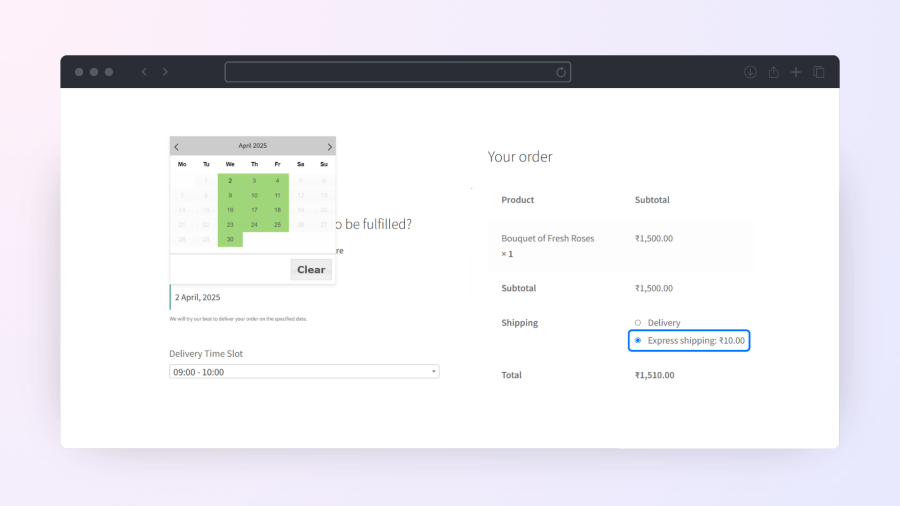
Ensure your delivery schedules align with different shipping methods.
Example: A bakery can allow flat rate shipping deliveries from Monday to Saturday, free shipping only on Tuesdays and Thursdays, and enable local pickup every day, with same-day pickup available if ordered before 12 PM.
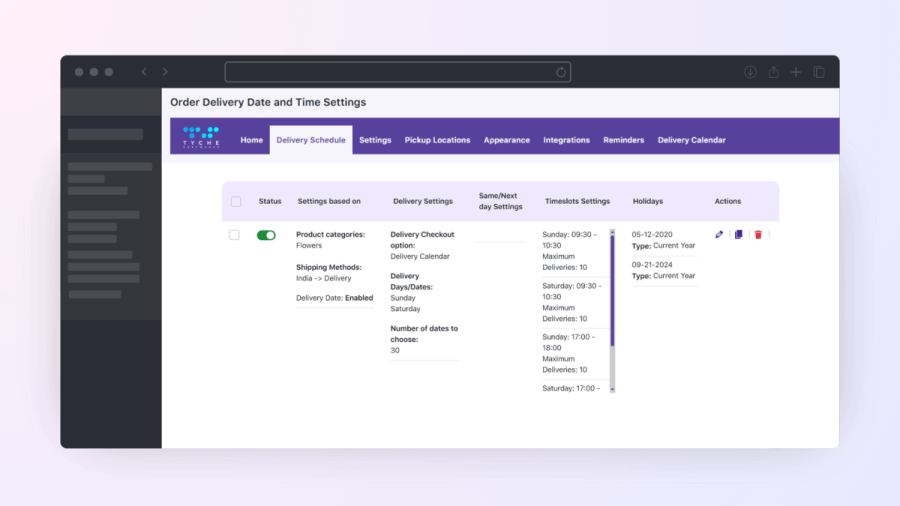
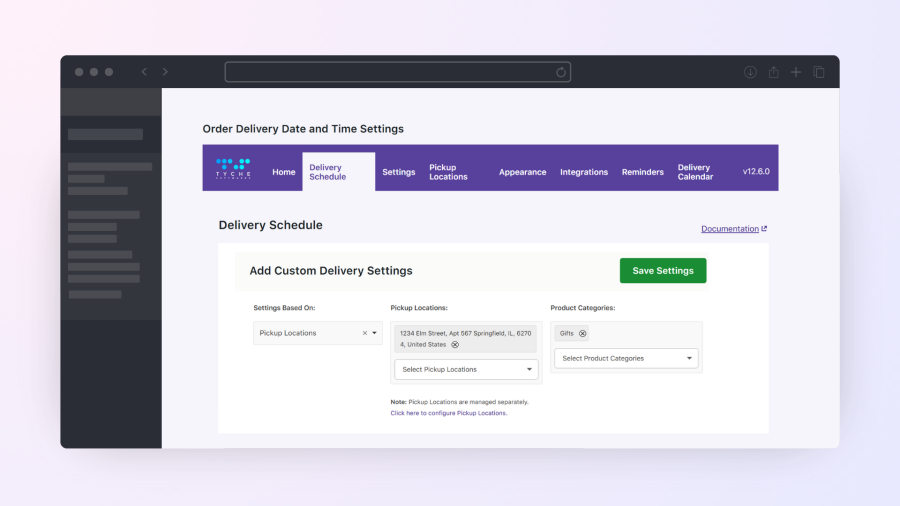
Offer customized delivery scheduling for different product categories. Not all products require the same delivery approach, you can set delivery schedules based on the product categories.
Example: A bakery can schedule deliveries in the morning for cupcakes and for custom birthday cakes the deliveries can be scheduled in the evening.
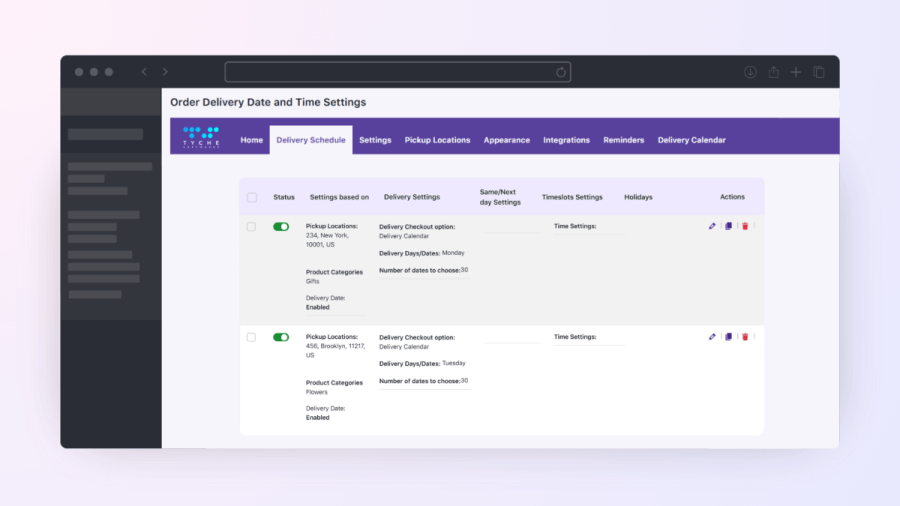
Provide convenient pickup options to your customers like Buy Online and Pickup in Store or Pickup in the locations you provide.
Example: A clothing store can allow customers to pick up their orders from its New York City store on Mondays or from its Brooklyn store on Tuesdays.
Effortlessly manage same day and next day delivery by setting a feasible cutoff time and also add extra charges for the deliveries if needed.
Example: A bakery can allow same-day delivery for orders placed before 12 PM with a $5 extra charge and next-day delivery for orders placed before 8 PM with no extra fee, ensuring timely preparation and fulfillment.

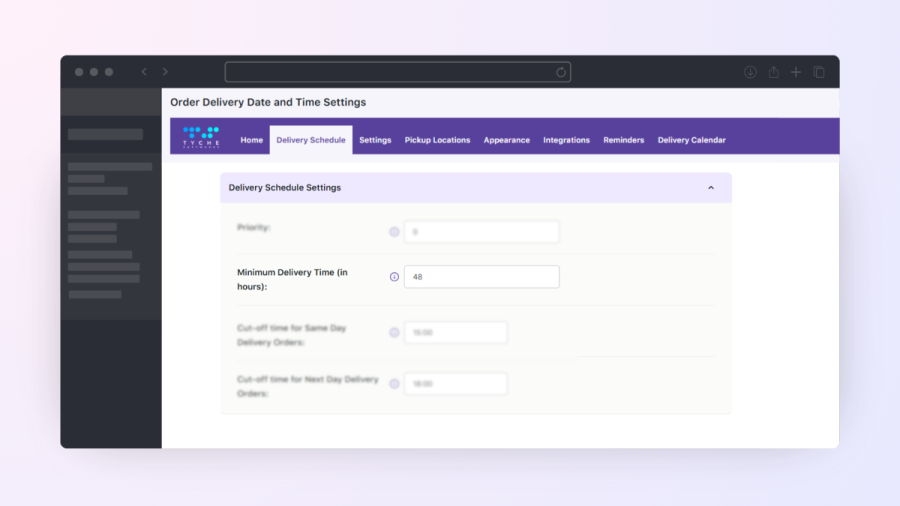
Set the delivery schedule based on the preparation time you need. Avoid unrealistic expectations and ensure fresh delivery by setting the minimum preparation time.
Example: A florist can set 24 hours of preparation time for a custom flower bouquet order before it can be delivered, or a baker can set 96 hours of preparation time for a large cake.
What makes the Order Delivery Date for WooCommerce plugin unique is the variety of delivery combos you can create to simplify your logistics and delivery needs. Create more efficient delivery schedules by combining parameters such as-
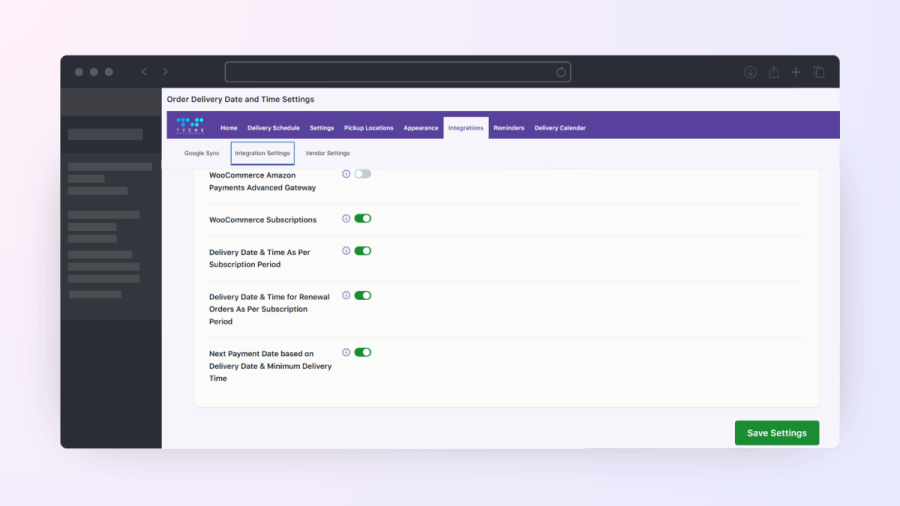
Enable recurring deliveries with the WooCommerce Subscriptions plugin and the WooCommerce Subscriptions Compatibility Add-on for Order Delivery Date Pro.
Example: A food box subscription can have delivery dates pre-selected based on the billing cycle, ensuring customers receive the food box regularly on time.
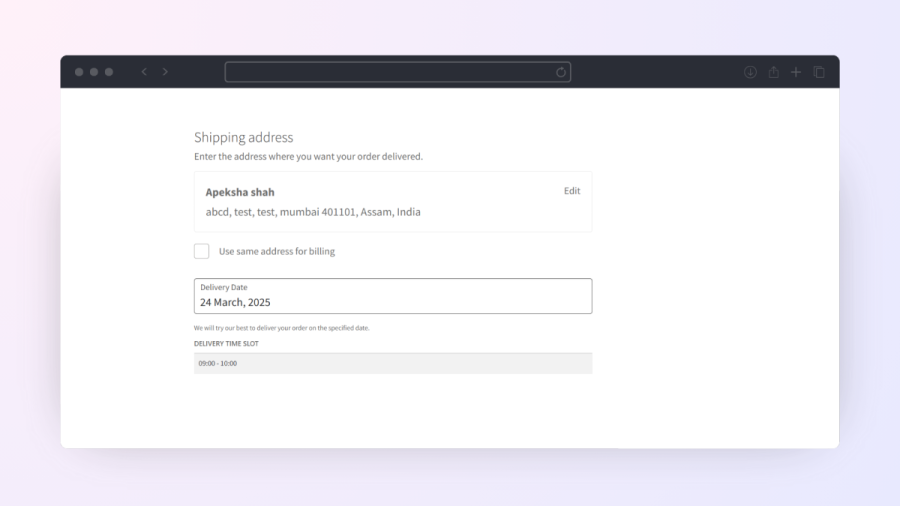
Easily add Order Delivery Date Pro fields to your checkout page using the “Order Delivery Date” block under the “Shipping Address” section in the WooCommerce block editor.
Pickup location, Delivery date, and Time slot fields will appear accordingly.
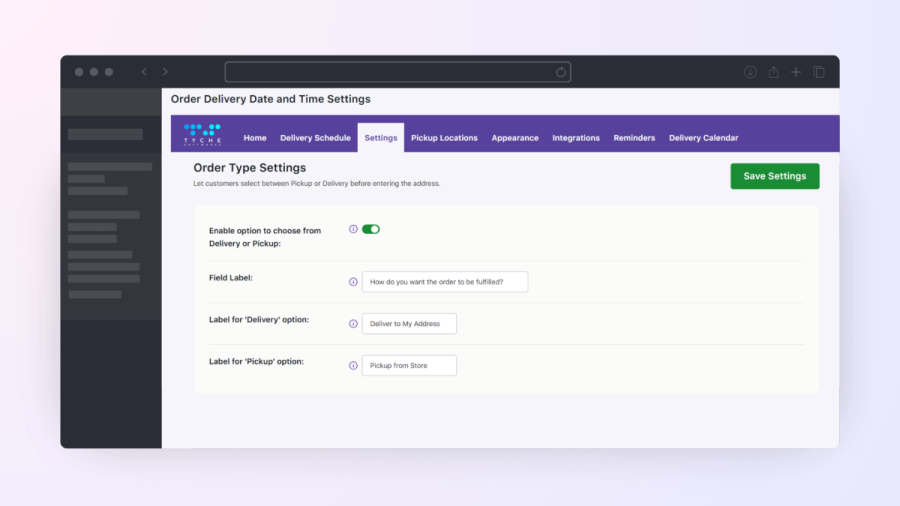
Let your customers easily select between Pickup or Delivery type before they enter their delivery address or select the delivery date. And then, provide relevant delivery dates as per the user’s delivery type preference.
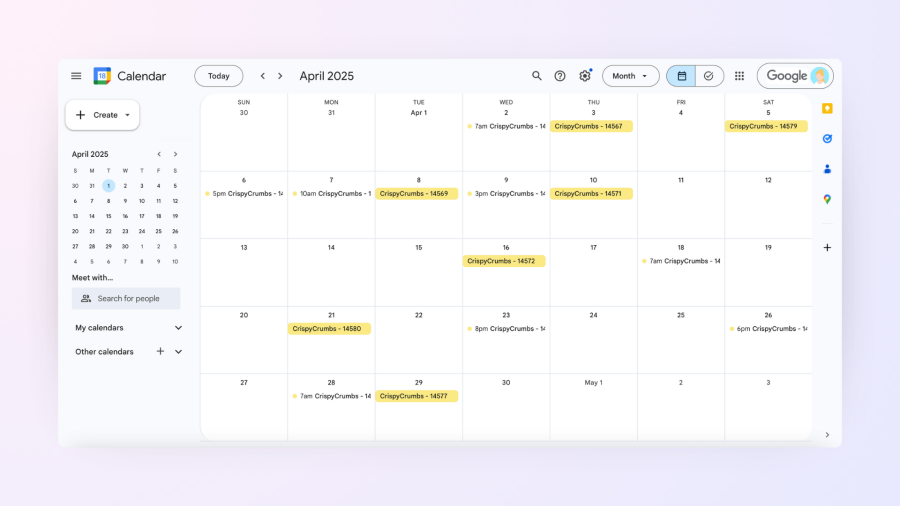
Sync Order Delivery schedules to Google Calendar to manage deliveries on the go. You can also use our clean-looking built-in delivery calendar on the admin side to have a clear view of the delivery schedules.
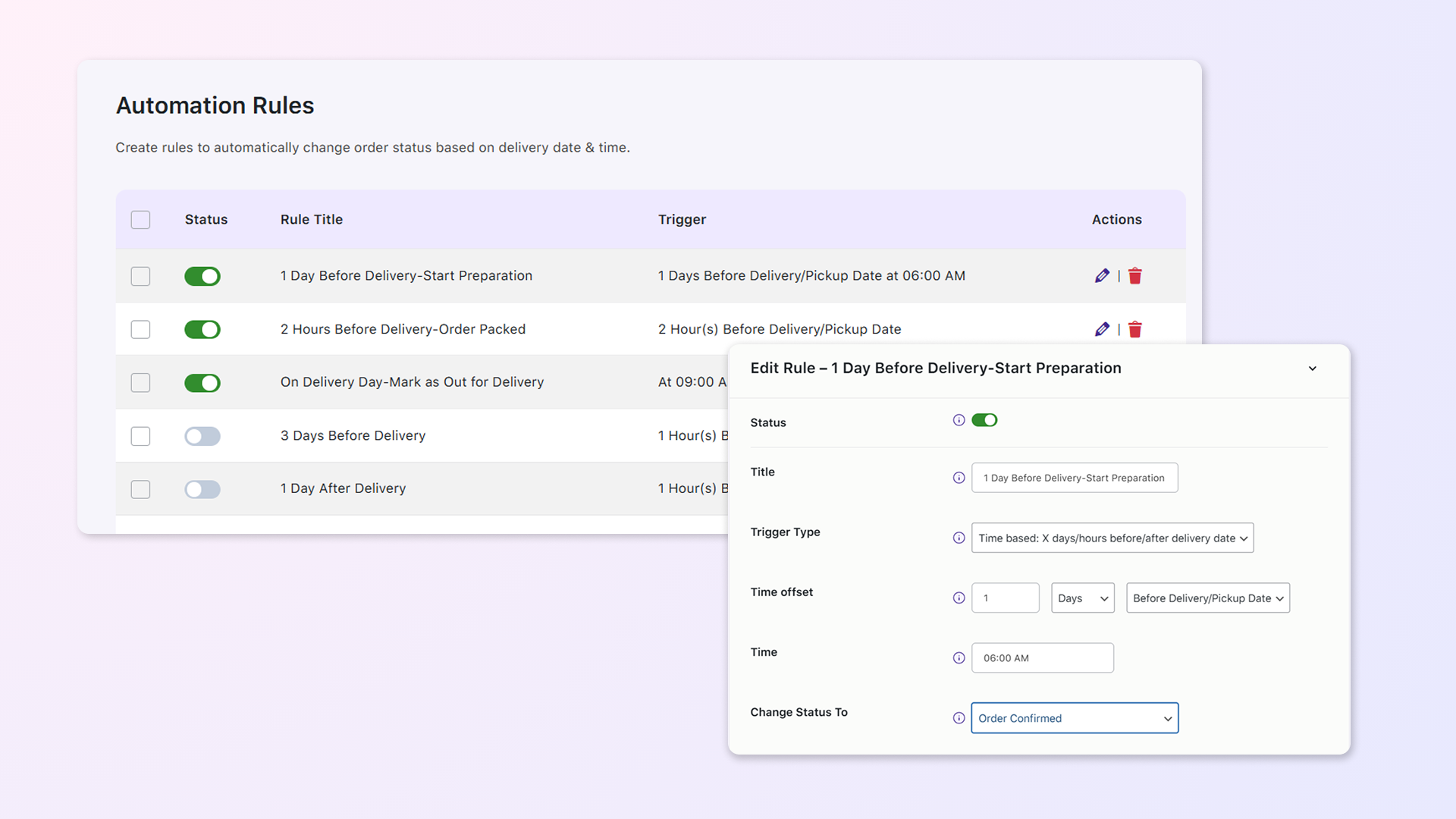
Connect the Order Delivery Date plugin with our Flexi Custom Order Status and automatically update order statuses based on the selected delivery date, time, and delivery stage.
Example: A bakery can change an order to “Scheduled” 3 days before delivery, update it to “In Preparation” 1 day before at 6 AM, mark it as “Ready for Pickup” 2 hours before delivery, and move it to “Completed” after delivery.
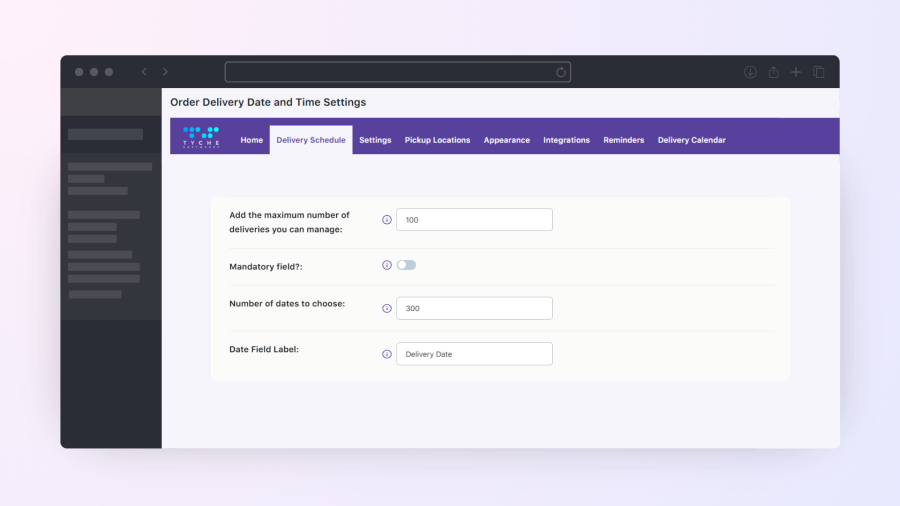
Set limit for delivery slots by specifying maximum orders that can be picked from a location & product category
Example: A bakery can allow up to 200 pickups per day for cupcakes at its Downtown Los Angeles store, while large cake orders are limited to 50 per day at its Koreatown location.
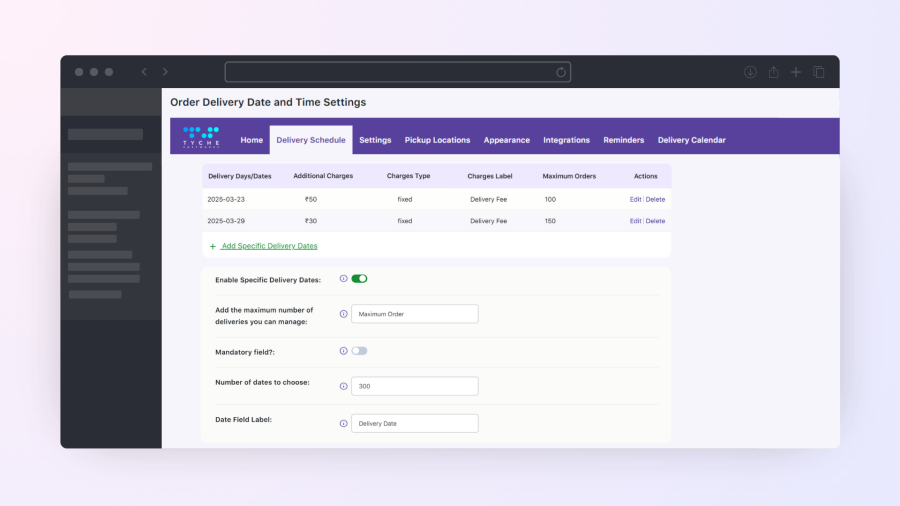
Set fixed delivery dates for seasonal or special products, ensuring availability on designated days. Store owners can enable specific dates, apply extra charges, or restrict certain shipping methods for better order management. If needed, they can disable regular delivery schedules and allow orders only on selected dates.
Example: A Christmas tree seller can offer deliveries only on weekends in December, apply an extra charge for holiday eve deliveries, and disable standard shipping on non-delivery days to streamline fulfillment.
Manage peak delivery times efficiently by prioritizing high-value orders or urgent shipments.
Example: A floral shop can prioritize early morning deliveries for wedding bouquets while regular flower orders are scheduled for later in the day, ensuring timely fulfillment for special events.

Our customers have shared that they can 3x their order managing efficiency with the premium features and reduce their work hours by half. Try the premium version today to scale your order delivery without increasing your workload.
Yes, you can deliver to different zip codes on different days. This is possible by creating custom delivery schedules.
Yes. You can control delivery availability based on where the customer is located by creating different delivery schedules for different shipping zones. Each zone can have its own delivery days, cut-off times, and minimum preparation time.
Yes — you can create custom delivery schedules for each product category, so different types of products can have their own delivery dates.
Yes. You can choose which days should be available for delivery. Simply disable Saturday, Sunday, or any other days when you do not offer delivery, and customers will only be able to select the remaining working days.
Yes. You can set a minimum preparation time so customers can only choose delivery dates or time slots after that buffer period has passed. This is especially useful for businesses like bakeries, restaurants, grocery stores, and local delivery services that need time to prepare, pack, or process orders before delivery or pickup.
Yes, the Delivery Date and Time will be displayed in the order notification emails sent to the customers as well as the admin.
Yes. You can configure cut-off times for same-day and next-day delivery or pickup, and also add additional charges for these options.
Yes! You can set additional delivery charges for specific dates. For example, you might charge an extra $10 for deliveries on Christmas. Customers choosing that date at checkout will automatically see the extra charge applied.
Yes. In the Pro version, you can show available delivery dates on product pages via the Delivery Date Availability Calendar widget so customers know when each product can be delivered before checkout. This helps them plan their order and avoid surprises at the cart or checkout stage.
Yes. You can define separate working days for your own company and your shipping company, so the plugin can handle delivery schedules accurately without conflicts.
Yes. You can set different preparation times for delivery and pickup by creating separate delivery schedules and assigning them to each shipping method.
Yes. You can decide how far in advance customers are allowed to select a delivery date. For example, you can allow delivery dates only for the next 7, 14, or 30 days — depending on how far ahead you want to accept orders.
Yes. You can let customers select a preferred time range for their booking. For example, they could choose a slot between 9 AM and 6 PM. This gives customers flexibility while helping you manage availability and schedule resources efficiently.
Yes. You can create multiple delivery time slots for the same day, such as afternoon and evening deliveries.
Yes. You can allow customers to select their preferred delivery time range at checkout and configure separate fees for each time range based on your business requirements.
Yes. The delivery date and time fields can be set as optional. When the ‘Mandatory field’ option is disabled, customers will be able to proceed to checkout and place their order without making a selection.
Yes. You can display an estimated delivery date on the checkout page instead of the delivery date field, making it simpler for customers to see when their order is expected.
Yes. You can group all pre-order products under a separate product category and disable the delivery date for that category. When a pre-order item is added to the cart, the delivery date field will be hidden at checkout.
Yes! You can let customers choose between Delivery and Pickup directly on the checkout page.
Yes. We have made every effort to make our plugin compliant with GDPR guidelines. It does not collect or process customers’ personal data without user consent.
Yes! Admins can export delivery events to their Google Calendar, and customers can add their selected delivery or pickup dates to their own calendars.
Yes. The plugin is fully compatible with WooCommerce HPOS, so you can continue using its features without any issues on sites using the latest WooCommerce order storage system.
Please fill out this pre-sales form.
Categories
Extension information
Countries








