
Product Icon

AI Image Search Products for WooCommerce

Let shoppers search your WooCommerce store with a photo. Upload or drag an image and see matching products instantly. No indexing needed.
Choose a billing option
$39
Save 20%
$78 $62.40

Subscription includes

  • Product updates and improvements
  • Customer support
  • 30-day money-back guarantee

Image Search for WooCommerce – Let Shoppers Search With a Photo

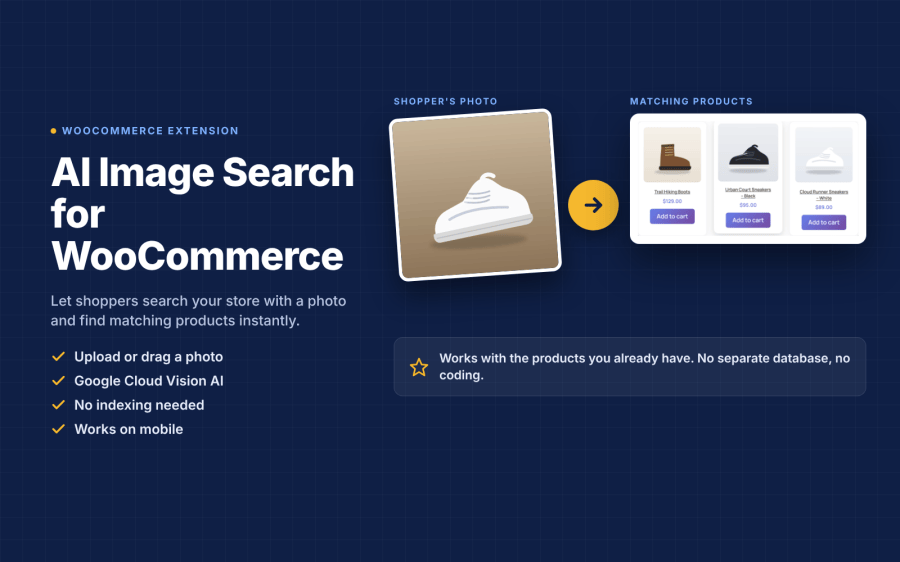
Some shoppers know exactly what they want but not what it is called. AI Image Search lets them search your WooCommerce store with a photo. They upload or drag an image, and the plugin shows matching products from your catalog in seconds.

It works with the products you already have. There is no product indexing, no separate database and no coding. Install it, add your Google Cloud Vision API key, and image search is live.

WooCommerce image search results after a shopper uploads a photo

Key Features

  • Search by Image: Shoppers upload a photo, drag and drop it, or pick one from their phone or computer.
  • AI Image Recognition: Google Cloud Vision detects what is in the photo, such as the type of item and its key details.
  • Matches Your Existing Catalog: Detected details are matched against your product titles, tags and descriptions.
  • No Indexing Needed: Works from day one with your current products. New products are searchable as soon as you publish them.
  • Shoppable Results: Results show the product image, name and price, with a direct path to the product page and checkout.
  • Mobile-Friendly: A responsive search interface that works on desktop, tablet and mobile.
  • Fast and Lightweight: Image analysis runs in the background through AJAX, so your pages do not slow down.
  • Secure Uploads: Images are validated and sanitized, and they are not stored on your server.
  • Your Rules: Choose the allowed file types (JPG, PNG, GIF, WebP) and the maximum upload size.

How It Works

  1. Upload a Photo: The shopper opens image search and adds a picture.
  2. AI Reads the Image: Google Cloud Vision identifies what the photo shows.
  3. Products Are Matched: The plugin compares those details with your product titles, tags and descriptions.
  4. Shop the Results: Matching products appear with images and prices, ready to open and buy.

Who Is It For?

  • Fashion & Footwear – Shoppers find a dress or shoe they saw on social media.
  • Furniture & Home Decor – Search by a photo of a sofa, lamp or rug.
  • Jewelry & Accessories – Find similar styles without knowing the right words.
  • Beauty, Electronics & Sports – Identify a product from a picture of the item or its packaging.
  • Large Catalogs – Help shoppers reach the right product faster than with text search alone.

Setup and Costs

Setup takes a few minutes: install the plugin, create a Google Cloud Vision API key, and paste it into the settings.

You use your own Google Cloud Vision API key, so Google bills image analysis to your Google Cloud account. At the time of writing, Google includes the first 1,000 images per month free, then charges about $1.50 per 1,000 images for label detection. A store with 5,000 image searches a month would pay around $6 a month to Google. Check Google’s current Cloud Vision pricing before you start.

Tip: Products with clear titles, tags and descriptions get the best matches, because image search uses the same product details as your store’s text search.

Turn Photos Into Sales

When shoppers cannot describe a product, they often leave. Image search gives them another way in: show a picture, find the product, add it to the cart.

Add image search to your WooCommerce store today. Try the live demo, and you are covered by Woo’s 30-day money-back guarantee.


Frequently asked questions

How does AI Image Search find products?

The shopper uploads a photo. Google Cloud Vision detects what it shows (for example “Shoe”, “Sneakers”, “Chair”), and the plugin searches your product titles and descriptions for those terms. Matching products appear with image, price and an Add to cart button.

Do I need to index my products first?

No. There is no indexing and no separate database. The plugin searches your existing WooCommerce products, so new products are searchable as soon as you publish them.

Do I need a Google Cloud account?

Yes. You need your own Google Cloud Vision API key and Project ID. The settings page includes a step-by-step setup guide, and it takes a few minutes.

How much does Google Cloud Vision cost?

Google bills image analysis to your own Google Cloud account. At the time of writing, the first 1,000 images per month are free, and after that it costs about $1.50 per 1,000 images. Check Google’s Cloud Vision pricing page for current rates.

Which image types are supported?

JPG, JPEG, PNG, GIF and WebP by default. BMP and TIFF can be enabled. You choose the allowed types and the maximum file size (1–100 MB) in the settings.

Are uploaded images stored on my server?

No. Images are validated and sent to Google Cloud Vision for analysis. They are not saved to your media library.

Will it slow down my store?

No. The search runs through AJAX after the shopper clicks “Search with AI”, so your pages load as normal.

How do I add the search to my store?

Add the [ai_image_search] shortcode to any page or post, for example a “Search by Image” page in your menu.

How can I get better matches?

Use clear, descriptive product titles and descriptions, such as “White leather running sneakers” instead of “Style 204”. The plugin matches the AI’s description of the photo against these words.

Does it work on mobile?

Yes. The upload area and results grid are responsive, so shoppers can search with photos and screenshots from their phone.

How many results are shown?

You can set the number of results from 1 to 50 in the settings.

Can I change the text on the search form?

Yes. You can change the form title, upload instructions, button text and text filter placeholder in the settings.

Related Products

Price $279 annually
Rated 3.9 out of 5 stars
Price $79 annually
Rated 3.4 out of 5 stars
Price $59 annually
Rated 3.1 out of 5 stars
Price $109 annually
Rated 2.8 out of 5 stars
Price $49 annually
Rated 4.1 out of 5 stars
Price $109 annually
Rated 2 out of 5 stars
Price $109 annually
Rated 2.5 out of 5 stars
Price $39 annually
Rated 2.8 out of 5 stars
Price $109 annually
Rated 2.6 out of 5 stars
Use of your personal data
We and our partners process your personal data (such as browsing data, IP Addresses, cookie information, and other unique identifiers) based on your consent and/or our legitimate interest to optimize our website, marketing activities, and your user experience.