
Product Icon

Bulk Search & Replace for WooCommerce

Safely search & replace across your entire store’s products, categories, media, orders, and more, with a powerful dry-run preview and export
Choose a billing option
$49
Save 20%
$98 $78.40

Subscription includes

  • Product updates and improvements
  • Customer support
  • 30-day money-back guarantee

Stop editing WooCommerce records one by one

Renaming a brand? Fixing SKU prefixes? Updating image alt text or old URLs across hundreds of products? Bulk Search & Replace handles it in minutes — not days.

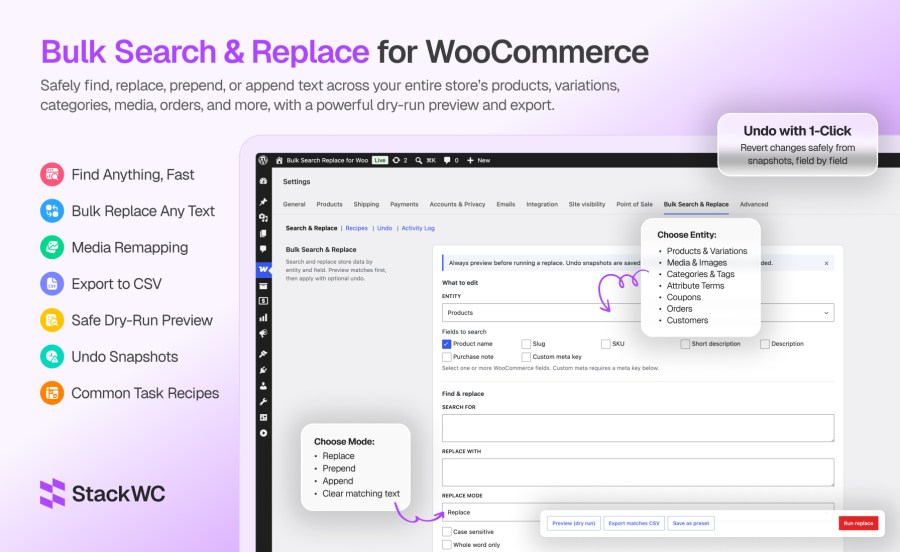
The tool lives inside WooCommerce at WooCommerce → Settings → Bulk Search & Replace. Pick what to search, preview every match with before/after values, export a CSV for review, and apply when ready. Nothing is saved until you confirm.

Built for real store operations

Every update runs through WooCommerce APIs — products, variations, orders, coupons, and customers use the same CRUD layer your store already relies on. That means serialized product meta stays intact, variations keep working, and High-Performance Order Storage (HPOS) orders are fully supported.

Preview first. Undo if needed

Dry-run preview is the default workflow. See exactly what will change before a single row is touched. When you run a replace, field-level undo snapshots are saved automatically so you can roll back the entire job from the Undo tab.

8 data types. One tool.

Search and replace across:
  • Products — names, SKUs, slugs, descriptions, purchase notes, custom meta
  • Variations — variation SKUs, descriptions, custom meta
  • Media & images — alt text, titles, captions, URLs, and image remap by attachment ID or URL
  • Categories & tags — names, slugs, descriptions
  • Attribute terms — global attribute values like Color and Size
  • Coupons — coupon codes and descriptions
  • Orders — billing/shipping addresses, customer notes, custom order meta (HPOS compatible)
  • Customers — stored addresses, display name, custom user meta

Recipes for common jobs

13 built-in recipes cover everyday tasks: SKU prefix changes, rebrands, domain migrations, coupon prefix updates, order company name fixes, image alt text updates, CDN URL changes, and product image swap (remap A → B). Save your own presets for jobs you run often.

Built for large catalogs

Batch processing handles big stores without timeouts. Configurable batch size, live progress, and memory-aware defaults keep jobs stable on shared hosting and dedicated servers alike.


Key features ::

  • Dry-run preview — See before/after diffs and match counts before anything is saved
  • One-click undo — Roll back any completed job with field-level snapshots (enabled by default)
  • CSV export — Download up to 5,000 matching rows for audit, sign-off, or offline review
  • 8 WooCommerce entities — Products, variations, media, categories/tags, attributes, coupons, orders, customers
  • 4 replace modes — Replace, prepend, append, and clear matching text
  • Advanced matching — Case sensitive, whole word, and guarded regular expression support
  • 13 built-in recipes — SKU prefix, rebrand, domain/URL, coupon prefix, image remap, CDN update, and more
  • Save custom presets — Reuse complex searches without reconfiguring filters
  • Product image remap — Swap attachment A → B by ID or URL across featured, gallery, and variation images
  • Scoped media search — Alt text, titles, captions, and URLs on product images only
  • HPOS compatible — Order updates use WooCommerce order CRUD; custom order tables supported
  • Custom product types — Works with Bookings, Subscriptions, and other non-standard product types
  • Batch processing — Configurable batch size (1–100) with live progress for large catalogs
  • Scope filters — Narrow by status, category, stock, SKU, product IDs, order dates, user roles, and more
  • Custom meta support — Search and replace any product, variation, order, or customer meta key
  • Activity log — Full audit trail of replace and undo operations with user attribution
  • WooCommerce-native UI — Lives under WooCommerce → Settings; no extra admin menu clutter
  • Safe by design — Capability checks, nonce verification, confirmation dialogs, regex ReDoS guards
  • No raw database writes — Updates via WooCommerce APIs to protect serialized data
  • Translation ready — Full i18n support with .pot template included

Preview before you change anything

Every job starts with a dry run. Matching items show field-by-field before/after values and total match counts. Store owners review first, apply second.

Undo any job in one click

Undo snapshots are saved by default. If something looks wrong after a replace, open the Undo tab and restore previous values through WooCommerce APIs — no manual database work.

Covers your whole catalog, not just products

Most bulk-edit tools stop at products. Bulk Search & Replace handles variations, product images, categories, attribute terms, coupons, orders, and customer profiles in one place.

Enterprise-safe on any hosting

Batch processing, memory-aware defaults, and WooCommerce CRUD updates keep large jobs stable. HPOS orders, custom product types, and serialized meta are handled correctly.


Ideal for

  • Rebranding product names, descriptions, and image alt text after a company rename
  • Changing SKU or coupon prefixes across the entire catalog
  • Fixing old domain or CDN URLs in product content and image metadata
  • Updating billing or shipping company names on historical orders
  • Renaming category labels, tag names, or attribute term values (Grey → Gray)
  • Swapping an outdated product photo for a new one across many products
  • Bulk-appending SKU suffixes during a catalog version change
  • Exporting match lists to CSV for team review before applying changes

Comparison one-liner :

Manual editing Bulk Search & Replace
Edit one product at a time Update hundreds of records in one job
No preview of impact Dry-run preview with before/after diffs
Hard to reverse mistakes One-click undo with field-level snapshots
No audit trail Activity log with user and match counts
Risky database plugins WooCommerce API updates only


Frequently asked questions

What does Bulk Search & Replace for WooCommerce do?

It lets store owners find and replace text across WooCommerce products, variations, images, categories, attributes, coupons, orders, and customers in bulk — with preview, CSV export, and undo.

Can you preview changes before applying?

Yes. Dry-run preview shows matching items with before/after values. You can also export CSV. Nothing is written until Run replace is confirmed.

Can you undo a bulk replace job?

Yes. Undo snapshots are saved by default. Completed jobs can be rolled back from the Undo tab.

Does it work with HPOS (High-Performance Order Storage)?

Yes. Order updates use the WooCommerce order CRUD layer and the plugin declares HPOS compatibility.

What WooCommerce data types are supported?

Products, variations, media/images, categories and tags, attribute terms, coupons, orders, and customers.

Countries

  • Worldwide

Related Products

Price $279 annually
Rated 3.6 out of 5 stars
Price $79 annually
Rated 3.4 out of 5 stars
Price $59 annually
Rated 3.1 out of 5 stars
Price $49 annually
Rated 4.1 out of 5 stars
Price $109 annually
Rated 2.7 out of 5 stars
Price $109 annually
Rated 2 out of 5 stars
Price $109 annually
Rated 2.3 out of 5 stars
Price $39 annually
Rated 2.8 out of 5 stars
Price $109 annually
Rated 2.6 out of 5 stars
Use of your personal data
We and our partners process your personal data (such as browsing data, IP Addresses, cookie information, and other unique identifiers) based on your consent and/or our legitimate interest to optimize our website, marketing activities, and your user experience.




