
Product Icon

Cart and Checkout Upsell for WooCommerce

Create Converting Upsell Funnels by Suggesting Products to Customers on the Cart and Checkout Pages.
Choose a billing option
$29
Save 20%
$58 $46.40

Subscription includes

  • Product updates and improvements
  • Customer support
  • 30-day money-back guarantee

Create Cart and Checkout Upsell Funnels

The Cart and Checkout Upsell Plugin for WooCommerce helps you increase average order value by displaying targeted product offers where customers are most likely to add another item. Show upsells on the cart, checkout, and Thank You pages, and control when and where each offer appears.

Create upsell rules based on specific products, categories, cart quantities, totals, subtotals, items in the cart, or coupon codes. Use AND/OR condition logic to display relevant offers based on the customer’s current cart or completed order.

You can also offer percentage or fixed-amount discounts on upsell products and customize the upsell message, button text, colors, and display positions to match your store.

Features of Cart and Checkout Upsell Plugin

  • Create targeted upsell rules for your store
  • Display upsell products in a responsive slider
  • Show upsells on cart, checkout, and Thank You pages
  • Add suggested products to the cart with one click
  • Upsell all products, selected products, or categories
  • Include or exclude specific products and categories
  • Apply percentage or fixed-amount discounts to upsell products
  • Create condition-based upsell offers
  • Use product, category, quantity, total, subtotal, cart item, and coupon conditions
  • Combine conditions using AND/OR logic
  • Use multiple comparison operators for conditional rules
  • Customize upsell text for individual rules
  • Set a global upsell message for your offers
  • Customize upsell header background and text colors
  • Customize add-to-cart button text and colors
  • Set add-to-cart button radius
  • Enable or disable the cart-item remove button on checkout
  • Choose the upsell position on the cart, checkout, and thank you pages

Create WooCommerce Upsell Funnels and Display Products in a Slider

The WooCommerce Cart and Checkout Upsell Plugin lets you create effective upsell funnels by displaying related products in a sleek, clickable slider. Customers can instantly add suggested products to their cart with a single click, helping you increase average order value without disrupting the checkout experience.
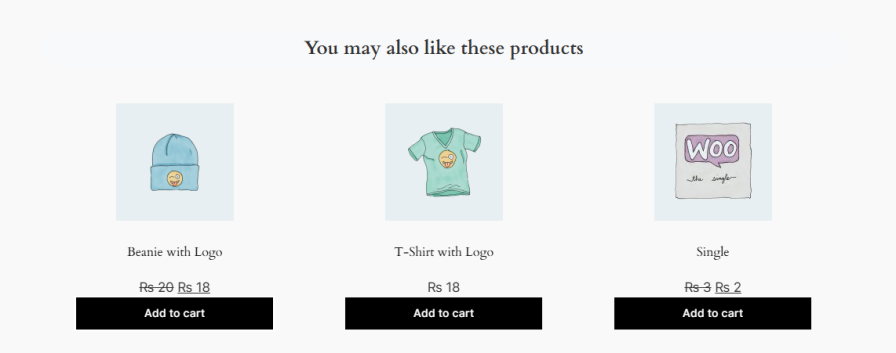
Create Upsell Funnels and Display Products in a Slider

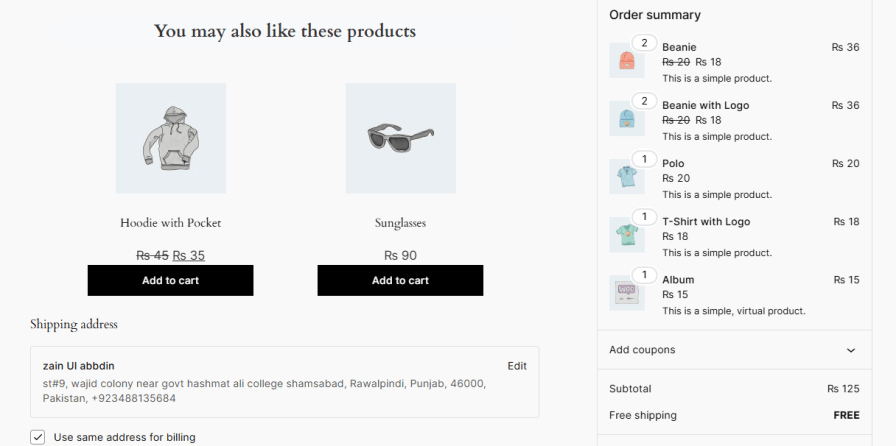
Show Upsell Products on Cart and Checkout Pages

Use WooCommerce upsell in cart and checkout to display relevant product suggestions exactly where customers are ready to buy. You can show upsells on both the cart and checkout pages and choose the best position to grab attention before purchase completion.
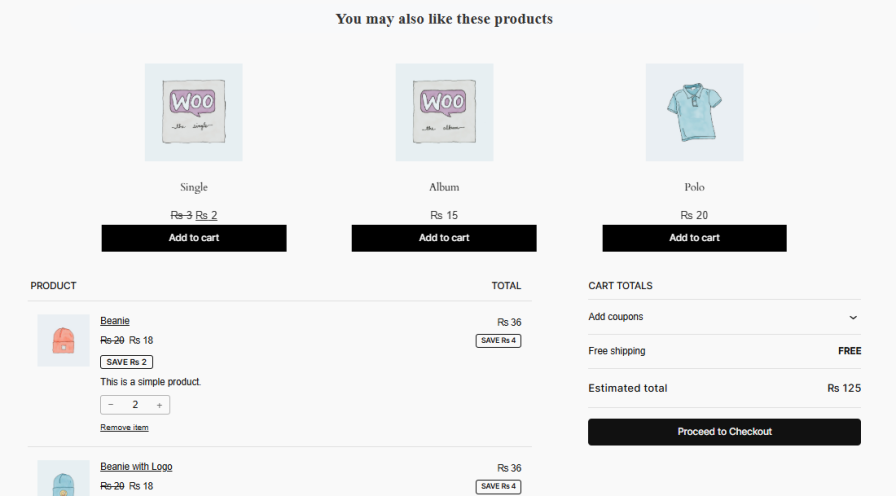
Cart Page

Show Upsell Products on Cart Pages

Checkout Page

Show Upsell Products on Checkout Pages

Upsell All or Selected Products and Categories

This cart upsell for WooCommerce lets you display all products or limit upsells to specific products or categories. You can also include or exclude items to ensure customers see only relevant and high-converting offers.

Upsell All or Selected Products and Categories

Display Products Based on Smart Conditions

Create targeted upsell rules that appear only when specific cart or order conditions are met. Choose from conditions such as:

  • Cart contains a specific product
  • Cart contains a specific category
  • Product quantity
  • Cart total
  • Cart subtotal
  • Number of items in the cart
  • Coupon code used

Use comparison operators such as Equal to, Not equal to, Greater than, Greater than or equal to, Less than, and Less than or equal to. Combine multiple conditions using AND/OR logic. All conditions within a group must be met, while multiple condition groups can be used to create alternative scenarios.
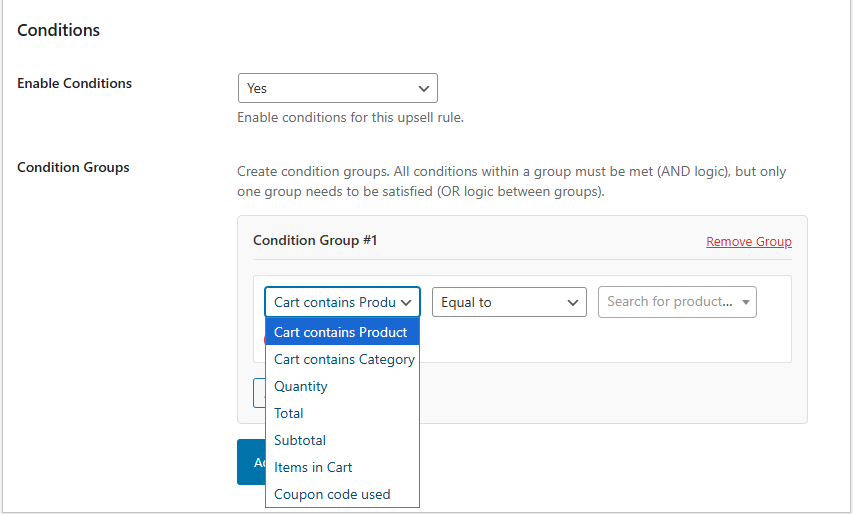
Display Products Based on Smart Conditions

Personalize the Upsell Slider

Customize your WooCommerce upsell checkout slider to match your store’s branding and improve conversions. Set a custom upsell message, adjust header background and text colors, and style the add-to-cart button to create a consistent shopping experience.
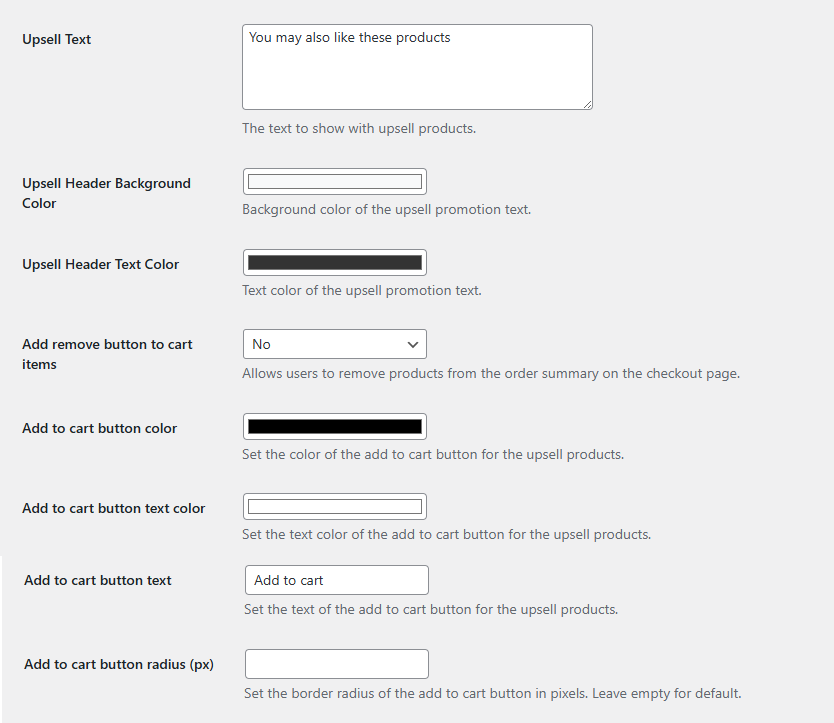
Personalize the Upsell Slider

Offer Discounts on Upsell Products

Encourage customers to add recommended products by offering a discount directly on your upsell offers. Enable discounts for individual upsell rules and choose between:

  • Percentage discount
  • Fixed-amount discount

Set the discount amount for each upsell offer to create targeted promotions that encourage additional purchases.
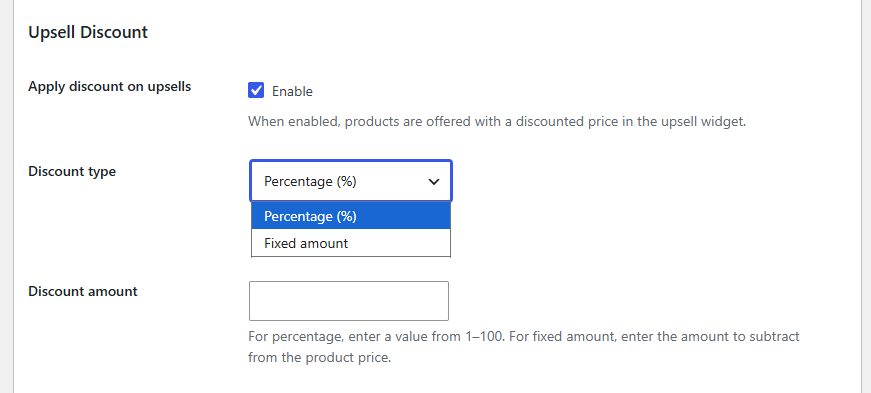
Flexible Slider Placement on Cart Page

Choose where to display WooCommerce cart upsell products for maximum visibility:
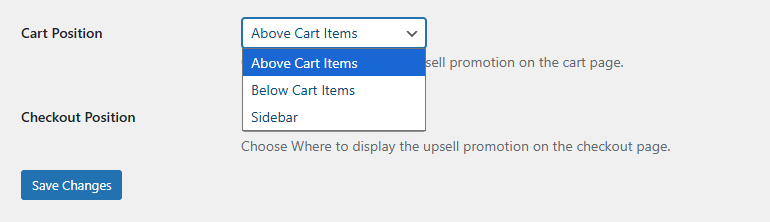
  • Above cart items
  • Below cart items
  • In the cart sidebar

Flexible Slider Placement on Cart Page

Flexible Slider Placement on Checkout Page

Position WooCommerce upsell checkout products where they perform best:
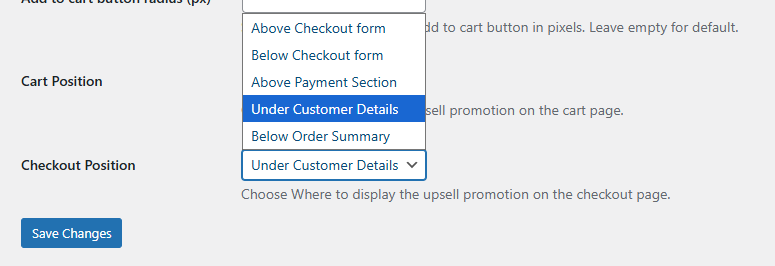
  • Above checkout form
  • Below checkout form
  • Above payment section
  • Below order summary
  • Under customer details

Flexible Slider Placement on Checkout Page

Display Upsells on the Thank You Page

Continue promoting relevant products after customers complete their purchase. Display upsell offers on the WooCommerce Thank You page and choose where they appear:
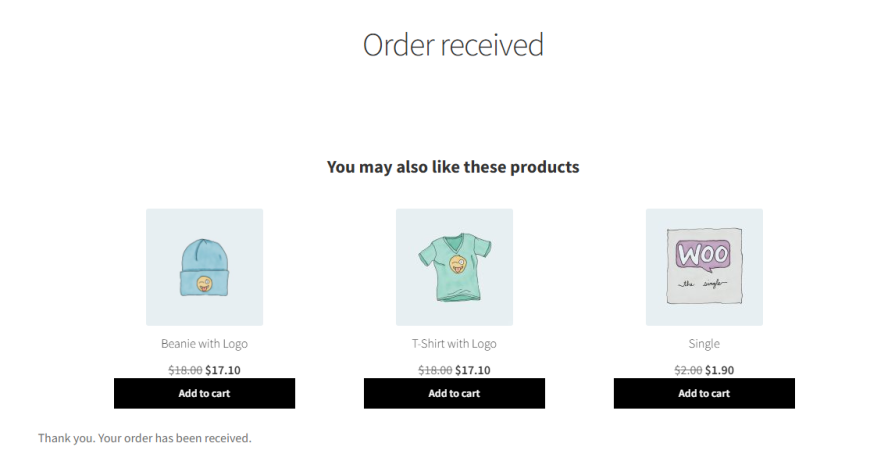
  • Above the Thank You message
  • Before order details
  • Above shipping and billing details
  • At the bottom of the Thank You page


Frequently asked questions

Can I display upsell products on both the cart and checkout pages?

The answer goes here Yes, the plugin lets you show upsell products on the cart page, checkout page, or both. You can choose the exact position for maximum visibility.

Can I target specific products or categories for upsells?

Absolutely. You can display all products, select specific products or categories, and even exclude certain items to show only the most relevant upsells.

Does the plugin support conditional upsells based on cart or user details?

Yes, you can create dynamic upsell rules based on cart total, subtotal, items in the cart, or user roles. You can also combine conditions using AND/OR logic for precise targeting.

Can I customize the upsell slider to match my store’s design?

Yes, you can set a custom upsell message, adjust header and button colors, change add-to-cart button text, and enable or disable the remove button on checkout.

Is it easy for customers to add upsell products to their cart?

Yes, products in the upsell slider can be added to the cart with a single click, providing a smooth and seamless shopping experience.

Extension information

  • PHP version required: 7.4.0
  • Tested with WordPress: 7.0
  • Tested with WooCommerce: 10.9.3
  • Requires at least WordPress: 5.0
  • Requires at least WooCommerce: 4.0.0

Countries

  • Worldwide

Related Products

Price $79 annually
Rated 3.4 out of 5 stars
Price $279 annually
Rated 3.2 out of 5 stars
Price $59 annually
Rated 3.1 out of 5 stars
Price $109 annually
Rated 2.7 out of 5 stars
Price $109 annually
Rated 2 out of 5 stars
Price $49 annually
Rated 4.1 out of 5 stars
Price $109 annually
Rated 2.3 out of 5 stars
Price $109 annually
Rated 2.6 out of 5 stars
Price $109 annually
Rated 2.3 out of 5 stars
Use of your personal data
We and our partners process your personal data (such as browsing data, IP Addresses, cookie information, and other unique identifiers) based on your consent and/or our legitimate interest to optimize our website, marketing activities, and your user experience.




