Product Icon

Competitions for WooCommerce

Create engaging lotteries, raffles, competitions and giveaways for your customers with Competitions for WooCommerce.
Choose a billing option
$109
Save 20%
$218 $174.40

Product comparison

Subscription includes

  • Product updates and improvements
  • Customer support
  • 30-day money-back guarantee

Prize competitions. Your store. Your rules.

Run paid competitions, free giveaways, and prize draws in your WooCommerce store. Customers enter competitions by selecting number of tickets and complete order through your checkout. You manage the prizes, instant prizes, entries, draws and results in WordPress wp-admin.

  • Make entry easy: let customers choose numbers or use the random number generator to assign them.
  • Add more chances to win: combine a main draw with instant prizes.
  • Keep control: set prices, dates, entry limits, and winner options for each competition.

From choosing a prize to entering the draw

Customers see the prize, instant prizes, entry price, closing date, and ticket progress on one product page. They choose their entries, answer an optional question, and continue to WooCommerce checkout.

The plugin includes a random number generator that assigns available ticket numbers automatically. Customers only choose how many entries they want. You can also let customers pick their own numbers or run a giveaway without ticket numbers.

Add letters, prefixes, or suffixes to suit your ticket format. Ticket allocation excludes sold and reserved numbers to help prevent duplicate tickets.

For competitions with questions, use text or image answers. You can require an answer before checkout and choose whether to accept only correct answers.

After checkout, customers can find their entries in My Tickets. Competition emails and published draw results help them follow what happens next.

Competition page with prize details, countdown, entry question, and purchase controls
Prize details and entry options on one page. See ticket selection and draw results in the gallery above.

Offer ticket packages and quantity discounts

Let customers choose a ticket package in one click. Set lower ticket prices for larger quantities and show the package total before checkout.
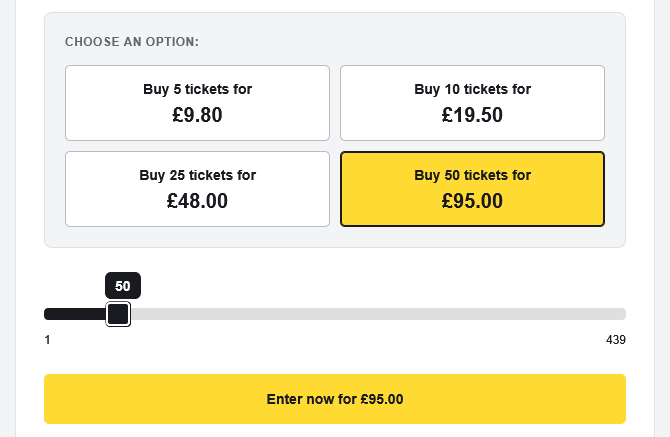
Ticket packages with quantity discounts, a quantity slider, and the total entry price
Customers can choose a package or adjust the number of tickets.
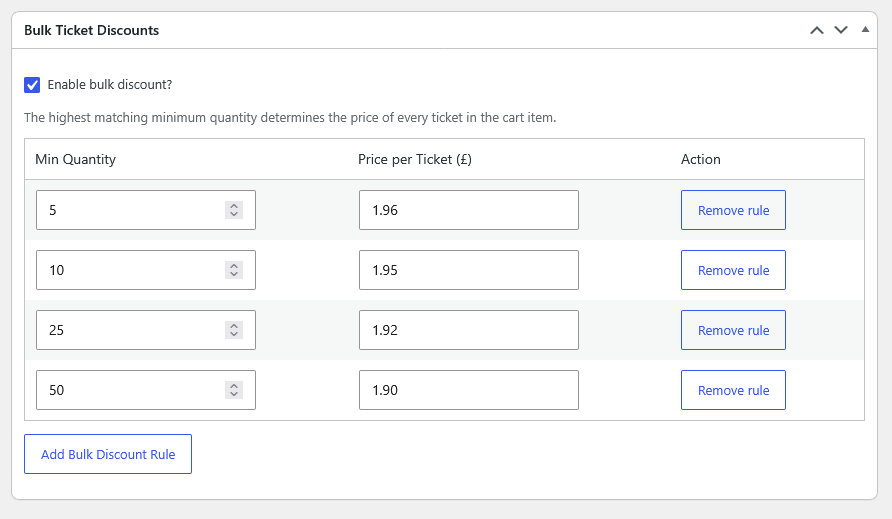
Bulk ticket discount settings with minimum quantities and a price per ticket for each rule
Set the minimum quantity and price per ticket for each discount.

Show competition entries and ticket numbers

Add a Competition History tab to the product page so visitors can review entry dates, participants, and ticket numbers. For competitions with questions, it can also show the answers.
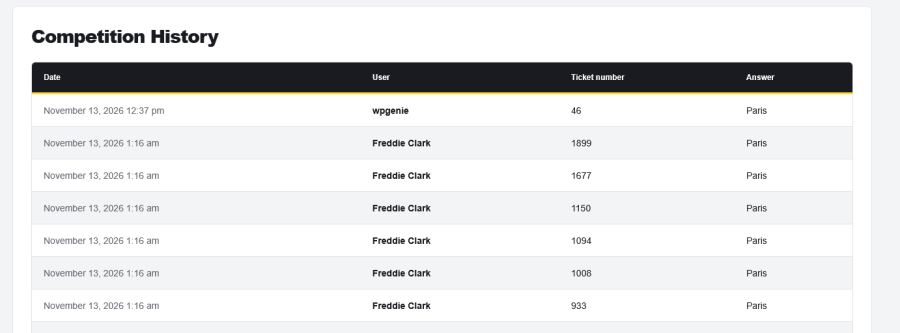
Competition History table with entry dates, participants, ticket numbers, and answers
Competition History on a demo product page. All entries shown are sample data.

Give customers a chance to win before the main draw

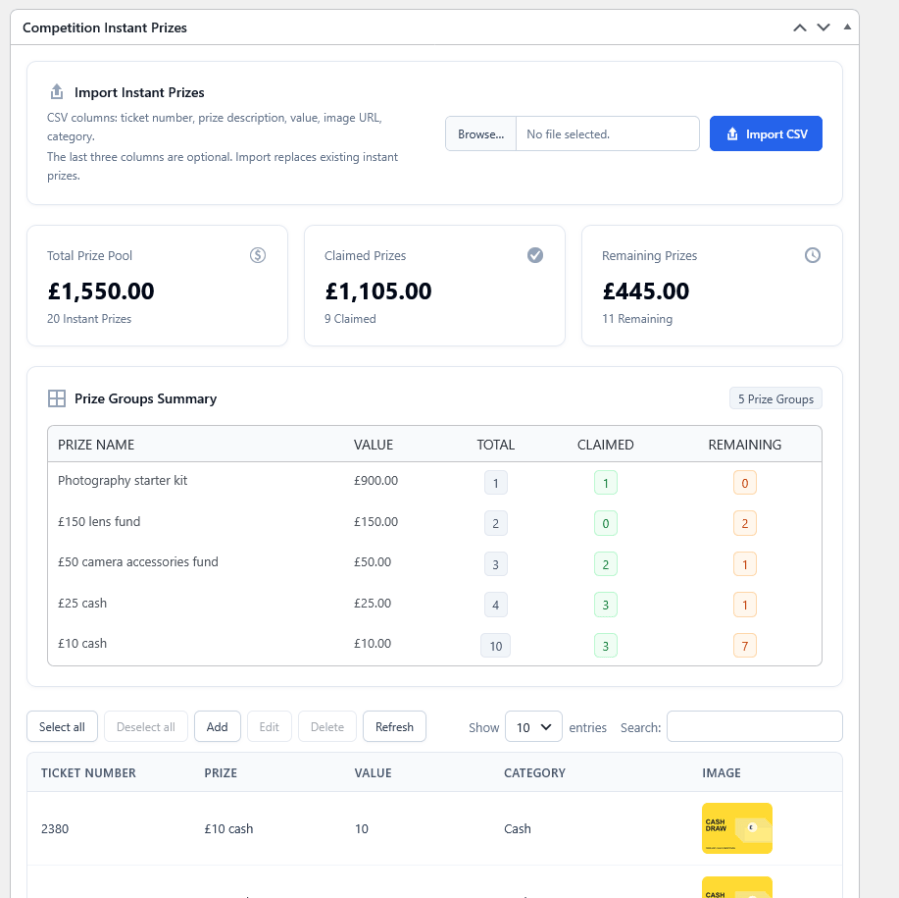
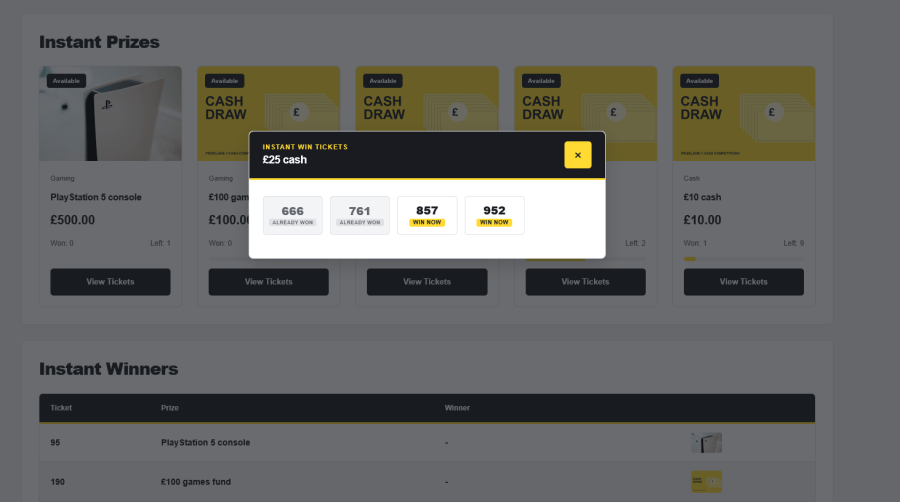
Assign instant prizes to selected ticket numbers. Group matching prizes with an image and value, and show how many prizes customers claimed and how many remain. Customers can open each prize to see its ticket numbers and which ones already won.

Import prize descriptions, values, images, and categories from a CSV file. Choose whether instant winners can also win a main prize. With the optional TeraWallet integration, credit prizes can go straight to the winner’s wallet.
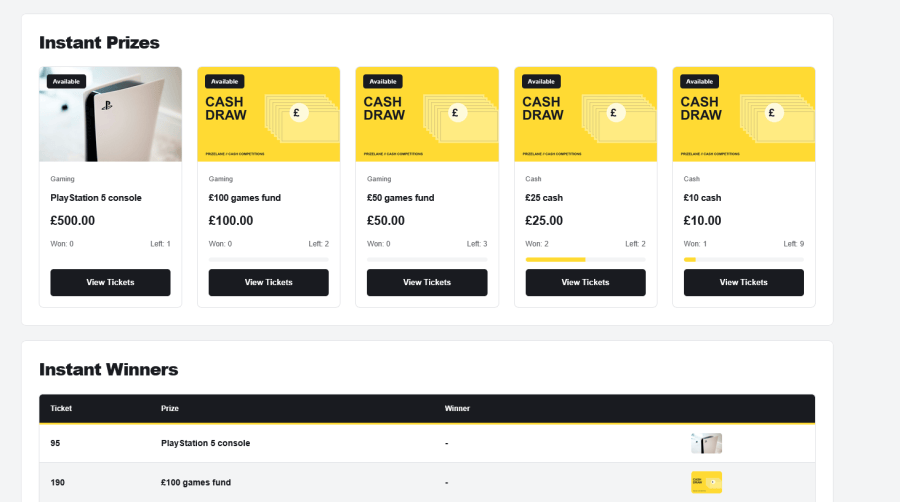
Grouped instant prizes with images, values, and available and claimed totals
Show customers the extra prizes available in the same competition.
Instant prize ticket details showing already won and available winning numbers for a cash prize
Customers can view the ticket numbers for each instant prize and see which prizes remain available.

Manage your competitions in one place

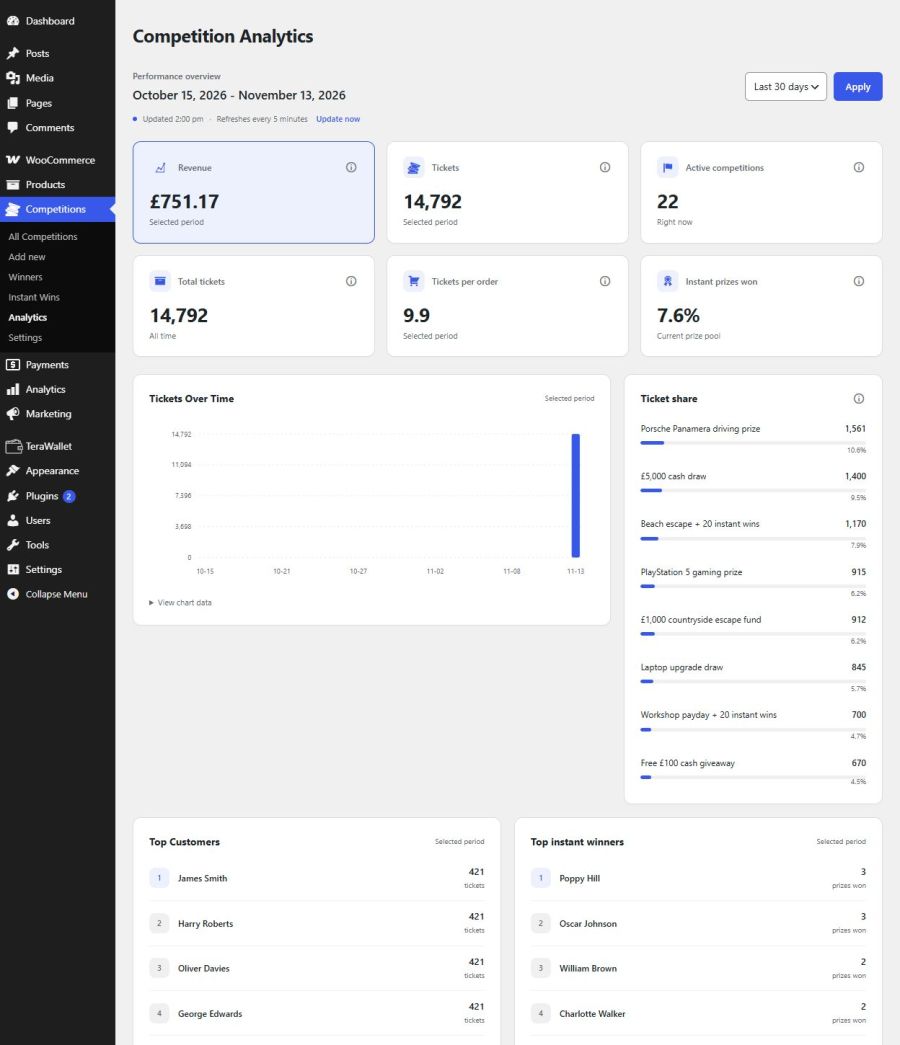
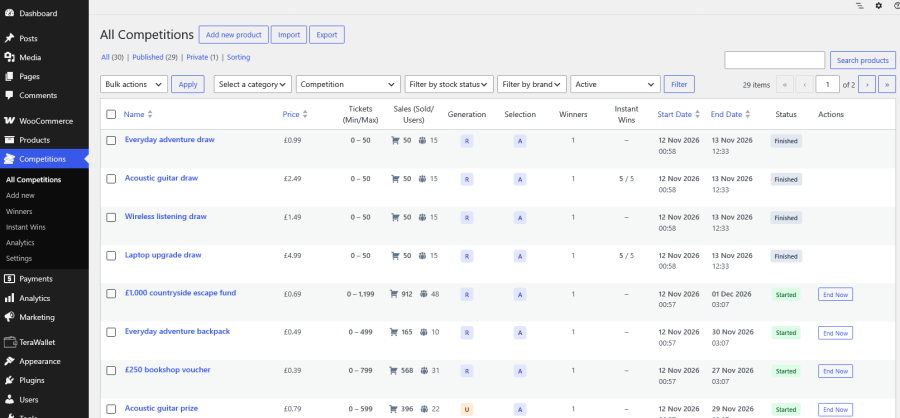
Review ticket sales, participants, prizes, and competition statuses from your dashboard. Use Analytics to compare lottery / competition activity and prize totals over a selected period.
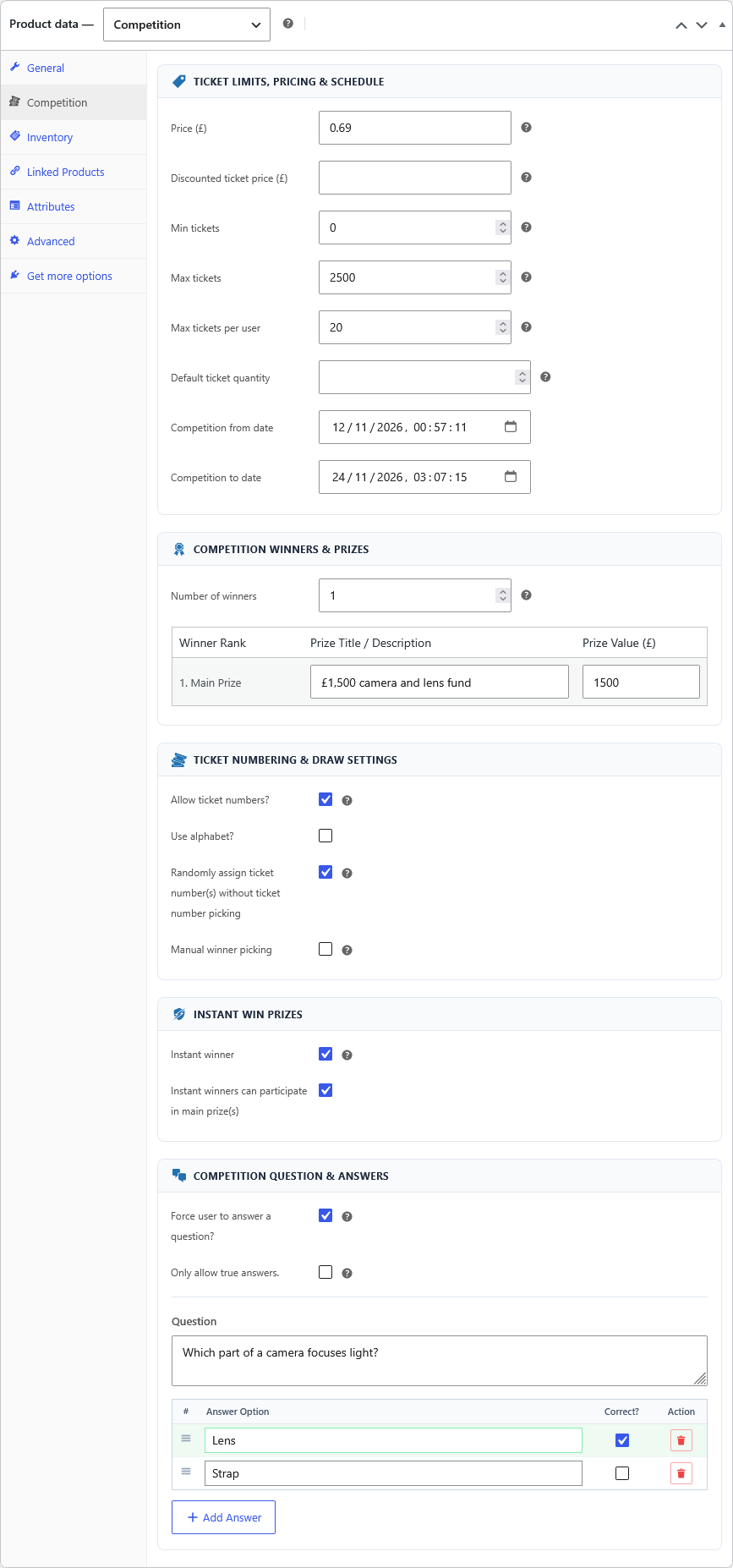
  • Dates and entry limits: set the opening and closing dates, total ticket limits, and maximum entries per customer.
  • Winner options: select one or more winners automatically, or enter numbers from an external draw. Decide whether one customer can win multiple prizes.
  • Repeat competitions: relist manually or automatically for your next campaign.
  • Postal entries: display free entry instructions and add postal entries from the admin area.
  • Records and reports: review participants and winners, and export competition history to CSV or Excel.
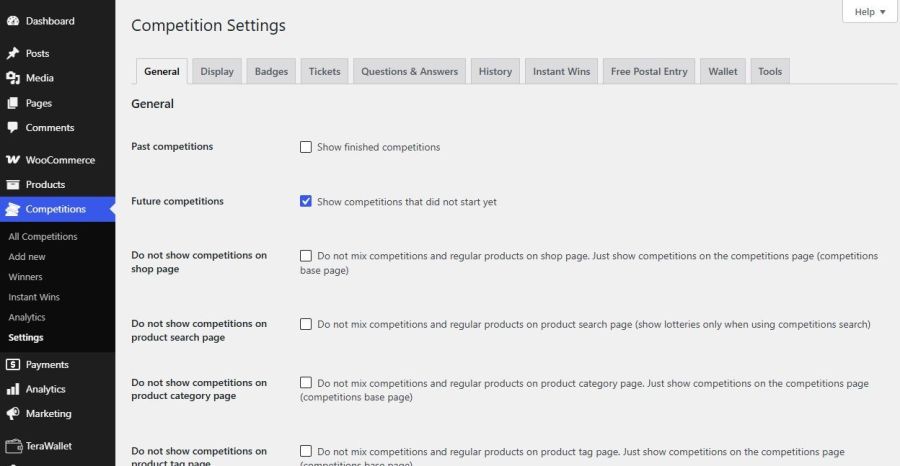
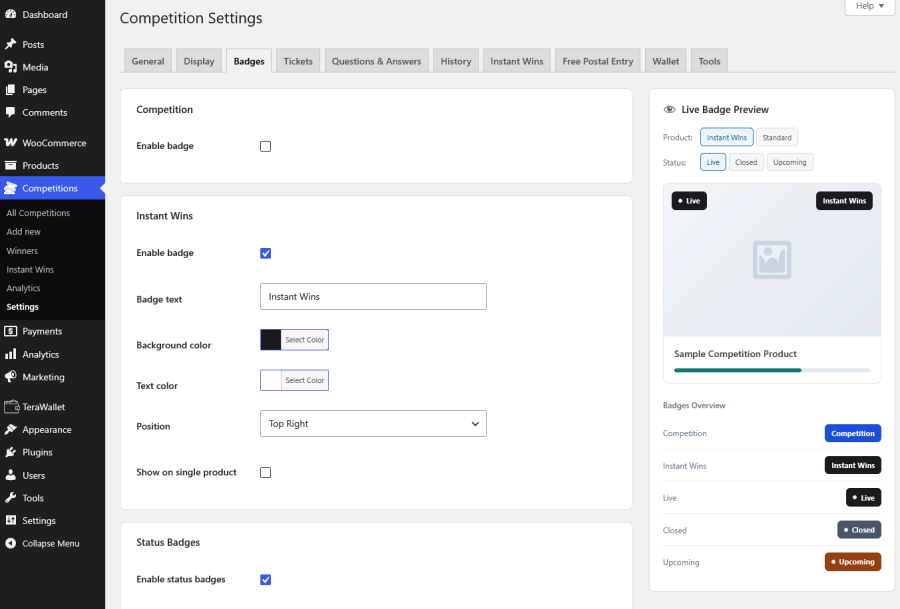
  • Store appearance: adjust competition badges and progress bar colors to match your design.
All Competitions dashboard with ticket sales, participants, ticket settings, dates, and statuses
Review ticket sales, participants, dates, and statuses from the competition list.

Works with your WooCommerce store

Add competitions alongside regular products or create a website just for competitions. Use shortcodes to display competition lists, entry lists, and draw results on your pages. Editable templates give developers more control over the layout.

Elementor widgets and Theme Builder templates cover competition archives, individual competitions, entry pages, and draw results. Theme Builder layouts require Elementor Pro.

The plugin supports object cache like Redis, High-Performance Order Storage (HPOS), WPML for multilingual stores, and the WooCommerce REST API for custom integrations.

Tested at scale: the plugin works with millions of ticket numbers, instant prizes, and orders.

With WooCommerce Subscriptions and Subscription Gifts for WooCommerce, subscribers can receive tickets when they subscribe or renew subscription to a competition. Those extensions and TeraWallet for auto credit of instant wins to user’s wallet are separate plugins.

Make sure your payment gateway / provider allows competitions.

Read the documentation for setup details and troubleshooting.


Frequently asked questions

How are winners chosen?

The plugin can select winners automatically or manually by entering winning numbers. If you use an external draw, enter and save its winning ticket numbers manually.

Can I import instant prizes?
Yes. Import a CSV file with ticket numbers and prize descriptions. You can also include values, image URLs, and categories. An import replaces the competition’s existing instant prizes.
What happens if too few tickets sell?
A competition fails if it has no sold tickets or does not meet the minimum ticket requirement. You can extend or relist those competitions, with one click refund option available.
Does my hosting need scheduled tasks?
It is not mandatory and plugin will work, but we strongly suggest using real cronjobs. Configure scheduled task to close competitions on time. Automatic relisting also needs a scheduled task. Your hosting provider can help with this setup or you can use 3rd party external service for that purpose.
Do I need other plugins?
WordPress and WooCommerce are only requirements. TeraWallet is optional for instant wins with automatic wallet credits. Competitions work without a wallet plugin it is just needed for auto credit of instant wins.
Does the plugin come with demo theme?

No, the custom PrizeLane demo theme is separate from plugin. The plugin includes a sample CSV file for instant prizes. The competitions, entrants, and results in the screenshots are demo examples. If you would like to use demo theme PrizeLane please contact us.

Is object cache like Redis supported?

The plugin supports object cache like Redis and Memcache. Go to Competition > Settings > Tools and scroll down to Object Cache Status.

Does Competitions for WooCommerce support competition subscriptions?

Yes, with WooCommerce Subscriptions and Subscription Gifts for WooCommerce, subscribers can automatically receive tickets when they subscribe or renew subscription to a competition.

Extension information

  • WordPress version required: 4.6
  • WooCommerce version required: 4.0.0
  • PHP version required: 7.4
  • Tested with WordPress: 7.1
  • Tested with WooCommerce: 13.0
  • Requires at least WordPress: 6.2
  • Requires at least WooCommerce: 5.0

Countries

  • Worldwide

Languages

English (UK), English (United States)

Related products

Price $279 annually
Rated 3.9 out of 5 stars
Price $79 annually
Rated 3.4 out of 5 stars
Price $59 annually
Rated 3.1 out of 5 stars
Price $109 annually
Rated 2.8 out of 5 stars
Price $49 annually
Rated 4.1 out of 5 stars
Price $109 annually
Rated 2 out of 5 stars
Price $109 annually
Rated 2.5 out of 5 stars
Price $199 annually
Rated 4 out of 5 stars
Price $39 annually
Rated 2.8 out of 5 stars
Use of your personal data
We and our partners process your personal data (such as browsing data, IP Addresses, cookie information, and other unique identifiers) based on your consent and/or our legitimate interest to optimize our website, marketing activities, and your user experience.