
Subscription includes
Support
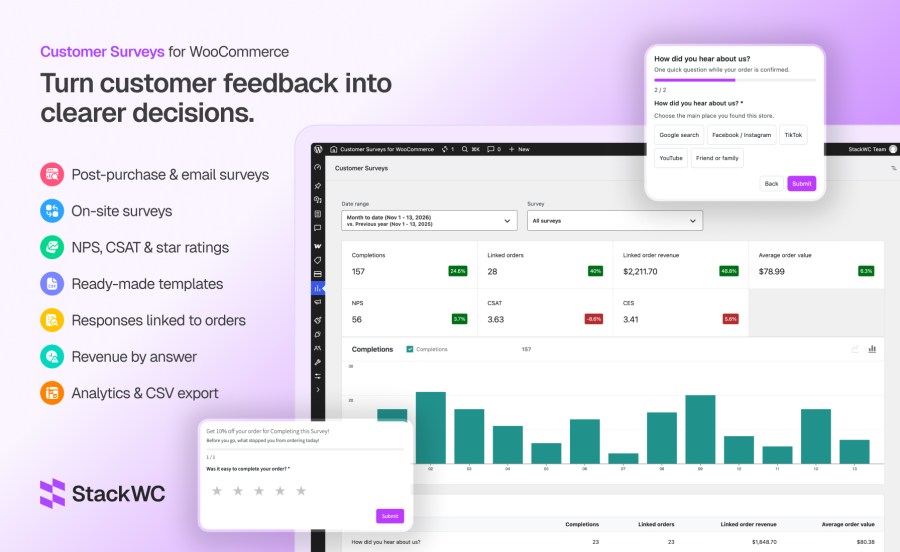
Most WooCommerce stores guess where sales come from, whether checkout felt smooth, and why carts get abandoned. Customer Surveys keeps the whole flow inside WordPress: you build surveys in WooCommerce → Customer Surveys, shoppers answer on the thank-you page, in order emails, on product and cart pages, or from a link — and every response can tie back to the order that triggered it.
No Typeform account. No data leaving your database for a hosted survey tool. Reports live under Analytics → Customer Surveys, with the same date filters and report feel as native WooCommerce Analytics. Checkout is never interrupted; surveys are deliberately kept off the checkout step so Cart and Checkout Blocks stay fast.
Build surveys in a modern admin UI, or start from ready-made templates:
Question types: single choice, multiple choice, dropdown, yes/no, NPS (0–10), CSAT (1–5), CES (1–7), star rating, short text, long text.
Conditional logic — Show a follow-up question when a score is low or a specific source is selected.
Display layouts — Inline on the page, or overlay as modal, slide-in, or banner (rendered in the footer so themes like Storefront do not clip them).
One question at a time with optional progress bar, custom intro/thank-you copy, and per-survey accent color.
| Placement | Use case |
|---|---|
| Order confirmation (thank you) | Right after purchase; works with block order confirmation |
| WooCommerce order emails | Link or embed under the order table in processing/completed (and other emails you choose) |
| After order status | Scheduled WooCommerce email when status changes (with configurable delay in days) |
| Product / cart / shop | Browse and cart feedback without touching checkout |
| Exit intent | Catch shoppers before they leave |
| My Account | Light pulse surveys for logged-in customers |
| Shortcode, block, kiosk | [customer_survey id="1"], Customer Survey block, [customer_survey id="1" kiosk="1"] |
Important: Surveys do not run on checkout pages. That keeps checkout lean and compatible with Cart and Checkout blocks.
Show each survey only to the shoppers you care about:
Shop managers can preview on the storefront even when sampling is below 100%.
Open Analytics → Customer Surveys (survey builder stays under WooCommerce → Customer Surveys).
Yes. Order totals, notes, and meta use the WooCommerce order API. Custom order table compatibility is declared.
Yes. Surveys are not shown on checkout. Thank-you / order confirmation, emails, product, cart, account, and kiosk placements are supported instead.
No. Surveys, responses, and reports stay in your WordPress database.
Primary home is Analytics → Customer Surveys. Builder, templates, responses list, and global settings are under WooCommerce → Customer Surveys.
Yes, on attribution-style surveys (typically single or multi choice on order-linked placements). Analytics shows response count, linked revenue, and AOV per answer.
Yes. Use placement “After an order status” with status Completed (or your custom status) and a delay in days. A dedicated WooCommerce email sends the survey link.
Yes. Point the survey at a template coupon; each completion can receive a unique single-use code, optionally limited to that customer’s billing email.
Yes. Once per order, once per customer, frequency in days, and percentage sample rate are all supported.
Yes. CSV from the Responses area and from Analytics (filtered by date range and survey). REST export endpoint for integrations.
Yes. WordPress personal data exporter and eraser hooks are included; optional consent text on surveys.
Yes. Use the shortcode, the Customer Survey block, or kiosk mode on any page.
Categories
Quality Checks
Countries