
Subscription includes
Support
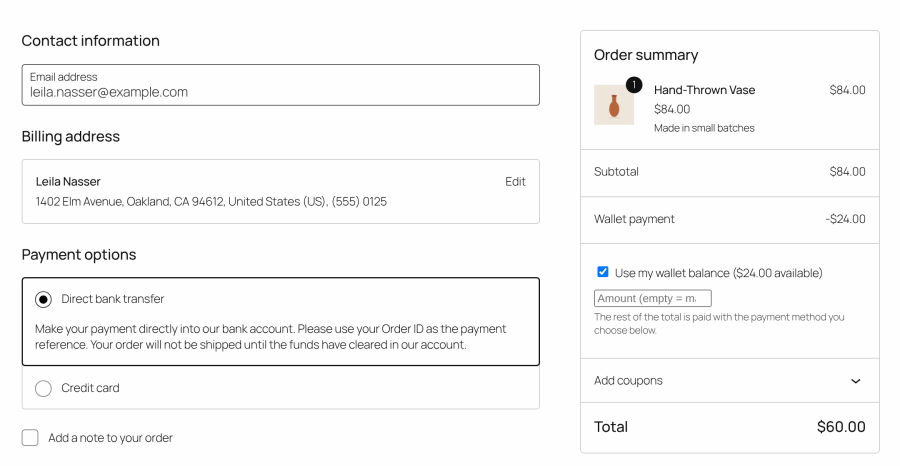
Elite Balance gives every customer in your WooCommerce store a wallet. Refund orders as store credit instead of sending money back to the card, reward loyal shoppers with cashback, and let customers pay with their balance at checkout, including their WooCommerce Subscriptions renewals. The money stays in your store, and your customers have a reason to come back.
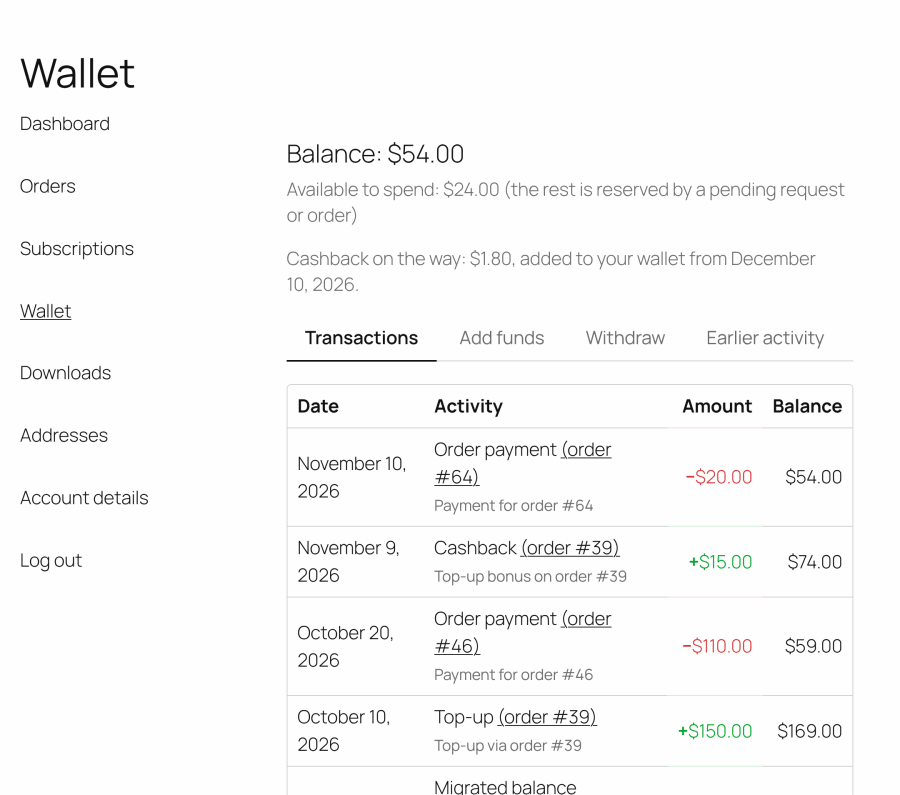
Offer store credit for returns, late deliveries and goodwill gestures. The credit appears in the customer’s wallet straight away and is spent on their next order, instead of leaving your business.
Give 5% back on every order, more on selected products or categories, or a fixed reward for reviews and birthdays. Run limited-time campaigns, such as double cashback for Black Friday week, with start and end dates. You also decide whether the part of an order paid from the wallet earns cashback. If you like, let cashback and promotional credit expire after a set number of days so customers come back sooner.
Let customers top up their wallet from their account with any payment method you accept, and reward them with a bonus, for example 5% extra when they add 100 or more.
With WooCommerce Subscriptions, customers can put a subscription on their wallet and top it up as they go, or keep their card on file and let their balance pay first. Their wallet page lists upcoming renewals, and an email reminds them a few days before a renewal their balance will not cover.
Credit a group of customers in one go, such as everyone who has not ordered in 90 days, or upload a spreadsheet of customers from a campaign. You always see exactly who will be credited before anything happens. Staff accounts are left out unless you choose to include them.
Let customers, affiliates or resellers ask to withdraw money from their wallet. You pay them by bank transfer, PayPal or however you prefer, then mark the request as paid. The amount is set aside as soon as they ask, so it cannot be spent twice.
Elite Balance finds your existing customer balances, shows you exactly what it will bring across before anything changes, and gives you a report at the end confirming the totals match. Your old plugin’s data is never changed or deleted, and the move can be safely repeated. Where the old plugin kept a log, each customer’s history comes along too, read only, so you and your customers can still look back at it. Built-in support covers TeraWallet, WP Swings Wallet System, YITH WooCommerce Account Funds and WooCommerce Account Funds. Balances come across without expiry dates, so moved balances never expire.
WordPress 6.6 or newer, WooCommerce 9.0 or newer and PHP 7.4 or newer. Customers need an account to have a wallet. To offer top-ups, you need at least one other payment method enabled (cash on delivery is never offered for top-ups). Paying subscription renewals from the wallet needs WooCommerce Subscriptions 7.7 or newer.
Elite Balance is built and supported by RoundBorders, a WooCommerce agency partner.
Yes. Customers can pay fully or partly with their wallet on both the classic checkout and the block-based checkout.
Yes. They choose how much of their balance to use and pay the rest with any other payment method you offer.
Yes. Elite Balance brings balances across from TeraWallet, WP Swings Wallet System, YITH WooCommerce Account Funds and WooCommerce Account Funds. Where the old plugin kept a log, your customers' past transactions come along too, read only, so you and your customers can still look back at them. You see exactly what will be moved first, and your old plugin's data is never changed.
Yes, with WooCommerce Subscriptions 7.7 or newer. A customer picks the wallet as the subscription's payment method, at checkout or later from their account, and each renewal is paid from their balance. If the balance is too low, nothing is taken, and WooCommerce Subscriptions handles the failed renewal as it normally does (its emails, and its retries if you use them). You can also let customers use their balance first and pay the rest by card, for payment methods that allow it.
Only if you want it to. Expiry is off by default. When you turn it on, you choose the number of days for each kind of credit, such as cashback or rewards. Credit given before you turn it on never expires, purchases always use the credit that expires soonest, and customers get a reminder email before credit expires.
The Reports tab shows the store credit you owed at the start and end of any period, everything added and taken out by type, what expired and what is about to expire, and gives you a spreadsheet of each customer's balance on the date you choose.
No. Balances come across without an expiry date, so moved balances never expire.
Cashback waits for your refund period (30 days by default) before it can be spent. If the order is refunded during that time, the cashback is reduced or cancelled automatically.
No. It keeps track of each request and sets the money aside. You pay the customer your usual way, such as a bank transfer, then mark the request as paid.
Yes. Elite Balance is built to stay fast with thousands of customers and wallets, and it supports WooCommerce High-Performance Order Storage.
No. Wallet balances and history are kept unless you choose to delete them in the settings before removing the plugin.
From the Elite Balance support page in your WooCommerce.com account. The plugin's Support tab gives you your site details to paste into your message.
Extension information
Quality Checks
Countries