

Subscription includes
Support
You’re running a busy WooCommerce store. Every day, you need to find specific orders — but the default order list only lets you filter by date, customer, or status. For everything else, you’re left scrolling through pages and pages of orders, using your browser’s find function, or giving up entirely.
Extra Order Filters is the only WooCommerce extension that adds 11 powerful, fully integrated filters to your WooCommerce Orders page — so you can find exactly what you’re looking for in a single click. Filter by products, categories, payment methods, shipping methods, user roles, countries, coupons, SKUs, order totals, and date ranges — all working seamlessly together.
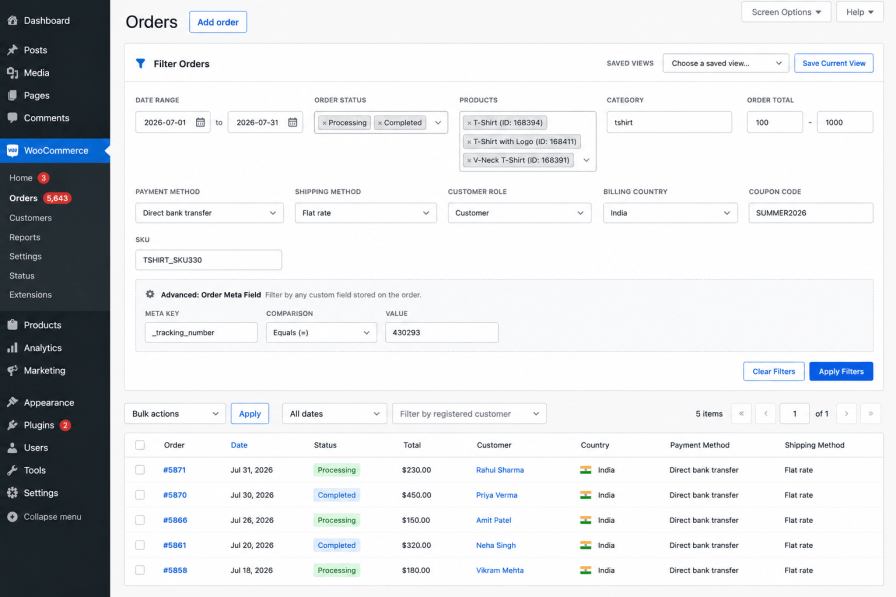
Most store owners don’t realise how much time they waste finding orders — until they’re 20 minutes deep and still haven’t found that one order they need.
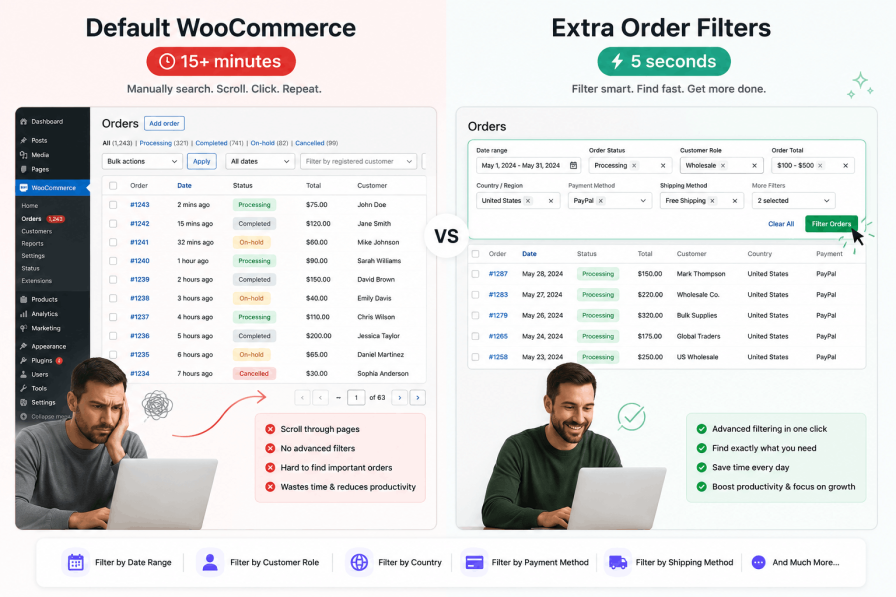
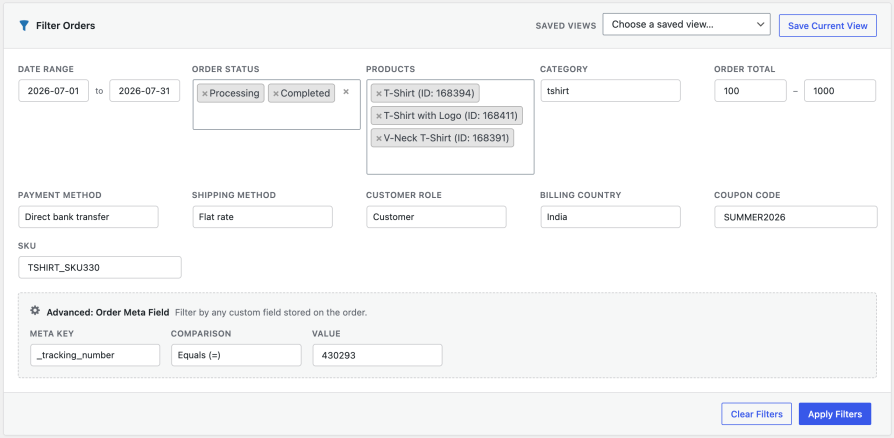
Unlike other order filter plugins that offer one or two extra options, Extra Order Filters gives you a complete toolkit. Every filter is designed to work seamlessly with every other filter, so you can combine criteria to find exactly the orders you need.
Stop guessing. Select a specific date or a custom date range — and see only the orders placed in that window. Perfect for monthly reporting, campaign analysis, or investigating a specific time period.
Need to find every order that contains a specific product? Type the product name and select it from the AJAX-powered dropdown — even with thousands of products, it loads instantly. Works with simple products, variations, and variable products.
Looking for all orders that include products from a specific category? Select one or multiple categories and see every order that contains at least one product from those categories.
Find high-value orders for VIP treatment, or low-value orders for bulk processing. Set a minimum total, a maximum total, or both — and see only the orders that match.
See all orders paid via Stripe? PayPal? Cash on Delivery? Select your payment gateway and get an instant list. Essential for reconciling payments and managing cash flow.
Need to see which orders are using express shipping? Or maybe you need to find all orders using a specific local pickup method? Filter by shipping method and get the list in seconds.
Wholesale customers? VIP members? Subscribers? Filter orders by the customer’s user role to see exactly what your different customer segments are buying.
Running international shipping? Need to see all orders from a specific country for customs or tax purposes? Select the country and get your list instantly.
Running a promotion? Track its performance by filtering orders that used a specific coupon code. See exactly how many orders were placed with that coupon — and the total revenue generated.
Need to find orders containing a specific SKU? Type it in and get an instant list. Perfect for product recalls, inventory investigations, or supplier audits.
The real power of Extra Order Filters isn’t just the individual filters — it’s how they work together. Every filter can be combined with every other filter, giving you almost unlimited ways to slice your order data.
| You need to find… | Filters you combine |
|---|---|
| All COD orders over ₹500 placed last month | Payment Method = COD + Min Total = 500 + Date Range = Last Month |
| All wholesale customer orders containing a specific product | User Role = Wholesale + Product = [your product] |
| All international orders placed with a specific coupon | Country = [any country except yours] + Coupon = [coupon code] |
| All orders from the UK using express shipping | Country = United Kingdom + Shipping Method = Express Shipping |
| All orders placed via PayPal containing products from the “Electronics” category | Payment Gateway = PayPal + Category = Electronics |
Once you start combining filters, you’ll quickly realise you’re running the same complex searches over and over — every morning for your support queue, every week for international shipping reports, every time a VIP customer calls.
Instead of manually selecting your filters each time, simply save any combination as a named view. Need to switch context? Just pick it from the dropdown and the entire filter set applies instantly. No re-selecting. No mistakes.
| View Name | Filters it saves (so you don’t have to re-select them) |
|---|---|
| Support Queue | Status = On Hold + Payment Method = Any + Date Range = Last 7 Days |
| International Orders | Country ≠ United States + Shipping Method = Any |
| VIP Customers | User Role = Wholesale + Min Total = 500 |
| COD High-Value | Payment Gateway = Cash on Delivery + Min Total = 1000 + Date Range = This Month |
| Monthly Returns | Date Range = Last Month + Status = Refunded |
| Black Friday Campaign | Coupon = BF2025 + Date Range = Nov 25 – Nov 30 |
Creating a view is as simple as setting your filters once, clicking “Save View”, giving it a memorable name, and choosing it from the dropdown whenever you need it. Unlimited views, unlimited combinations, zero limits.
Extra Order Filters isn’t just for the admin screen. The plugin now supports filtering WooCommerce orders through the official WooCommerce REST API. This means you can programmatically filter orders using all the plugin’s filtering capabilities — perfect for:
eofw_product        — Filter by product ID(s)
eofw_sku            — Filter by SKU
eofw_category       — Filter by category ID(s)
eofw_shipping_method — Filter by shipping method
eofw_payment_method — Filter by payment gateway
eofw_coupon         — Filter by coupon code
eofw_user_role      — Filter by user role
eofw_country        — Filter by country code
eofw_min_total      — Minimum order total
eofw_max_total      — Maximum order total
eofw_date_start     — Start date (YYYY-MM-DD)
eofw_date_end       — End date (YYYY-MM-DD)
GET /wp-json/wc/v3/orders?eofw_product=123,456&eofw_payment_method=stripe&eofw_date_start=2025-01-01
Here’s how different store owners use Extra Order Filters every day:
Yes, Extra Order Filters is fully compatible with WooCommerce’s High-Performance Order Storage (HPOS).
No. The plugin is lightweight and optimized for performance. Product searches use AJAX and load results on demand — so even with thousands of products, your orders page stays fast.
No. Once installed and activated, all filters appear automatically on the WooCommerce > Orders page. Just start using them
Yes. All filters are available via the WooCommerce REST API using the eofw_* parameters. This makes it easy to build custom dashboards, integrate with third-party systems, or automate workflows.
Yes. Extra Order Filters works with all major WooCommerce plugins, including payment gateways, shipping methods, and membership plugins.
Extra Order Filters already includes the most requested filters — date range, products, categories, min/max total, payment methods, shipping methods, user roles, countries, coupons, and SKUs. If you need something specific, we’re always open to feature requests.
Every minute you spend scrolling through orders looking for one specific order is a minute not spent on what actually grows your store — marketing, customer service, and product development.
Extra Order Filters gives that time back. With 11 powerful filters that work together seamlessly, you’ll find any order in under 5 seconds — and you’ll never waste time scrolling through pages of orders again.
Save hours of frustration by finding orders instantly. Whether you’re processing refunds, investigating issues, tracking campaigns, or managing international shipping — Extra Order Filters helps you find what you need, when you need it.
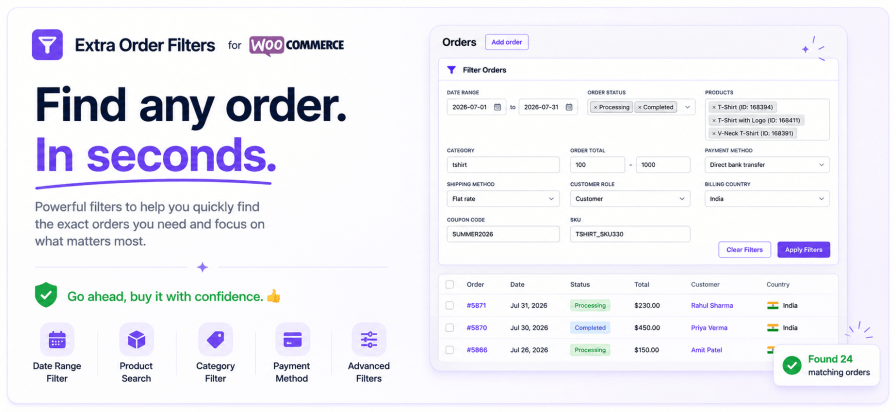
Need another reason to choose us? Extra Order Filters is developed by Kartechify, a trusted WooCommerce extension developer known for delivering reliable solutions backed by dedicated customer support.
Check out our other best-selling and popular plugins on WooCommerce.
Absolutely! You can combine any number of filters — for example, find orders from a specific country that used a certain coupon and include a particular product — all at once.
Yes, the plugin is fully compatible with WooCommerce HPOS. It uses optimized query logic and WooCommerce-recommended filters to ensure accurate results across both legacy and HPOS systems.
Yes, the product filter uses AJAX-based search for quick selection by product name. You can also filter by SKU using the dedicated SKU filter field.
No. The plugin is performance-optimized and uses smart SQL queries to prevent loading all orders or running unnecessary loops. It works efficiently even on stores with large order volumes.
Once activated, go to WooCommerce → Orders. You will see a new filter section appear above the orders table, allowing you to filter orders by product, category, order total, shipping method, and more.
Extension information
Quality Checks
Countries







