
Product Icon

Flexi Product Delivery Date for WooCommerce

Set product-specific delivery schedules & pickup locations and let your customer pick the delivery date and time slots on your product page. Restrict the number of orders you can take per product and charge extra for deliveries if needed. 
Choose a billing option
$119
Save 20%
$238 $190.40

Subscription includes

  • Product updates and improvements
  • Customer support
  • 30-day money-back guarantee

Key Features

  • Automatically display only the available delivery dates and time slots for each product.
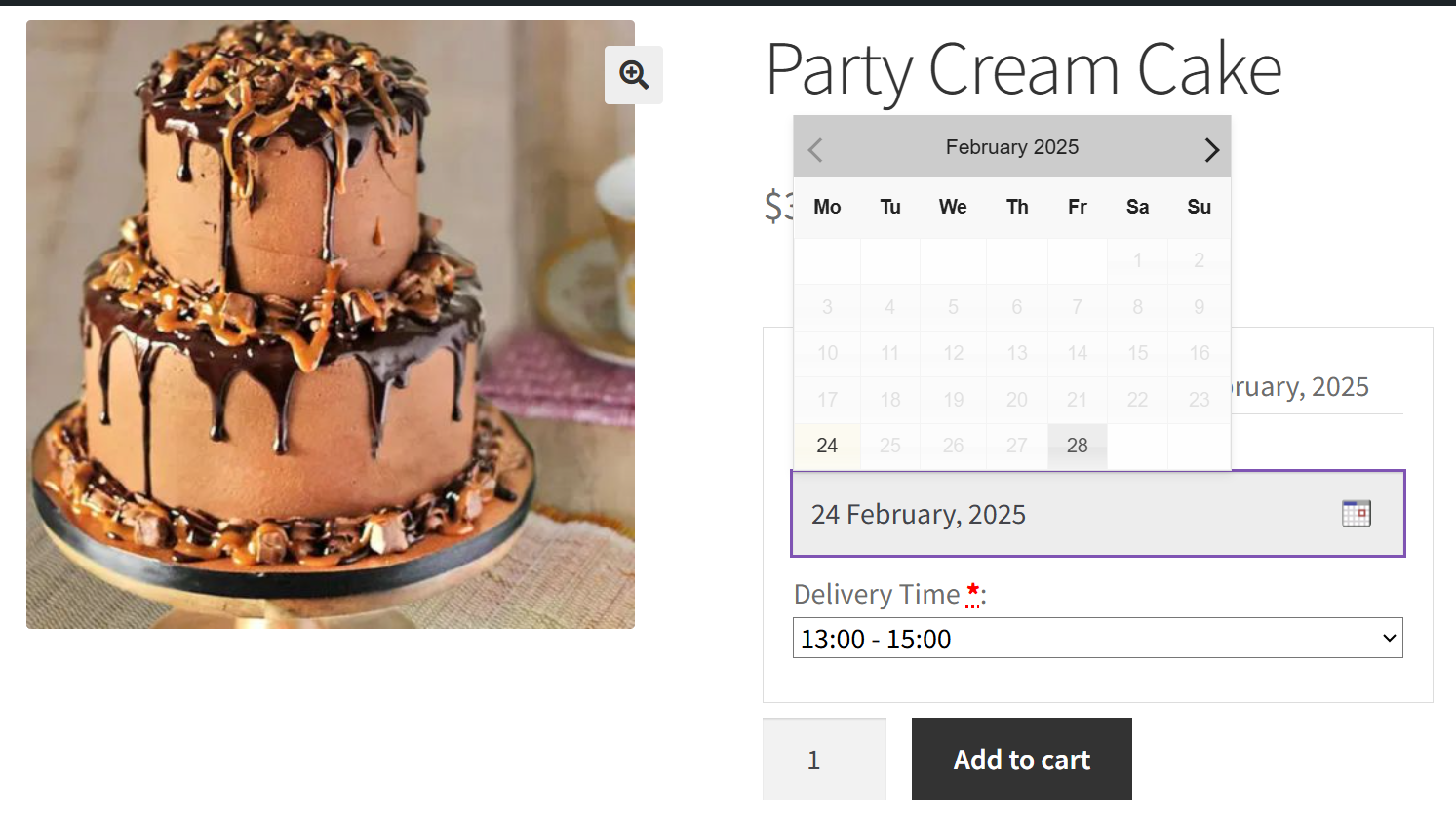
    Example: A boutique bakery can show precise delivery windows for custom cakes, ensuring every order arrives fresh when promised.
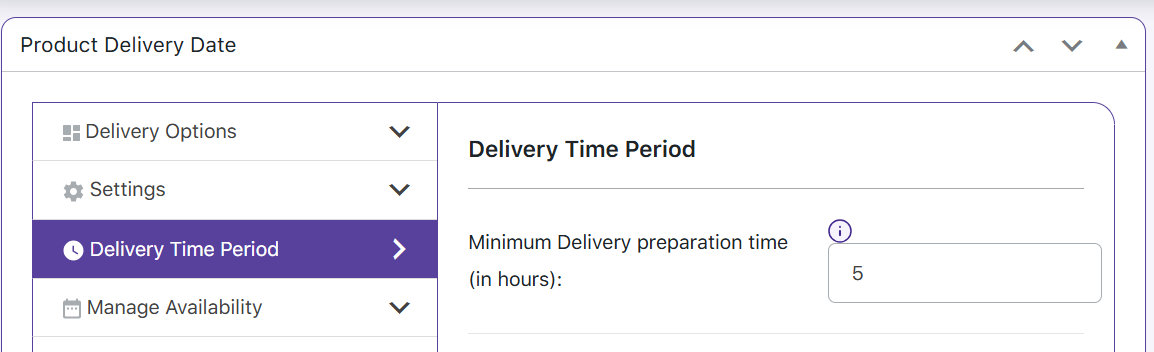
  • Set a minimum preparation time based on each product’s needs so that items like large cakes or handmade goods are ready on time.
    Example: A florist selling arrangements can avoid last-minute rushes by specifying extra prep time for delicate bouquets.
  • Automatically stop accepting orders once the daily delivery limit is reached to prevent overbooking.
    Example: A bakery can cap cake deliveries at 20 per day to ensure timely preparation and quality.
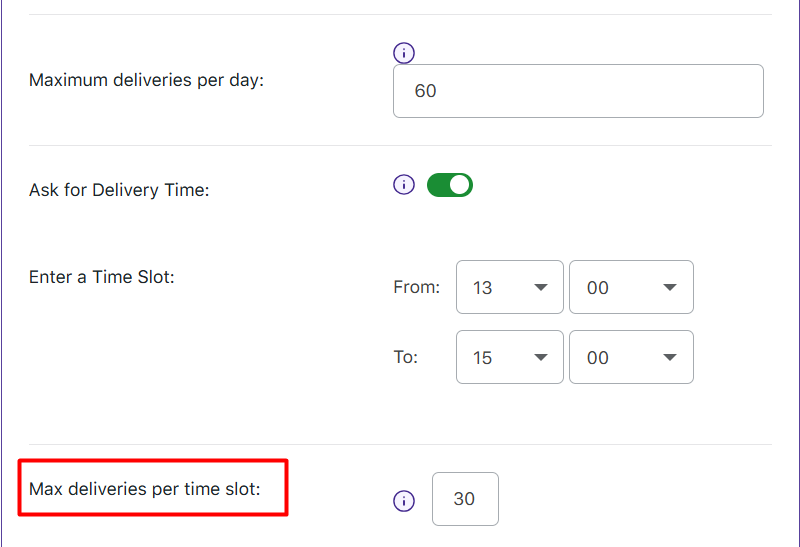
  • Limit the number of orders for specific time slots to manage workload efficiently and avoid overbooking.
    Example: A sushi restaurant can stop accepting orders after 30 deliveries for the 7 PM to 8 PM time slot.
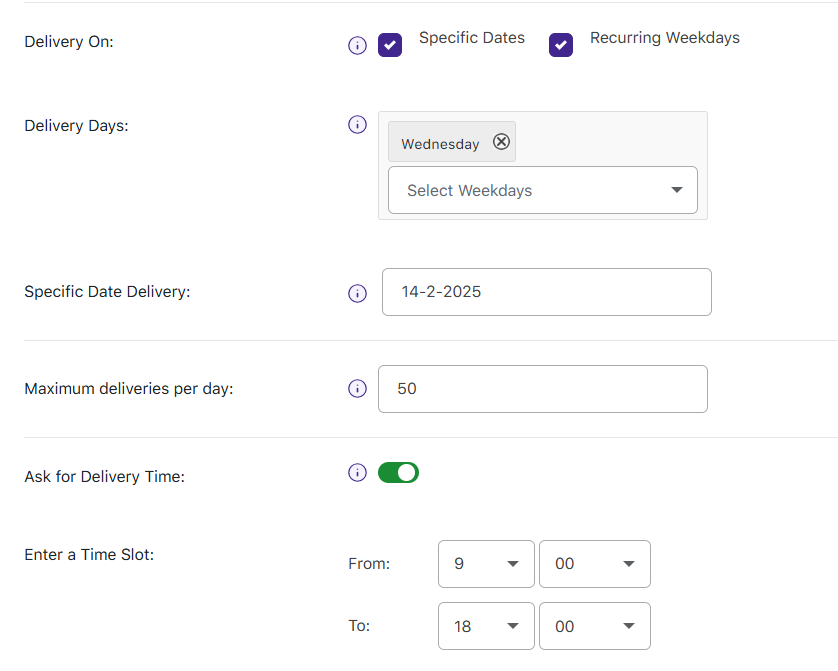
  • Set different maximum delivery limits for individual weekdays or specific dates to better manage peak days.
    Example: Accept only 5 deliveries on Mondays, 20 on Fridays, and 50 on Valentine’s Day.
  • Specify particular dates, weekdays, or even specific time slots for festive or seasonal products.
    Example: A bakery can set Valentine’s Day cake deliveries for February 14, ensuring all orders arrive on the right day.
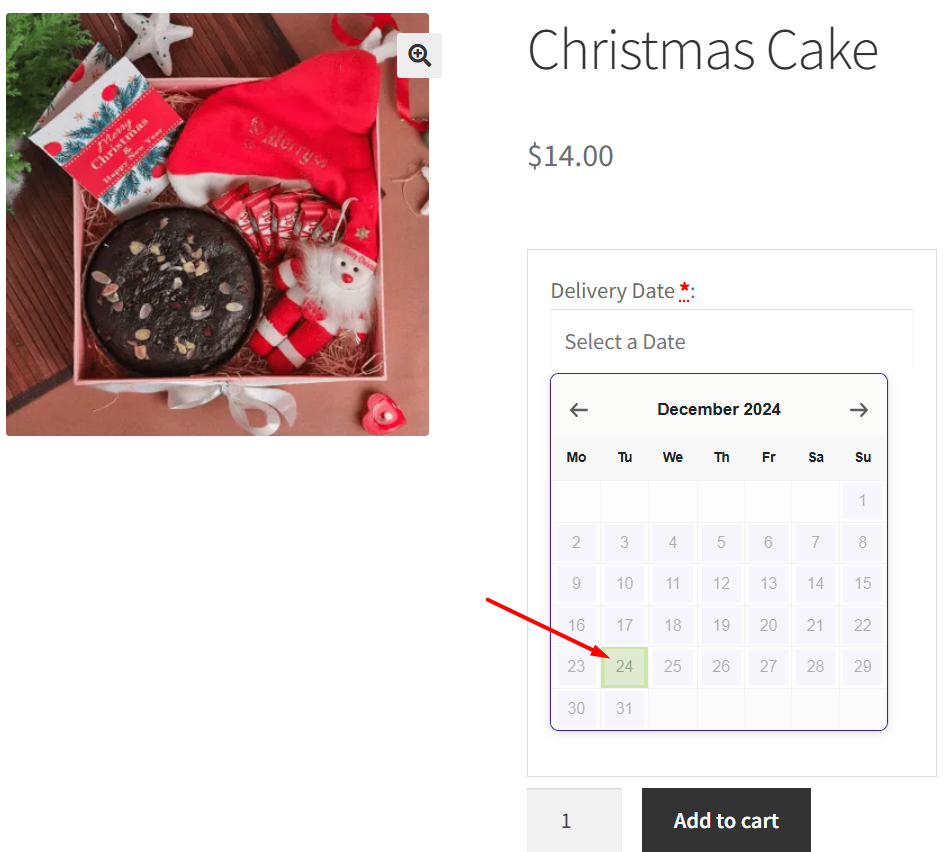
  • Schedule deliveries for special or festive products on specific dates
    Example: A bakery can set all Christmas cake deliveries for December 24 to ensure timely arrivals.
  • Schedule deliveries for special or festive products on specific time slots
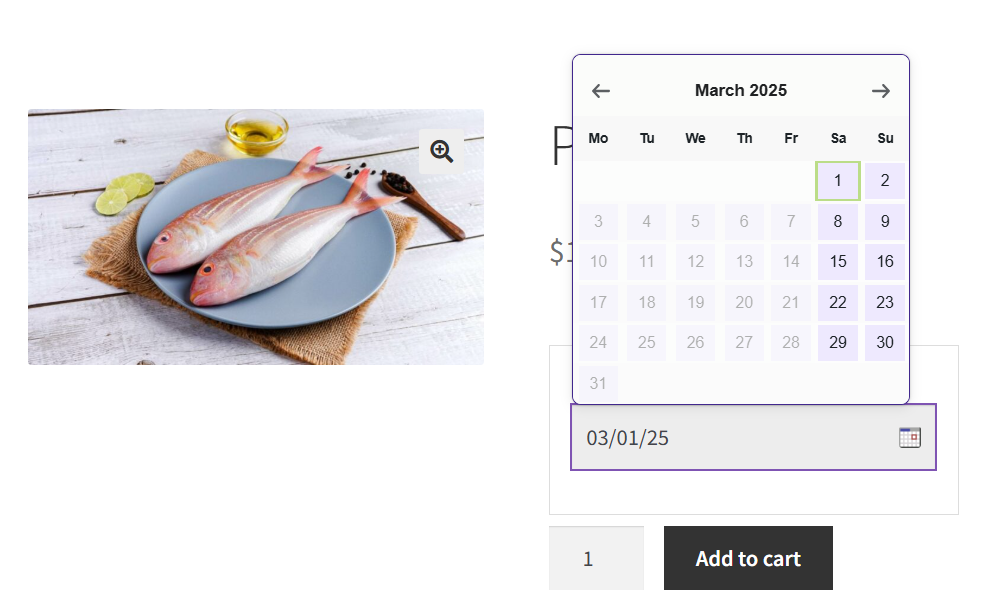
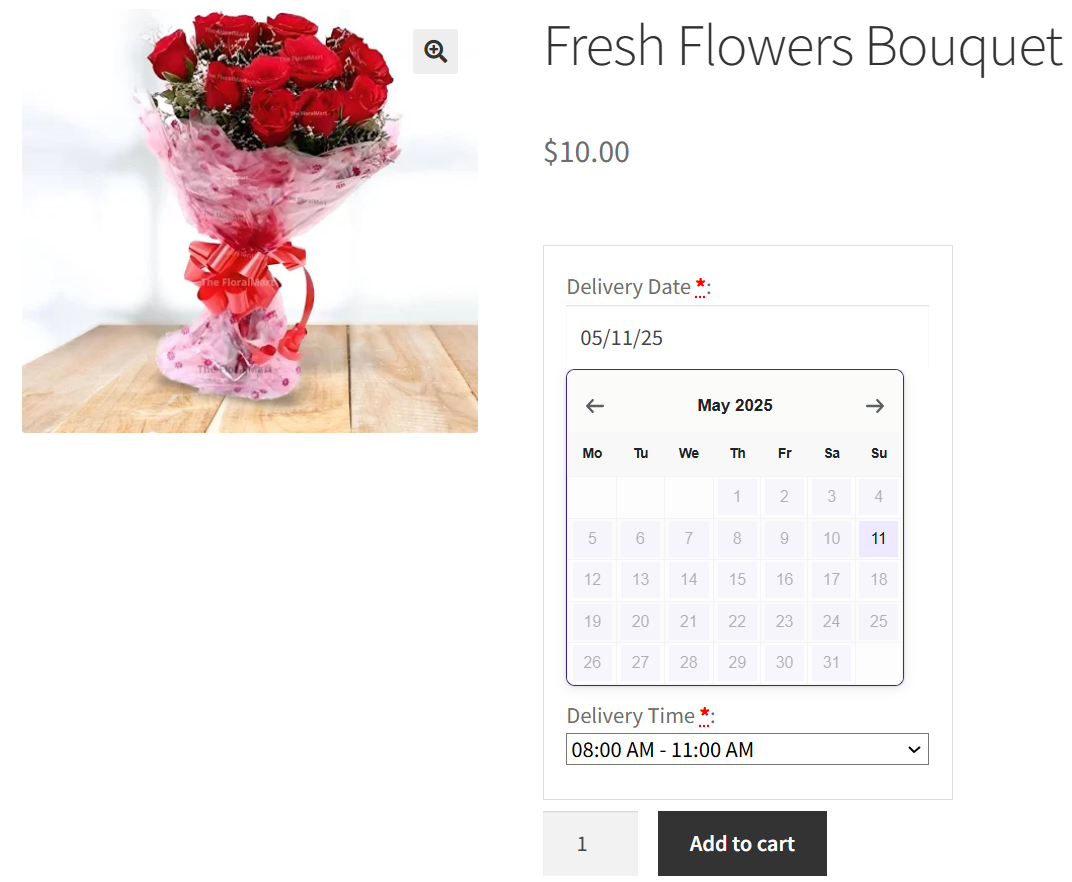
    Example: A fresh seafood store can schedule deliveries only on Fridays to ensure weekend availability
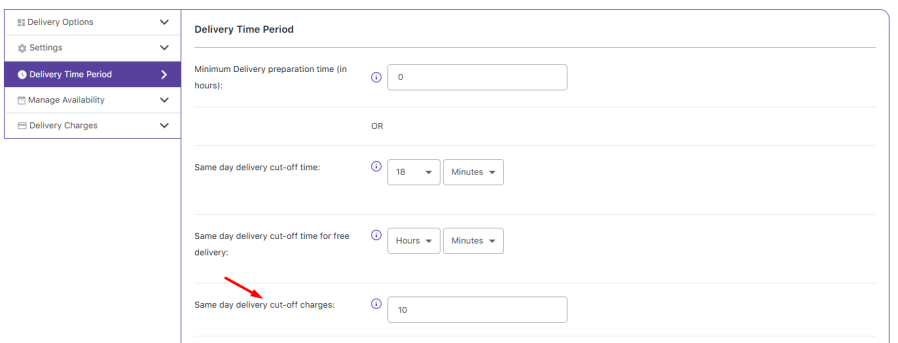
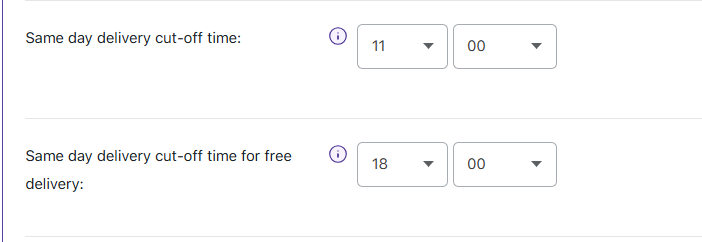
  • Set clear cut-off times for same-day and next-day deliveries, making it easy to offer speedy service for urgent orders.
    Example: An electronics store can offer same-day delivery for phone accessories ordered before 11 AM and next-day delivery for orders placed before 6 PM.
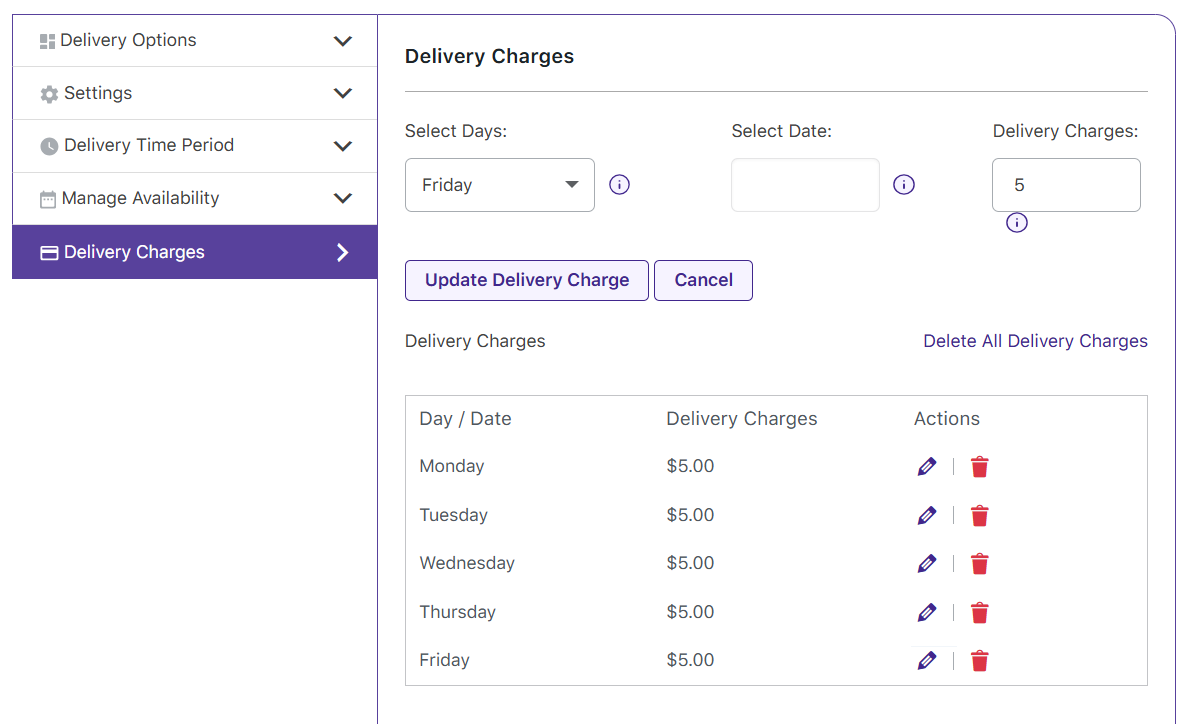
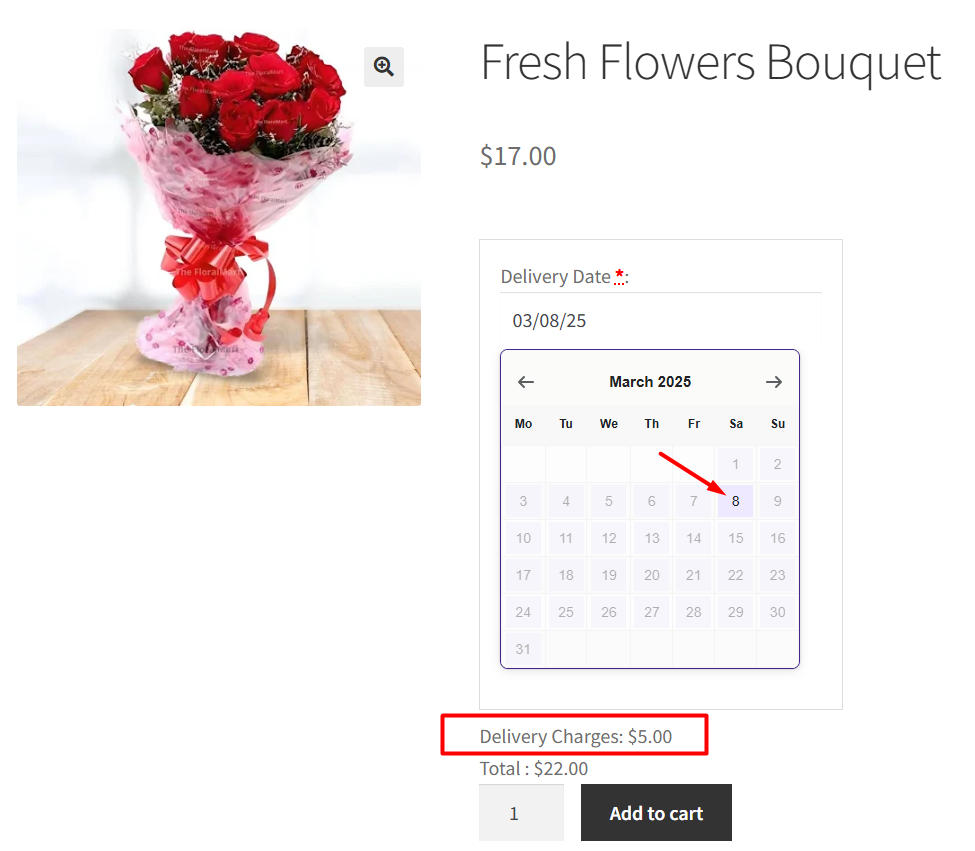
  • Charge extra for weekend deliveries to balance demand and logistics.Example: A bakery can charge an extra fee for Sunday cake deliveries.
  • Charge Extra for Peak-Hour Deliveries
    Example: A pizza restaurant can charge an extra fee for deliveries between 6–8 PM, when order volume is at its peak.
  • Charge extra for deliveries on important days like festive days
    Example: A flower shop can charge an extra fee for deliveries on Women’s Day due to the surge in orders.
  • Charge extra for same day deliveries
    Example: A bakery can charge an extra fee for same-day custom cake orders to prioritize quick preparation and delivery.
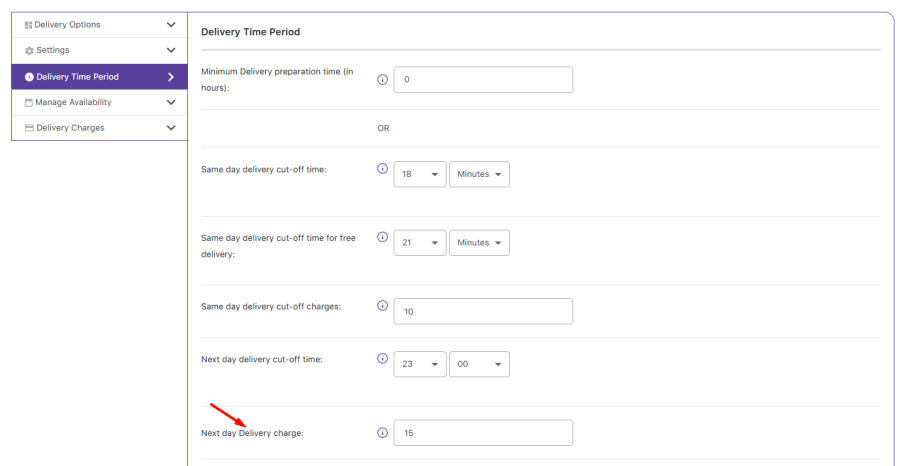
  • Apply an additional fee for expedited next-day deliveries to ensure timely fulfillment.
    Example: An appliance store can charge an extra fee for next-day refrigerator deliveries to cover logistics and fast processing.
  • Use bulk settings to apply your delivery configurations across multiple products at once and even copy settings from one product to others in the cart.

    Additional Features

  • Bulk & Quick Settings to Save Time:
    Use bulk settings to apply your delivery configurations across multiple products at once and even copy settings from one product to others in the cart.
    Example: A clothing retailer can set the same 2-day delivery option for all winter jackets in a new collection, reducing repetitive work and ensuring consistency.
  • End-to-End Delivery Visibility:
    Provide clear estimated delivery dates and track delivery details throughout the WooCommerce checkout cycle, giving your customers confidence in their purchase.
    Example: Customers selecting their delivery time directly from the shop page enjoy a smooth, transparent ordering process.
  • Customizable Communication:
    Tailor field labels and messages to match your brand’s tone, ensuring that every step of the checkout process is clear and engaging.
    Example: A tech gadget store can customize notifications to keep buyers informed and reduce uncertainty about their delivery status.
    This benefit-driven approach highlights how Flexi Product Delivery Date Pro solves everyday problems—from avoiding overbooked schedules to ensuring timely and customized deliveries—while saving you time and enhancing customer satisfaction.
  • Holiday Restrictions for Smarter Scheduling
    Avoid delivery mishaps by preventing orders on non-operational days for individual products or your entire store.
    Example: A catering service can block deliveries on public holidays to manage staff availability efficiently.
  • Google Calendar Integration 
    Automatically sync upcoming deliveries with Google Calendar (Now with easy-to-set-up OAuth integration), ensuring you never miss an order deadline.
    Example: A handmade jewelry business can see all scheduled deliveries at a glance, making planning easier.
  • Flexible Delivery Rescheduling by Admin & Customers
    Allow both store owners and customers to modify delivery dates, reducing cancellations and improving service flexibility.
    Example: A subscription meal service can let customers reschedule if their plans change, improving retention.
  • Works Seamlessly with All WooCommerce Product Types
    Compatible with simple, variable, and subscription-based products, making it versatile for all kinds of businesses.
    Example: Whether you sell physical goods, rentals, or made-to-order products, your delivery scheduling adapts effortlessly.
  • Estimated Delivery Date for Better Customer Confidence
    Show customers when to expect their products at checkout, boosting trust and reducing post-purchase inquiries.
    Example: A custom furniture store can provide realistic delivery dates to manage customer expectations.
  • Real-Time Delivery Tracking Across the Checkout Cycle
    Monitor and manage delivery details from the moment an order is placed until it reaches the customer.
    Example: A luxury fashion brand can track high-value shipments with complete transparency.
  • Customizable Field Labels & Messages for a Branded Experience
    Personalize how delivery options and messages appear to customers, ensuring brand consistency.
    Example: A high-end florist can match their checkout process to their premium aesthetic.
  • Customizable Field Labels & Messages for a Branded Experience
    Personalize how delivery options and messages appear to customers, ensuring brand consistency.
    Example: A high-end florist can match their checkout process to their premium aesthetic.
  • Customers Can Choose Their Delivery Date & Time from the Shop Page
    Make the checkout experience smoother by letting customers pick their preferred delivery schedule directly on the product page.
    Example: A gourmet cake shop can allow customers to schedule birthday cake deliveries while browsing.
  • Save customers time by automatically applying the selected delivery date and time from the first product to all other items in the cart.Example: A bakery customer choosing a cake delivery for Friday will have the same date applied to cupcakes and cookies in the cart.

Automatically display only the available delivery dates and time slots for each product

Set a minimum preparation time based on each product’s needs so that items like large cakes or handmade goods are ready on time

Automatically stop accepting orders once the daily delivery limit is reached to prevent overbooking.

Limit the number of orders for specific time slots to manage workload efficiently and avoid overbooking

Specify particular dates, weekdays, or even specific time slots for festive or seasonal products

Schedule deliveries for special or festive products on specific dates

Schedule deliveries for special or festive products on specific time slots
Schedule deliveries for special or festive products on specific time slots
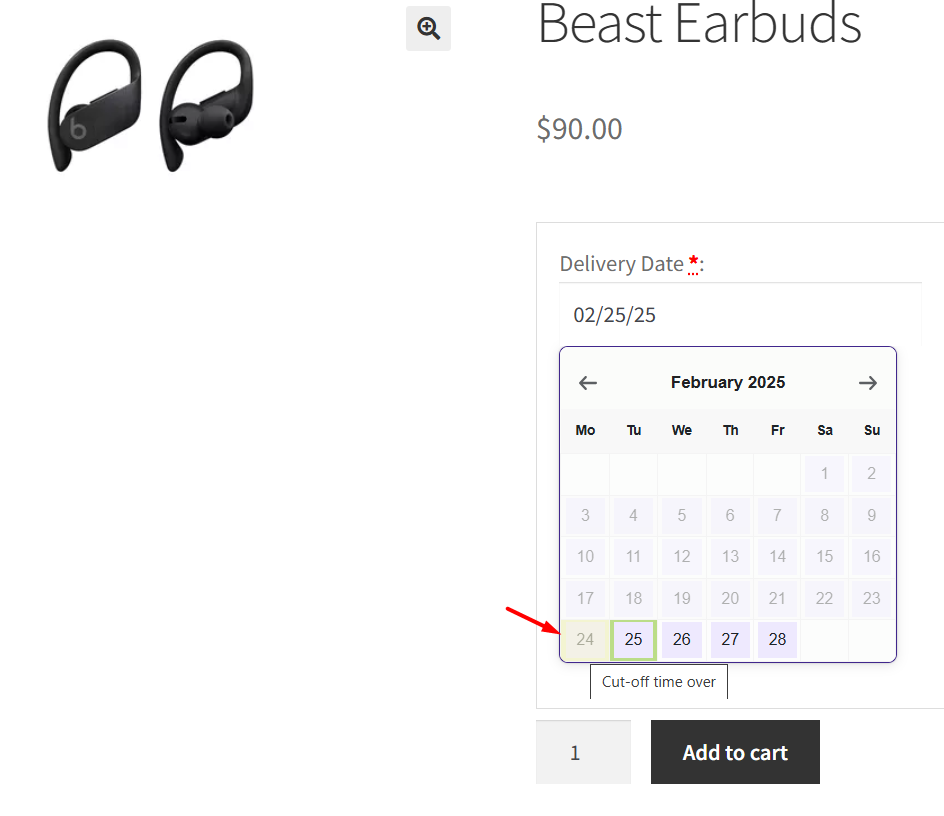

Set clear cut-off times for same-day and next-day deliveries, making it easy to offer speedy service for urgent orders

Charge extra for weekend deliveries to balance demand and logistics

Charge Extra for Peak-Hour Deliveries


Charge extra for deliveries on important days like festive days

Charge extra for same day deliveries

Apply an additional fee for expedited next-day deliveries to ensure timely fulfillment


Set unique delivery schedules for each WooCommerce products

Each product is unique and different types of delivery processes have to be followed. You may need to charge extra for deliveries during peak hours, block out a few days/time slots, etc. Flexi Product Delivery Date Pro helps you balance customer experience and delivery experience by letting your customers choose the available delivery dates/time slots set by you from the product page.
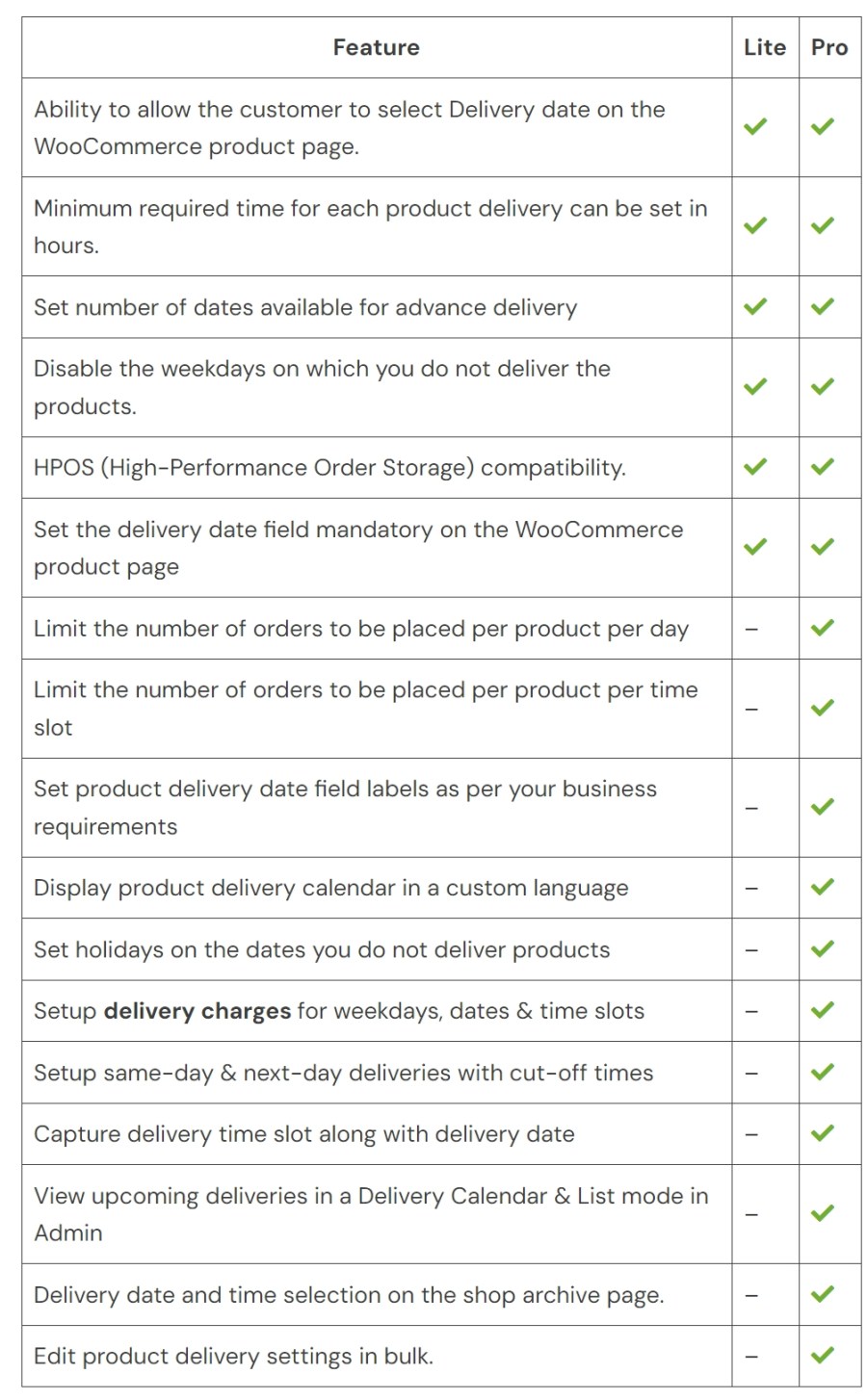
 

Flexi Product Delivery Date for WooCommerce Free Vs Premium – Full Feature Comparison


Frequently asked questions

Where can customers select the delivery date?

Customers can choose their delivery date directly on the product page before adding the item to their cart, making it easy for them to plan ahead.

Can I set a fixed delivery date per product without allowing customers to choose a date?

Customers can choose their delivery date directly on the product page before adding the item to their cart, making it easy for them to plan ahead.

Can I show an estimated delivery date as a text message instead of a date picker for products?

Yes! You can display a simple estimated delivery date message on the product page, so customers know when to expect their order without selecting a specific date.

Can I exclude weekend deliveries?

Yes! You can prevent deliveries on weekends or any specific weekdays, so customers can only choose from the days you actually deliver.

Can I disable deliveries on public holidays or specific dates?

Absolutely. You can block public holidays or any custom dates so customers cannot select them for delivery.

Can I set different preparation times for each product?

Yes! Each product can have its own preparation time. For example, Product A can require 48 hours, while Product B can require 72 hours, affecting when customers can schedule deliveries.

Does it support cutoff times and extra charges for same-day or next-day delivery?

Yes! You can configure same-day and next-day delivery cutoff times per product and even add extra charges for these delivery options.

Can I create delivery time slots for my products?

Yes! You can offer specific delivery time slots for each product, allowing customers to choose a convenient time slot on the available delivery dates.

Can I limit how many orders are allowed per product for each delivery date?

Yes! You can set a maximum number of deliveries per product for each date. Once the limit is reached, that date automatically becomes unavailable for further orders.

Can I restrict delivery date selection to specific products?

Yes. You can enable delivery date and time selection on a per-product basis, giving you full control over which products shows the date picker on the frontend.

Can I apply delivery settings to multiple products at once?

Yes. You can apply delivery rules to multiple products or to the selected product categories.

Can customers place orders without selecting a delivery date on the product page?

Yes! The delivery date can be set as optional. When the ‘Mandatory Field’ option is disabled, customers can proceed to checkout and place their order without selecting a delivery date.

Does WooCommerce Product Delivery Date Pro comply with GDPR guidelines?

Yes! The plugin is GDPR-compliant and does not capture any customer data without consent.

I have another question.

Please fill out this pre-sales form.

Customer reviews

Extension information

  • PHP version required: 7.3
  • Tested with WordPress: 6.9.0.
  • Tested with WooCommerce: 10.4.3
  • Requires at least WordPress: 3.0
  • Requires at least WooCommerce: 3.0.0

Countries

  • Worldwide

Related Products

Price $79 annually
Rated 3.4 out of 5 stars
Price $59 annually
Rated 3.1 out of 5 stars
Price $109 annually
Rated 2.8 out of 5 stars
Price $49 annually
Rated 4.1 out of 5 stars
Price $109 annually
Rated 2 out of 5 stars
Price $109 annually
Rated 2.3 out of 5 stars
Price $109 annually
Rated 2 out of 5 stars
Price $109 annually
Rated 2.6 out of 5 stars
Price $109 annually
Rated 2.3 out of 5 stars