

Product comparison
Subscription includes
Support
Flexible Measurement Price Calculator for WooCommerce lets you sell products based on real-world measurements instead of fixed quantities. Customers simply enter the required dimensions, and the plugin instantly calculates the final price using your pricing rules.
Whether you sell flooring, fabric, wallpaper, glass, wood, tiles, banners, construction materials, liquids, or any product priced by measurements, this plugin automates the entire pricing process while delivering a smooth shopping experience.
Built exclusively for WooCommerce, the plugin supports multiple measurement types, automatic unit conversion, pricing tables, variation pricing, inventory management, and secure server-side calculations.
Many WooCommerce stores sell products that cannot be priced using standard quantities. Instead of asking customers to purchase “10 quantities,” they need to purchase 2.5 meters, 12 square meters, 8 cubic feet, or 5 boxes.
Flexible Measurement Price Calculator makes this simple.
Customers enter their measurements, the plugin calculates the required amount, applies your pricing rules, and instantly displays the correct price before checkout.
Transform standard WooCommerce products into measurement-based products.
Sell products priced by:
Perfect for businesses selling products by size, dimensions, or coverage.
Choose the pricing method that best fits your products.
Sell products by:
Ideal for:
Sell products by:
Perfect for:
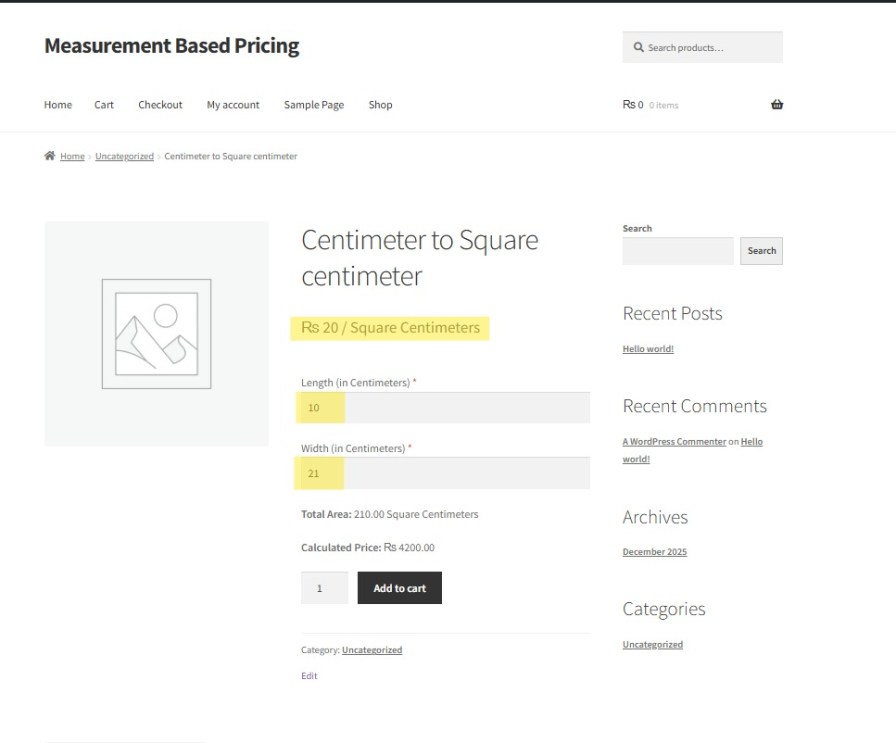
Customers enter both Length and Width.
The plugin calculates:
Length × Width
Perfect for:
Allow customers to enter the total area directly without entering individual dimensions.
Ideal when customers already know the total square measurement.
Automatically calculate pricing using:
Length × Width × Height
Perfect for:
Calculate pricing using:
2(LW + LH + WH)
Ideal for:
Sell products packaged in boxes while charging customers based on coverage.
Example:
One box covers 2.5 square meters.
Customer needs 17 square meters.
The plugin automatically calculates the required number of boxes and total price.
Perfect for:
Configure pricing individually for every WooCommerce product.
Each product can have:
Save time by creating pricing rules that automatically apply to:
Perfect for stores with large product catalogs.
Allow customers to enter measurements using their preferred units while your pricing remains based on a different unit.
Example:
Customer enters:
120 cm
Plugin calculates pricing in:
Meters
Everything happens automatically.
Supported units include:
Let customers choose their preferred measurement unit before entering values.
The plugin automatically converts measurements into your pricing unit.
Create tiered pricing based on measurement size.
Example:
0–10 m² → $20 per m²
10–25 m² → $18 per m²
25–50 m² → $15 per m²
Perfect for wholesale and bulk pricing.
Assign different:
for every WooCommerce variation.
Ideal for products with multiple materials, sizes, or qualities.
Track inventory using measurement values instead of simple quantities.
Prevent customers from purchasing more material than available.
Control what customers can purchase.
Set:
Reduce ordering errors before checkout.
As customers enter measurements, the plugin instantly updates:
No page refresh required.
Customers always know exactly what they will pay.
Measurement-based pricing works by setting a unit price (for example, per square centimeter or per meter). Customers enter their required measurements, and the plugin calculates the total price by multiplying the measurement value by the unit price.
The plugin supports multiple measurement units including meters, centimeters, square meters, square centimeters, inches, feet, yards, and custom units. You can choose the units that best fit your products.
Yes. Customers can enter their own dimensions directly on the product page. The price updates automatically in real time, creating a smooth and user-friendly shopping experience.
Yes. The measurement price calculator is fully compatible with WooCommerce simple products and variable products, making it suitable for most store setups.
Categories
Extension information
Quality Checks
Countries







