
Product Icon

Mix and Match Bundle Builder with Tiered Discounts for WooCommerce

Let shoppers build their own custom product bundle and see tiered discounts unlock automatically. The more they add, the more they save.
Choose a billing option
$69
Save 20%
$138 $110.40

Product comparison

Subscription includes

  • Product updates and improvements
  • Customer support
  • 30-day money-back guarantee

  • A beautifully designed product grid lets customers mix and match items with a single click
  • A live bundle summary panel shows selected items, real-time pricing, and discount progress at a glance
  • Tiered discounts unlock automatically as customers add more items. No coupon codes, no friction.
  • Drop it onto any page, post, or landing page, including a blog post, using a shortcode or Gutenberg block. It works like a section you place anywhere, not something locked to a product page.
  • Full color theming per bundle: 6 customizable color settings, no CSS required
  • Clean, fast, and lightweight. No bloat, no conflicts. Built to WooCommerce standards.
  • Fully compatible with WooCommerce Cart & Checkout Blocks and High Performance Order Storage (HPOS)

Try the live demos

Build a real bundle yourself — no setup required. It’s the same plugin in both, simply styled for two very different stores.

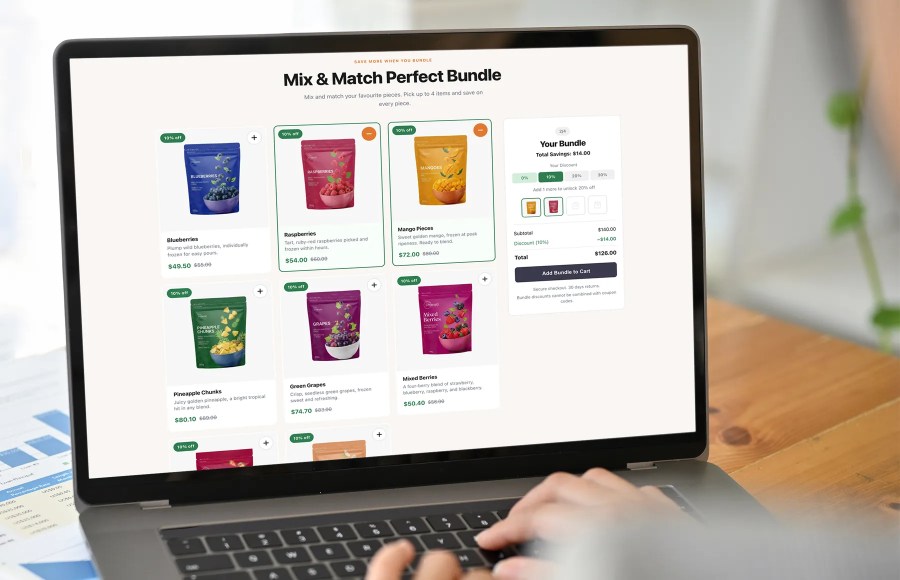
The mix and match bundle experience customers actually want to use

Most product bundle builders for WooCommerce are an afterthought: a list of products bolted onto a standard product page with a checkbox next to each one. Mix & Match Bundle Builder with Tiered Discounts for WooCommerce was designed from the ground up as a conversion experience.

The result is a modern editorial-quality layout: large product cards with photography front and center, a live bundle summary panel that updates in real time, and a discount tier progress bar that creates genuine urgency. Customers always know what they have, what they are saving, and how close they are to the next discount.

The whole layout is built to help your products sell.
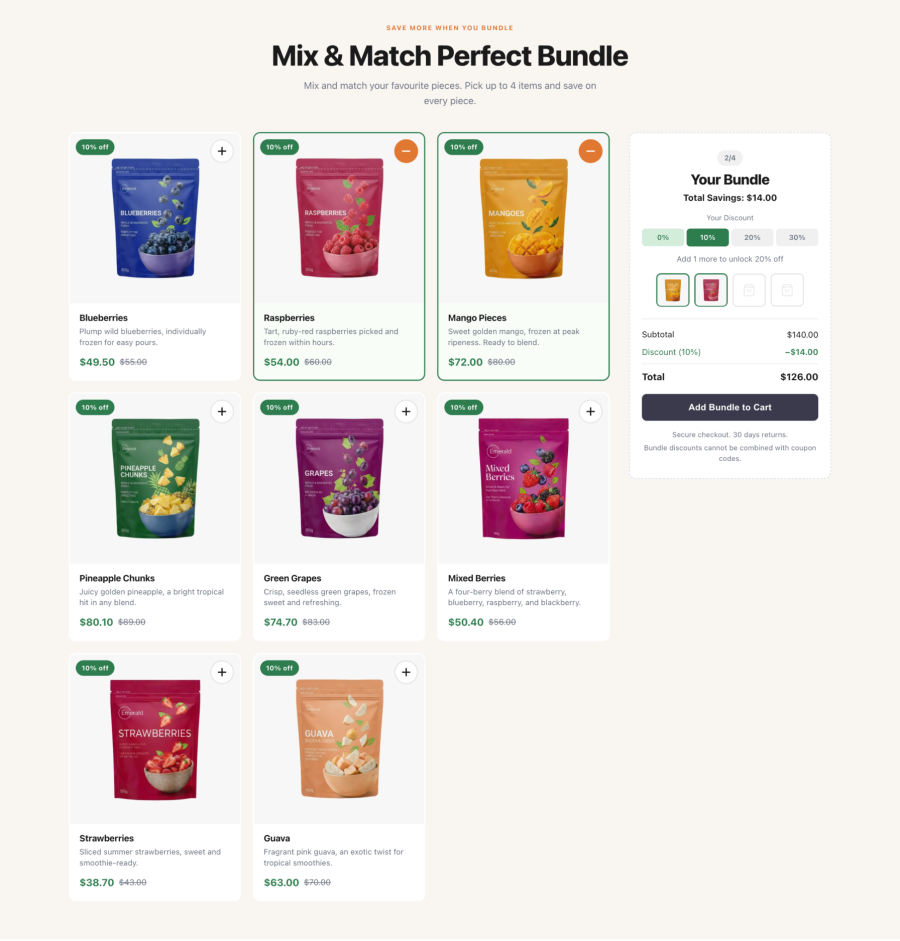
WooCommerce mix and match product cards showing sale pricing and selected state
Close-up of product cards showing sale pricing, out-of-stock state, and selected state

Tiered discounts that drive higher order values

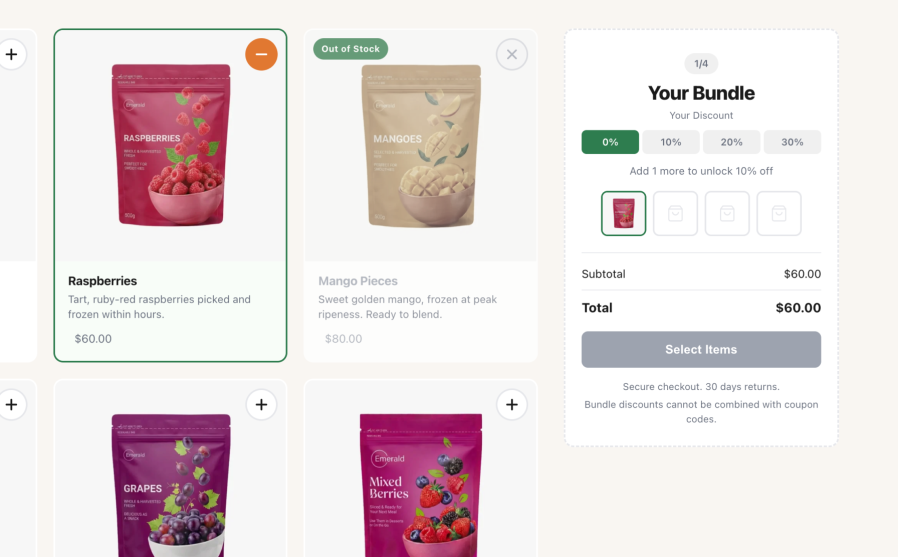
The most powerful conversion mechanic in the plugin is the tiered discount system. Customers see exactly how many more items they need to unlock a bigger saving, and that number drives action. A visual slot tracker and a live subtotal update the moment an item is added, so shoppers keep building instead of abandoning the cart.
  • Set as many tiers as you need, e.g. 2 items = 10% off, 3 = 20% off, 4 = 30% off
  • The tier progress bar updates live as items are selected. No page reloads.
  • Discounts are applied automatically at checkout. Customers never need a code.
  • Sale prices display correctly on cards with strikethrough original pricing
  • Optionally disable coupon stacking to protect your margins
  • All discounts are reflected accurately in the cart, order admin, and customer emails
Tiered discount progress bar in the WooCommerce mix and match bundle builder
Tier progress bar animating as products are added to the bundle.

A layout that converts, right out of the box

Every visual detail in the frontend has been considered for conversion:
  • Large, clickable product cards with an image-first design put your products in the spotlight
  • Real-time thumbnail slots in the summary panel show customers their selection building
  • Out-of-stock products are elegantly flagged on the card and non-selectable. No dead ends.
  • Sale badges and strikethrough pricing communicate value immediately
  • Product descriptions surface on each card so customers can make informed choices without leaving the page
  • The “Add Bundle to Cart” button stays disabled until the minimum item count is met, preventing empty cart submissions
  • Optional promotional notice beneath the CTA button for trust signals (e.g. “Free shipping, 30-day returns, and secure checkout”)
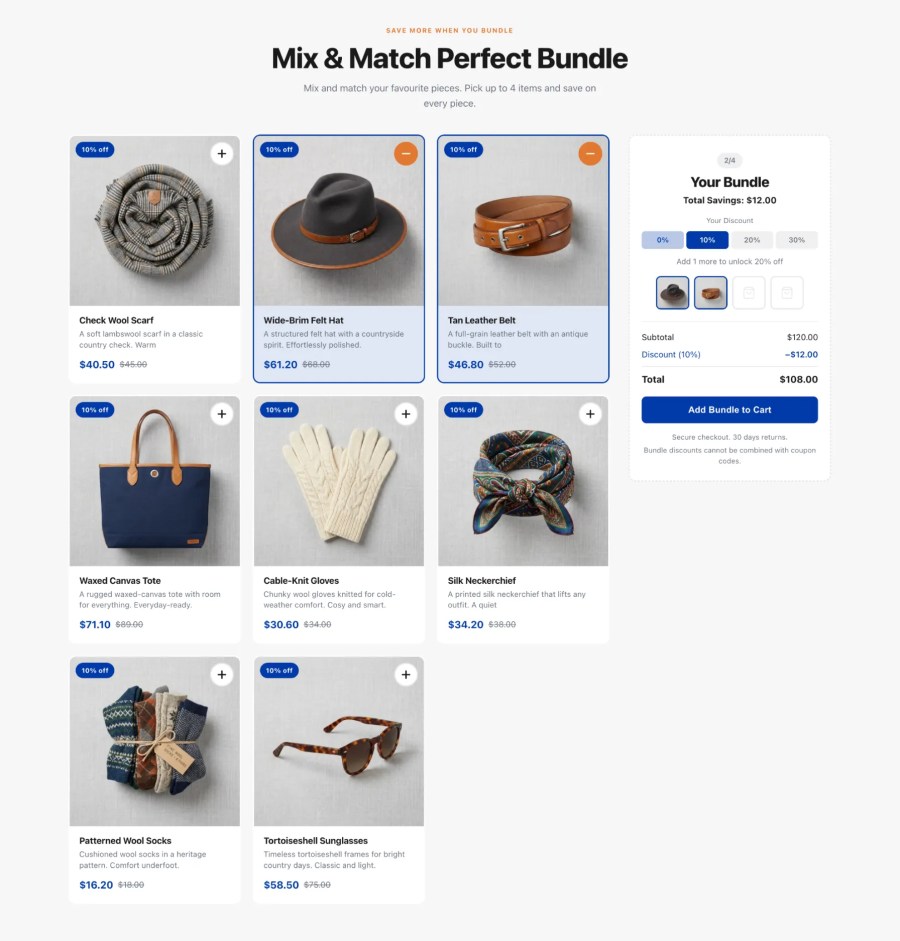
WooCommerce mix and match product cards showing sale pricing and selected state
Full frontend layout on a fashion or lifestyle store

Use cases across popular industries

Any store that sells in sets, kits, or multiples can put the bundle builder to work. A few examples:

  • Beauty and skincare: let customers curate a personalized routine, e.g. “Build your 4-step skincare regime: cleanser, serum, moisturizer, and SPF.”
  • Health, wellness, and supplements: let buyers stack daily vitamins, protein powders, and functional supplements in one order, e.g. “Create your monthly wellness and energy stack.”
  • Food, specialty beverages, and snacks: ideal for variety packs, craft brews, specialty coffee, and artisanal snacks, e.g. “Pick your 6-pack of specialty coffee bags.”
  • Personal care and bath: perfect for repeat-purchase essentials like haircare, soap, deodorant, and body wash, e.g. “Build a custom hair and body care trio.”
  • Apparel basics and accessories: drive volume on everyday items like socks, underwear, tees, and activewear, e.g. “Mix and match any 5 pairs of socks.”
  • Home fragrance and gifts: create custom gift sets from candles, essential oils, and bath bombs, e.g. “Choose any 3 aromatherapy candles and save 20%.”

Because a bundle is not tied to a product page, you can place it wherever it sells best: a dedicated landing page, a campaign page, or even inside a blog post. Each bundle behaves like a self-contained section you drop into any page or post.

Simple to configure. Powerful to deploy.

Site managers can set up a complete mix and match products bundle in minutes. No developer required.
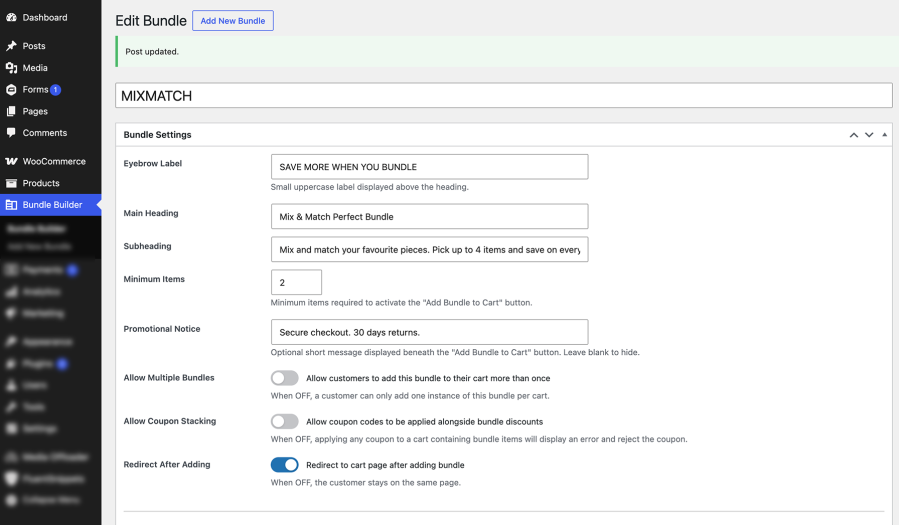
  • Live product search by name or SKU directly inside the WordPress admin
  • Add as many products to the grid as you need
  • Set a minimum item count to activate the Add to Cart button
  • Configure discount tiers with a clean, intuitive admin table
  • Toggle allow multiple bundles per cart on or off per bundle
  • Toggle redirect to cart after adding, or keep customers on the same page
  • Add an optional eyebrow label, heading, and subheading to each bundle
  • Deploy instantly with the shortcode or the Bundle Builder Gutenberg block
Bundle settings panel for the WooCommerce product bundle builder
Admin bundle configuration panel, Bundle Settings meta box

Brand-matched design with zero code

Every bundle has its own independent color scheme. Choose your colors from a visual picker and the entire bundle updates instantly: cards, badges, tier indicators, the CTA button, and more.
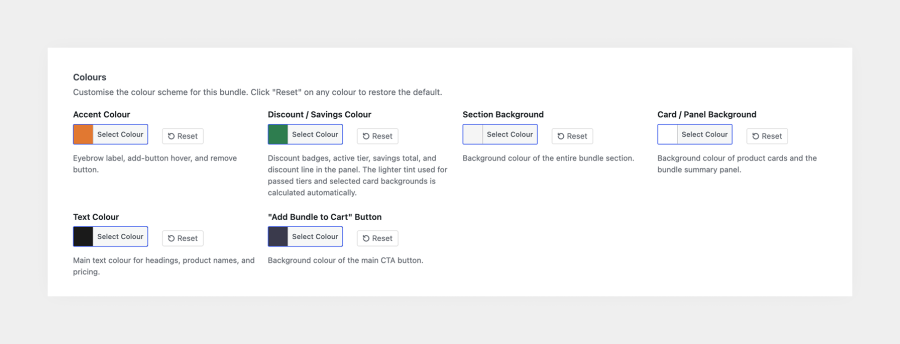
  • Accent color: add button hover, eyebrow label, remove button
  • Discount / savings color: tier badges, active tier highlight, savings total
  • Section background: the full bundle section background
  • Card / panel background: product cards and the summary panel
  • Text color: headings, product names, and pricing
  • CTA button color: the “Add Bundle to Cart” button
  • Reset any color to its default with a single click
Color settings for a WooCommerce mix and match products bundle
Color settings panel showing pickers and reset buttons

Cart behavior built for trust

The cart experience is as considered as the frontend:
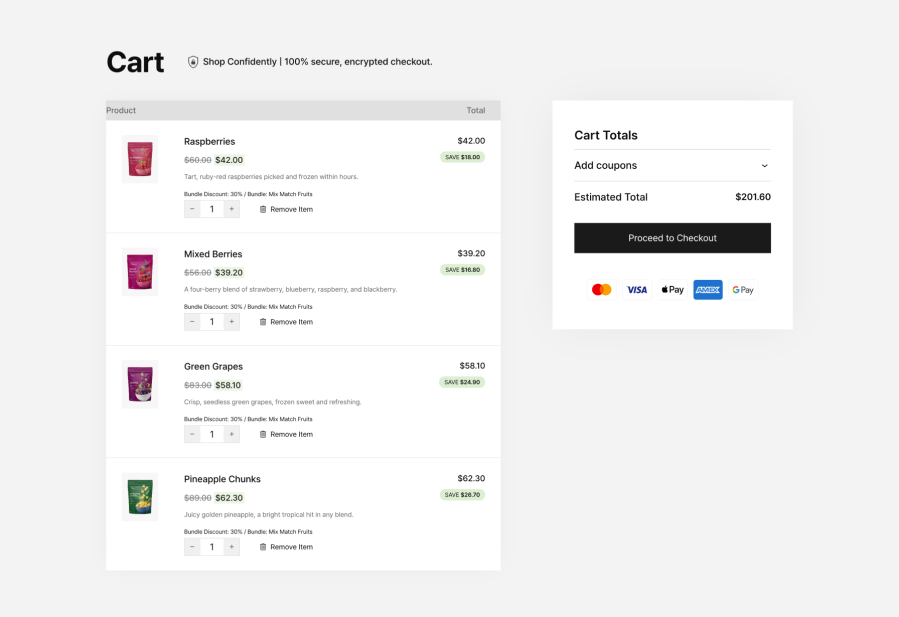
  • Bundle items are added individually with the discount baked into each line item
  • Items are visually grouped in the cart under the bundle name so customers see a clean summary
  • Item quantities are locked at 1. No accidental discount-breaking quantity changes.
  • If a customer removes a bundle item, the discount recalculates automatically for the remaining items
  • If the bundle drops below the minimum count, checkout is blocked with a clear, friendly explanation
  • Bundle name and discount percentage are saved to the WooCommerce order for admin visibility
Grouped bundle items with per-item discount in the WooCommerce cart
Cart page showing grouped bundle items with per-item discount applied

Frequently asked questions

How is this plugin different from other mix and match products plugins for WooCommerce?

Most mix and match tools focus on the product data model. Mix & Match Bundle Builder focuses on the storefront: a conversion-first product grid, a live summary panel, and automatic tiered discounts you can drop onto any page with a shortcode or Gutenberg block. Customers watch their savings update in real time as they build the bundle.

How do the tiered discounts work, and can I set my own tiers?

You define the tiers. Each tier sets a percentage discount for a minimum number of items, so the saving grows as customers add more — for example, 2 items = 10% off, 3 items = 20%, and 4 items = 30%. The discount applies to every item in the bundle, updates live as customers build it, and works well for buy-more-save-more, bulk, and quantity-based pricing on a curated set of products.

Can I add variable products (e.g. products with sizes or colors) to a bundle?

The bundle works with simple, purchasable products, so variable products are not supported directly. If you search for a variable product in the admin, it appears grayed out with a clear explanation. To include a specific size or color, save that variation as a standalone simple product in WooCommerce, then add it to the bundle.

Why not support variable products?

Variable products need a variation selected before they can be added to a cart. The bundle builder adds products directly with no variation picker, which keeps the build-your-own experience fast and frictionless for shoppers.

Does the discount work on products that are already on sale?

Yes. The bundle discount applies on top of a product's existing sale price, so customers get both the sale price and the bundle saving.

Where can I display a bundle?

Anywhere on your store. Add a bundle to any page or post with the [bundle_builder] shortcode (classic themes) or the Bundle Builder block (block themes). For best results, set the page template to full width.

Can I have more than one bundle on my store?

Yes, create as many bundles as you need, and place more than one on the same page. Each bundle has its own products, discount tiers, colors, and settings, and each instance works independently.

Can I match the bundle to my store's branding?

Yes. Each bundle has its own color scheme - accent, savings, section and card backgrounds, text, and button - so you can match it to your brand or run different color schemes across different bundles.

Can I set a minimum and maximum number of items per bundle?

Yes. Set a minimum number of items a customer must add before checkout, and the highest discount tier sets the maximum bundle size.

Can customers add the same bundle to their cart more than once?

This is configurable per bundle and disabled by default. Enable "Allow multiple bundles" in the bundle settings if your use case needs it.

Can customers use coupon codes alongside bundle discounts?

Also configurable per bundle and disabled by default, which protects your discount margins. Enable "Allow coupon stacking" on a specific bundle if you want to permit it.

What happens to the discount if a customer removes an item from the bundle?

The bundle revalidates automatically and adjusts the discount to the next applicable tier. If the remaining items fall below the bundle's minimum, checkout stops with a clear message asking the customer to restore or replace an item.

How is tax calculated on discounted bundle items?

WooCommerce calculates tax using your existing tax settings. The bundle discount applies to each item's price before tax, so WooCommerce charges tax on the discounted price.

Will it work with my theme?

Yes. It works with any standard WooCommerce-compatible theme, in both classic (shortcode) and block themes, and you set the bundle's colors to match your design.

Does it work with WooCommerce HPOS (High-Performance Order Storage)?

Yes. The extension is fully compatible with High-Performance Order Storage and declares compatibility on activation.

Does it work with the Cart and Checkout Blocks?

Yes. Bundle items render correctly in the WooCommerce Cart and Checkout Blocks, as well as the classic shortcode cart and checkout.

Is it translation-ready?

Yes. It includes a .pot template in the /languages/ folder and works with standard translation tools such as WPML and Loco Translate.

Will the plugin slow down my site?

No. The CSS and JavaScript load only on pages that contain a bundle, not site-wide, and there are no jQuery or third-party framework dependencies on the front end.

Extension information

  • PHP version required: 7.4
  • Tested with WordPress: 7.0.2
  • Tested with WooCommerce: 11.0.1
  • Requires at least WordPress: 6.2
  • Requires at least WooCommerce: 6.0.0

Countries

  • Worldwide

Related Products

Price $279 annually
Rated 3.5 out of 5 stars
Price $79 annually
Rated 3.4 out of 5 stars
Price $59 annually
Rated 3.1 out of 5 stars
Price $109 annually
Rated 2.7 out of 5 stars
Price $49 annually
Rated 4.1 out of 5 stars
Price $109 annually
Rated 2 out of 5 stars
Price $109 annually
Rated 2.3 out of 5 stars
Price $39 annually
Rated 2.8 out of 5 stars
Price $109 annually
Rated 2.6 out of 5 stars
Use of your personal data
We and our partners process your personal data (such as browsing data, IP Addresses, cookie information, and other unique identifiers) based on your consent and/or our legitimate interest to optimize our website, marketing activities, and your user experience.




