Product Icon

Quick Checkout for WooCommerce

Quick Checkout for WooCommerce allows your users to quickly complete their purchase by using Buy Now Buttons and Saving Multiple Addresses.
Choose a billing option
$49
Save 20%
$98 $78.40

Subscription includes

  • Product updates and improvements
  • Customer support
  • 30-day money-back guarantee

Quick Checkout for WooCommerce allows users to complete purchases quickly with the following tools:

1. Buy Now Button

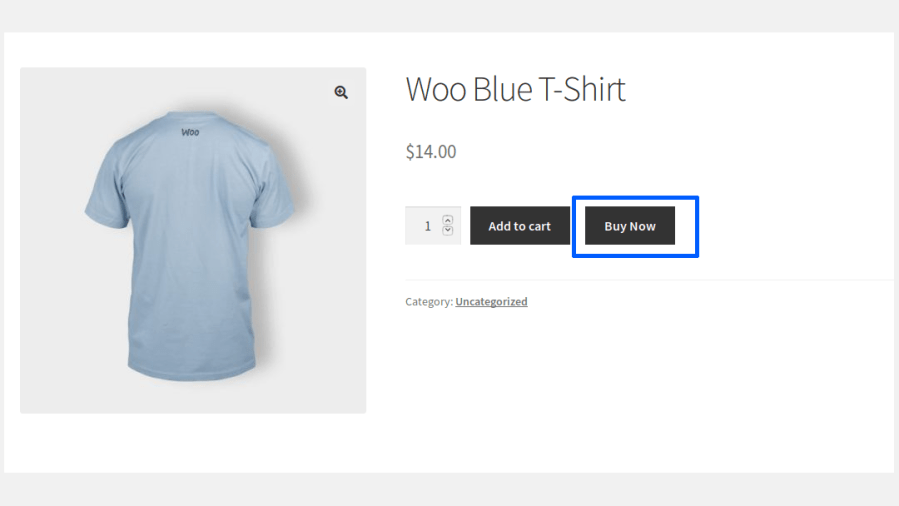
Customers can skip the cart page and quickly complete a purchase by using the Buy Now button.

2. Multiple Addresses

Customers can save multiple addresses in their account, saving time at checkout by choosing from their saved addresses instead of inputting a new one.

Benefits

1. Reduces Cart Abandonment

Offering ways to quickly complete a purchase can help reduce cart abandonment.

2. Offers Convenience to the Users

Customers who are in a hurry can quickly complete their purchase by using the Buy Now buttons and pre-saved addresses.

How Buy Now Works

The Buy Now button will be visible on the following pages:

– Shop page, category page, and tag pages
– Single product Pages

Shop/Category/Tag Pages
Single Product Page

Users can also update the quantity from the checkout page.

Customers purchasing a Variable Product from the Shop or Category pages can select their preferred variation from a variation picker popup before proceeding.

How Multiple Addresses Works

Registered users can add multiple addresses to their address book from their My Account > Addresses section by clicking Add New Address.

Add New Address

Users can add multiple billing & shipping addresses based on their needs.
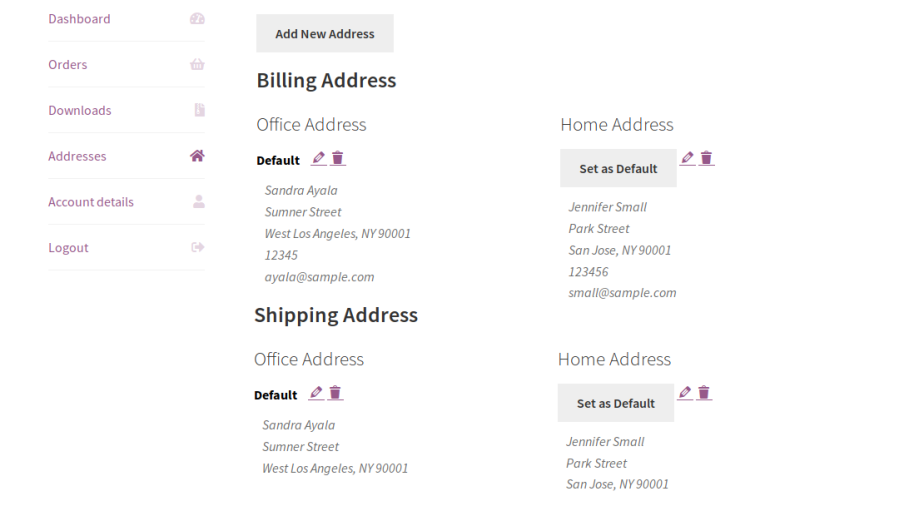
Multiple Addresses Saved In User’s Account

During checkout, users can choose their preferred address from the list of addresses displayed for both billing and shipping.
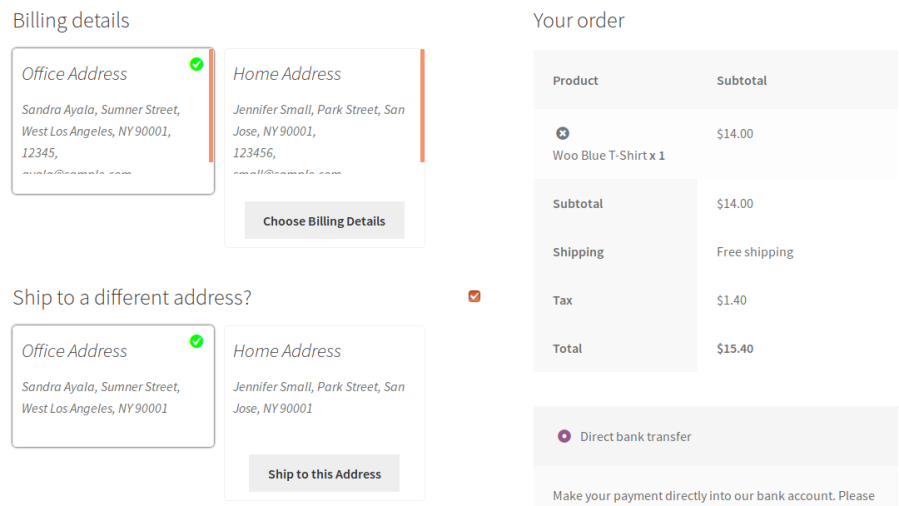
Address Selection in Checkout Page

The site admin can view the addresses saved by their customers from the Quick Checkout > Multiple Address > Saved Address.

Admins can also add and edit customer addresses directly from the backend, and use the saved address picker on the order edit screen to select a customer’s saved billing or shipping address. Billing and shipping details entered on an order are automatically saved to that customer’s address book.

Popular Features

1. One-Click Buy Now

Reduce the number of steps required to complete a purchase by allowing customers to skip the Cart page and proceed directly to Checkout with a single click. Deliver a faster shopping experience and help improve conversion rates.

  • Buy Now Button
  • Direct Checkout
  • Reduced Cart Abandonment

2. Advanced Buy Now Controls

Control how the Buy Now button behaves across your WooCommerce store. Display it for selected products, categories, tags, and brands while customizing its appearance to match your storefront. Customers purchasing variable products can select their preferred variation from a popup directly on the shop and category pages.

  • Simple & Variable Product Support
  • Product, Category, Tag & Brand Rules
  • Variation Selection Popup
  • Customizable Button Text & Style
  • Display Control Options

3. Multiple Billing & Shipping Addresses

Allow customers to save multiple billing and shipping addresses within their account, making repeat purchases faster and more convenient.

  • Multiple Billing Addresses
  • Multiple Shipping Addresses
  • Configurable Address Limit
  • Default Address Selection

4. Address Book Management

Provide customers with a dedicated address book to organize their billing and shipping addresses. They can easily add, edit, delete, and manage saved addresses directly from the My Account page.

  • Add New Addresses
  • Edit Saved Addresses
  • Delete Addresses
  • Manage Address Book

5. Multiple Address Layouts

Choose how saved addresses are displayed during checkout with multiple built-in layouts. Present addresses in a clear and user-friendly format to simplify address selection.

  • Grid View
  • List View
  • Popup Address Selection
  • Checkout Form Display

6. Shortcode Generator

Display the Buy Now button anywhere on your WooCommerce store using the built-in shortcode generator. Easily integrate quick checkout into landing pages, product promotions, and custom store layouts.

  • Built-in Shortcode Generator
  • Display Buy Now Anywhere
  • Easy Store Integration

7. Guest Checkout Memory

Let guest shoppers check out faster by remembering their name, email, phone, and address for future purchases. Configure how long details are retained and let customers opt-in with a Remember Me checkbox, or have an account automatically created and logged in after their Buy Now purchase.

  • Guest Detail Retention
  • Remember Me Opt-In
  • Automatic Account Creation

8. Buy Now Analytics

Track the performance of the Buy Now button with a dedicated Analytics tab showing clicks, conversions, and revenue generated.

  • Buy Now Clicks
  • Conversion Tracking
  • Revenue Reports

9. Backend Address Management

Manage customer addresses directly from the WordPress admin. Add or edit saved addresses, and select a customer’s saved billing or shipping address right from the order edit screen.

  • Admin Address Editing
  • Saved Address Picker on Orders
  • Order Details Saved to Address Book

Extensive Feature List

1. Buy Now Features

  • Support Simple, Variable, Simple Subscription, and Variable Subscription Products.
  • Display a Buy Now Button on Shop, Category, and Product pages.
  • Display the Buy Now Button on Shop and Category pages Before Add to Cart Button, After Add to Cart Button, or Replace Add to Cart Button.
  • Display the Buy Now Button on Single Product pages Before Add to Cart Button, After Add to Cart Button, or Replace Add to Cart Button.
  • Display a variation picker popup for Variable Products when using Buy Now on Shop and Category pages.
  • Redirect customers directly to the Checkout for a faster purchasing experience.
  • Retain the User’s Cart using a dedicated session-backed cart that automatically restores the customer’s original cart after a Buy Now purchase.
  • Customize the Buy Now Button Text.
  • Customize the Buy Now Button Style to match your store design.
  • Customize the Buy Now Button using Custom CSS.
  • Restrict the Buy Now Button based on products, categories, tags, and brands with include/exclude conditions.
  • Customers can update product quantities during checkout.
  • Generate and display Buy Now Buttons using Shortcodes anywhere on your store.
  • Track Buy Now performance with an Analytics tab showing clicks, conversions, and revenue.

2. Multiple Billing & Shipping Address Features

  • Save and manage Multiple Billing Addresses.
  • Save and manage Multiple Shipping Addresses.
  • Create, edit, delete, and select saved addresses during checkout.
  • Display saved addresses using Grid or List Layouts.
  • Configure the New Address Display Method as a Popup or Checkout Form.
  • Configure the Maximum Number of Saved Addresses per customer.
  • Customize Billing and Shipping Address Titles and Labels.
  • Enable or disable Address Selection Confirmation Messages.
  • Automatically populate checkout fields using saved addresses.
  • Allow administrators to view and manage customer saved addresses.
  • Remember guest Name, Email, Phone, and Address details for faster future checkouts.
  • Configure the Retention Duration for remembered guest details.
  • Enable or disable memory on a per-field basis.
  • Let guests opt-in to having their details remembered using a Remember Me checkbox.
  • Automatically create an account and log in guests after completing a Buy Now purchase.
  • Allow administrators to view and manage customer saved addresses.
  • Allow administrators to add and edit customer saved addresses from the backend.
  • Select a customer’s saved address using the Saved Address Picker on the admin order edit screen.
  • Automatically save billing and shipping details entered on an order to the customer’s address book.

Requirements

Minimum PHP version: 5.6


Extension information

  • PHP version required: 7.4.0
  • Tested with WordPress: 7.1
  • Tested with WooCommerce: 11.0.1
  • Requires at least WordPress: 6.2
  • Requires at least WooCommerce: 8.2.0

Compatibility

  • High performance order storage (HPOS)

Countries

  • Worldwide

Languages

English (United States)

Related Products

Price $279 annually
Rated 3.6 out of 5 stars
Price $79 annually
Rated 3.4 out of 5 stars
Price $59 annually
Rated 3.1 out of 5 stars
Price $109 annually
Rated 2.7 out of 5 stars
Price $109 annually
Rated 2 out of 5 stars
Price $49 annually
Rated 4.1 out of 5 stars
Price $109 annually
Rated 2.3 out of 5 stars
Price $39 annually
Rated 2.8 out of 5 stars
Price $109 annually
Rated 2.6 out of 5 stars
Use of your personal data
We and our partners process your personal data (such as browsing data, IP Addresses, cookie information, and other unique identifiers) based on your consent and/or our legitimate interest to optimize our website, marketing activities, and your user experience.