

Subscription includes
Support
Advanced WooCommerce filters, custom columns, saved views, and CSV export for your Orders, Products, and Coupons admin screens.
Works with WooCommerce’s latest order storage (HPOS), Multisite, and stores with 50,000+ orders.
OrderFusion adds columns and filters to the WooCommerce admin screens you already use. Phone numbers, tracking codes, stock levels, coupon expiry: all visible right in the list. Need all orders over $500 from last month? Combine filters and get results in seconds. Save your setup as a view and reload it with one click.
Everything works through the Screen Options panel you already know.
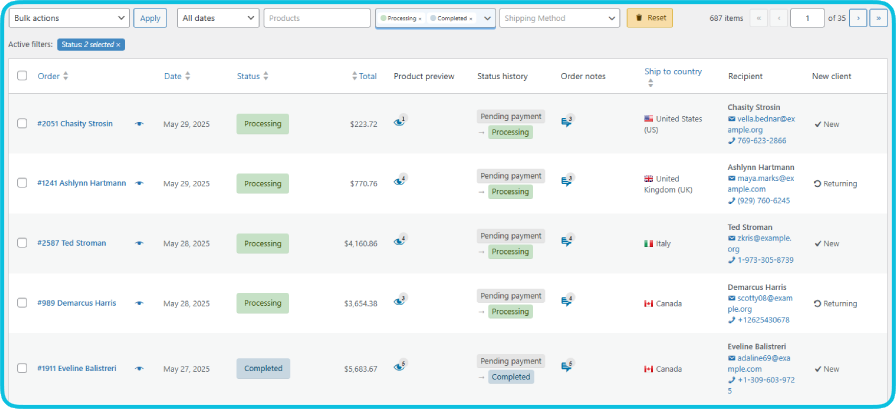
Add columns for phone numbers, tracking codes, and products to your orders list. Combine filters to find exactly what you need.
18 custom columns including:
Products:
Order Details:
Customer Data:
Enable the columns you need. Disable the rest. Each user saves their own preferences.

22 advanced WooCommerce order filters including:
Order Information:
Products:
Customer Data:
Combine as many filters as you need. All filters update via AJAX, no page reloads. Active filters display in a bar above the list.


Filter and sort your entire catalog from the products list.
9 advanced filters:
Product name (search with wildcards), SKU (search with wildcards, find empty/non-empty), Stock quantity (min/max range), Price (min/max range), Categories (hierarchical tree with subcategories), Date published (date range), Featured (yes/no), On sale (yes/no), Visibility (shop & search, shop only, search only, hidden).
5 custom columns:
See usage, expiry, and restrictions in your coupons list.
12 advanced filters:
Coupon code (search with wildcards), Coupon types (multi-select), Discount amount (min/max range), Usage count (min/max range), Usage limit (min/max range, includes unlimited), Expiry date (date range), Expiry status (active, expired, never expires, expires within 7 days), Date created (date range), Minimum spend (min/max range), Maximum spend (min/max range), Free shipping (yes/no), Individual use (yes/no).
10 custom columns:
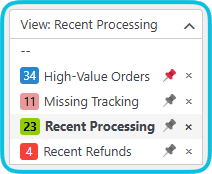
Save any combination of columns and filters as a view. Each page has its own set of views.
Examples:
Create unlimited views. Switch from a dropdown. Pin frequently used views for quick access. Views are available to your entire team. Each user can switch independently.
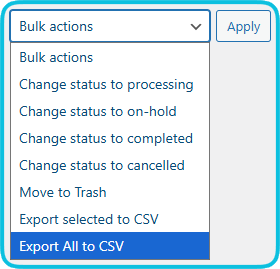
Export exactly what you see. Your custom columns, filters, and records — all included in the CSV file.
Enable infinite scroll in Screen Options. Scroll down to load the next batch automatically. Works on all pages with all filters and columns. Disable it if you prefer pagination.
Add your own filters and columns based on custom fields stored in your orders, products, or coupons. Use the ‘+’ button in Screen Options. No coding required.
For example, if a checkout plugin stores a “Delivery Date” field, you can create a filter to find orders by delivery date and a column to display it in the list.
One plugin, three screens. Most admin enhancement plugins cover only Orders or only Products. OrderFusion handles all three with the same workflow: filters, columns, views, and export.
Nothing new to learn. Everything works through the Screen Options panel you already use.
Per-user configuration. Warehouse sees tracking and shipping. Support sees phones and notes. Marketing sees coupon usage. Same screen, different setups.
Privacy by design. Zero external API calls. No analytics, no tracking, no cloud. All data stays on your server. GDPR compliant.
Built for scale. Tested with 50,000+ orders. Batch CSV export handles large datasets. HPOS and Multisite support from day one.
Install OrderFusion today. Set up your columns, apply your filters, and see the difference in your first session. 30-day money-back guarantee through the WooCommerce Marketplace.
Orders, Products, and Coupons. Each page has its own independent set of filters, columns, views, and export settings.
Yes, OrderFusion detects your setup automatically and uses optimized queries for both HPOS and legacy order tables.
Yes, each site maintains its own settings and views.
OrderFusion loads only on admin list screens and uses optimized queries. Your store's frontend is unaffected at all.
Yes, optimized database queries and batch processing maintain performance even with large datasets.
No external calls. No APIs, no analytics, no data transmission. All data stays on your server. GDPR compliant.
Everything: which columns are visible, which filters are applied and their values, and settings like infinite scroll. Loading a view restores the full configuration.
Each user controls their own layout on every page. Support might show phone and tracking columns, while marketing shows coupon usage. Everyone gets the view that fits their role.
Use the '+' button in Screen Options to add columns and filters based on any custom field stored in your orders, products, or coupons.
Click the "Get support" link under the Support section on this product page, or access it from your WooCommerce.com account. Support is handled through the marketplace ticketing system.
Extension information
Quality Checks
Countries








