
Product Icon

Self-Service Refunds for WooCommerce

Let customers request refunds directly from their account, no support tickets, no back-and-forth emails. Self-Service Refunds streamlines your refund workflow with automatic processing, flexible rules, and complete admin control.
Choose a billing option
$39
Save 20%
$78 $62.40

Subscription includes

  • Product updates and improvements
  • Customer support
  • 30-day money-back guarantee


Key Benefits

  • Reduce Support Tickets – Let customers request refunds directly from their account without contacting support
  • Automatic Processing – Refunds processed instantly through payment gateways when conditions are met
  • Complete Control – Flexible rules engine, time limits, per-user controls, and per-product settings
  • Guest & Logged-In Support – Secure refund forms for both registered customers and guest orders

Main Features

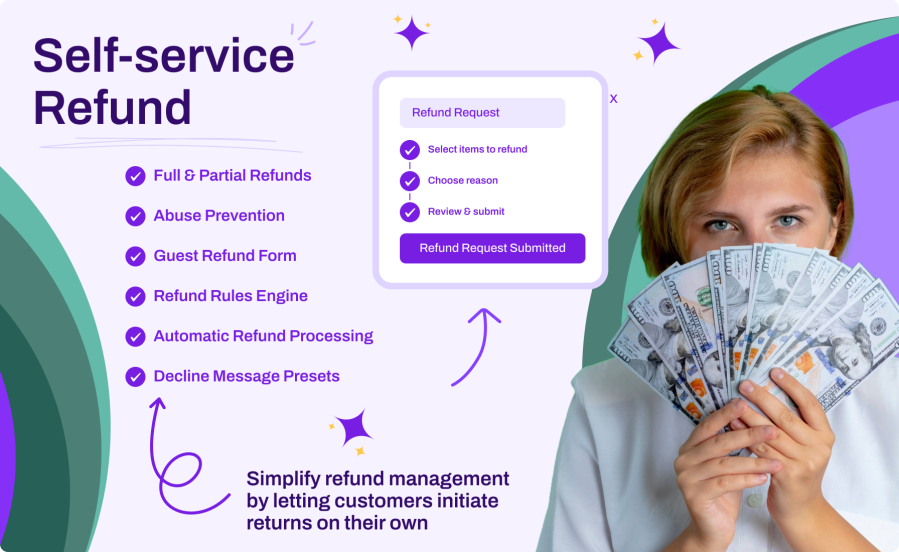
  • Full & Partial Refunds – Support both full order refunds and line-item partial refunds
  • Automatic Refund Processing – Process refunds through payment gateways without admin intervention
  • Guest Refund Form – Shortcode and Gutenberg block for guest customers to request refunds
  • Refund Rules Engine – Automate approval based on user role, product category, payment method, and more
  • Abuse Prevention – Per-customer refund limits (daily, weekly, monthly, yearly) and per-user blocking
  • Custom Refund Reasons – Configurable reason list with drag-and-drop ordering
  • Decline Message Presets – Rich text rejection templates for consistent communication
  • WooCommerce Analytics Integration – Track refund reasons and patterns in the Analytics dashboard

Self-Service Refund Requests

Customers can request refunds directly from their My Account page with a guided multi-step process. Choose full or partial refunds, select line items, provide a reason, and review before submitting. No more back-and-forth emails or support tickets.

Intelligent Rules Engine

Define rules to automatically process or escalate refund requests based on conditions like user role, product category or tag, payment method, shipping zone, order value, and more. First matching rule wins, with drag-and-drop priority ordering.

Guest Refund Form

Allow guest customers to request refunds using a secure three-factor verification form (email, order number, order date). Available as a shortcode or a native Gutenberg block with customizable styling options.

Admin Approval Workflow

Review and manage refund requests with quick approve/reject actions on the order list and individual order pages. Use decline message presets for consistent, professional rejection responses with rich text support.

How It Works

  1. Install & Activate – Upload the plugin and activate it in WordPress
  2. Configure Settings – Set refund time limits, enable automatic processing, and configure refund reasons
  3. Set Up Rules (Optional) – Create rules to auto-approve or escalate requests based on conditions
  4. Customers Request Refunds – From My Account or the guest refund form
  5. Process or Review – Refunds are auto-processed or queued for admin approval based on your rules

Flexible Refund Options

Give customers the right level of control:

  • Full Order Refunds – One-click full order refund requests
  • Line-Item Refunds – Customers select specific items and quantities to refund
  • Non-Refundable Products – Mark specific products or variations as non-refundable
  • Time Limits – Set a configurable window (1-365 days) for refund eligibility
  • Re-Request After Rejection – Optionally allow customers to resubmit declined requests
  • Request Cancellation – Customers can cancel pending requests before admin review

Powerful Rules Engine

Automate refund decisions with flexible conditions:

  • User Role – Different handling for wholesale, retail, or VIP customers
  • Product Category / Tag / Type – Auto-approve for specific product groups
  • Payment Method – Route based on how the order was paid
  • Shipping Zone / Method – Handle international orders differently
  • Billing / Shipping Country – Region-specific refund policies
  • Order Value / Quantity – Thresholds for automatic vs. manual processing
  • Order Status – Conditions based on current order status
  • Priority Ordering – Drag-and-drop rule priority with first-match-wins logic

Abuse Prevention

Protect your business while staying customer-friendly:

  • Refund Limits – Set maximum automatic refunds per customer per day, week, month, or year
  • Per-User Controls – Block refund requests or disable auto-processing for specific users
  • Per-User Limit Overrides – Custom refund limits for individual customers
  • Counter Management – View and reset refund counters from the user profile
  • Rate Limiting – Built-in protection against spam and abuse on request endpoints

Email Notifications

Keep everyone informed at every step:

  • Customer Confirmation – Automatic email when a refund request is submitted
  • Admin Notification – Alert when a new refund request needs review
  • Escalation Alert – Notification when auto-processing falls back to manual review
  • Rejection Notice – Customer notification with decline reason when a request is rejected
  • Full WooCommerce Integration – Manage all emails from WooCommerce > Settings > Emails

Refund Analytics

Make data-driven decisions with built-in analytics:

  • Refund Reasons Report – See which reasons customers select most frequently
  • Date Range Filtering – Analyze refund trends using WooCommerce’s standard date picker
  • Product-Level Data – Identify which products generate the most refund requests
  • Status Tracking – Monitor approved, rejected, and pending request counts
  • Seamless Integration – Access analytics directly from WooCommerce > Analytics menu

Seamless Integration

Works perfectly with your existing setup:

  • WooCommerce HPOS – Fully compatible with High-Performance Order Storage
  • Payment Gateways – Automatic refunds through any gateway that supports programmatic refunds
  • Gutenberg Block – Native block editor support for the guest refund form
  • Shortcode Support – Use [ssr_guest_refund] to place the guest form anywhere
  • WooCommerce Emails – Full integration with the WooCommerce email system
  • Any Theme – Works with any properly coded WooCommerce theme

Frequently asked questions

Can I limit how many refunds a customer can request?

Yes. You can set a maximum number of automatic refunds per customer per day, week, month, or year. When the limit is reached, requests are escalated to manual review instead of being blocked. You can also override the global limit for individual customers from their user profile.

What happens if the payment gateway doesn't support automatic refunds?

The plugin detects this automatically and escalates the request to manual review. An escalation email is sent to the admin, and the order is flagged with the "Refund Requested" status so you can process it manually through WooCommerce's standard refund interface.

Can I exclude specific products from being refunded?

Yes. You can mark any product as non-refundable from its edit screen. For variable products, you can set this per variation. Non-refundable items are excluded from the refund form and clearly indicated to customers during the request process.

How does the rules engine decide whether to auto-process or require manual review?

Rules are evaluated from top to bottom, and the first matching rule wins. Each rule combines conditions (such as user role, product category, payment method, order value, or shipping zone) with an action, either process automatically or require manual review. If no rule matches, the global automatic refund setting applies.

Do guest customers need an account to request a refund?

No. When guest refunds are enabled, customers verify their identity by providing their email address, order number, and order date. You can place the guest refund form on any page using the [ssr_guest_refund] shortcode or the native Gutenberg block.

Customer reviews

Related Products

Price $79 annually
Rated 3.4 out of 5 stars
Price $59 annually
Rated 3.1 out of 5 stars
Price $109 annually
Rated 3 out of 5 stars
Price $49 annually
Rated 4.1 out of 5 stars
Price $109 annually
Rated 2 out of 5 stars
Price $109 annually
Rated 2.3 out of 5 stars
Price $109 annually
Rated 2.6 out of 5 stars
Price $39 annually
Rated 2.8 out of 5 stars
Price $109 annually
Rated 2 out of 5 stars




