

Active installs
200+
Subscription includes
Support
Every purchase is an opportunity to spread the word about your products. With Share Your Purchase for WooCommerce, customers can easily share what they’ve just bought directly from your store’s thank you page.
Make post-purchase sharing a natural part of the shopping experience, without complicated marketing campaigns or additional steps for your customers.
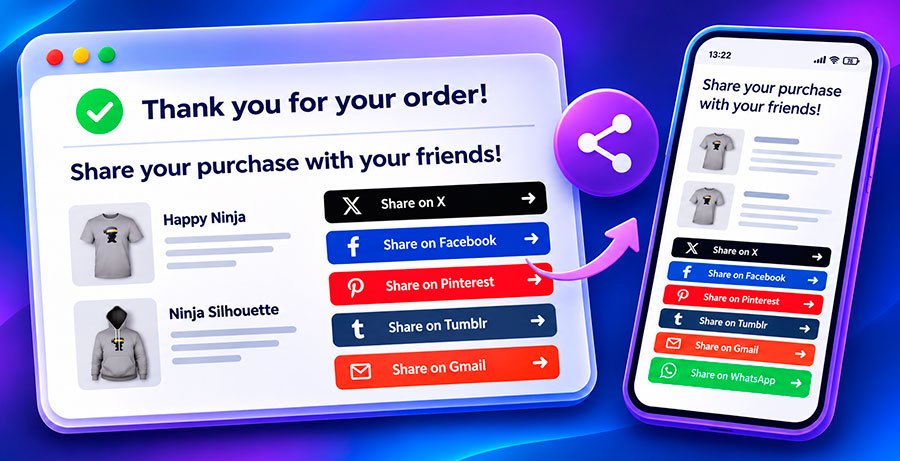
After a customer completes an order, Share Your Purchase automatically adds a sharing section to the WooCommerce order confirmation page.
The section displays the purchased products alongside buttons for your enabled sharing services. Customers simply choose a platform to share a link to a product they’ve purchased.
The sharing section adapts to desktop and mobile screens, providing a convenient experience across devices.
Enable the sharing services that best suit your audience:
You decide which buttons appear. WhatsApp and Telegram are available on mobile devices, where customers can easily share purchases through their messaging apps.
Customize the sharing section to fit your store’s style and communication:
All these options are available directly from your WooCommerce settings, so you can tailor the experience without writing code.
Share Your Purchase is designed to do one thing well: make it easy for customers to share their purchases.
Install the extension, choose your sharing services, customize your messages and button colors, and you’re ready to go. There’s no need to create social media developer accounts or configure API credentials.
Give your customers an easy way to share what they love and help others discover your products.
Share Your Purchase displays the products in the completed order and provides social sharing buttons that link to a purchased product. The customer's order details and personal information are not included in the shared link.
No. Share Your Purchase uses the sharing features provided by supported platforms. Customers can share using their preferred services without connecting their social media accounts to your WooCommerce store.
Copy answer
hare Your Purchase supports X (formerly Twitter), Facebook, Pinterest, Tumblr, Gmail, WhatsApp, and Telegram. You can enable or disable each service individually. WhatsApp and Telegram buttons are displayed on mobile devices.
Yes. You can customize button colors individually, change their labels, and edit the call to action displayed above the sharing section. These options are available directly in WooCommerce settings.
Copy answer
Yes. The sharing section adapts to mobile screens. WhatsApp and Telegram buttons are specifically available on mobile devices, alongside your other enabled sharing options.
No. You don't need to register developer applications or configure API credentials. The extension uses the sharing mechanisms provided by the supported services.
Yes. Share Your Purchase is compatible with WooCommerce High-Performance Order Storage (HPOS).
Copy answer
Extension information
Quality Checks
Countries







