
Product comparison
Subscription includes
Support
Size Chart Recommender for WooCommerce combines customizable product size charts with a built-in size recommender, so customers can view detailed measurements or use their own measurements to find a suitable size.
Create and manage size guides for your WooCommerce products, assign different charts to products or categories, display them in flexible layouts, convert measurements between inches and centimeters, and import or export chart data with CSV.
It is specially designed for fashion, apparel, footwear, sportswear, uniforms, custom-sized products, and international WooCommerce stores.
Size Chart Recommender for WooCommerce gives you more than a basic size table. Build a complete sizing experience that helps shoppers understand product measurements, find a suitable size, and access the right size guide wherever they shop.
Give shoppers a guided way to find a suitable size instead of making them manually compare every measurement.
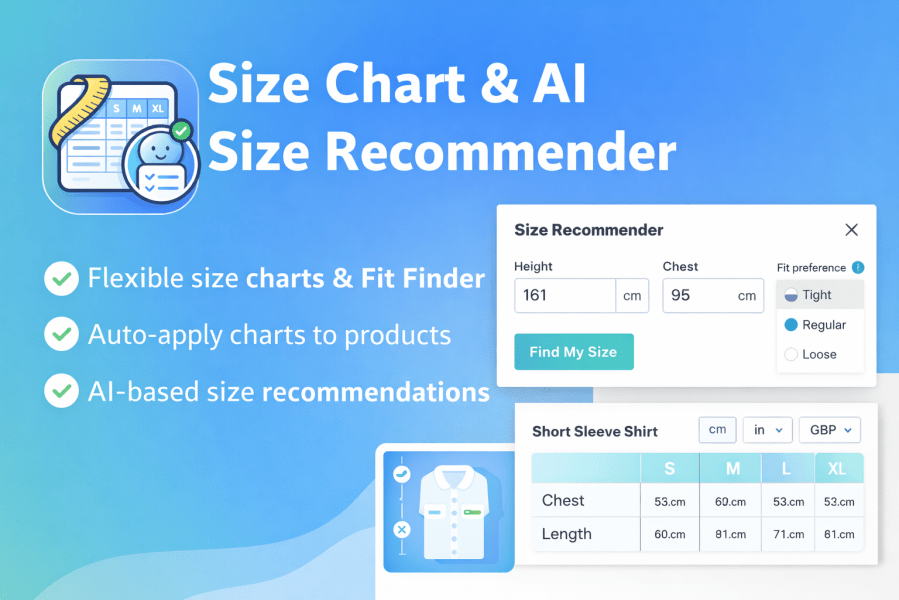
With the built-in Size Recommender, customers can enter relevant measurements and preferences, then receive a size suggestion based on your configured sizing information.
Why it matters:
Perfect for: clothing, apparel, sportswear, uniforms, footwear, and other size-dependent products.
Different products often need different measurements.
Create multiple WooCommerce size charts and assign the appropriate chart to individual products, categories, tags, brands, customers, user roles, or countries.
For example:
Men’s Shirts → Men’s Shirt Size Chart
Women’s Dresses → Women’s Dress Size Chart
Sportswear → Sportswear Size Chart
Brand A → Brand A Size Guide
This gives you precise control over which sizing information customers see.
Make your size chart easy to discover without disrupting the shopping experience.
Choose from multiple display options:
Choose the presentation that works best for your store design and customer journey.
Customers don’t always use the same measurement system.
Let shoppers work with familiar units using built-in conversion between inches, centimeters, and millimeters.
This makes your international size guide easier to understand and helps you serve customers across different markets.
Managing dozens of product size charts doesn’t have to mean starting from scratch every time.
Duplicate existing charts with one click, make the required changes, and assign the new chart where it’s needed.
For larger catalogs, use CSV import and export to manage size-chart data more efficiently.
Whether you’re creating a new chart, updating existing measurements, or preparing sizing data for multiple products, these tools help simplify ongoing store management.
Set up a simple, flexible sizing experience for your WooCommerce store in just a few steps.
Add your product measurements and sizing information to create a custom WooCommerce size guide.
Display specific size charts for products, categories, brands, tags, customers, or countries using flexible display conditions.
Configure the Size Recommender so customers can enter their measurements and get a suitable size suggestion.
Show your size guide inline, in a popup, as a floating widget, in a product tab, or with a shortcode.
Customers can view detailed measurements or use Fit Finder directly from the product page to make a more informed size choice.
A great product deserves a great sizing experience.
Give shoppers the information they need to understand your products, compare measurements, and choose a suitable size all without leaving the product page.
Size Chart Recommender for WooCommerce combines a detailed product size guide with a guided Fit Finder, making sizing simpler for both your customers and your store.
From T-shirts and shirts to dresses, jackets, jeans, and trousers, create detailed clothing size charts that match the measurements of your products.
Let customers compare sizes manually or use the Size Recommender when they want help choosing a suitable size.
Different footwear products can require different sizing information.
Create dedicated shoe size guides and display the relevant sizing information for the products your customers are viewing.
Sportswear, team jerseys, workwear, and uniforms often use their own measurement requirements.
Create product-specific size charts and assign them exactly where they are needed, so customers can access the right measurements before ordering.
Make your sizing information easier to understand across different markets with built-in conversion between inches, centimeters, and millimeters.
Whether your store serves local customers or sells worldwide, provide a more familiar sizing experience.
When standard S, M, L, and XL sizing isn’t enough, give customers detailed measurements to help them understand the fit of your products.
Create custom product size guides and use Fit Finder to provide a more guided sizing experience.
Don’t make customers guess.
Give them a clear WooCommerce size chart when they want to compare measurements and a size recommender when they want a guided way to find a suitable size.
With the right sizing information available at the right moment, customers can shop with greater confidence and spend less time searching for answers.
Create a better sizing experience with Size Chart Recommender for WooCommerce.
Unlike basic size chart plugins, this solution includes:
Multiple display templates (inline, modal, floating)
Automatic size recommendations (fit finder)
AI-based sizing logic
Location-based unit conversion
CSV import/export
Advanced product, category, and brands assignment
It’s a complete size management and recommendation system, not just a table.
Yes. You can assign size charts at multiple levels:
Product
Category
Tag
Brand
User roles
Specific customers
A smart fallback system ensures the correct chart is always shown:
Product → Global
Yes. Customers can open a Size Recommender (Fit Finder) modal and enter measurements such as height, chest, or waist, along with fit preference. The plugin then recommends the best size based on the selected size chart.
Yes. All size charts, modals, floating widgets, and questionnaires are fully mobile responsive and optimized for touch devices. This ensures a smooth experience on phones and tablets.
Yes. You can easily import size charts using CSV files. You can also export existing size charts to CSV for backup or reuse
Yes. The plugin supports:
Store-level unit settings (cm / inches)
Per-chart unit conversion
Yes. You can choose from multiple templates and fully customize the appearance using:
Built-in layouts
Custom CSS
Conditional logic
Tabs
It works with most WooCommerce themes.
No. The plugin is optimized for performance and uses lightweight scripts with AJAX loading. Size charts and recommenders only load when needed, ensuring fast page speeds
Categories
Extension information
Quality Checks
Countries







