
Product Icon

Sprintr for WooCommerce

Improve product copy, create AI images and videos, and review pricing and profit. Approve listing updates individually or in bulk.

Third-party subscription required. Learn more

Product comparison


Product content, pricing and profit in one workspace

Improve product copy, create AI images and videos, and review pricing and profit. Approve listing updates individually or in bulk.

Understand your catalogue

Bring your connected store products into one workspace and decide which listings to work on next.
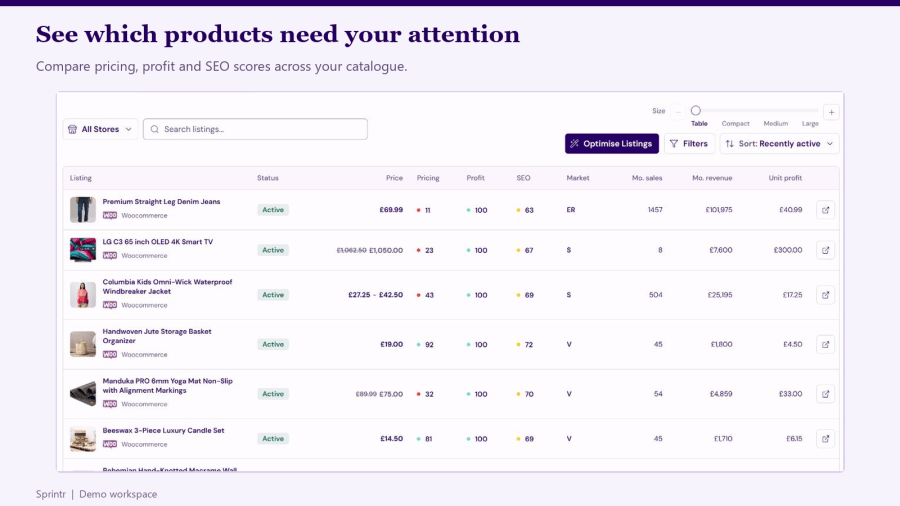
  • Search and filter your catalogue, and compare pricing, profit, SEO and market assessments.
  • Open a product to inspect its details, recommendations and recorded changes.
  • Ask Sprintr AI to help explain product performance and plan your next action.

Catalogue view with product pricing, profit and SEO scores

Improve copy, images and video

Use the Listing Optimiser to prepare product content with your own brief and brand guidance.
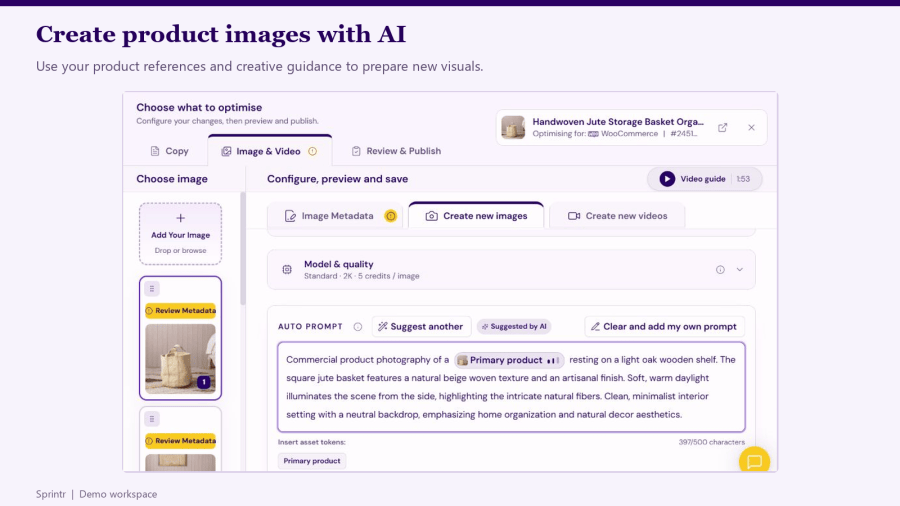
  • Review and edit suggested product titles, descriptions and supported copy fields.
  • Review image metadata, create AI product images and videos, and choose what to keep.
  • Use reference images, brand voice notes and style guides to guide the result.
  • Save a workspace for later and return to the changes you were preparing.

AI image creator with product reference and editable prompt

Optimise several products together

Use Bulk Optimisation to prepare content changes for a selected group of listings.
  • Choose the listings, copy fields and media outputs for the run.
  • Check the estimated image and video credit cost before generating.
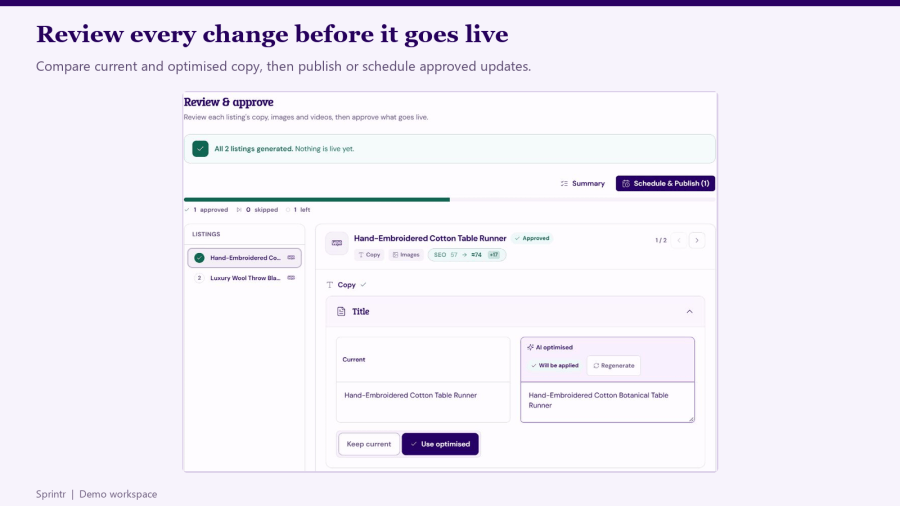
  • Compare current and generated content, review each product and approve the changes you want.
  • Publish approved updates now or schedule them for later. Track future changes in Scheduled Updates.

Bulk review comparing current and AI optimised product titles

Review pricing and profit together

Use comparable product prices alongside your recorded costs and margin targets to assess a price change.
  • Review which competitor products and prices are being used in a comparison.
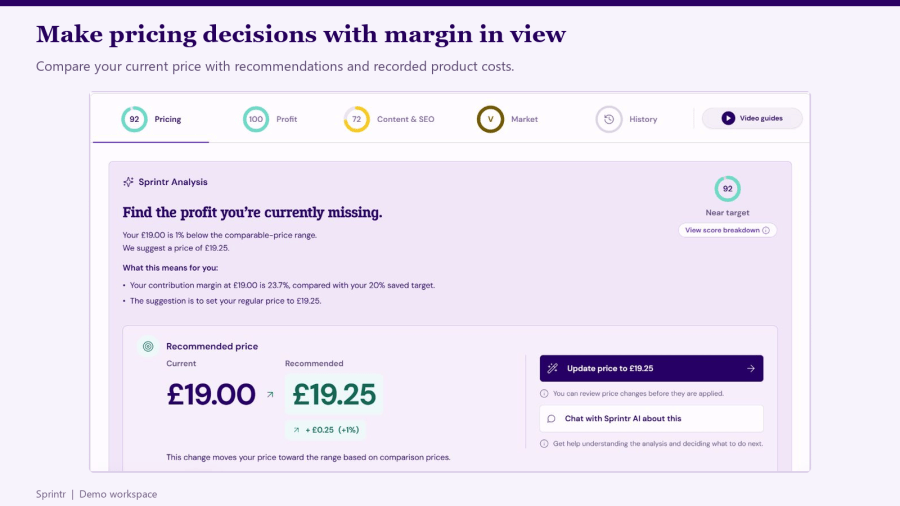
  • Inspect the current price, recommendation and margin information where data is available.
  • Review a proposed price update before applying it to your WooCommerce product.
  • Check product costs and margins before deciding which changes to make.

Pricing analysis with current and recommended product prices

Reuse your brand guidance and assets

Keep supporting images, brand voice notes and visual style references in Asset Manager.
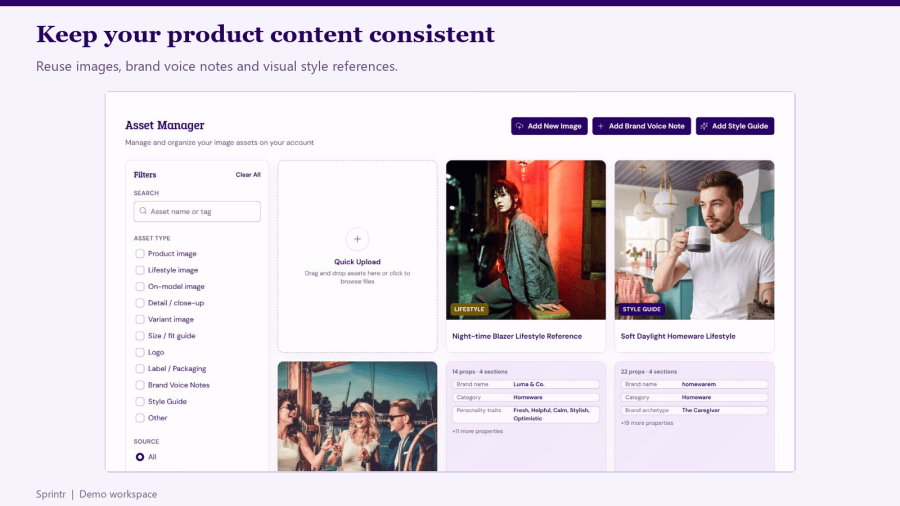
  • Reuse your own assets and guidance across optimisation tasks.
  • Review generated content against the actual product before approving it.
  • Keep product details and factual claims accurate when refining AI suggestions.

Asset Manager with reusable images and brand guidance

Plan your next action with Sprintr AI

Ask about your connected catalogue, product content, pricing or profit. Use market insights to inspect search-interest patterns and product seasonality alongside available sales history.

  • Review the data and recommendations behind an action before changing your store.
  • Inspect recorded updates in History and review available revert options.
  • Market patterns and product scores are guidance, not guarantees of sales or search rankings.

Frequently asked questions

Does generating content change my live store?

No. Generating content and saving a workspace prepare drafts. Review the content, save your choices and complete the publishing or scheduling step to make approved changes live. Price changes also require a separate review and apply action.

Can I update multiple products together?

Yes. Bulk Optimisation lets you select products, prepare copy or media, review the results and choose which approved updates to publish now or schedule.

Can Sprintr publish every image field and video directly to WooCommerce?

Publishing support depends on the field and media type. For WooCommerce image metadata, supported alt text and title updates can be published. Caption and description suggestions need to be copied into the image fields in WordPress Media Library. Follow any manual-upload notice for other media or fields.

How current are the insights?

Store synchronisation and individual analyses can update at different times. Check the timestamps and available data shown for the product or comparison. Competitor and market information may be unavailable for some products; assessments should not be treated as a live market feed.

What does Sprintr cost?

The WooCommerce Marketplace connection is free to install and requires a separate Sprintr subscription. Monthly plans are Starter £59 / $79 USD, Growth £129 / $199 USD and Pro £199 / $269 USD. See the Sprintr pricing page for current plan details, credit allowances and annual billing options.

Where can I find setup and support guidance?

Visit https://help.sprintr.ai/en/ for setup, optimisation, billing and troubleshooting guides, or contact support@sprintr.ai.

Related Products

Price $279 annually
Rated 3.9 out of 5 stars
Price $79 annually
Rated 3.4 out of 5 stars
Price $59 annually
Rated 3.1 out of 5 stars
Price $109 annually
Rated 2.8 out of 5 stars
Price $49 annually
Rated 4.1 out of 5 stars
Price $109 annually
Rated 2 out of 5 stars
Price $109 annually
Rated 2.5 out of 5 stars
Price $39 annually
Rated 2.8 out of 5 stars
Price $109 annually
Rated 2.6 out of 5 stars
Use of your personal data
We and our partners process your personal data (such as browsing data, IP Addresses, cookie information, and other unique identifiers) based on your consent and/or our legitimate interest to optimize our website, marketing activities, and your user experience.