

Subscription includes
Support
Move your Wix store to WooCommerce without complicated CSV exports.
Wix Data Migrator lets you transfer products, customers, orders, and product reviews directly from your WordPress admin. Connect to the Wix API, configure your migration rules, and import your store data in the background while your Wix store remains online.
Whether you are moving your entire Wix store or importing selected products, customers, orders, or reviews, Wix Data Migrator gives you the tools to control what gets transferred and how it is imported into WooCommerce.
Key features:
Complete Wix to WooCommerce migration
Move your store data from Wix to WooCommerce directly from the WordPress admin.
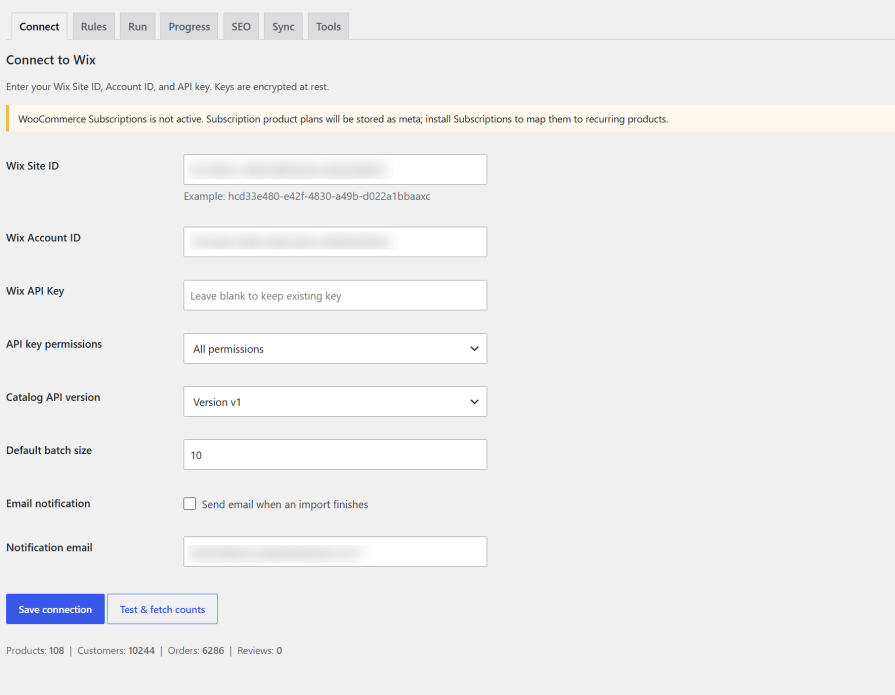
Connect your Wix account using your Site ID, Account ID, and API key, configure your migration settings, and start transferring your store data.
You can perform a complete Wix to WooCommerce migration or migrate individual data types separately. This makes it easier to test your WooCommerce store before moving all of your data.
Migration process:
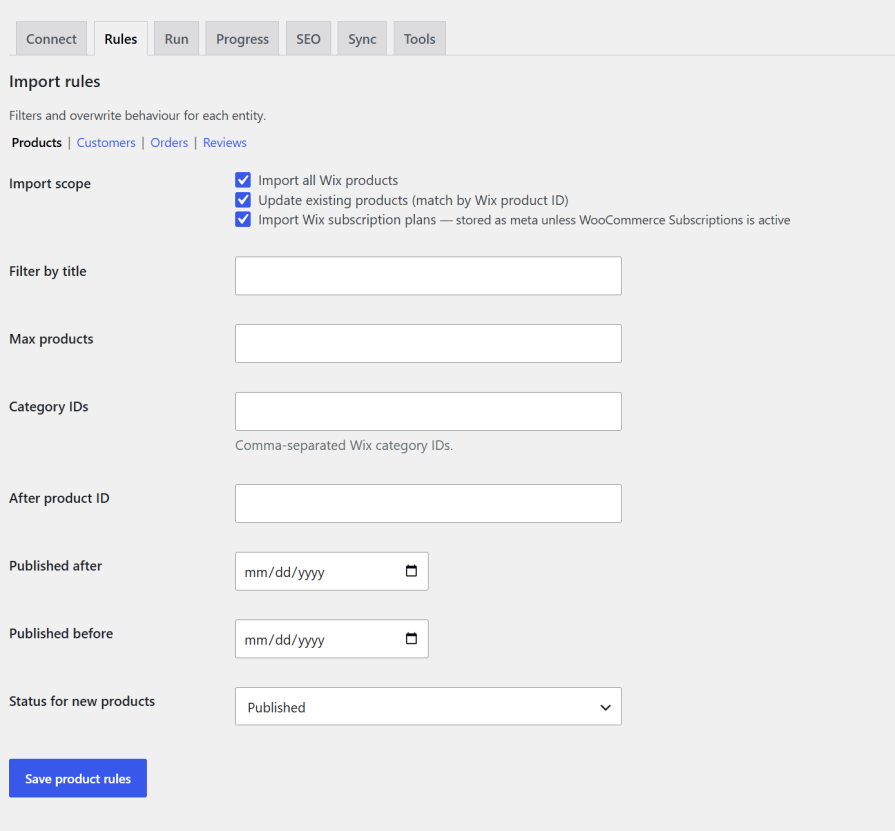
Migrate Wix products to WooCommerce
Import your Wix product catalog into WooCommerce, including product information, images, inventory, categories, and supported product variations. With Catalog API v3, brand information can also be imported when available.
You can import your complete Wix product catalog or select exactly which products should be transferred.
Product migration filters include:
Choose whether newly imported products should be published, saved as drafts, or use the same publication status as Wix.
Existing WooCommerce products can also be updated using their Wix product ID.
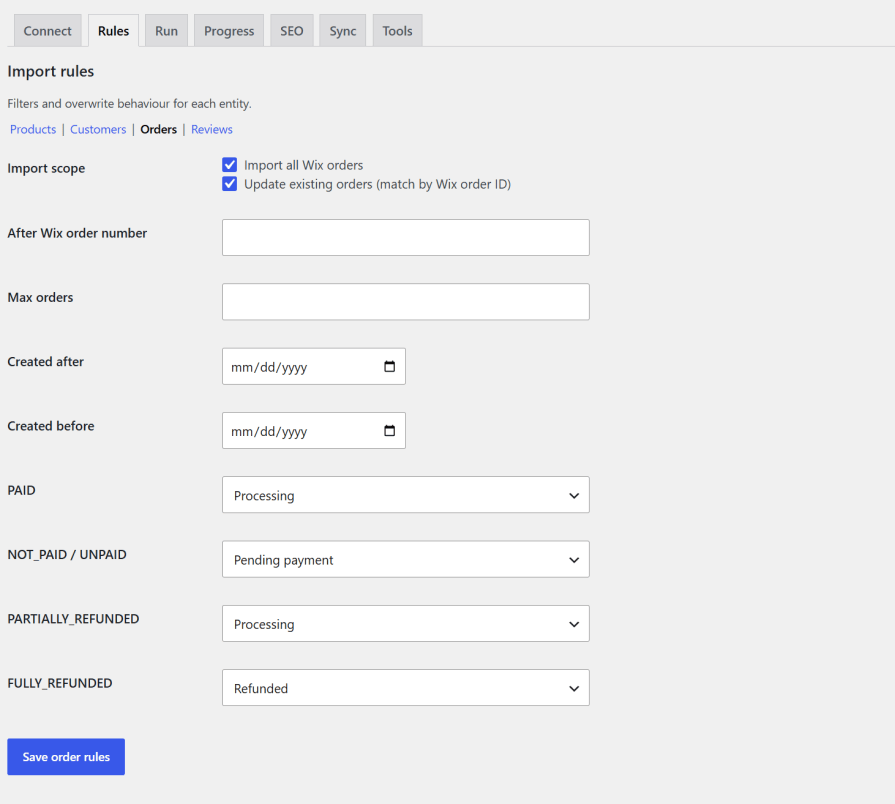
Transfer Wix orders to WooCommerce
Import your Wix order history into WooCommerce with line items, shipping information, refunds, and payment-status mapping.
You can migrate historical orders without reducing current WooCommerce inventory or sending customer emails.
You can identify imported orders using their original Wix Order number directly in the WooCommerce orders list, including stores using High-Performance Order Storage (HPOS).
Order migration filters include:
Payment statuses such as paid, unpaid, partially refunded, and fully refunded are mapped to the appropriate WooCommerce order state.
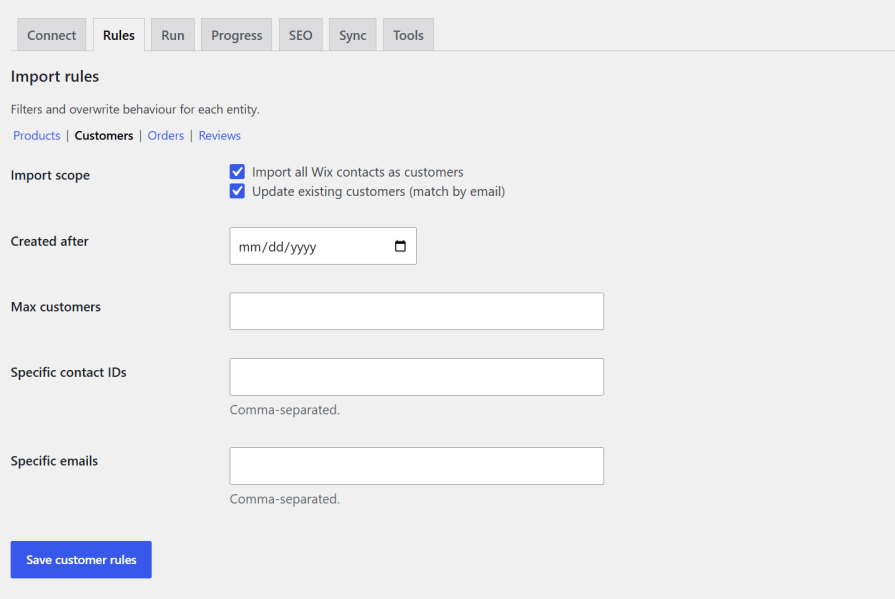
Import Wix customers to WooCommerce
Transfer Wix contacts into WooCommerce customer accounts with billing and shipping information.
Country and region values are mapped to WooCommerce-compatible formats during the migration.
Existing customers can be matched by email address, while administrator accounts are protected from accidental takeover. Existing WordPress login emails are never changed during the customer migration.
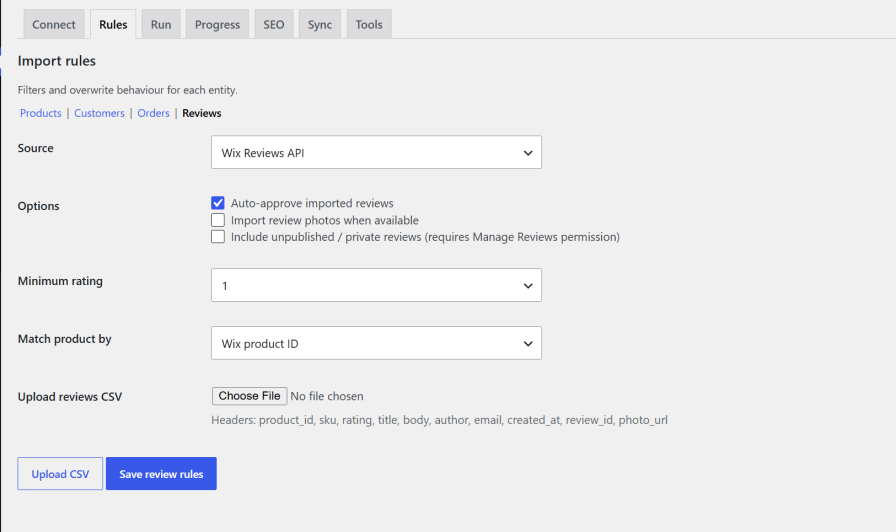
Migrate Wix product reviews
Bring your Wix product reviews into WooCommerce so you can retain customer feedback after moving your store.
Reviews can be imported directly through the Wix Reviews API or uploaded using a CSV file.
Features include:
Advanced Wix to WooCommerce migration filters
Do not migrate data you do not need.
Wix Data Migrator provides filtering options so you can perform a complete migration or transfer only selected records.
Use filters based on titles, IDs, categories, email addresses, dates, and statuses to control the migration.
You can also limit the maximum number of records imported during a migration.
This is useful when testing a WooCommerce store, migrating a large catalog in stages, or importing only recently created Wix data.
Preserve Wix SEO URLs with 301 redirects
Moving from Wix to WooCommerce can change your product and category URLs.
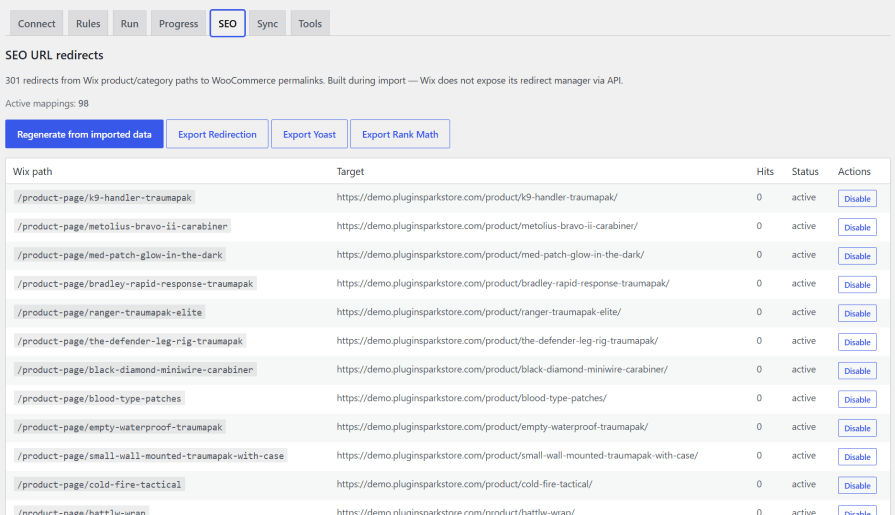
Wix Data Migrator helps protect your existing SEO structure by recording Wix storefront paths during migration and mapping them to your new WooCommerce URLs.
Enable 301 redirects from the SEO settings, regenerate redirects after migration, or export your redirect mappings for use with popular WordPress SEO and redirection plugins.
SEO migration features include:
Cart, checkout, and account URLs are excluded from storefront redirects.
Transfer SEO metadata to WooCommerce
When available, product SEO information can be transferred during the Wix to WooCommerce migration.
Yoast SEO title and meta description fields are populated when corresponding data is available.
After migration, review your SEO metadata, generate your WooCommerce sitemap, and verify your redirects before switching your store completely to WooCommerce.
Keep Wix and WooCommerce in sync after migration
Need to keep your Wix store active while completing the transition?
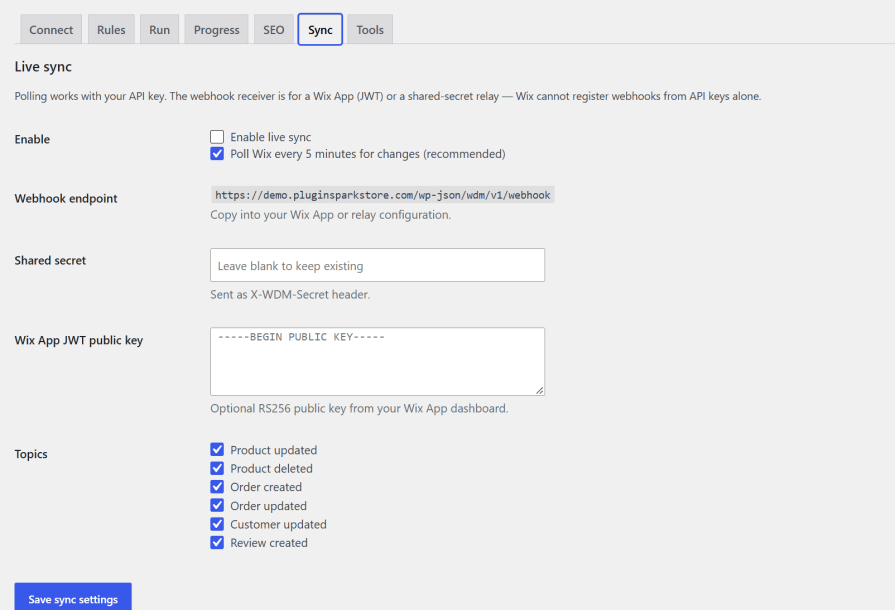
Enable Live Sync to continue transferring changes from Wix to WooCommerce after the initial migration.
Polling checks Wix every five minutes for changes to supported products, orders, and contacts.
You can also use the webhook endpoint for event-driven synchronization when a Wix App or supported relay is available.
Live Sync features include:
Wix subscription plan mapping
If you use WooCommerce Subscriptions, Wix subscription plans can be mapped to WooCommerce subscription products during product migration.
If WooCommerce Subscriptions is not active, Wix subscription plan information can instead be stored as product metadata.
Billing contracts and payment tokens are not transferred.
Customers must create new subscriptions or configure billing on WooCommerce after migration.

Background migration for large Wix stores
Large Wix stores can be difficult to migrate through a browser-based import.
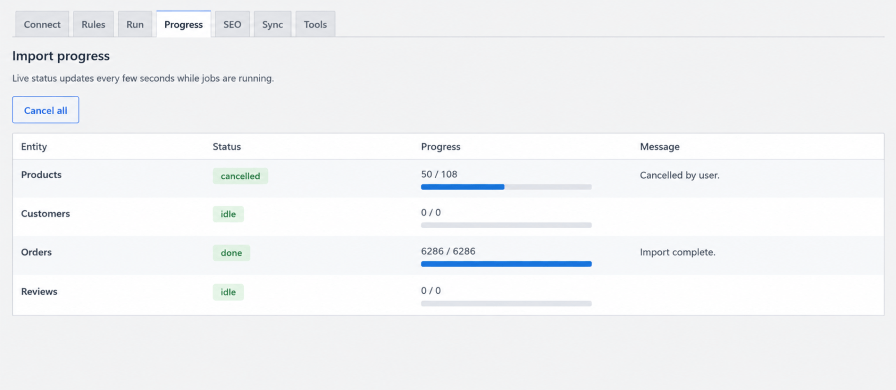
Wix Data Migrator processes migration jobs in batches using WP-Cron, allowing large catalogs and order histories to continue processing in the background.
The Progress panel shows migration activity so you can monitor imported, ignored, and remaining records without keeping the browser open.
Features include:
Secure Wix API connection
Wix Data Migrator connects to Wix through HTTPS using your Site ID, Account ID, and API key.
The saved API key is encrypted when OpenSSL is available and is not displayed again in the WordPress admin.
You can select the recommended Wix Catalog API v3 or Catalog API v1 and test your connection before starting the migration.
Safe historical order migration
Historical Wix orders are imported without triggering normal WooCommerce purchasing behavior.
Imported historical orders do not reduce live product inventory or send customer order emails.
This allows you to transfer your order history without unintentionally changing the inventory available for new WooCommerce orders.
Compatible with modern WooCommerce
Wix Data Migrator is designed for modern WooCommerce stores and supports High-Performance Order Storage (HPOS) and WooCommerce Cart and Checkout Blocks.
You can migrate products, customers, orders, and product reviews from Wix to WooCommerce. Product SEO information, Wix URLs, subscription plans, images, categories, shipping information, refunds, and other supported data can also be transferred according to the migration settings and available Wix API data.
Yes. You can filter products by title, category, publication dates, IDs, and other supported criteria. You can also set a maximum number of products to import.
Yes. Wix contacts can be imported as WooCommerce customers with billing and shipping information. Existing customers can be matched by email when the existing WordPress user has the customer role.
Yes. You can migrate historical Wix orders with line items, shipping information, refunds, and payment-status mapping. Existing orders can also be updated using the Wix order ID.
Yes. Product reviews can be imported through the Wix Reviews API or from a CSV file.
No. The migration runs from WooCommerce and does not require your Wix storefront to be taken offline. Background batch processing allows the migration to continue while your Wix store remains available.
Yes. The plugin records supported Wix product and category paths and can generate 301 redirects to the corresponding WooCommerce URLs. Redirects can also be exported as CSV.
Yes. Supported product SEO titles and meta descriptions can be transferred, and Wix product and category paths can be mapped to WooCommerce URLs for 301 redirects.
Categories
Quality Checks
Countries







