



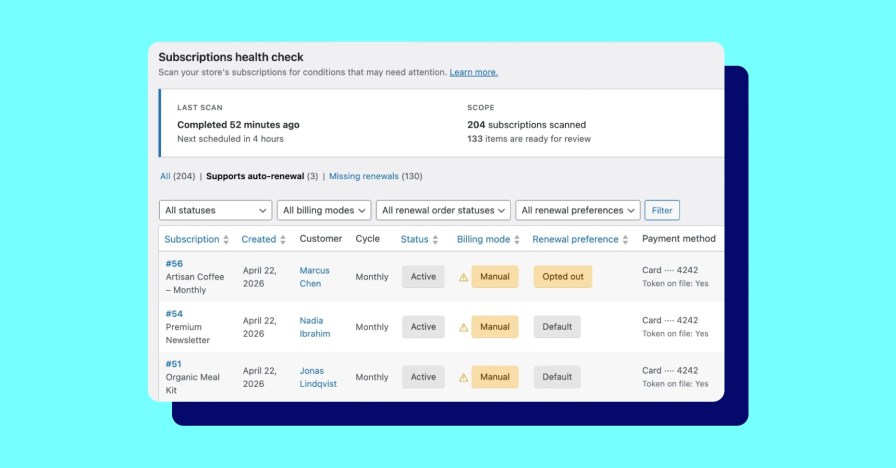
WooCommerce Subscriptions is built to be flexible. With automatic renewal, manual renewal, bank transfers, and customer-controlled billing, that flexibility is a feature. And it makes it important to have a clear view into what’s happening with your subscriptions, not just how they’re configured.
Introducing the Subscriptions Health Check: A new view that can tell you just that. Find it in your WP Admin dashboard at WooCommerce > Status > Subscriptions.
What’s under the hood
↑ Back to topThe tool currently has two views. Each one surfaces a different kind of info worth knowing about.
View 1: Supports autorenewal
This view shows you manual-renewal subscriptions that have a tokenized payment method capable of handling automatic charges — meaning the infrastructure for automatic billing is already there, but the subscription isn’t using it.
It also shows renewal preference. Not every manual-renewal subscription here is a problem. Some were set manually by the customer. Some reflect a store-level setting that was in place when the subscription was created. That context is visible in the tool.
One thing worth noting: when you update your store’s renewal settings, the change only applies to new subscriptions. Existing ones stay as they were. This view is how you find the ones you might want to go back and update.
View 2: Missing renewals
This view shows subscriptions that aren’t renewing when they should be. The cause is usually a data integrity issue like action scheduler failures or subscriptions affected by a bug. If you’ve had gaps in renewal revenue that you couldn’t explain, this is where to look.
No matter which view you choose, it’s important to note that the tool doesn’t make changes automatically. It gives you the information; what you do with that is up to you. Review flagged subscriptions individually before taking any action — some of what surfaces will be intentional, and the tool is designed to help you tell the difference.
How to get it
↑ Back to topUpdate to the latest version of WooCommerce Subscriptions from Updates in WP Admin, then head to WooCommerce > Status > Subscriptions.
We’re just getting started
↑ Back to topThese two views are just the start. Our goal is to provide you with an ongoing, reliable read on your subscription health — not a one-off diagnostic — so we’ll be dropping more releases soon. As the tool grows, you’ll have more visibility into what’s working and where to look when something isn’t.
If you have questions or run into anything unexpected, the WooCommerce Happiness Engineering team can help.


About


can i add this on travel website like https://www.nepaltrekkinginfo.com/ as well. can u help me please
Hi there! Our Happiness Engineers would love to help! You can reach out to them here: https://woocommerce.com/my-account/contact-support/