

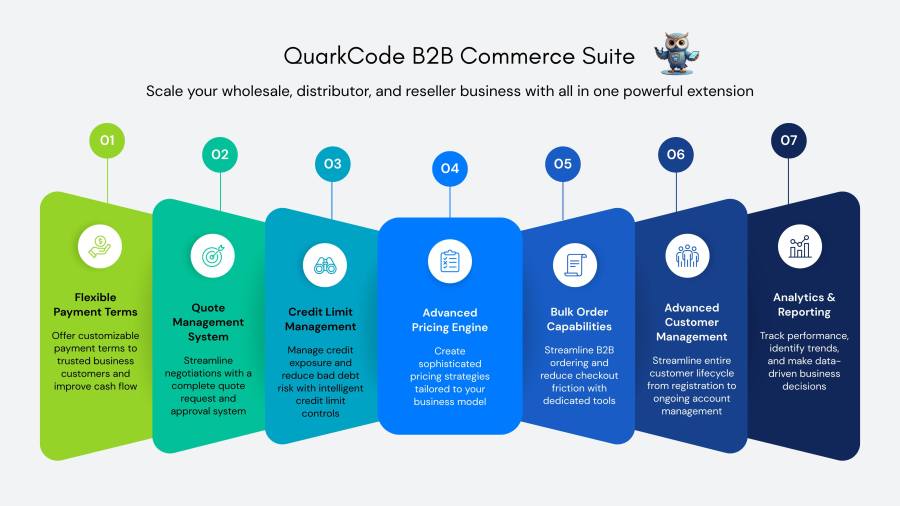
Subscription includes
Support
Stop losing wholesale customers to complicated ordering processes and manual quote management. QuarkCode B2B Commerce Suite gives you everything needed to run wholesale, distributor, and reseller operations directly within WooCommerce, without expensive enterprise software or complex integrations.
Create pricing rules based on quantity purchased, customer groups, or specific products. Set up once and let the system automatically apply the right price to every order. Whether you need simple volume discounts or complex tiered pricing for different customer segments, the flexible pricing engine handles it without manual quotes for routine orders.
Let customers request quotes for custom orders directly from your site. Review requests in your dashboard, modify pricing if needed, and send professional quote notifications via email. Customers can accept quotes with one click, and the system converts them to orders automatically. Track all quotes from request to conversion in one centralized location. The customers can also negotiate via the real time negotiation chat system.
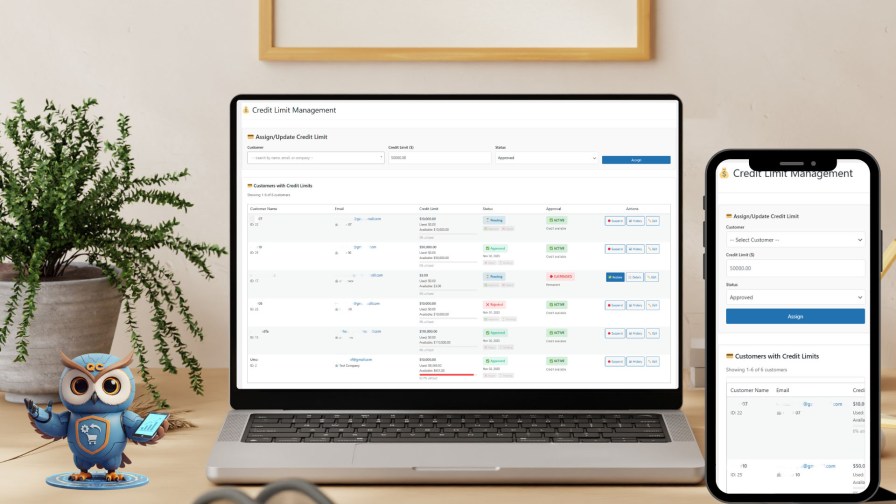
Assign credit limits to business customers based on their payment history and relationship. The system prevents orders that exceed available credit automatically. Offer flexible payment terms like Net 30 or Net 60 instead of requiring immediate payment. Send automated payment reminders before and after due dates to reduce collection effort.
Organize customers into groups like wholesaler, distributor, or preferred partner. Each group gets its own pricing rules, minimum order requirements, and payment terms. Assign account managers to specific customers for personalized service. Hide prices from guest visitors to encourage B2B registration.
B2B customers can use dedicated quick order forms to add multiple SKUs in seconds. Support CSV file uploads so customers can order directly from their inventory spreadsheets. Save frequently ordered product lists as templates for instant reordering. Real-time pricing updates show volume discounts as customers build their orders.
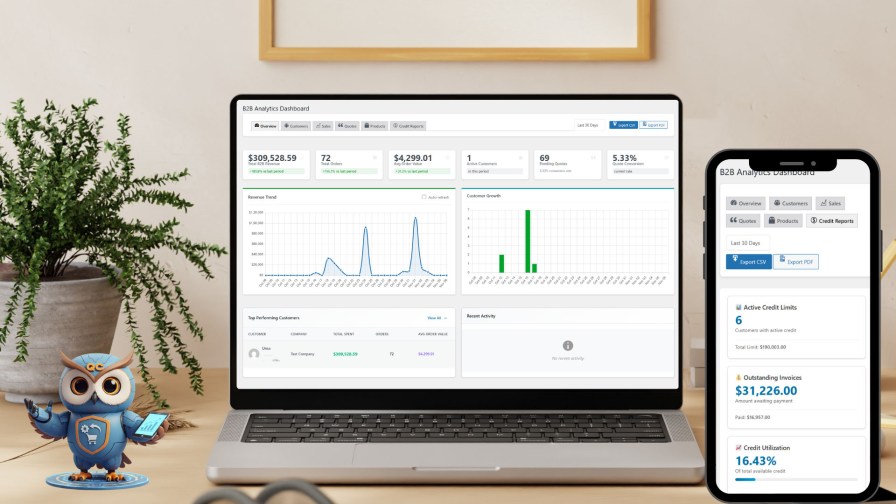
Track B2B sales performance with comprehensive dashboards. Identify your top wholesale customers, most profitable product categories, and pricing rule effectiveness. Monitor credit utilization across all customers. Export reports for accounting or share with your team to make informed business decisions.
Business customers need to find products quickly by SKU, category, or specifications. The advanced search engine supports multiple filters simultaneously and saves frequent searches. Customers can search by product attributes relevant to their industry, making reordering faster and reducing support inquiries.
When you serve both retail and wholesale customers, showing the same price to everyone costs you money. Manual quote management for every wholesale order wastes hours. QuarkCode automatically displays the right price based on who is logged in and how much they order. Set it up once and trust the system to handle pricing for thousands of transactions.
Extending credit to business customers grows sales but creates cash flow risk. Tracking payment terms manually leads to errors and delayed collections. This extension monitors credit limits automatically, blocks orders that exceed limits, and sends payment reminders on schedule. You maintain customer relationships while protecting your business.
B2B customers ordering through standard retail checkout abandon their carts. They need to order 50 products but your store forces them to add items one at a time. Bulk order forms and CSV upload transform the experience. Customers complete large orders in minutes instead of hours, reducing cart abandonment and increasing satisfaction.
Managing quote requests through email creates confusion. Customers send incomplete information, you lose track of pending quotes, and opportunities slip away. The built-in quote system captures all necessary details, keeps everything organized in your dashboard, and provides professional automated communications. Convert more quotes to orders without the administrative burden.
Unlike basic wholesale extensions that only handle simple percentage discounts, QuarkCode B2B Commerce Suite provides enterprise B2B functionality at a fraction of the cost. You get sophisticated features like credit management, payment terms, and comprehensive analytics that typically require expensive custom development. Everything integrates seamlessly with WooCommerce, so you do not need to learn a separate platform or migrate data.
The extension works with your existing payment gateways, shipping methods, and accounting tools. It does not lock you into a proprietary ecosystem. Updates maintain compatibility with the latest WordPress and WooCommerce versions, protecting your investment over time.
Once you install this extension, you can configure customer groups, create your first pricing rules, and set default payment terms. The extension includes documentation and examples for common B2B scenarios. No coding required — everything uses intuitive admin interfaces you already know from WordPress.
Built specifically for WooCommerce with WordPress best practices. Uses custom database tables for performance with large product catalogs and customer bases. Regular updates ensure compatibility with new WooCommerce releases and security patches.
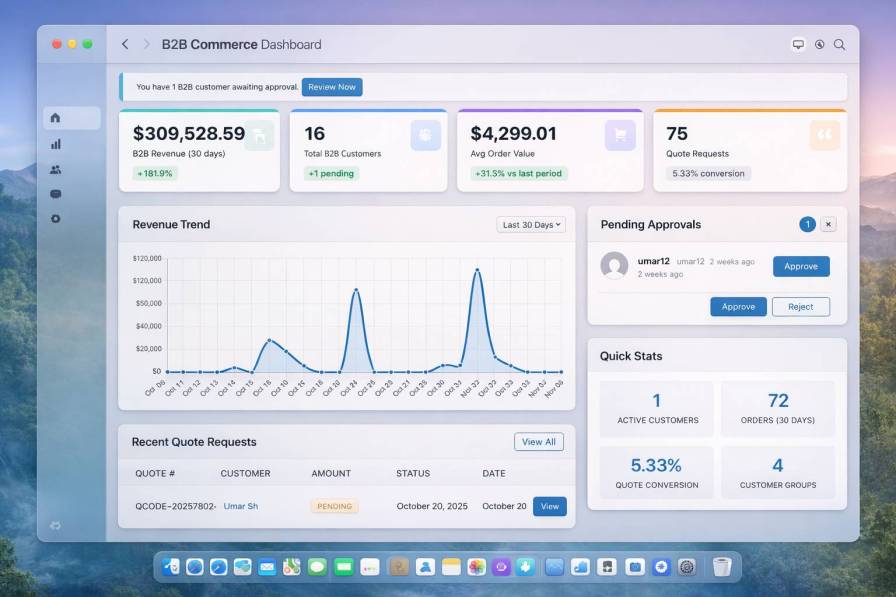
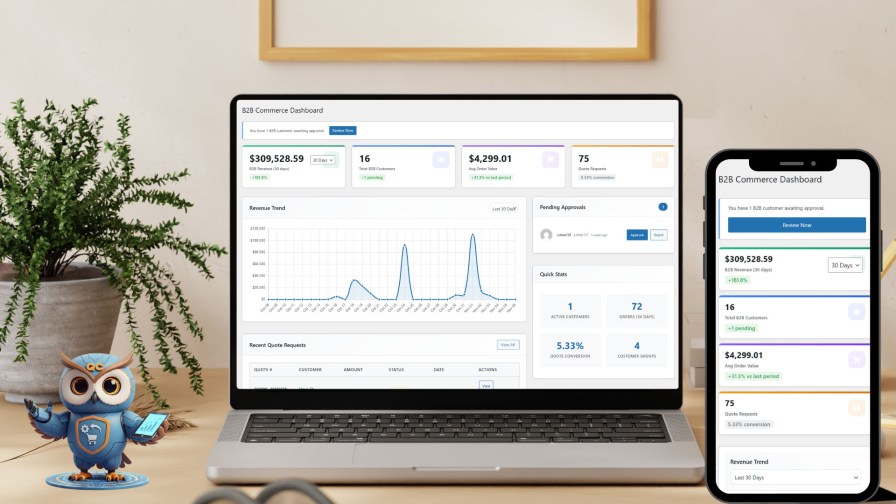
The QuarkCode B2B WooCommerce dashboard gives wholesale and distribution businesses the operational visibility they need to scale confidently. Unlike standard WooCommerce reporting, this B2B-specific dashboard surfaces wholesale KPIs including customer approval status, quote pipeline health, credit exposure, and bulk order activity — all in one place. Whether you run a wholesale distribution operation, a manufacturer’s direct sales channel, or a multi-tier B2B store, this dashboard ensures your team always knows exactly where the business stands. It is the control center your WooCommerce B2B extension needs to function at an enterprise level.
The Problem
Running a wholesale store on default WooCommerce means juggling five browser tabs, exporting spreadsheets, and calling customers to check on payments — just to get a basic picture of where your business stands today. WooCommerce was built for retail. Its native dashboard shows you order counts and recent sales. What it cannot show you is your pending B2B approvals, your active quote pipeline, your credit exposure, or which wholesale customers are your top revenue drivers. Without visibility, you cannot make decisions. And in wholesale, slow decisions cost real money.
The Solution
The QuarkCode B2B Dashboard puts your entire wholesale operation on a single screen. From the moment you log in, you see what matters — revenue trends, pending customer approvals, active quotes, recent bulk orders, and B2B-specific KPIs — all updated in real time. No exports. No digging. No guessing.
Feature Breakdown
Revenue Trend Chart — Visualizes your B2B revenue over time. Spot seasonal spikes, identify slow periods, and plan inventory procurement accordingly.
Pending Approval Queue — See exactly how many wholesale customers are waiting for account approval. Act immediately so you never leave a paying customer waiting.
Active Quotes Summary — Know how many quotes are open, how many are expiring soon, and which deals need a follow-up — all without entering the quotes module.
Recent B2B Orders Panel — Track your latest wholesale orders by customer, value, and status. Identify fulfilment bottlenecks before they become complaints.
Key Metrics Cards — Total B2B revenue, total customers, pending quotes, and open credit — surfaced as headline numbers so you can orient yourself in seconds.
Quick Action Shortcuts — Jump directly to approvals, pricing rules, or quote management without navigating through menus.
Business Impact
A wholesale manager who starts their day on this dashboard saves 30–45 minutes of manual reporting every single morning. Approvals happen faster, quotes get followed up on time, and revenue gaps are spotted before they compound. For businesses processing 50+ wholesale orders per week, that operational clarity is the difference between controlled growth and reactive chaos.
Key Benefits
Save Time: Approve customers in seconds vs navigating multiple pages
Data-Driven: Visual charts reveal revenue trends instantly
Centralized: All critical B2B metrics in single view
Actionable: Smart alerts highlight urgent actions
B2B-Focused: Separate analytics from B2C operations
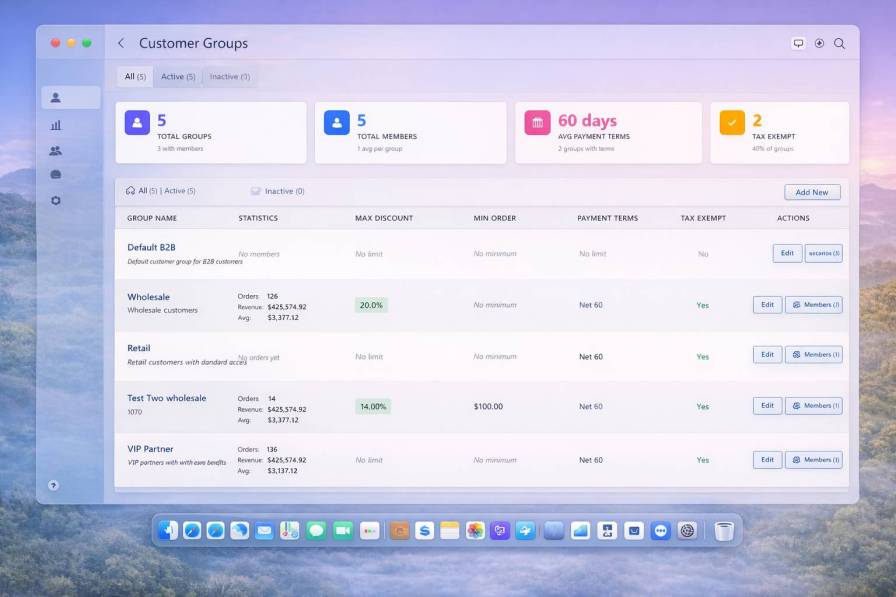
Role-based pricing for WooCommerce is the foundation of any serious B2B wholesale operation. The QuarkCode B2B extension delivers a complete customer segmentation system that goes well beyond simple user roles. Create unlimited wholesale customer groups, assign group-specific pricing tiers, credit limits, and payment terms, and let the system manage group transitions automatically as customer value grows. Whether you’re managing resellers, distributors, retail partners, or direct wholesale buyers, this customer group management system gives your WooCommerce B2B store the pricing infrastructure it needs to scale profitably.
The Problem
Not all wholesale customers are the same. A reseller buying $500/month should not see the same prices as a distributor buying $50,000/month. But in standard WooCommerce, there is no concept of tiered wholesale groups. You either have one price — or you are manually managing discount coupons per customer in a way that doesn’t scale and can’t be audited. The result? Your best customers don’t feel rewarded. Your margins on smaller accounts get eroded. And your pricing structure is invisible to the people making purchasing decisions.
The Solution
Customer Groups let you segment your wholesale buyers into distinct tiers — Gold, Silver, Distributor, Reseller, or any custom structure — and assign pricing rules, minimum orders, and payment terms to each group independently. Segment once. Automate everything else.
Feature Breakdown
Group KPI Cards — Total groups, total members, average order value per group, and satisfaction rate at a glance.
Group Performance Metrics — Each group displays member count, average order value, average delivery time, and satisfaction percentage inline. Compare tier performance without a separate report.
Discount & Pricing Tier Assignment — Each group maps to pricing rules, percentage discounts, or fixed-price overrides. Change a group’s pricing rule and every member updates automatically.
Group-Level Credit Limits — Set a default credit limit for an entire group. New members inherit the group default automatically.
Group-Level Payment Terms — Assign Net-30 or Net-60 terms to a group. All members get those conditions applied at checkout.
Member Management — Add or remove individual customers from groups and transfer customers between tiers as their account value evolves.
Automatic Group Transitions — Define rules to automatically move customers between groups based on order history, revenue thresholds, or account age.
Business Impact
Customer segmentation protects margin on small accounts while remaining competitive for large ones. Automating that segmentation removes the manual overhead of managing hundreds of individual pricing exceptions and gives your sales team a clean framework for communicating value. Businesses with 3–5 well-defined customer tiers consistently report higher repeat purchase rates and stronger account loyalty.
Segment B2B customers into groups with automated pricing, discounts, payment terms, and tax rules.
Group Configuration Features
Automated Discounts
Set maximum discount percentages that apply automatically at checkout without manual intervention
Payment Terms
Configure Net 7/15/30/60 payment options or “Due on Receipt” based on customer relationship and credit worthiness
Tax Exemption
Enable automatic tax removal for qualified organizations
Minimum Orders
Enforce order minimums to maintain profitability and prevent small unprofitable orders
Priority Ranking
Assign 0-20 priority levels to control which pricing rules apply first when customers belong to multiple groups
Key Benefits
✓ Zero Manual Work – Rules apply automatically at checkout
✓ Scale Infinitely – Manage thousands of customers with simple group logic
✓ Performance Tracking – Monitor revenue and orders per customer segment
✓ Flexible Pricing – Different discounts for wholesale, retail, VIP tiers
✓ Payment Control – Offer extended terms to qualified buyers only
Perfect for wholesalers, distributors, and B2B enterprises managing multiple customer tiers with differentiated pricing and payment structures.
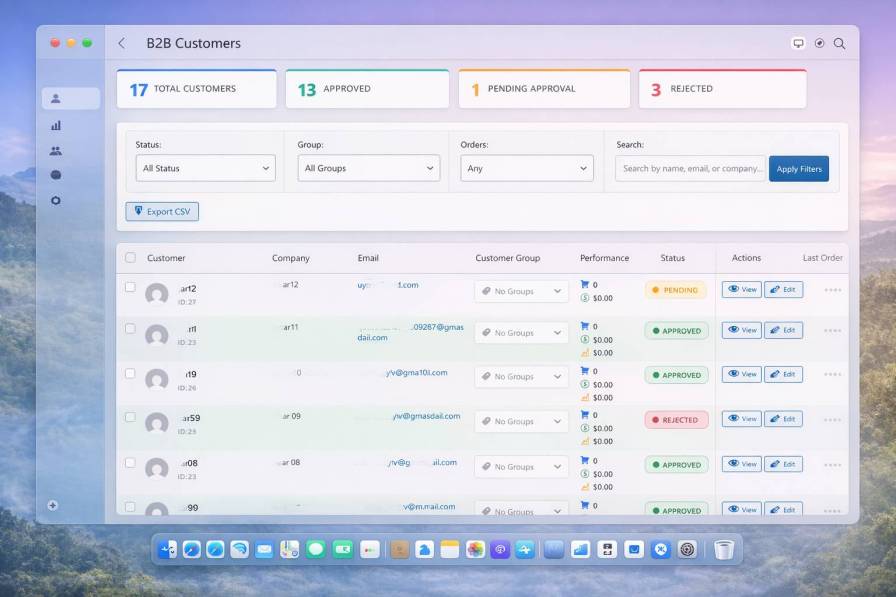
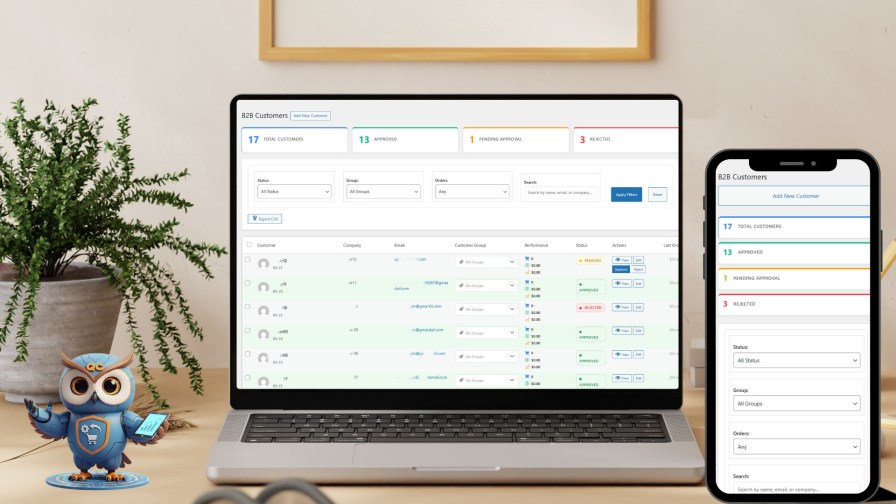
Managing B2B customers on WooCommerce requires more than a user list — it requires a structured approval workflow, status tracking, and group-based access control. The QuarkCode B2B WooCommerce extension delivers exactly that. With dedicated customer management tools built for wholesale and distribution businesses, you can gate access to your private wholesale store, approve or reject applicants instantly, verify business credentials, and assign customers to pricing tiers — all from a single admin panel. For WooCommerce store owners managing wholesale accounts at scale, this is the customer control infrastructure that default WooCommerce simply does not provide.
The Problem
Opening your WooCommerce store to wholesale buyers without a gated approval process is a risk most serious B2B operators cannot afford. Retail customers see your wholesale prices. Competitors register fake accounts. Unqualified buyers place orders your team cannot fulfil at wholesale terms. Even if you manually vet customers through email, there is no structured system to track approval status, rejection reasons, or customer tier assignments. Your customer data lives in WooCommerce user tables mixed with regular retail buyers — impossible to filter, segment, or act on efficiently.
The Solution
The B2B Customer Management panel gives you a dedicated space to manage every wholesale customer at every stage of their lifecycle — from registration through approval, assignment, verification, and long-term account management. Every customer has a status. Every action is logged. Every account is searchable.
Feature Breakdown
Status Badges (Approved / Pending / Rejected) — Instantly see where each customer stands in your onboarding workflow. Color-coded for fast scanning across large customer lists.
Approval & Rejection Controls — Approve or reject wholesale applications directly from the list view with one click. Trigger automated email notifications to customers the moment a decision is made.
Customer Verification System — Mark customers as verified once business credentials are confirmed — useful for high-volume or high-credit-exposure accounts.
KPI Summary Bar — Total customers, approved count, pending applications, and rejected accounts as headline metrics at the top of the page.
Search & Filter — Filter customers by status, group, or registration date. Find any account in seconds regardless of how large your customer base grows.
Bulk Actions — Approve, reject, assign to group, or export multiple customers simultaneously. Eliminate repetitive one-by-one processing on busy registration days.
Customer Group Assignment — Assign customers to pricing groups directly from this view. Link account approval to pricing tier in one workflow.
Business Impact
Every day a legitimate wholesale customer sits in “Pending” status is a day they might place their order with your competitor. For distributors onboarding 20–100 new wholesale accounts per month, a clean customer management system replaces a chaotic inbox-and-spreadsheet process with an auditable, scalable pipeline.
Real-Time Statistics Engine
Calculates customer counts by querying deduplicated user data combining role-based (‘b2b_customer’, ‘b2b_manager’) and meta-based lookups, tracking approval status via ‘qb2b_approval_status’ user meta.
One-Click Approval Workflow
Triggers confirmation → sends approval email → grants B2B access → page reload with updated stats. Rejection includes optional reason prompt stored as audit trail.
CSV Export Engine
Generates CSV with 15+ columns respecting active filters, auto-downloads as “b2b-customers-YYYY-MM-DD.csv” via data URL, includes selective export via checkboxes.
Automatic Badge System
VERIFIED: Green gradient after document verification (‘qb2b_verified’ meta)
VIP: Golden badge for customers with $10,000+ total spent
NEW: Blue badge for registrations within 7 days
INACTIVE: Gray badge for 90+ days without orders
Unlike basic customer lists, this system provides:
→ Enterprise Scale: Handles 10,000+ customers with same performance
→ Zero Manual Work: Automated badges, group rules, approval emails
→ Visual Intelligence: Badge system reveals customer status instantly
→ Bulk Efficiency: Process 100+ customers in seconds
→ Real-Time Sync: All metrics calculated on-demand, no caching delays
Result: 70% reduction in customer management time while maintaining data accuracy and improving customer experience.
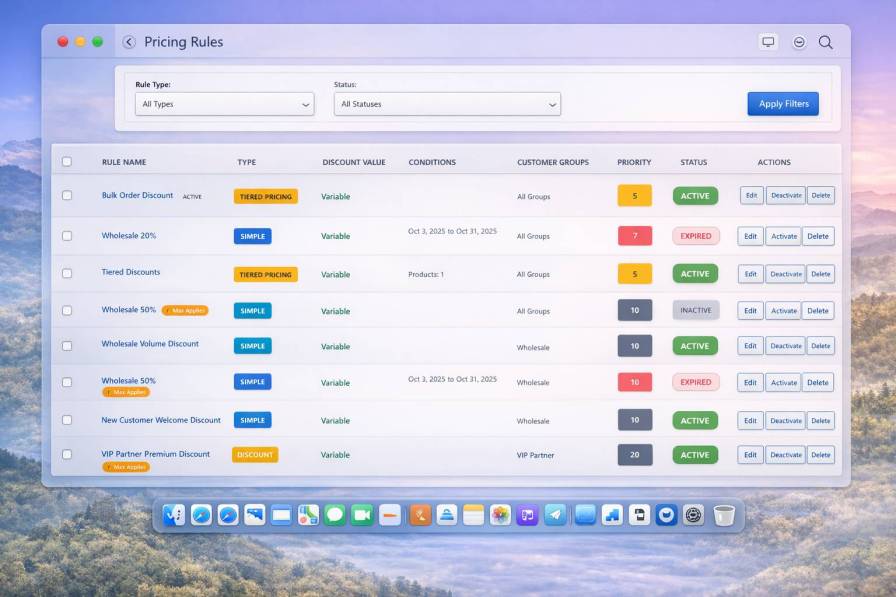
Wholesale pricing control is one of the most complex requirements for any WooCommerce B2B plugin. The QuarkCode pricing engine handles it comprehensively — supporting tiered quantity pricing, group-based discounts, customer-specific contract pricing, seasonal rules, and category-level overrides, all managed from a single rule management interface. For WooCommerce wholesale extensions, this level of pricing flexibility is what separates a serious B2B tool from a basic discount plugin. Whether you run a manufacturing business with negotiated pricing contracts or a distributor with multi-tier reseller pricing, this engine handles every scenario without custom development.
The Problem
Wholesale pricing is never simple. You have group discounts, quantity-based tiers, customer-specific contracts, seasonal promotions, and category-level pricing — all running simultaneously. Managing this in WooCommerce with native tools means an unmanageable tangle of coupons, manual price overrides, and pricing errors that cost you margin every week. Most B2B stores end up with a blanket discount that destroys margin on small orders and still loses deals to competitors offering real tiered pricing.
The Solution
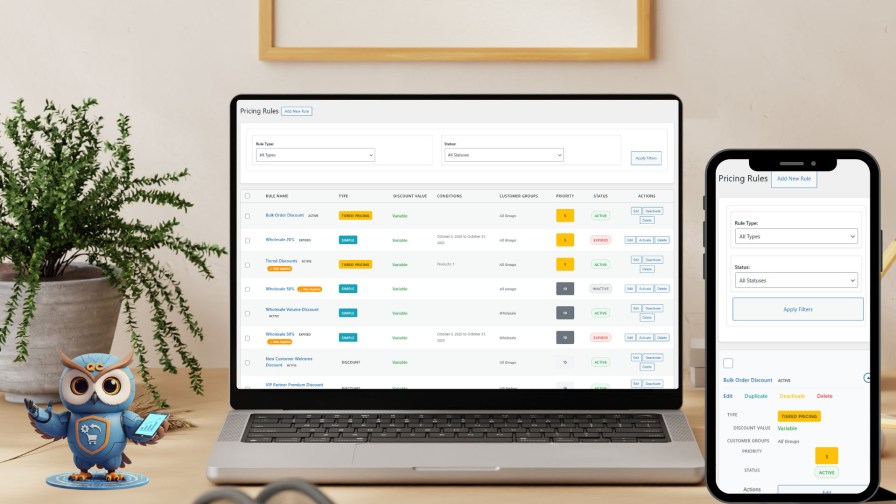
The Pricing Rules Engine lets you create, manage, and automate every pricing condition your wholesale business requires. Rules are named, typed, status-toggled, and scoped — so you always know what’s active, what applies to whom, and what can be safely paused without disrupting other agreements.
Feature Breakdown
Rule Type Color Coding — Distinct visual labels identify rule types at a glance: Group Discount, Tiered Pricing, Customer-Specific, Seasonal, and more.
Active / Inactive Status Toggle — Enable or disable any pricing rule instantly. Run seasonal promotions on a schedule and pause contract pricing during reviews.
Tiered Quantity Pricing — Set price breakpoints by order quantity. Buy 1–9 at price A, 10–49 at price B, 50+ at price C. Applied automatically at cart.
Group-Based Pricing Rules — Assign a rule to an entire customer group. Every member receives the discount automatically — no coupon codes, no manual exceptions.
Customer-Specific Contract Pricing — Override standard pricing for individual accounts. Honor negotiated contracts without affecting any other customer’s pricing.
Seasonal & Date-Range Rules — Define start and end dates for promotional pricing. Rules activate and deactivate automatically.
Category & Product Scoping — Apply a rule to a specific product, a product category, or your entire catalogue. Surgical pricing control at every level.
Bulk Rule Actions — Enable, disable, or delete multiple rules simultaneously. Manage pricing at scale without one-by-one administration.
Business Impact
Accurate, automated pricing removes one of the biggest sources of margin leakage in wholesale operations. When the right price is applied at the right time to the right customer, you eliminate under-billing errors, remove the need for manual invoice corrections, and create a pricing experience professional enough to retain larger accounts.
Three Intelligent Pricing Engines:
1. TIERED PRICING (Golden Badge)
Creates volume-based discount tiers automatically applying highest qualifying level. Examples shown: “Bulk Order Discount”, “Tiered Discounts” with unlimited tier support. Each tier configures min/max quantity, discount type (percentage/fixed), and value.
2. SIMPLE (Cyan Badge)
Flat-rate discounts as percentage or fixed amount. Shown: “Wholesale 20%”, “Wholesale 50%”, “Wholesale Volume Discount”. Single configuration applies to all qualifying orders.
3. DISCOUNT (White Badge)
Basic promotional rules for time-limited offers. Examples: “New Customer Welcome Discount”, “VIP Partner Premium Discount”.
Advanced Features Analysis
Priority Conflict Resolution System
0-100 numerical scale determines winning rule when multiple match. Highest priority wins conflicts. Examples show Priority 5, 10, 15, 20 creating clear hierarchy. VIP Partner at Priority 20 overrides all others.
Max Discount Protection
System automatically caps discounts to prevent pricing errors. Validation checks both simple discounts and highest tier values for tiered rules.
Automated Status Management
Rules display ACTIVE (green), EXPIRED (red), or INACTIVE (gray) badges based on date ranges and manual toggles. System auto-expires rules past end dates while preserving configuration for reactivation.
Customer Group Integration
Rules filter by assigned groups showing “All Groups”, “Wholesale”, or “VIP Partner”. System reads group assignments and enforces max discount limits automatically. Multiple groups supported with priority-based winner selection.
Key Differentiators
Unlike basic coupon systems :
→ Automatic Application: No customer action required
→ Intelligent Conflict Resolution: Priority system prevents overlaps
→ Safety Net: Max discount warnings prevent margin erosion
→ Date Automation: Rules self-activate and expire
→ B2B Optimization: Designed for volume pricing and customer segmentation
→ Scalability: Handles unlimited products and rules efficiently
Result: 80% reduction in pricing management time while eliminating manual errors and enabling sophisticated B2B pricing strategies .
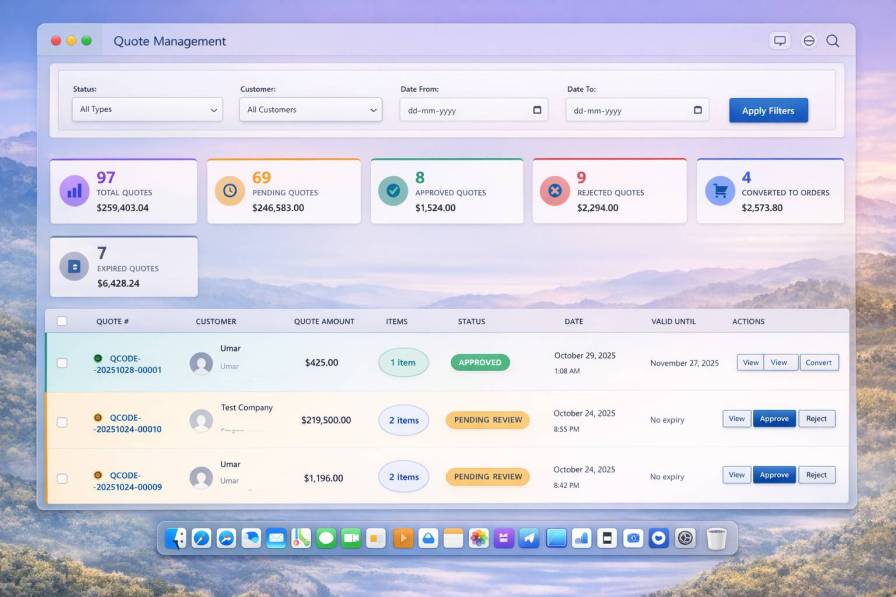
A request-for-quote system is an essential component of any serious WooCommerce B2B extension. The QuarkCode B2b Commerce Suite quote management system delivers a complete B2B quoting workflow — customer-facing quote requests, admin review and pricing control, negotiation via modification requests, expiry automation, and one-click conversion to WooCommerce orders. For wholesale distributors, manufacturers, and bulk suppliers, this eliminates the operational chaos of email-based price negotiations and creates a professional, auditable quoting process directly inside WooCommerce.
The Problem
Negotiated pricing is the heartbeat of wholesale selling. Yet most WooCommerce stores handle quote requests through customer emails, WhatsApp messages, and disconnected spreadsheets. There is no audit trail. Quotes expire silently. Sales reps manually build PDF quotes and email them back. Customers wait 48 hours for a price — and by the time the quote arrives, the buyer has already placed the order elsewhere. Your team has spent an hour on admin work that should have taken five minutes.
The Solution
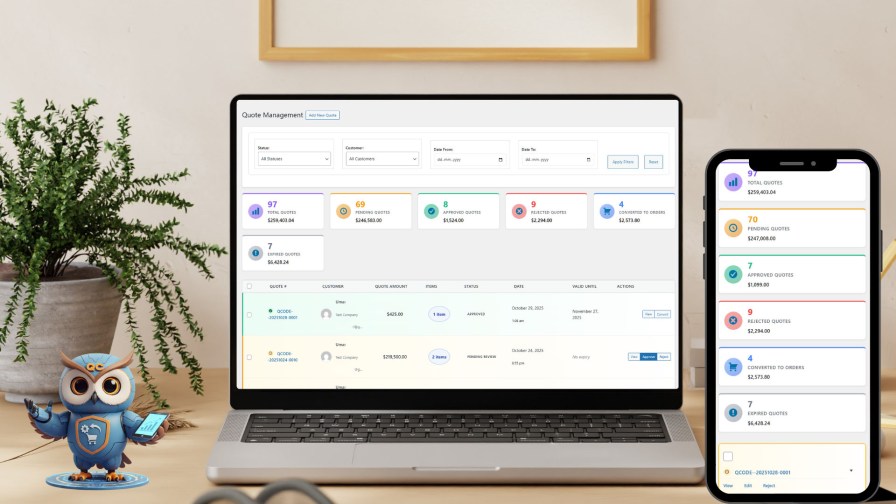
The Quote Management System gives your wholesale store a complete request-for-quote workflow — from customer submission through admin review, negotiation, approval, and one-click order conversion. Every quote is tracked, every status is visible, and every conversion is automated.
Feature Breakdown
Quote Pipeline Summary Cards — Total quotes, pending review, approved, rejected, and converted-to-order counts as headline KPIs. Understand your sales pipeline health instantly.
Quote Status Pie Chart — Visual breakdown of quote statuses. Identify pipeline blockages without running a report.
Quote List with Status Badges — Color-coded status indicators (Pending, Approved, Rejected, Converted, Expired) across every quote. Prioritize your review queue by age or value.
One-Click Quote-to-Order Conversion — Convert an approved quote to a WooCommerce order in a single click. Pricing, items, and customer details transfer automatically.
Admin Approval & Rejection Controls — Review quote line items, adjust pricing, add notes, then approve or reject — all from the quote details page.
Quote Expiry Management — Set expiry dates on all quotes. Automated reminders notify customers before expiry. Expired quotes are flagged automatically.
Customer Quote Modification Requests — Customers can request changes to a submitted quote. Requests are tracked and visible to admins for structured negotiation.
Quote Activity Timeline — Every action on a quote is logged chronologically. Full audit trail for every deal.
Business Impact
A structured quote workflow reduces average quote-to-order time significantly. When customers submit a request online and receive a reviewed quote within hours — without a phone call — conversion rates climb and admin overhead drops. For wholesale operations handling 20–200 quote requests per month, replacing the email-and-spreadsheet process often pays for the plugin within the first week.
All metrics calculate real-time from database summing quote line items.
Quote Status Lifecycle (6 Stages)
Status Flow: DRAFT → PENDING REVIEW → APPROVED → CONVERTED with side paths to REJECTED or EXPIRED
Each status has color-coded badges (green/yellow/orange/red/gray/blue) and determines available admin actions.
Status-Dependent Action Buttons
APPROVED Quotes: View (details) + Convert (creates WooCommerce order)
PENDING Quotes: View (review) + Approve (sets expiry, sends email) + Reject (prompts reason)
Others: View with Re-approve/Edit options
Complete Quote Workflow
Customer Journey:
Request quote via product page/cart
Submit with items, quantities, notes (status: PENDING)
Receive confirmation email
Wait for admin approval
Get approval email with convert link (status: APPROVED)
Click “Convert to Order”
System creates cart with locked pricing
Complete checkout (status: CONVERTED)
Admin Journey:
Receive pending notification
Review quote details and pricing
Click “Approve” → Set validity period
System sends approval email
Customer converts → Auto-creates order
Quote updates to CONVERTED
Quote Numbering System
Format: QCODE-YYYYMMDD-#### (e.g., QCODE-20251028-0001) with auto-generation, daily reset, customizable prefix.
Pricing Protection at Conversion
Locked pricing prevents modifications, quantities non-editable, discounts preserved, payment terms honored, no additional promotions applied. Creates WooCommerce order with quote items and locked pricing automatically.
Seven Email Notification Triggers
Request confirmation, pending notification (to admin), approval email (with convert link), rejection email (with reason), expiry reminder (3 days before), expired notification, conversion confirmation – all customizable with branding.
Key Differentiators
Unlike email-based quote processes:
→ Automated Pipeline: Complete workflow from request to order
→ Self-Service Conversion: Customers convert approved quotes themselves
→ Locked Pricing: Prevents mid-deal price changes
→ Visibility: Pending opportunities tracked in real-time
→ Bulk Efficiency: Handle pending quotes with batch operations
→ Analytics: Track conversion rate and optimize
Real Results: B2B businesses report 60% faster quote-to-order cycles, 85% reduction in pricing errors, 40% higher conversion rates versus manual processes .
Perfect for wholesalers, distributors, and B2B businesses managing negotiated pricing with approval workflows at any scale (10 to 10,000 quotes).
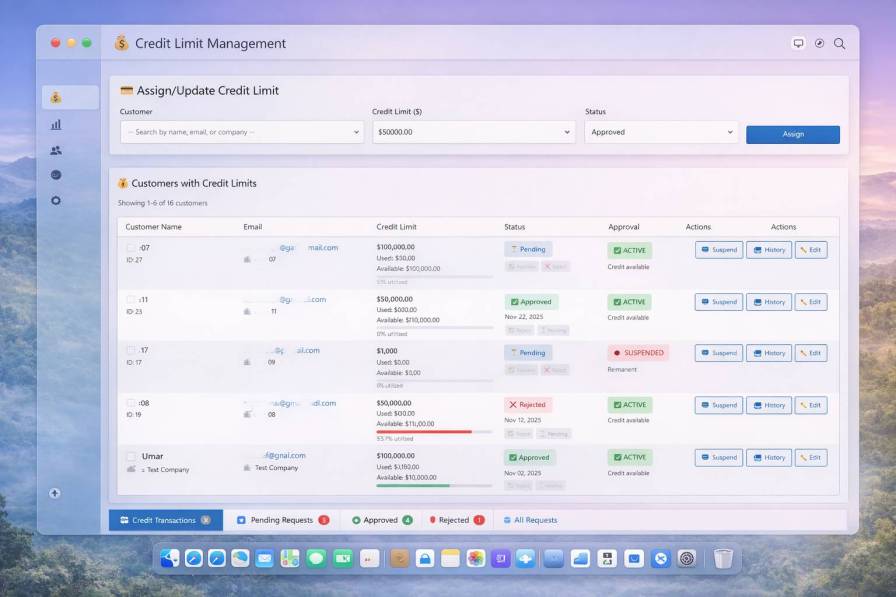
Credit limit management is one of the most business-critical features a WooCommerce B2B plugin can offer — and one of the least commonly done well. The QuarkCode credit limit system brings enterprise-grade trade credit controls to WooCommerce, enabling wholesale and distribution businesses to extend Net-30 or Net-60 payment terms with full exposure visibility, automated order blocking, credit request workflows, and atomic transaction integrity. For B2B WooCommerce stores managing significant trade credit exposure, this is the risk management infrastructure that transforms WooCommerce into a platform serious wholesale businesses can actually rely on.
The Problem
Extending trade credit is standard practice in B2B wholesale — but doing it without a system is how businesses get burned. A customer places five large orders on Net-30 terms, makes no payments, and disappears with $30,000 in outstanding invoices. You had no credit ceiling, no exposure tracking, and no automatic block when the limit was reached. WooCommerce has no concept of trade credit. Every B2B store offering payment terms is managing this risk manually — or not managing it at all.
The Solution
Credit Limit Management gives you complete control over trade credit across your entire wholesale customer base. Set limits per customer, track live outstanding balances, block orders when limits are exceeded, and manage the full credit request and approval lifecycle — built natively into your WooCommerce B2B store.
Feature Breakdown
Per-Customer Credit Limits — Set a specific credit ceiling for each wholesale account. $5,000 for new resellers, $50,000 for established distributors. Control exposure at the account level.
Credit Status Indicators — Instantly see which accounts are within limits, approaching their ceiling, or over limit. Act before exposure becomes a bad debt.
Credit Request & Approval Workflow — Customers request a credit limit increase from their account dashboard. Requests surface in your admin panel for one-click approve or reject, with automated customer notification.
Atomic Credit Transactions — Credit reservations use atomic database transactions to prevent race conditions. No double-booking, no overshooting limits on simultaneous orders. Enterprise-grade financial integrity.
Order Block on Limit Exceeded — When a customer’s outstanding balance exceeds their approved credit limit, checkout is automatically blocked.
Credit Suspension Controls — Suspend a customer’s credit access entirely — with a reason and a log entry — if payment obligations are not met. Reinstate with a single click.
Credit Transactions Log — A full history of every credit movement: orders placed, payments received, limit changes, and manual adjustments. Audit-ready records for every account.
Payment Aging Report — See outstanding invoices by age bucket (0–30, 31–60, 61–90, 90+ days). Identify accounts trending toward default before it becomes a write-off.
Business Impact
Credit limit management directly protects cash flow. Businesses that implement hard credit ceilings with automated enforcement report dramatically lower bad debt rates than those managing credit manually. When customers know the limit is firm and enforced at checkout, payment behavior improves accordingly. For wholesale operations extending $500K+ in trade credit annually, this system pays for itself by preventing even a single mid-sized bad debt event.
Key Technical Features
Real-time credit calculations from unpaid orders
Automatic suspension at 100% utilization (optional)
Daily cron jobs for expiry checks and payment reminders
Complete audit trail
Key Differentiators
Unlike basic credit systems:
→ Visual Utilization: Color-coded progress bars
→ Instant Control: Suspend/restore with one click
→ Automatic Alerts: 75%, 90%, 95%, 100% threshold notifications
→ Complete History: Every invoice, payment, refund tracked
→ Checkout Blocking: Orders prevented when credit exceeded
→ Flexible Suspension: Temporary (auto-restore) or permanent
Real Results: B2B businesses report 40% increase in order values, 60% higher retention, 80% reduction in manual tracking .
Perfect for wholesalers offering Net 30/60 terms with $10K-$110K+ orders requiring systematic credit management and risk control.
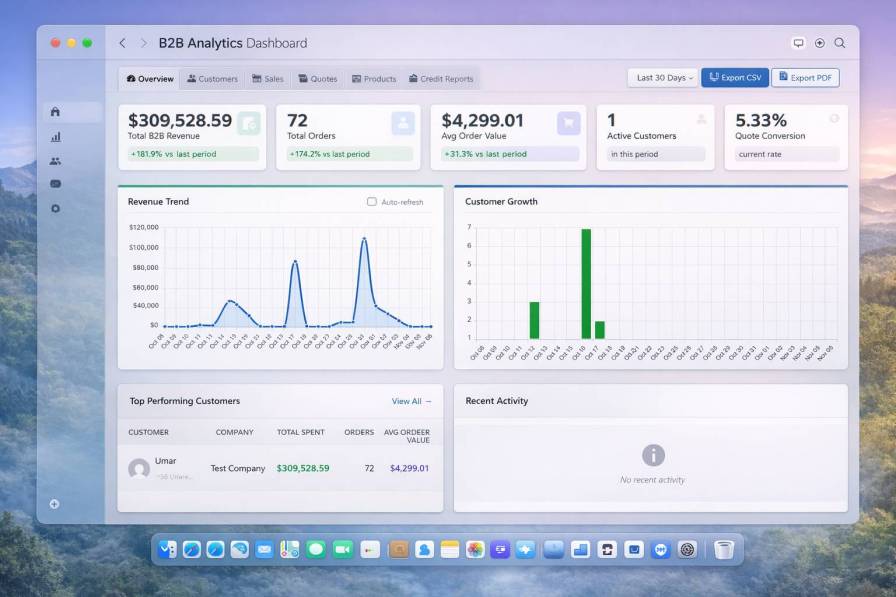
B2B analytics for WooCommerce goes far beyond what the platform offers natively. The QuarkCode wholesale analytics module delivers B2B-specific reporting including revenue trends by customer group, wholesale customer acquisition metrics, quote pipeline conversion analysis, top account performance tracking, and product-level wholesale demand insights. For WooCommerce store owners running serious wholesale and distribution operations, these analytics provide the decision-making intelligence needed to price competitively, manage accounts proactively, and grow wholesale revenue with confidence.
The Problem
Standard WooCommerce analytics tell you total sales and order count. That is not enough to run a wholesale business. You need to know which customer groups drive the most revenue, whether your top 10 accounts are growing or shrinking, and how your quote conversion rate trends month over month. Without B2B-specific analytics, wholesale store owners make pricing, credit, and inventory decisions based on gut feel — eroding margin without anyone noticing.
The Solution
The B2B Analytics module surfaces the wholesale-specific metrics your business actually runs on. Revenue trends, customer growth curves, top-performing accounts, quote pipeline analysis, and segment performance — all visualized and exportable.
Feature Breakdown
B2B Revenue Trend Chart — Track wholesale revenue over time with configurable date ranges. Identify growth periods, seasonal patterns, and the impact of pricing changes on your top line.
Customer Growth Chart — Visualize new B2B customer registrations and approvals over time. Measure your wholesale acquisition velocity.
Top Performing Customers Panel — See your highest-value wholesale accounts ranked by revenue, average order value, and purchase frequency. Know exactly where your revenue concentration lies.
Customer Segment Performance — Compare revenue, order volume, and average order value across customer groups. Identify which tiers are growing and where pricing adjustments would have the most impact.
Quote Pipeline Analytics — Track quote submission rates, approval rates, conversion rates, and average quote values. Understand where deals are being won and where they’re being lost.
Product & Category Insights — See which products drive the most B2B revenue and which are growing or declining in wholesale demand.
CSV Export — Export any report for board presentations, sales team reviews, or financial reconciliation.
Business Impact
B2B businesses that track segment performance systematically make better pricing decisions, allocate account management resources more effectively, and identify churn risk before accounts go silent. For wholesale operations at scale, the difference between growing profitably and growing unsustainably often comes down to whether the right metrics are visible to the right people at the right time.
Transform your WooCommerce store into a professional B2B platform that serves wholesale customers as well as you serve retail shoppers. Stop losing business to complicated ordering processes or spending hours on manual quote management. Install QuarkCode B2B Commerce Suite and start automating your wholesale operations today.
Yes, the extension works with all WooCommerce product types including simple, variable, and grouped products. You do not need to recreate your catalog or change existing products. Add B2B pricing rules to products you want to sell wholesale while keeping regular pricing for retail customers.
Absolutely. Create customer groups like wholesaler, distributor, preferred, and standard. Each group sees pricing according to rules you define. Guest visitors can see regular prices, you can also hide the prices encouraging them to register for wholesale access.
Assign payment terms like Net 15, Net 30, or Net 60 to customer groups or individual customers. When customers with payment terms check out, they select the payment terms gateway instead of paying immediately. The system tracks due dates and sends automated reminders. You can customize reminder timing and messages.
The system prevents checkout automatically when an order would exceed the customer's available credit. Customers see a clear message explaining the situation. They can contact you to request a credit increase, which you approve or deny from your dashboard. This prevents awkward situations and protects your business from overextension.
Yes, the bulk order form supports CSV file uploads. Customers prepare their order in Excel or other spreadsheet software, export to CSV with SKU and quantity columns, and upload. The system validates products and calculates pricing automatically. This saves significant time for customers who order the same products regularly.
Customers can request quotes for specific products or many products in one quote. They fill out a form with product details and quantities. You receive notification of new quote requests in your dashboard. Review the request, set custom pricing, add notes, add discounts, and accept the quote. Customers receive email notification with quote details and can accept with one click to convert to an order. Customers can also negotiate with the already approved quote.
Access reports on B2B sales trends, top customers by revenue, pricing rule performance, credit utilization, quote conversion rates, and payment term usage. Export reports to CSV for further analysis in Excel or accounting software.
No, this extension manages the ordering and pricing aspects of B2B commerce. It exports data that can integrate with accounting systems through CSV export. Many businesses use this extension for order management and customer-facing functions while handling accounting in specialized software.
Extension information
Quality Checks
Countries






