Product Icon

Size Chart for WooCommerce

With size chart extension, merchants can now create multiple size guides and attach them to relevant products and categories.
Choose a billing option
$49
Save 20%
$98 $78.40

Subscription includes

  • Product updates and improvements
  • Customer support
  • 30-day money-back guarantee

  • Create country, product, and category-specific size guides
  • Help customers pick the right fit and minimize size confusion 
  • Increase sales and reduce returns due to wrong sizing 
  • Display different size guides in different countries to match your audience 
  • Choose a size chart format to maximize conversions

Create Multiple Custom Size Guides

Standard sizes vary from country to country, which is why many users struggle with online shopping. For stores selling apparel and shoes, the right size charts are crucial, but many fail to use them the right way. Apparels have a staggering 24% return rate, which is the highest compared to other categories in the US. The top reason for these returns is wrong sizing issues.

The WooCommerce Size Chart extension can easily avoid these returns. The plugin lets you create and customize multiple-size charts for your store, suited to your products and customer needs. This will make it easy for customers to choose the right size and give them the confidence to make the purchase.

You can display country-specific size charts to cater to an international audience and show size charts as buttons or popups. For convenience, you can upload a size chart image or add a table using the WYSIWYG editor. The size charts are highly customizable and can be attached to all or specific products and categories as required.
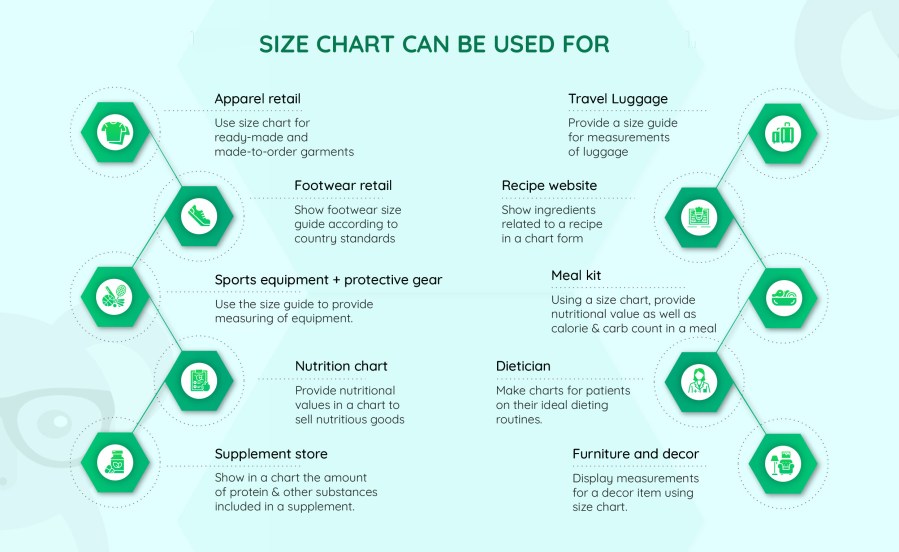
Product use-cases

size chart for woocommerce
Features:

  • Add multiple-size charts and attach them to relevant products, categories, and countries.
  • Create a size chart table or simply upload a size chart image.
  • Attach size charts by product tags (New)
  • Import and export size charts using a CSV file (New)
  • Add a size chart in the product tab or display it in a popup using a button.
  • Choose from multiple popup positions (New)
  • Choose from multiple popup animation effects (New)
  • Add size chart button after price, description, add to cart, or product meta.
  • Choose from multiple popup icons (New)
  • Customize button background and text color.
  • Customize size chart tab display order.
  • Create use role-specific size charts (New)
  • Add custom color for table rows and columns.
  • Style size charts the way you want using custom CSS (New)
  • Option to add table border.

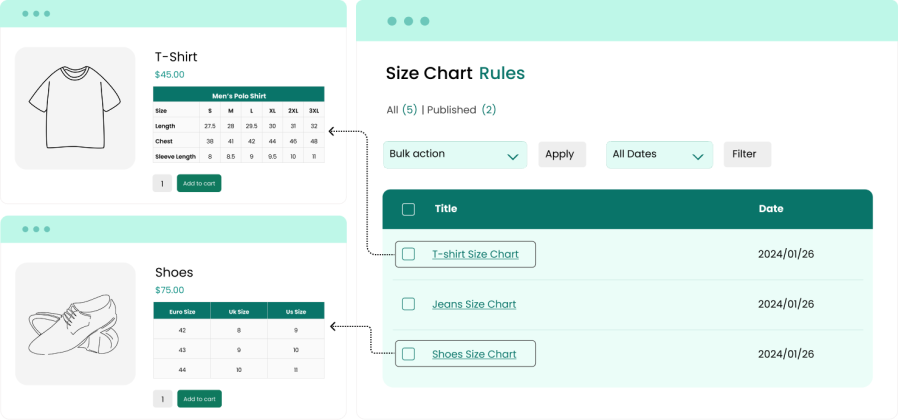
Create multiple-size charts for different types of products

Add multiple customized size charts according to your product catalog on your store. Create size guides manually or add a size chart image. For each size chart, you can insert descriptions to explain the sizing. Quickly adjust chart dimensions and choose color schemes for various elements. As you create a new size chart, you can add as many rows and columns as needed and adjust color schemes accordingly.
woocommerce size chart

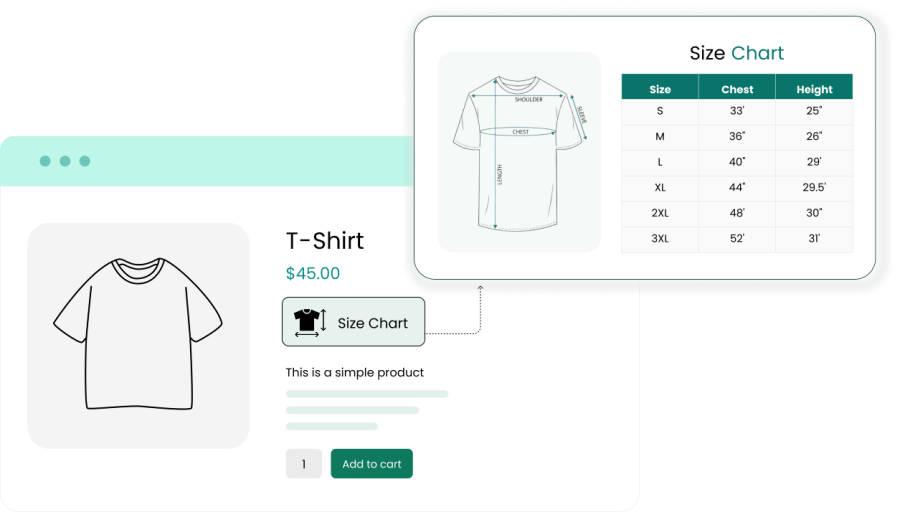
Show the size chart in a button

Using the WooCommerce size chart extension, you can show the size guide as a button on the product page. The size chart button and the table itself are highly customizable and you can style it the way you want to.
woocommerce size chart

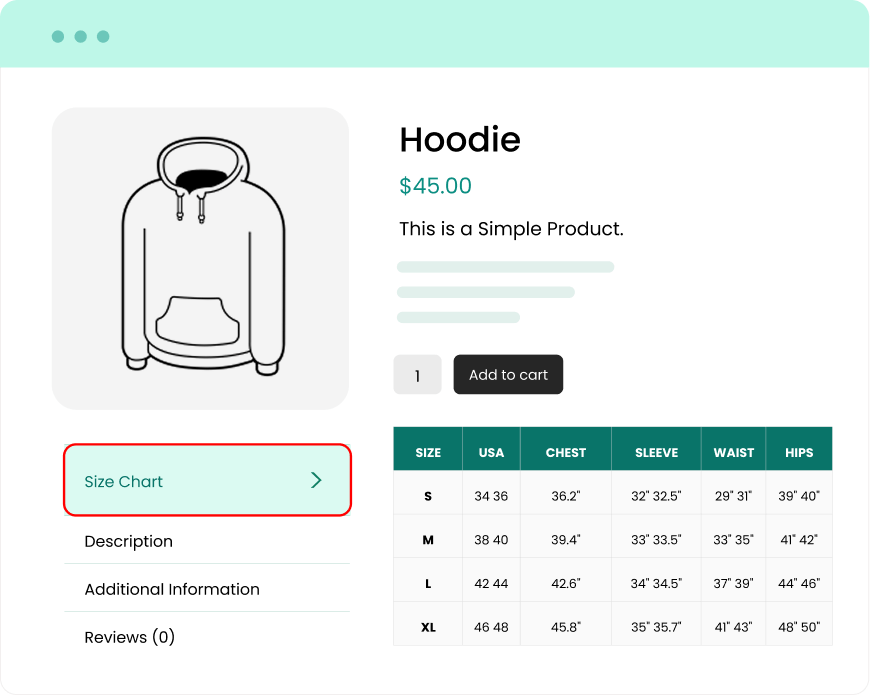
Show size chart in a Tab

Instead of displaying in a popup, you can choose to show size charts in a tab. While showing the size chart in a product tab, you can customize the following options:

  • Tab label
  • Size chart styling
  • Size chart content

Show picture-based size charts

Instead of creating an entire size chart and then styling it, you can just get a size chart designed in the dimensions of your liking and display it on product pages.
woocommerce size chart


Customer reviews

Average rating 4.7
8 reviews
5 stars, 71% of reviews
4 stars, 29% of reviews
3 stars, 0% of reviews
2 stars, 0% of reviews
1 star, 0% of reviews
8 reviews
  • senorbrims
    Rated 2 out of 5
    Functionality
    Dec 31, 2024
    Functionality
    Very unreliable. Button doesn't do what you want to do. Also, doesn't blend well with theme you can tell it is not part of the theme and it doesn't look good. Issues I had with it were never resolved. You are better off looking for a theme that already has a built in sizing chart especially since you have to pay for this one. There are a lot of themes for less than $100 that have many features like sizing charts built in already.
  • wikistuffify
    Rated 5 out of 5
    Oct 20, 2022
    5 stars plugin and support
    I've been using this plugin for a while and I recently encountered an issue. The support was fast to respond and took care of the issue to make sure everything was working properly in a timely manner.
  • bmeunier2365
    Rated 5 out of 5
    May 5, 2022
    Good plugin with good support
    Easy installation & good functionnalities. The best, reative et nice support after a compatibilty problem with multisite.
  • kenteush29
    Rated 4 out of 5
    Aug 21, 2021
    Great plugin, but...
    The plugin works great, no SEO issues, nothing to do with the code. Support is reactive too, I had a little css issue that was quickly fixed. But, impossible to export/import the product meta data for the size charts. So it's a mess if you have a lot of products on your store, if they can't be bulk updated by categories (the plugin includes that option).
  • okkomarketing
    Rated 5 out of 5
    Mar 11, 2021

Extension information

  • WordPress version required: 4.6
  • WooCommerce version required: 3.1.0
  • Tested with WooCommerce: 10.*.*
  • Requires at least WooCommerce: 3.0.9

Countries

  • Worldwide

Languages

English (United States)

Related Products

Price $79 annually
Rated 3.4 out of 5 stars
Price $59 annually
Rated 3.1 out of 5 stars
Price $109 annually
Rated 2.8 out of 5 stars
Price $49 annually
Rated 4.1 out of 5 stars
Price $109 annually
Rated 2 out of 5 stars
Price $109 annually
Rated 2.3 out of 5 stars
Price $109 annually
Rated 2.6 out of 5 stars
Price $109 annually
Rated 2 out of 5 stars
Price $109 annually
Rated 2.3 out of 5 stars




