

Subscription includes
Support
Every customer deserves a personalized experience. Whether you’re running a membership site, managing wholesale accounts, or onboarding new buyers, sending everyone to the same generic My Account page creates friction and confusion.
Per-User Login Redirect Manager lets you assign custom post-login destinations to individual users through WordPress user profiles. Stop sending everyone to the same My Account page and start creating personalized login experiences that guide each customer to exactly where they need to be.
Personalized Customer Experiences
Direct VIP members to exclusive content areas, send wholesale customers to B2B portals, and guide new buyers to onboarding pages, all without any custom code.
Streamlined User Journeys
Eliminate unnecessary clicks and confusion. Each customer lands on the page most relevant to them, improving satisfaction and reducing support requests.
Flexible Management Options
Set a default redirect for all users, then override it for specific individuals who need special handling. Personal URLs always take priority over defaults.
Works Everywhere
Integrates with WooCommerce’s core login system, so it works with checkout login, widget forms, My Account pages, and custom login implementations-configure once, works everywhere.
Membership Sites
Different membership levels have access to different content areas. Premium members see the VIP lounge; basic members view standard content. Assign the appropriate URL to each user based on their membership tier.
B2B and Wholesale
Wholesale customers land on portals with net-30 terms and bulk pricing. Retail customers see the standard shop with consumer prices. One store, completely different experiences based on customer type.
Customer Onboarding
New customers receive redirects to welcome pages explaining how your store works, product categories, and shipping policies. Once familiar with your site, update their redirect to the main shop.
Subscription Management
Active subscribers go directly to their customization dashboard, where they can modify upcoming deliveries, making account management effortless.
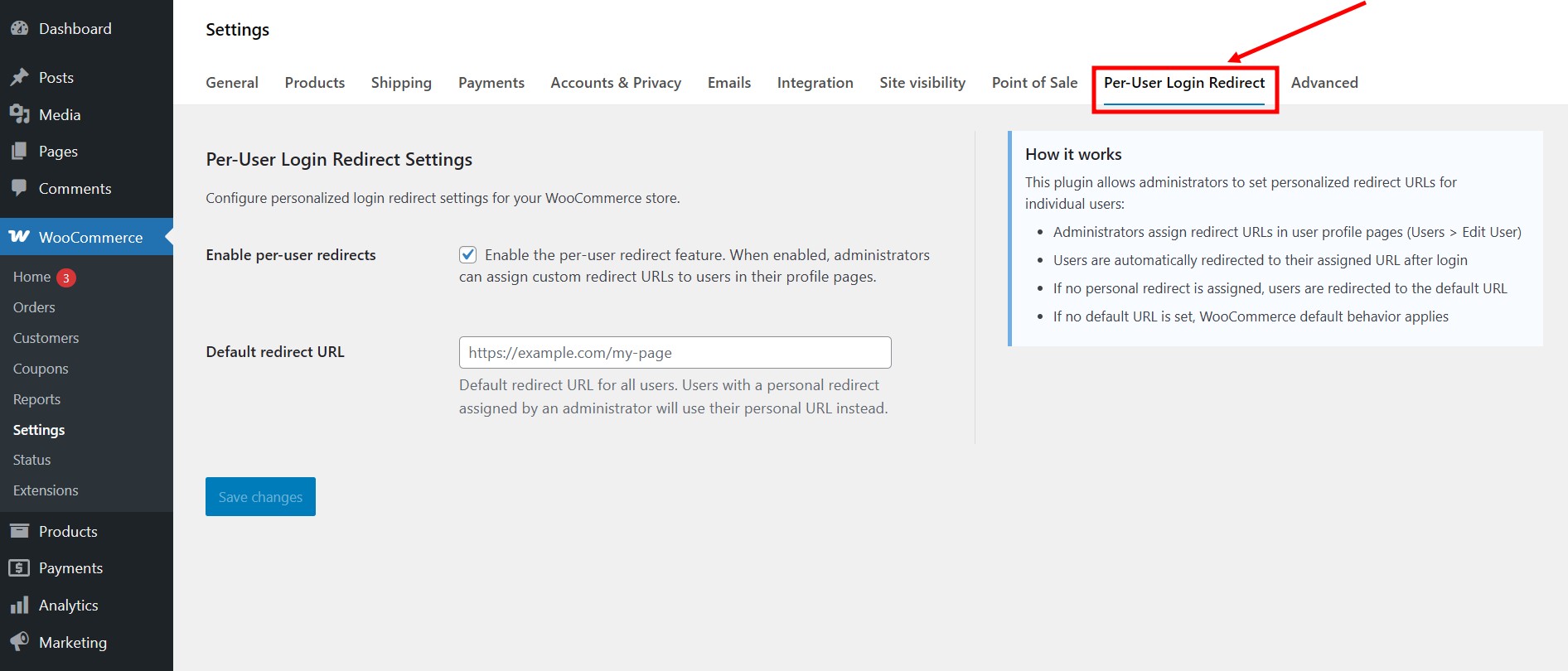
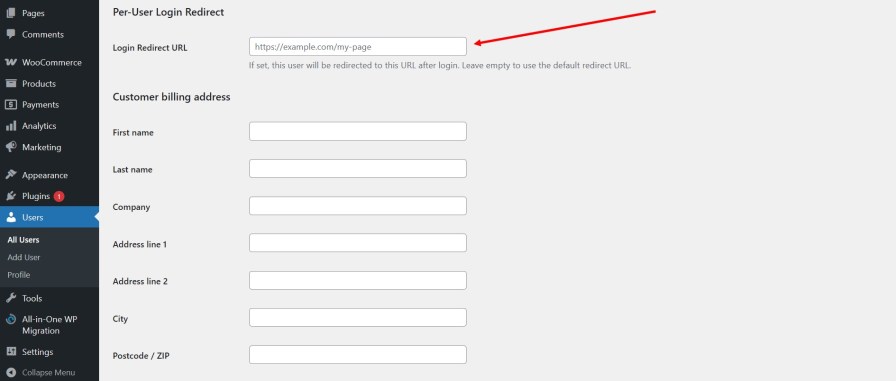
The extension adds redirect management to two locations in your WordPress admin:
When users log in, the system checks for redirect URLs in this priority order:
1. Personal redirect URL (set in user profile), highest priority
2. Default redirect URL (set in WooCommerce settings)
3. WooCommerce default (My Account page)
Personal URLs always override the default setting, giving you precise control over each user’s experience.
Install and activate the extension. Navigate to WooCommerce → Settings → Per-User Login Redirect. Enable the feature and optionally enter a default URL that applies to all users without personal assignments.
To assign personal redirects, edit any user in WordPress. Scroll to the login redirect section, enter their custom URL, and save. Next time they log in, they land on that page instead of the generic account dashboard.
All URLs undergo validation before saving. The system verifies proper formatting and prevents redirects to malicious or invalid destinations. Only administrators can configure redirect URLs-regular users cannot modify these settings.
The extension is lightweight, with redirect logic executing only during actual login events. No additional database queries affect regular page loads, ensuring zero performance impact on your site.
Works with any WordPress theme and WooCommerce configuration. Pairs naturally with WooCommerce Subscriptions and WooCommerce Memberships. HPOS (High-Performance Order Storage) is compatible and translation-ready.
The extension integrates at the WooCommerce level rather than modifying core functionality, ensuring compatibility with your existing setup without conflicts.
This extension provides direct control: you manually assign URLs to users. It does not include automated rules like “detect VIP status and redirect accordingly” or “analyze purchase history to choose destinations.” Those features would require different logic and complexity.
This approach is intentionally straightforward; you specify where each person should go, and the extension handles the redirection. Some stores need automated rules; others benefit from direct control. This extension serves the latter.
Yes! Administrators can assign unique redirect URLs to each user through their WordPress profile page. Each customer will be sent to their personalized destination after login.
Users without personal redirects will be sent to the default redirect URL configured in WooCommerce settings. If no default URL is set, WooCommerce's standard behavior applies (typically the My Account page).
No, redirect management is admin-only for security and control. Only administrators can view and modify redirect URLs through user profile pages.
Yes! The extension hooks into WooCommerce's core login system, so it works with checkout login, widget login forms, My Account pages, and any custom login forms.
Yes, you can redirect users to any valid HTTPS or HTTP URL. All URLs are validated for security to prevent malicious redirects.
No. The extension is lightweight and only executes during the login process. It has minimal impact on site performance.
Yes! The extension works with any WordPress theme that supports WooCommerce. It integrates at the WooCommerce level, ensuring universal compatibility.
Yes! The extension fully supports WooCommerce's High-Performance Order Storage and follows all modern WooCommerce best practices.
Extension information
Quality Checks
Countries








