

Subscription includes
Support
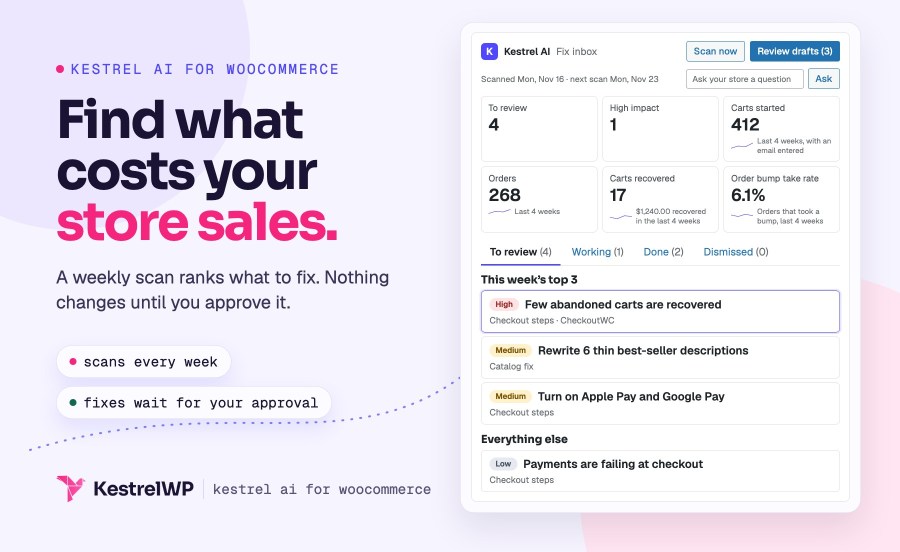
Kestrel AI scans your WooCommerce store every week for what is costing you sales, such as failed payments, a checkout with one payment method, and thin product descriptions on your best sellers. It ranks what it finds in a fix inbox, explains each finding, and fixes what it can after you approve, including AI product descriptions written in bulk, with undo for 90 days.
It runs on WordPress 7.0’s AI connectors with your own provider key: you connect a provider such as OpenAI, Anthropic or Google in Settings » Connectors, your provider bills your account, and a monthly spending cap stops Kestrel AI’s requests. Nothing changes on your store until you approve it. Checkout findings come as steps and drafts, and Kestrel AI never writes a payment or checkout setting. It needs WordPress 7.0 and WooCommerce 8.2.
The weekly scan runs in the background, so it never slows down wp-admin or your storefront. Findings land in WooCommerce » Kestrel AI, ranked by impact, and a finding that matches one of your store goals ranks above others of the same impact. Each finding shows the numbers behind it, so you can see why it ranks where it does.
The scan checks failed payments, a store with one payment method, express checkout, shipping zones with no methods, guest checkout and your refund, terms and privacy pages. With CheckoutWC active, it also checks cart recovery and order bumps. Each fix is a numbered list of steps that links to the exact screen, and Kestrel AI leaves the settings to you.
Choose Rewrite with Kestrel AI from the bulk actions on Products or Categories, or run it on all your published products. Kestrel AI drafts about three of your best sellers first, so you can check the tone and length before it drafts the rest. Then you review each draft beside the current text, approve it, or send it back with a note.
By default it fills thin and empty fields and leaves text you already wrote alone. The search description goes to Yoast SEO or Rank Math, whichever is active.
A Kestrel AI box on the product edit screen drafts the fields you pick for that product and applies the ones you select. When a best seller has a single photo, the inbox offers Improve photo: Kestrel AI makes a version on a clean white background with a cost estimate shown first, and adds it to the gallery once you approve it. You can undo it too.
On Products » Reviews, Draft a reply with Kestrel AI fills WordPress’s own reply box with a draft written from the review and your product facts. You edit it and send it yourself, and nothing posts until you do. A review that looks abusive or like spam is flagged, so you can decide whether to reply at all.
Ask your store answers questions such as how your best sellers are doing, from your own sales, products, failed orders and findings, and with CheckoutWC, carts and order bumps. It reads your data through read-only tools, checks that every number in the answer comes from that data, and shows what it looked at. It can’t change anything in your store.
Kestrel AI shows an estimate before each run and stops sending requests when your monthly cap is reached. The cap starts at $10, you can raise, lower or remove it, and you choose when to be warned. Pick a low-cost, balanced or best-quality model. Scans and store metrics keep working without AI.
Full steps are in the Get started with Kestrel AI guide, and Kestrel support is there if you get stuck. Built and supported by Kestrel.

Yes. Choose Rewrite with Kestrel AI from the bulk actions on Products or Categories, or write for all published products. It drafts a few best sellers first so you can check the brief, then you review every draft. Applied changes can be undone for 90 days.
No. Descriptions, photos and other catalog changes wait for your approval, and you can undo them. Checkout findings give you steps and unpublished CheckoutWC drafts: Kestrel AI never writes a payment or checkout setting and never sends or publishes a recovery email.
It uses the provider you connect in Settings » Connectors, such as OpenAI, Anthropic or Google, through that provider’s plugin. That provider bills your account. Kestrel AI shows an estimate before a run and stops at your monthly cap, set to $10 until you change it. The Anthropic connector can’t make images.
When you ask it to draft, it sends product data (titles, descriptions, attributes and image alt text) and review text to your provider. It sends no shopper personal data. The weekly scan and its email make no AI requests. Your provider handles what it receives under its own terms.
Yes. Kestrel AI works at no extra charge on a site where CheckoutWC is active with a valid, unexpired paid licence. CheckoutWC Lite doesn’t count. Without CheckoutWC, Kestrel AI needs its own licence.
Kestrel AI 2.0 requires WordPress 7.0 and no longer stores an OpenAI key, so you add your key in Settings » Connectors after updating (install the provider’s plugin first if you haven’t). The chat panel on product, order and review screens is gone, and your saved chat history is deleted. Your products, order notes and review replies are kept.
Extension information
Quality Checks
Countries







