Product Icon

Multi Vendor Marketplace for WooCommerce

Convert your existing WooCommerce Shop into a Multi Vendor Marketplace and allow users to register as vendors and sell their products.
Choose a billing option
$99
Save 20%
$198 $158.40

Product comparison

Subscription includes

  • Product updates and improvements
  • Customer support
  • 30-day money-back guarantee

Benefits

Low Operation Cost

In a Multi Vendor environment, the cost of operation would be less compared to a regular Online Shop because, the site Admin doesn’t have to maintain inventory since the product inventory will be handled by the Vendors.

Product Variety

When Multiple Vendors register themselves and add their products to the marketplace, the product list on the site will increase and hence the users will have a lot of products to choose from.

Offer Competitive Pricing to your Customers

When multiple Vendors sell the same product(s), the Vendors will start to price their products competitively and customers will purchase from the Vendor who is offering them the best price.

Key Features

1. Single Product Multiple Vendors

Product is Available from Multiple Vendors

You can allow multiple vendors to sell a same product on your Multi Vendor Marketplace.

2. Frontend Vendor Dashboard

Frontend Vendor Dashboard

A dedicated frontend dashboard for your Vendors using which they can perform the following actions,

  • Create Products/Modify Products
  • Create/Modify Coupons
  • Manage Orders
  • Request for Payout

3. Vendor Profile management

Customer Facing Vendor Profile

Option for the Vendor to display the following information on their Dashboard,

  • Store Logo
  • Store Banner
  • Store Description
  • Terms & Conditions
  • Vendor Address
  • Vendor’s Social Profile Links

4. Staff Management for Vendors

Vendor Has Two Staff to Manage their Account
Staff’s Login has Limited Access to Vendor Dashboard

Option for the Vendors to create Manage their Vendor Account by creating Staff Members.

5. Subscription Fee for Vendor
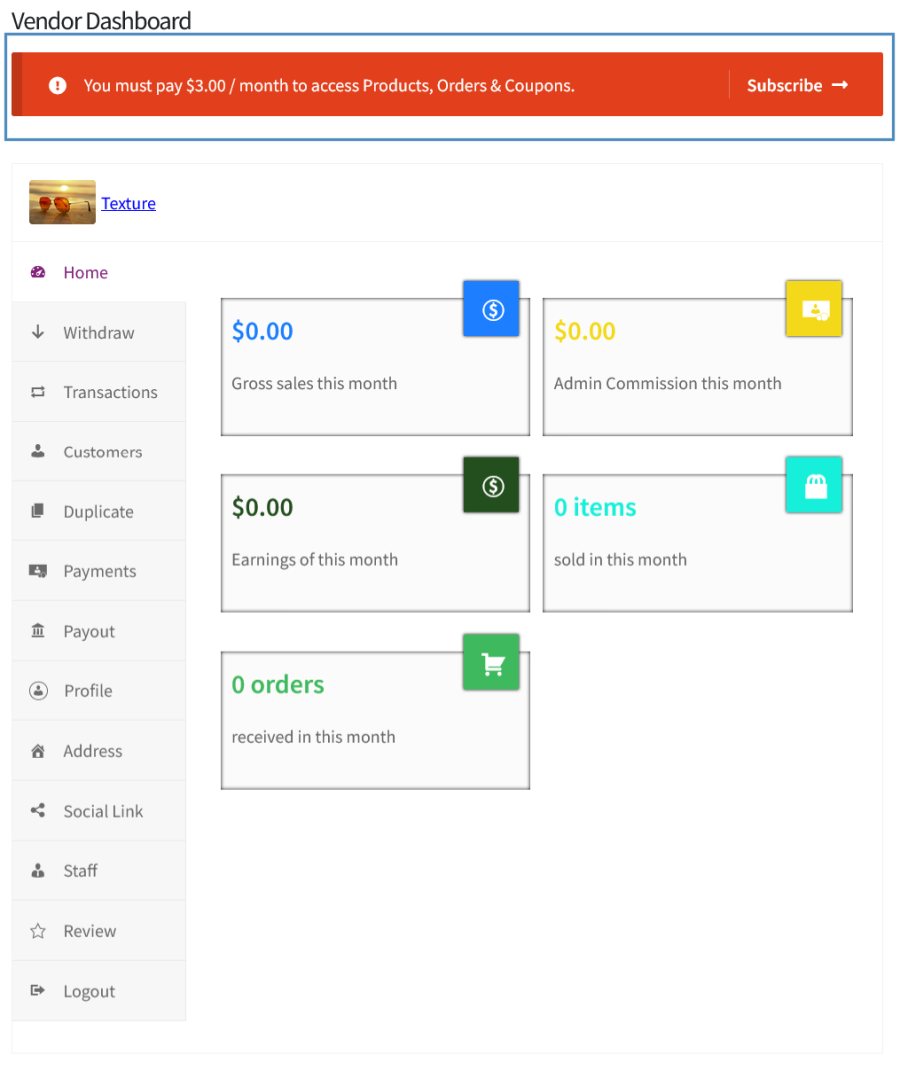
Vendor has to Pay a Fee to Manage their Vendor Dashboard

You can charge a recurring subscription fee from your Vendors for allowing them to sell products on your Marketplace. This feature requires WooCommerce Subscriptions Extension.

6. Additional Product Controls

Product Controls on Frontend Vendor Dashboard

You can offer/restrict the following product related capabilities to your vendors,

  • Product Creation
  • Product Modification
  • Published Product Modification
  • Manage Inventory
  • Product Deletion

7. Order Capabilities for Vendor

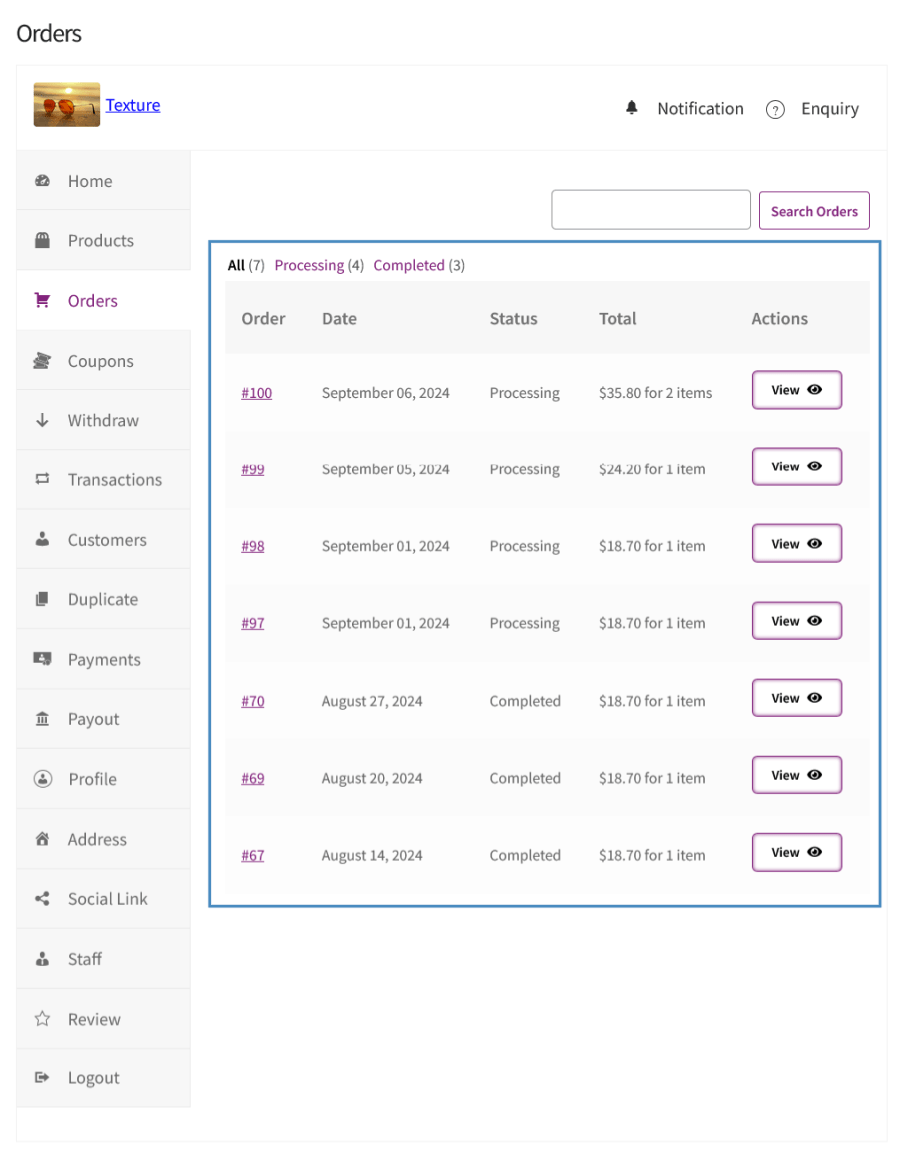
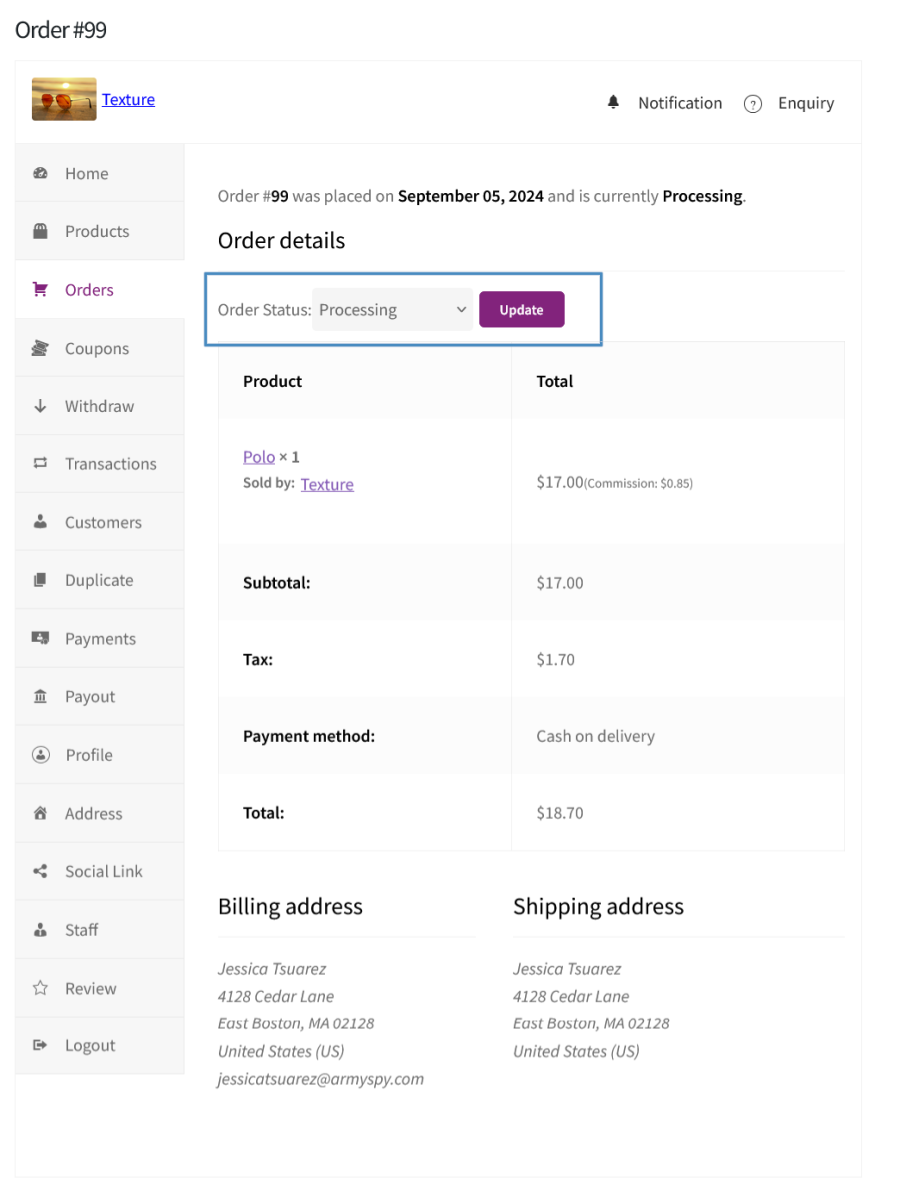
Order List from Vendor Dashboard
Order Management from Vendor Dashboard

You can allow your Vendors to Modify the Order status of the Orders.

8. Coupon Creation Capabilities for Vendor

Coupon Creation and Management from Vendor Dashboard

Option for the Vendors to Create/Manage WooCommerce Coupons which can be used by the users.

9. Product Enquiry
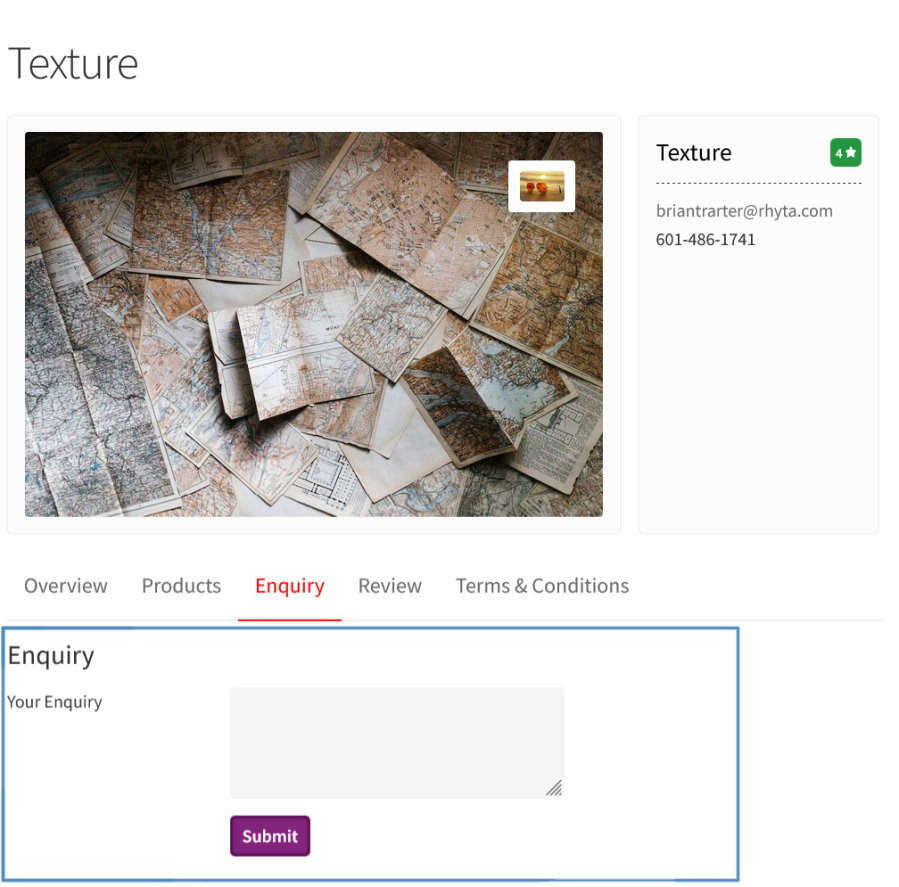
Enquiry Form on Customer Facing Vendor Profile
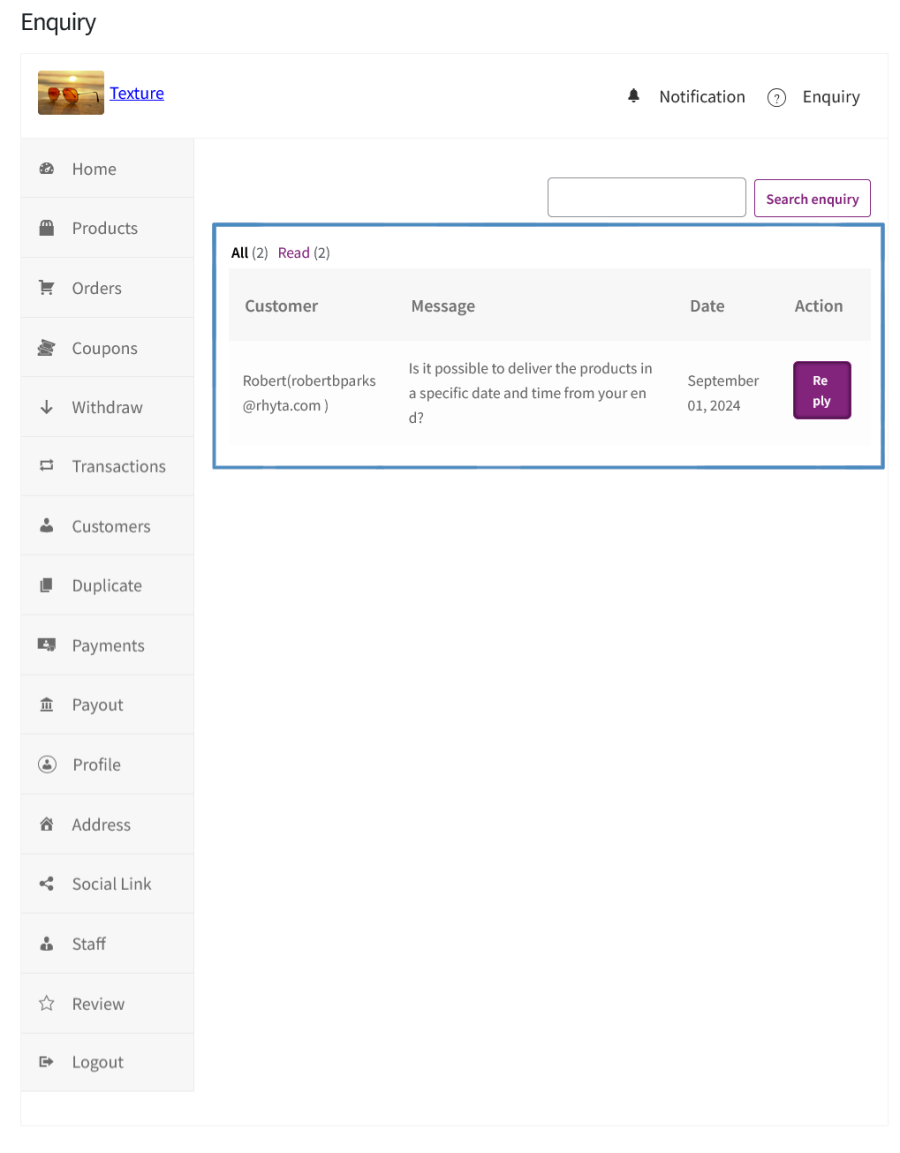
Vendors can View the Enquiry Posted from their Vendor Dashboard

Customers can directly post their questions to the Vendors and can receive a reply.

10. Store Reviews

Store Review on Customer Facing Vendor Profile
Vendors can View the Review Posted from their Vendor Dashboard

Customers can post their reviews about the stores from which they purchase the products.

11. Commission Withdrawal Charges

Withdrawal Charges

You can charge a fee from the Vendors for withdrawing their money to their account.

12. Generate Payout and Payout Log

Payout Type and Schedule Configuration
Payout Log

Option for the Site Admin to Pay Multiple Vendors at once using the Generate Payout option and a Payout Log to keep track of the payments made to the vendors.

13. Option to Calculate Admin Commission on the Price after applying the Vendor and Site Admin coupon Discount.

Popular Features

1. Vendor Registration & Onboarding

Allow new users to self-register from the frontend via a dedicated Vendor Registration page.

Key Capabilities:

  • Frontend vendor registration for both guests and existing logged-in users.
  • Admin approval workflow: Require site admin to approve vendor applications before activation.
  • Configurable registration fields: Enable or disable email, password, confirm password, vendor name, store name, and store slug fields.
  • Role-based access: Restrict which existing user roles are allowed to register as a vendor.
  • Terms & Conditions and Privacy Policy re-acceptance prompts when policies are updated.

2. Vendor Storefronts

Every vendor gets a dedicated public-facing storefront page showcasing their store banner, logo, and products. Customers can browse vendor products, view store policies, access social links, read vendor reviews, and submit store enquiries all from one page.

Key Capabilities:

  • Individual storefront page per vendor with a unique store URL.
  • Store banner and logo upload support for vendor branding.
  • Display of vendor’s address, email, contact number, and social links (configurable by admin).
  • Product listing on the storefront showing all active vendor products.
  • Store policies section for vendors to publish their return and shipping policies.
  • Enquiry form on the storefront for customer-to-vendor communication.
  • Vendor reviews displayed on the storefront to build buyer trust.

3. Frontend Vendor Dashboard

Vendors manage their entire store from a fully-featured frontend dashboard no WordPress admin access needed. Navigation covers all key sections: products, orders, coupons, withdrawals, payouts, staff, transactions, payments, profile, reviews, notifications, and more.

Key Capabilities:

  • Centralized frontend hub for all vendor management activities.
  • Dedicated sections for products, orders, coupons, withdrawals, payouts, staff, and more.
  • No admin access required: Vendors operate entirely from the frontend.

4. Product Management

Vendors create, edit, and manage products from the frontend dashboard.

Key Capabilities:

  • Product creation, modification, and deletion from the frontend dashboard.
  • Admin-controlled capability settings: Toggle product creation, modification, published product editing, and deletion per vendor.
  • Product approval workflow: Require admin approval before a vendor product goes live.
  • Allowed product types restriction: Admins define which WooCommerce product types vendors can list.
  • Inventory management capability toggle for vendor-level stock control.
  • Product duplication support from the vendor’s dashboard.

5. Order Management

Vendors view and manage their own orders from the dashboard.

Key Capabilities:

  • Per-vendor order listing: Each vendor sees only their own orders.
  • Full order detail view with customer info, line items, and order summary.
  • Order status modification capability (admin-configurable).
  • Commission info display toggle in the vendor order view.
  • Admin can filter orders by vendor in the WooCommerce admin order list.

6. Coupon Management

Vendors create and manage coupons from the frontend dashboard, subject to admin-controlled capabilities. Admins can require coupon approval and configure whether commission is calculated before or after vendor coupon discounts are applied.

Key Capabilities:

  • Vendor coupon creation from the frontend dashboard.
  • Coupon modification and deletion capabilities (admin-configurable).
  • Published coupon editing control to restrict post-approval changes.
  • Coupon approval workflow: Admin must approve vendor coupons before they activate.
  • Commission recalculation option: Calculate commission after vendor coupon discounts are applied.

7. Vendor Earnings, Commission Calculation, and Management

A flexible commission engine calculates earnings automatically.

Key Capabilities:

  • Global commission type: Fixed amount or percentage of order/product value.
  • Commission trigger: Choose which order status (e.g. Completed) activates earning calculation.
  • Tax inclusion/exclusion in commission calculations.
  • Commission recalculation after coupons: Support for both admin-created and vendor-created coupon discounts.
  • Per-vendor and per-product commission overrides for flexible earnings structures.
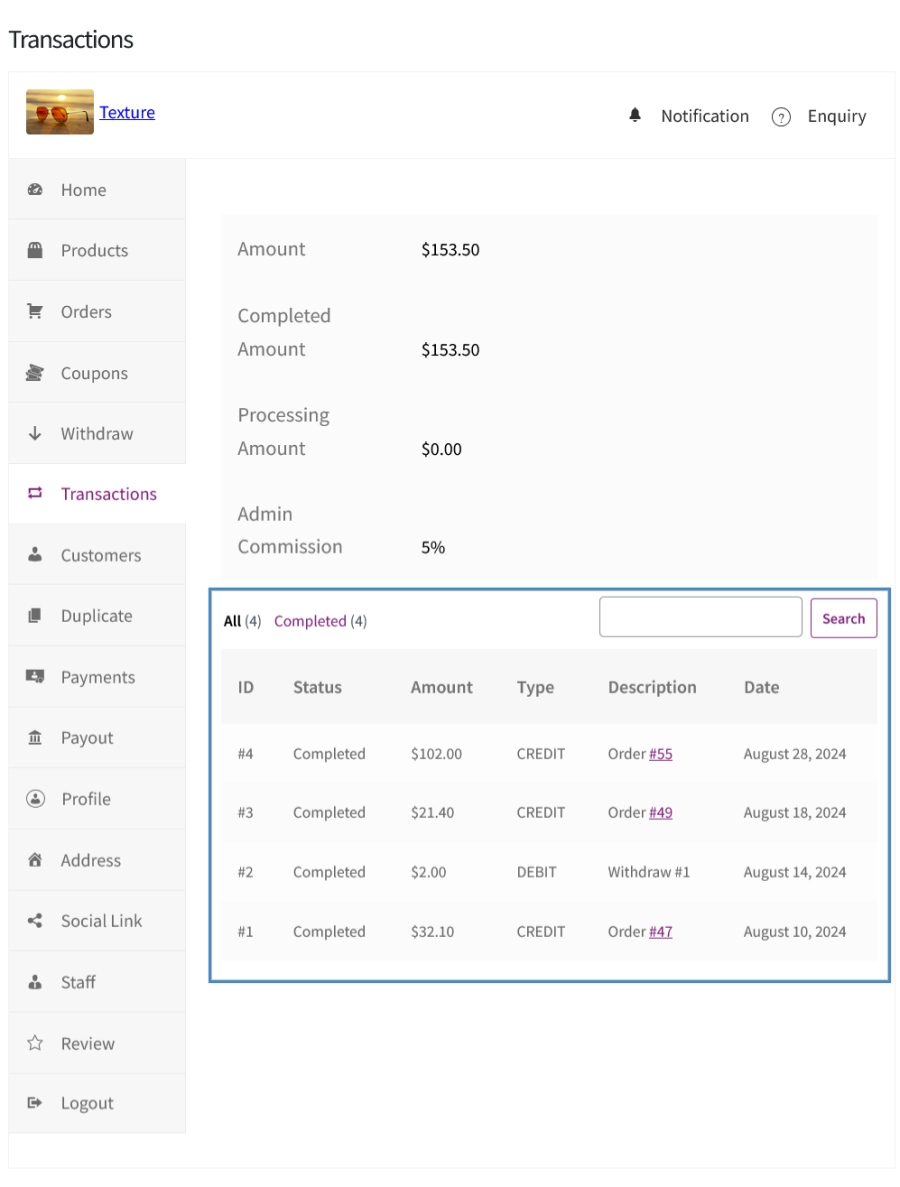
  • Vendor earnings transaction log accessible from the dashboard.

8. Vendor Withdrawal Requests and Charges

Vendors submit withdrawal requests for their earnings.

Key Capabilities:

  • Vendor-initiated withdrawal requests from the frontend dashboard.
  • Minimum commission threshold required before a withdrawal can be submitted.
  • Configurable payment methods for withdrawal (PayPal, bank transfer, and more).
  • Withdrawal charges: Enable a fixed or percentage-based fee deducted from each withdrawal request.
  • Scheduled withdrawal availability: Restrict when vendors can submit requests (by week, month, etc.).
  • Withdrawal history visible in the vendor dashboard with status, amount, charge, and payment method.

9. Automated Vendor Payouts

Automate earnings distribution with scheduled payouts (daily, weekly, or monthly) no manual intervention needed. PayPal Payouts integration enables direct automated transfers to vendor accounts.

Key Capabilities:

  • Automatic withdrawal mode with configurable schedule (daily, weekly, monthly).
  • PayPal Payouts integration for seamless automated transfers.
  • Sandbox and live mode support for PayPal configuration and testing.
  • Hide withdrawal options from vendor dashboard when automatic payouts are enabled.
  • Payout batch management from the admin panel for oversight and auditing.

10. Vendor Staff Management

Vendors add and manage staff members from the frontend dashboard, assigning granular capability permissions across products, orders, coupons, and more. Email notifications are sent automatically on staff assignment and removal.

Key Capabilities:

  • Add and manage multiple staff from the vendor frontend dashboard.
  • Granular staff capabilities: Toggle access for product management, order management, coupon management, and individual sub-actions.
  • Staff assignment and deletion with automated email notifications.
  • Admin visibility into all vendor staff from the backend.

11. Vendor Enquiry

Customers submit store enquiries via a form on the vendor storefront.

Key Capabilities:

  • Enquiry form on the vendor storefront for customer questions.
  • Enquiry inbox in the vendor dashboard with customer name, message, and date.
  • Inline reply capability from the dashboard — vendors respond without leaving the frontend.
  • Email notifications sent to vendors when a new enquiry is received.
  • Admin can enable or disable the enquiry form display on store pages.

12. Vendor Reviews & Ratings

Customers leave reviews and ratings on vendor storefronts.

Key Capabilities:

  • Customer-submitted vendor reviews displayed on the store page.
  • Reviews section in the vendor frontend dashboard for monitoring feedback.
  • Admin email notification when a new vendor review is submitted.
  • Display toggle: Admin can enable or disable review visibility on vendor storefronts.

13. Single Product Multi-Vendor Support

Enable Single Product Multiple Vendors (SPMV) to let multiple vendors sell the same product. Customers choose from available vendor offers on the product page, controlled globally via the SPMV settings panel.

Key Capabilities:

  • SPMV toggle: Enable or disable single product multi-vendor support site-wide.
  • Multiple vendors per product: Different vendors can list the same product with their own pricing.
  • Vendor offer selection displayed to customers on the product page.

14. Notifications on Vendor Dashboard

Vendors receive real-time dashboard notifications for key store events new orders, product approvals, withdrawal updates, and more via a dedicated notification inbox in the frontend dashboard.

Key Capabilities:

  • Notification inbox in the vendor frontend dashboard.
  • Notification types displayed: Type, message, and date.
  • Store Notification dashboard endpoint accessible via the dashboard navigation.
  • Real-time alerts for order activity, product status changes, and withdrawal updates.

15. Commission Tracking & Reporting

Track commission and earnings data via dedicated admin and vendor interfaces. The vendor earnings list gives admins per-vendor visibility, while vendors access their transaction history directly from the frontend dashboard.

Key Capabilities:

  • Admin vendor earnings list with per-vendor commission breakdown.
  • Transaction history accessible from the vendor frontend dashboard.
  • Commission data export capability for admin reporting.
  • Vendor overview dashboard in the admin with enhanced display and layout for earnings summaries.

16. Marketplace Settings & Controls

Admins control the entire marketplace through a comprehensive settings panel covering vendor registration, capabilities, commission, withdrawal, payment, profile management, SPMV, and advanced settings such as default pages, dashboard endpoints, and custom CSS.

17. Email Notifications

A comprehensive set of automated email notifications keeps admins, vendors, and staff informed on key marketplace events. All emails are customizable and built on WooCommerce’s email framework.

Extensive Feature List

Vendor Registration & On-boarding

  • Allow existing logged-in WordPress users to apply to become a vendor, with configurable control over which user roles are eligible (e.g. Customer, Subscriber, or any custom role).
  • Allow guest users to register directly as vendors without a pre-existing account.
  • Optionally require all vendor applications to be manually approved by the site Admin before the vendor account is activated.
  • Configure whether vendors must re-accept Terms & Conditions and Privacy Policy whenever those pages are updated.
  • Customize all registration form field labels individually: Email Address, Create Password,
  • Confirm Password, Vendor Name, Store Name, and Store Slug.
  • Dedicated Vendor Registration page powered by the [mvr_vendor_register] shortcode, assignable to any WordPress page.
  • Dedicated Vendor Login page powered by the [mvr_vendor_login] shortcode.
  • Vendors who begin registration but do not complete it are tracked as partial registrations, with an automated email notification available to nudge them to complete the process.

Vendor Profile & Store Management

  • Each vendor has a fully featured store profile with configurable details.
  • The configurable profile details allow vendor to personalize their store, establish their store URL, showcase their brand, provide information about their business, and manage their business location and contact information.
  • Store URLs are generated from the configurable Single Store Slug endpoint, creating clean and readable store URLs.
  • Vendors can manage social media links such as Facebook, X, YouTube, Instagram, LinkedIn, and Pinterest from their dashboard.
  • Store profile pages display information to shoppers about the stores handled by respective vendors.

Vendor Dashboard

  • Vendors access a fully featured frontend dashboard on a dedicated page.
  • The dashboard provides a home overview summarizing key metrics and activity at a glance.
  • The dashboard sidebar navigation includes: Home, Products, Orders, Coupons, Withdraw, Transactions, Customers, Reviews, Enquiries, Staff, Notifications, and profile editing sections.
  • Top navigation quick access for Notifications and Enquiries with unread count indicators.

Product Management from the Vendor Dashboard

  • Vendors can create, edit, and delete products from the frontend dashboard, subject to the permissions granted by the Admin.
  • Granular product capabilities configurable globally and per-vendor: Product Creation, Product Modification, Published Product Modification, Manage Inventory, and Product Deletion.
  • Admin controls which product types the vendors are permitted to create (e.g. Simple, Variable).
  • Newly created vendor products can be set to require Admin approval before going live or published immediately.
  • Vendors can duplicate existing products from the dashboard as a starting point for new listings.
  • Vendors can only access media files they have uploaded, preventing access to other vendor’s or Admin’s media library items.
  • Products are linked to their vendor and display vendor attribution on the product and store pages.

Single Product Multiple Vendors (SPMV)

  • Enable the Single Product Multiple Vendors feature so that multiple vendors can offer the same product with different pricing or terms.
  • Customers viewing a product can see and choose between the different vendor offers for that product on the product page.

Order Management

  • Orders containing a vendor’s products are automatically shared with the respective vendor, enabling them to manage order-related information through the vendor dashboard.
    • Vendors can view only the orders related to their own products.
    • The Orders section displays all orders containing the vendor’s products, with filtering and sorting capabilities for easier management.
  • Vendors can view full order details, including customer information, ordered items, and order status.
  • Optionally allow vendors to modify order statuses for their orders, subject to their assigned capabilities.
  • The Admin controls whether vendors can see commission information within their order details view.

Commission Management

  • Configurable global Admin Commission that is deducted from the vendor’s earnings on each qualifying order.
  • Commission Triggering Order Status is configurable.
  • Commission Type can be set as:
    • Fixed: a flat monetary amount per order.
    • Percentage: a percentage of the order value.
  • Commission Criteria: configure the conditions under which the admin commission structure becomes applicable:
    • From the vendor’s very first order.
    • After the vendor reaches a specified number of orders.
    • After the vendor exceeds a defined cumulative earnings threshold.
    • When the vendor’s product price exceeds a specified amount.
  • Tax Calculation options: tax charged to Admin only, to vendor only, or shared between both.
  • Control whether commission is calculated before or after Admin-created coupons are applied.
  • Control whether commission is calculated before or after vendor-created coupons are applied.
  • Commission records are tracked with statuses: Paid, Pending, and Failed.
  • Commission is sourced from both orders and withdrawal charges, tracked separately per source.
  • The Commission entries represent the commission-related information.

Vendor-Level Commission Override

  • Each vendor’s commission can be set to pull from the Global settings or configured with fully Custom values specific to that vendor.
  • Per-vendor commission configuration includes: Commission From (global or custom), Commission Criteria, Criteria Value, Commission Type, Commission Value, Tax Calculation, and coupon calculation toggles.

Withdrawal System

  • Enable vendors to submit withdrawal requests to receive their earnings.
  • Configure which payment methods are available for withdrawal: Bank Transfer and/or PayPal.
  • Optionally, a minimum commission threshold that must be reached before a withdrawal request can be submitted.
  • Configure a withdrawal waiting period for setting up he number of days after a successful order completion before the earned commission becomes available for withdrawal.
  • Automatic withdrawal scheduling with granular frequency options: Daily, Weekly (with configurable start day), Bi-Weekly/Monthly Twice (with configurable week and day), Monthly (with configurable week and day), and Quarterly (with configurable month, week, and day).
  • Optionally hide the withdrawal interface when automatic payouts are configured, since manual requests would be unnecessary.
  • Apply a withdrawal charge (Fixed or Percentage) deducted from the vendor’s requested withdrawal amount.
  • Each vendor can setup their own custom withdrawal configuration that overrides global withdrawal settings, including custom charge type and charge value.
  • Withdrawal records are managed via a dedicated Admin list table.
  • Admin can approve or reject withdrawal requests from the Admin interface.
  • Vendors receive email notifications when their withdrawal is approved or rejected.

Payout Processing

  • Disburse vendor payouts in bulk through the PayPal Payouts API, with funds sent directly to vendors’ PayPal email addresses.
  • Bank Transfer payouts are managed manually and tracked for reference.
    The payout section displays the details of each payout.
  • Payout Batch management groups multiple PayPal payouts into a single batch submission with batch-level notes and status tracking.
  • Export withdrawal data to CSV with selectable columns and filtering by vendor, payment method, and withdrawal status.
  • Export bank transfer payout details as CSV files with filters for vendors and payment methods.

Transaction Logs

  • Every financial movement in the system, the commissions earned, withdrawals processed, and charges deducted is recorded as a transaction for tracking and reference.
  • Vendors can view their complete transaction history from the dashboard, providing full financial transparency.

Vendor Staff Management

  • Optionally allow vendors to create and manage staff members to help operate their store.
  • Each staff member is a separate WordPress user assigned to the vendor’s account.
  • Staff capabilities mirror the vendor capability model — Admins can configure precisely which actions each staff member can perform
  • Automated email notifications are sent when staff are assigned or removed from a vendor’s account.
  • Admin can view all staff members and their associated vendors in the admin dashboard Staff section.

Vendor Capabilities System

  • Default permissions for new vendors are controlled through global capability settings, with the flexibility to customize them per vendor.
  • Product Management capabilities: The product management module allows the permission for Product Creation, Product Modification, Published Product Modification, Manage Inventory, Product Deletion, and permitted product types.
  • Order Management capabilities: The Order Management module allows the permission for Order Status Modification and Commission Info Display.
  • Coupon Management capabilities: The Coupon management module allows the permission for Coupon Creation, Coupon Modification, Published Coupon Modification, and Coupon Deletion.
  • Administrators can configure capabilities for individual vendors, allowing customized exceptions while preserving the global defaults.

Vendor Coupon Management

  • Vendors can create, edit, and delete coupons from the dashboard, subject to their assigned capabilities.
  • Vendor coupons require Admin approval (configurable) before becoming active.
    Vendor-created coupons are linked to the vendor.
  • Email notifications are sent to vendors when their coupon is approved or rejected.

Customer Enquiry System

  • Shoppers can send enquiries to individual vendors via an enquiry form on the store page.
  • Vendors receive enquiry notifications and can view and reply to customer enquiries from the dashboard Enquiry section.
  • The Admin can view all enquiries across all vendors from the Admin’s Enquiry list table.
  • The unread enquiry count is notified to the vendor via the vendor dashboard.

Vendor Review System

  • Enable or disable customer reviews for vendors via the Profile Management settings.
  • Vendors can view all reviews they have received from the dashboard’s Reviews section.
  • The Admin can manage all vendor reviews from the Admin’s Reviews list table with moderation capabilities.
  • The vendor’s average rating and review count are maintained and shown on the store page when enabled

Vendor Notification System

  • Vendors receive in-dashboard notifications for key events within their store.
  • Vendors can view and manage all notifications from the dashboard Notifications section.
  • Admin can manage all notifications from the Admin’s Notifications list table.

Vendor Subscription (WooCommerce Subscriptions Integration)

  • Optionally require vendors to hold an active WooCommerce Subscription to maintain their vendor status.
  • Configure a specific WooCommerce subscription product as the required vendor subscription.
  • The vendor list table shows each vendor’s subscription status when this feature is active.
  • Vendor subscription status is tracked on the vendor entity and displayed to the Admin.

Vendor Payment Configuration

  • Each vendor configures their preferred payment method for receiving payouts: Bank Transfer or PayPal.
  • Bank Transfer configuration captures: Account Name, Account Number, Account Type, Bank Name, IBAN, and SWIFT code.
  • Admin can define custom form fields for bank transfer configuration, which appear both in the Admin vendor record and the vendor’s dashboard payment settings, supporting unlimited custom data collection for bank transfer setup.
  • PayPal configuration captures the vendor’s PayPal email address for automated payout processing.

Email Notifications

  • Comprehensive automated email notification system covering all major marketplace events.

Store Profile Display Controls (Admin)

  • The Admin controls which elements are visible on public vendor store pages: vendor reviews, address, email, contact number, social links, product listing, store policies, and the enquiry form — each can be independently shown or hidden.

Shortcodes

  • Shortcodes supported

Admin Management & Reporting

  • Dedicated Multi-Vendor Admin menu in the WordPress Admin with applicable sections.
  • The Vendor list table displays details related to vendors.
  • The Vendor overview dashboard shows a consolidated view of vendor earnings and activity.


Customer reviews

We are accepting reviews for this product, and will display them when we get a few more.

Extension information

  • PHP version required: 7.4.0
  • Tested with WordPress: 7.0
  • Tested with WooCommerce: 10.8.1
  • Requires at least WordPress: 6.2
  • Requires at least WooCommerce: 8.2.0

Countries

  • Worldwide

Related Products

Price $279 annually
Rated 3.2 out of 5 stars
Price $79 annually
Rated 3.4 out of 5 stars
Price $59 annually
Rated 3.1 out of 5 stars
Price $109 annually
Rated 2.7 out of 5 stars
Price $49 annually
Rated 4.1 out of 5 stars
Price $109 annually
Rated 2 out of 5 stars
Price $109 annually
Rated 2.3 out of 5 stars
Price $109 annually
Rated 2.6 out of 5 stars
Price $109 annually
Rated 2.3 out of 5 stars
Use of your personal data
We and our partners process your personal data (such as browsing data, IP Addresses, cookie information, and other unique identifiers) based on your consent and/or our legitimate interest to optimize our website, marketing activities, and your user experience.