

Product comparison
Subscription includes
Support
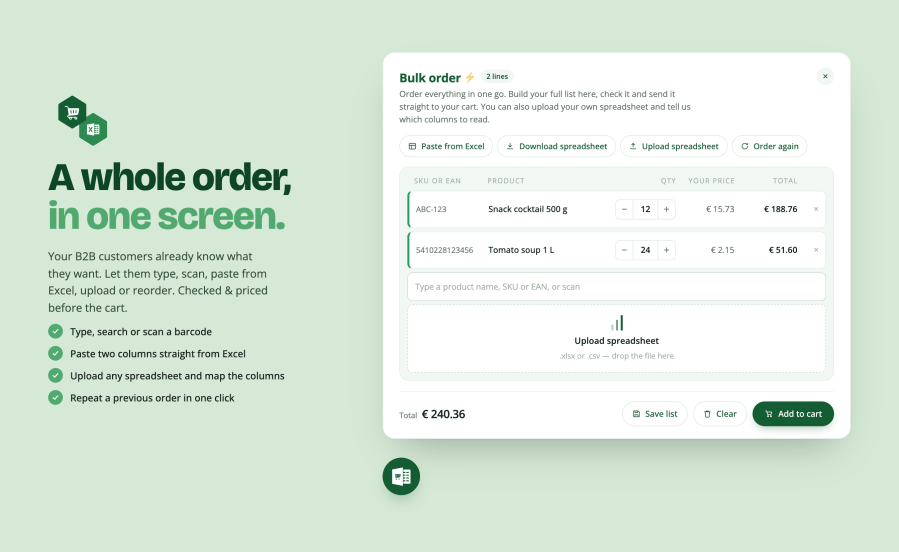
Wholesale customers don’t browse. They arrive with a list, in a spreadsheet, in a scanner, or in their head from last month’s order. Every click between that list and the cart is friction. Bulk Order Entry gives them one table and five ways to fill it. Every line resolves as it’s entered, against SKU, barcode or your own product code, with the customer’s own price. Anything that doesn’t match stays on screen to be fixed, instead of disappearing silently.
One form, and it meets the customer wherever their list already is. Turn off the ones you don’t need.
Order again: signed-in customers get their saved lists and their recent orders, one click to load either back into the form.
A code goes in and the line answers immediately: the product it matched, the price that customer pays, and what it comes to. Nobody reaches the cart to find out something was wrong.
Nothing disappears: a code that matches nothing stays on screen, marked, with its quantity intact, so it can be corrected. It is never silently dropped.
Plug in any USB or Bluetooth scanner, nothing to configure. The form tells a scan from typing and handles the two things people actually do at a shelf. Scan the same item repeatedly and each scan adds one or scan once and type a number instead. Either way the line flashes so you can see it landed, the field clears itself, and it is ready for the next box without anyone touching the screen.
WooCommerce’s own GTIN, UPC and EAN field is searched out of the box. If your barcodes live somewhere else: an import plugin, a custom field, your ERP’s own code, name that field in settings and it is searched too.
Customers download a catalogue of everything they are allowed to order, fill in the quantity column and upload it back. CSV, XLS and XLSX all read.
The file follows your shop. If you sell where prices are written with a comma, the download is separated with semicolons so it opens straight into columns in Excel rather than as one long line per row.
Customers who would rather send their own file can. Upload anything with a product column and a quantity column, then point the form at which is which. A supplier’s export works as well as yours.
Put it wherever your customers already are:
[bulk_order_entry], dropped into any editor.Bulk ordering is usually made available for some customers and some products, not all of them. Yours to control:
Texts & translations: every visible string is editable, per language, so the form uses your store’s tone of voice.
Templates can be overridden from your theme the ordinary WooCommerce way. Fourteen filters and actions cover the things a developer needs.
Find out what Bulk Order Entry can do for you:
[bulk_order_entry] shortcodeYes. The form asks WooCommerce what that customer would pay, the same way the shop page does, so whatever sets your prices, role pricing, tiered pricing, a B2B plugin, shows through in the table and in the total.
Only for saved lists and reordering, which need somewhere to save to. Typing, scanning, pasting and uploading all work for guests if you allow it, and you can restrict the whole form to chosen roles.
The line stays on screen, marked, with its quantity kept, and says so plainly. Nothing is dropped quietly. Four fields are searched before a code is called a miss: your SKU, WooCommerce's GTIN/EAN/UPC field, a product field of your own naming, and the product ID.
Yes. Variations are resolved, priced and ordered like any other product, and can be excluded one at a time.
It takes five colours and derives everything else from them, so it cannot end up half-branded. It works on a light or a dark background, and both templates can be overridden from your theme if you want to go further.
Not at all, the widget loads nothing on pages where it does not appear. Where it does, lookups and assets are optimized to ensure fast loading times.
CSV, XLS and XLSX. The separator is detected on the go, so a file saved by a Dutch, German or French copy of Excel reads as well as an English one.
Into eighteen locales across Dutch, French, German, Spanish and English, and every visible string can also be overridden per language in settings. WPML, Polylang and Weglot are supported.
Extension information
Quality Checks
Compatibility
Countries
Languages







