Product Icon

Smart Coupon Manager for WooCommerce

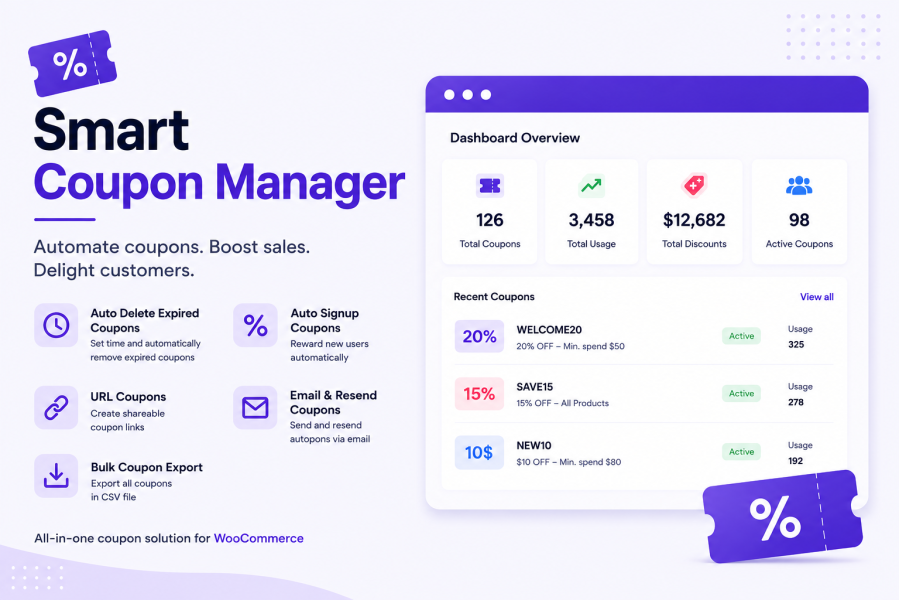
Automate WooCommerce coupons with signup rewards, bulk discounts, expiry rules, and smart usage controls.
Choose a billing option
$49
Save 20%
$98 $78.40

Subscription includes

  • Product updates and improvements
  • Customer support
  • 30-day money-back guarantee

  • Auto-generate unique coupons for new user signups, with automatic email delivery.
  • Create and manage coupons for existing customers based on roles or order history.
  • Show a customizable “Available Coupons” panel on the cart page — customers apply any coupon with one click.
  • Generate shareable coupon links that auto-apply a coupon (and add products) the moment someone visits — perfect for email, WhatsApp, and social media campaigns.
  • One-click sharing to WhatsApp, Facebook, X, and LinkedIn.
  • Protect signup coupons from abuse — block repeat use from the same email or shipping address.
  • Choose from 8 coupon card designs and 6 color palettes to match your store’s branding.
  • Automatically clean up expired or fully-used coupons on a schedule you control (from 1 hour up to 6 months).
  • Feature any hand-picked coupon in the Available Coupons panel, alongside the automatic ones.Export your coupons to CSV, complete with shareable links for each one.
  • Fully compatible with both the classic WooCommerce cart and the new Cart block.
  • Set custom expiry durations for each coupon.

Smart Coupon Manager for WooCommerce is a powerful, easy-to-use plugin that automates your entire discount strategy. Auto-generate coupons on signup, bulk-apply discounts by role or purchase history, and let customers apply offers with one click from a customizable cart-page panel — no code typing needed.

Turn any coupon into a shareable link that applies itself on click, and share it straight to WhatsApp, Facebook, X, or LinkedIn. Built-in abuse protection blocks repeat signup-discount claims, and automatic cleanup keeps expired coupons from piling up.

You can also set minimum and maximum order amount conditions, so discounts only apply when the cart total is within your desired range.

Auto Coupon on Signup

Automatically generate unique coupons for users as soon as they register a perfect way to welcome new customers and encourage their first purchase.

WooCommerce auto coupon for new customer registration

One-Click Coupon Apply

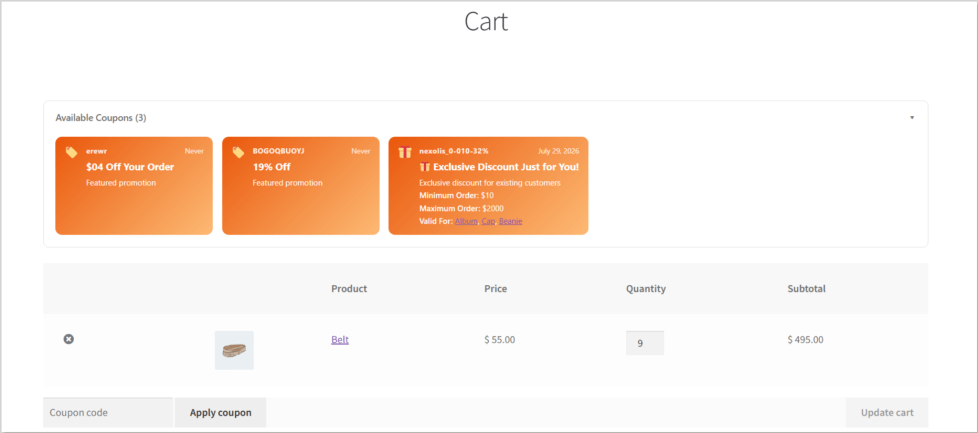
No more copy-pasting codes. A stylish “Available Coupons” panel appears right on the cart page — customers just click a card and the coupon applies instantly. Fully compatible with both the classic cart and the new WooCommerce Cart block.
Minimum & Maximum Amount Conditions

Set minimum and maximum cart totals required to apply a coupon perfect for restricting discounts based on order value.

Coupon not applicable unless cart total meets minimum or maximum amount condition in WooCommerce

Shareable Coupon Links

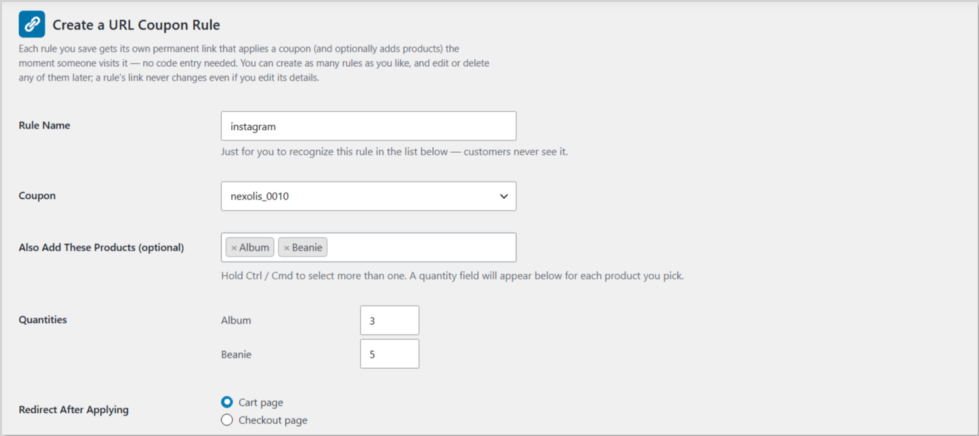
Turn any coupon into a link. Visiting it applies the coupon (and can add specific products) automatically, then redirects wherever you choose — your cart, checkout page. Perfect for email newsletters, Instagram bios, and paid ads.
Share to Social Media

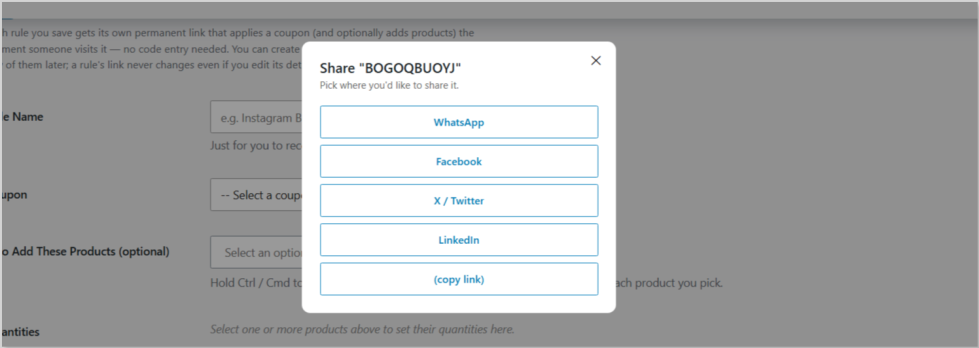
Send any coupon link straight to WhatsApp, Facebook, X, or LinkedIn with one click from the admin panel — no manual copying required.
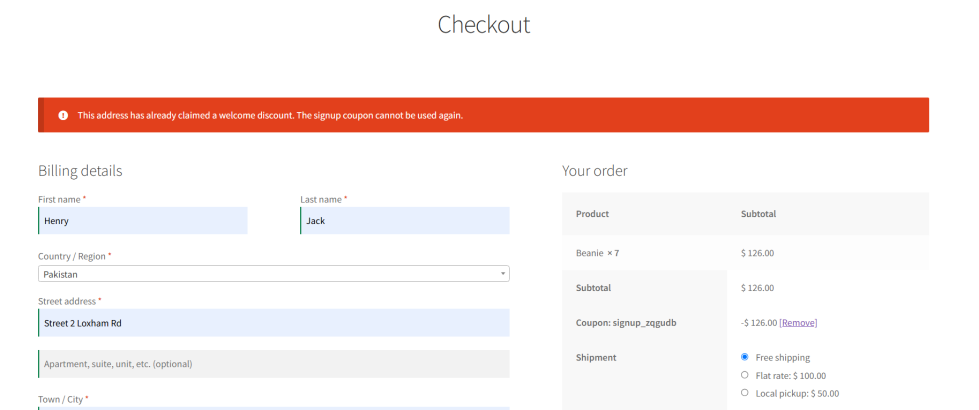
Coupon Abuse Protection

Stop customers from claiming your welcome discount twice with a different email. The plugin checks both email address and shipping address against previous orders before allowing a signup coupon to be applied.
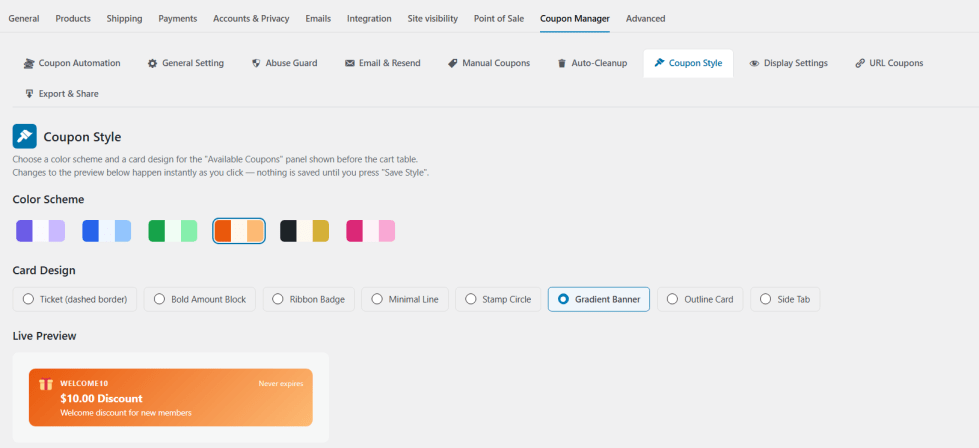
Customizable Coupon Design

Choose from 8 card styles — Ticket, Bold Amount, Ribbon, Minimal, Stamp, Gradient Banner, Outline, and Side Tab — and 6 color palettes, with a live preview as you customize.
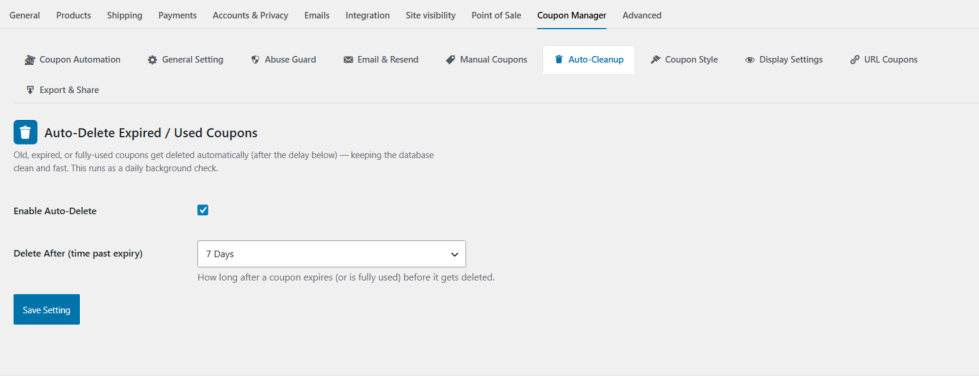
Automatic Cleanup

Keep your coupon list tidy. Expired or fully-used coupons are deleted automatically on a schedule from 1 hour to 6 months — no manual housekeeping required.
 Coupon Management

Easily enable bulk coupon codes for users who match your criteria (like past orders or user roles). Reduce manual work with automatic assignment.

WooCommerce bulk coupon creation and management for multiple customersWooCommerce bulk coupon creation and management for multiple customers

User Role & Order-Based Rules

Target specific groups like “Customers with 3+ orders” or “Wholesalers only” using flexible role and order-count-based rules.

WooCommerce coupon rules based on user roles and customer order history

Product & Category Restriction

Apply coupons only to selected products or categories, giving you tighter control over what discounts apply to.

Apply WooCommerce coupons to selected products or categories only

Use Cases

  • Automatically welcome new signups with a personalized discount coupon, delivered by email and shown on the cart page.
  • Reward loyal or repeat customers with bulk coupons targeted by role or order history.
  • Turn any coupon into a shareable link for WhatsApp, Instagram, or email campaigns that applies itself on click.
  • Let customers apply coupons on the cart page with one click — no code typing required.
  • Prevent the same customer from claiming your welcome discount twice using a different account.
  • Match coupon design to your brand with customizable card styles and color palettes.
  • Automatically delete expired or used-up coupons on a schedule you control.
  • Export all your coupons to CSV for reporting or sharing with your team.

Benefits

  • Saves time by automating coupon creation, delivery, and cleanup.
  • Increases conversions by making coupons easier to discover and apply.
  • Protects revenue by blocking repeat abuse of signup discounts.
  • Gives your store a more professional, on-brand coupon experience.
  • Extends your marketing reach beyond email through shareable links and social sharing.
  • Works seamlessly with both the classic WooCommerce cart and the new Cart block.
  • Keeps your coupon list organized as your store scales.

Frequently asked questions

Will this plugin automatically generate a coupon for each new user?

Yes, when the auto-coupon feature is enabled, each new registered user will get a unique coupon.

Can I restrict the coupon to specific products or categories?

Yes, you can choose which products or categories the coupon applies to from the settings.

How does the plugin handle coupon expiry?

You can either set a fixed expiry date or define the number of days after issuance.

Is it compatible with all WooCommerce themes?

Yes, the plugin is designed to be lightweight and compatible with most WooCommerce-compatible themes.

Can I limit coupons to certain user roles or order counts?

Absolutely. You can define which roles are allowed and also set a minimum order count condition.

Can customers apply a coupon without typing a code?

Yes — the Available Coupons panel on the cart page lets customers apply any eligible coupon with a single click.

Can I share a coupon on WhatsApp or social media?

Yes — every coupon can be turned into a shareable link, and you can post it directly to WhatsApp, Facebook, X, or LinkedIn from the plugin's admin screen.

Can I stop someone from using my signup coupon twice with a different account?

Yes — enable the Abuse Guard, which blocks a repeat signup discount from the same email or shipping address.

Extension information

  • PHP version required: 7.2
  • Tested with WordPress: 7.0.2
  • Tested with WooCommerce: 10.9.4
  • Requires at least WordPress: 5.0
  • Requires at least WooCommerce: 3.0

Countries

  • Worldwide

Related Products

Price $79 annually
Rated 3.4 out of 5 stars
Price $279 annually
Rated 3.2 out of 5 stars
Price $59 annually
Rated 3.1 out of 5 stars
Price $109 annually
Rated 2.7 out of 5 stars
Price $109 annually
Rated 2 out of 5 stars
Price $49 annually
Rated 4.1 out of 5 stars
Price $109 annually
Rated 2.3 out of 5 stars
Price $109 annually
Rated 2.6 out of 5 stars
Price $109 annually
Rated 2.3 out of 5 stars
Use of your personal data
We and our partners process your personal data (such as browsing data, IP Addresses, cookie information, and other unique identifiers) based on your consent and/or our legitimate interest to optimize our website, marketing activities, and your user experience.




