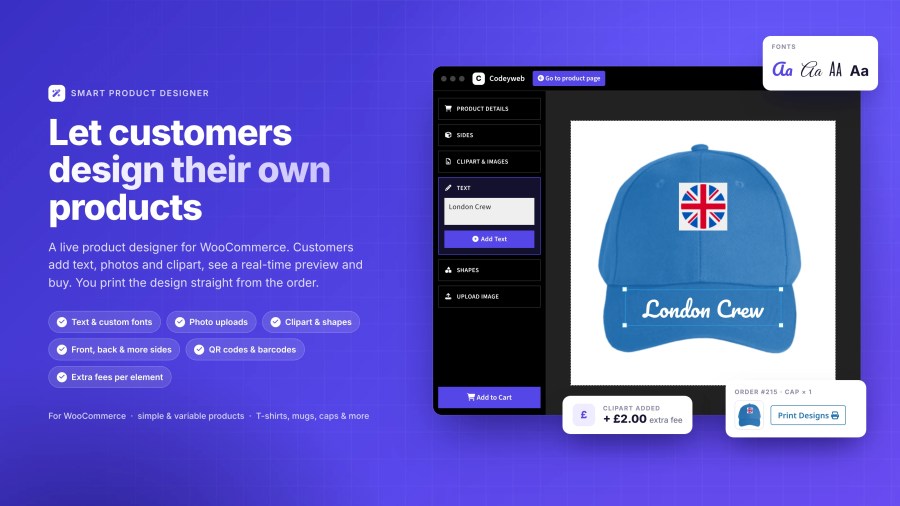
Shoppers don’t just want to buy – they want to create. Smart Product Designer lets customers design their own products directly on your store: add text, upload photos, place cliparts, and preview exactly what they’re getting before they buy.
You get a print-ready file with every order. No manual file prep. No back-and-forth. Just click, print, and ship.
Works with any product in your store – simple or variable. Popular use cases include:
T-shirts and hoodies:Â front, back, and sleeve design
Mugs and drinkware:Â wrap-around photo and text personalization
Business cards:Â text, QR codes, and custom fonts
Phone cases, caps, posters, tote bags, and more
This slideshow requires JavaScript.
Multi-surface design
Design front, back, and sleeves independently. Perfect for apparel and items with multiple customizable areas.
Print-ready output
Every design appears print-ready on the order screen. Click, print, ship, it’s that simple.
Upload images
Let customers upload their photos in common formats like JPG, PNG, and GIF for truly personal products.
Custom Text & Unlimited Font Options
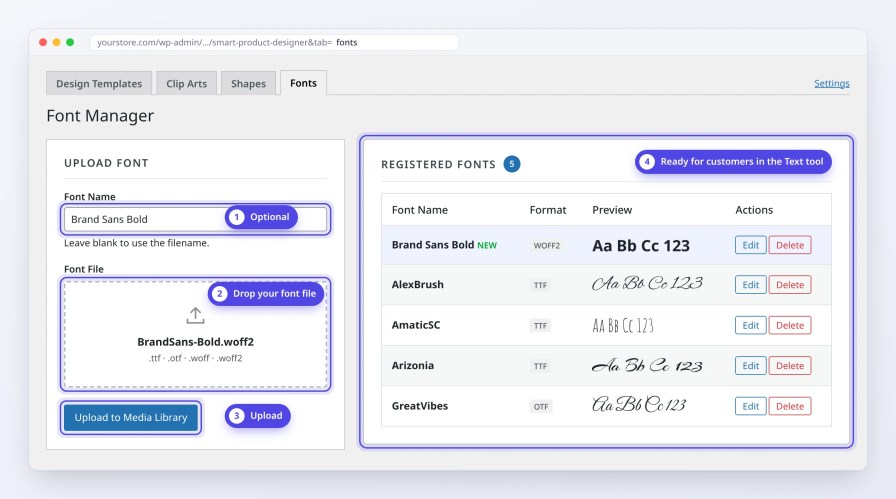
Let customers personalize with names, messages, and custom text. Choose from built-in fonts or upload your own branded fonts as an admin, total control over typography for both you and your customers.
Shapes and cliparts
Pre-made design elements make customization simple, even for customers with no design experience.
QR codes and barcodes
Generate QR codes and barcodes for business cards, promotional items, or any product that needs them.
Everything Admins Need to Run a POD Store
Smart Product Designer gives you full control over how products are presented, designed, and fulfilled, all from your WordPress admin.
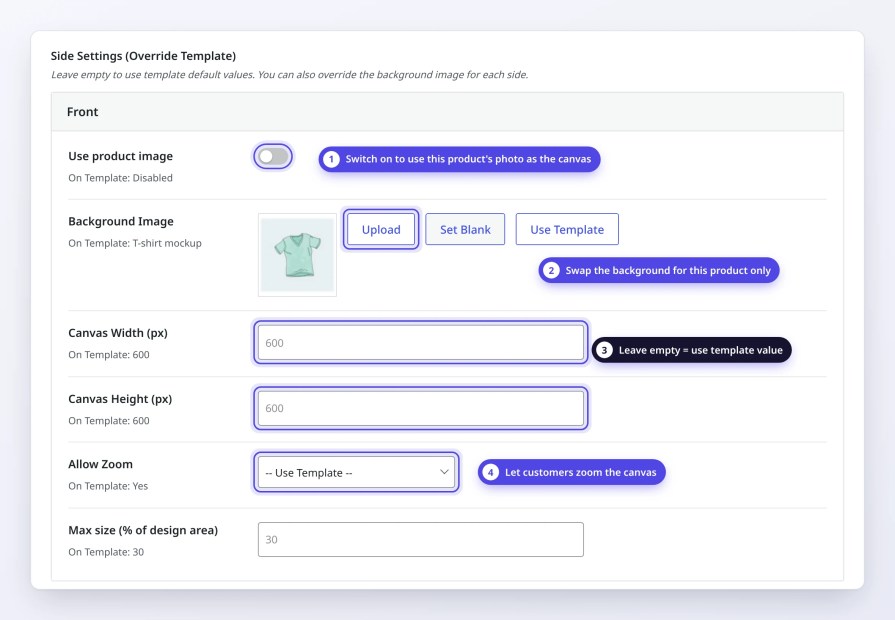
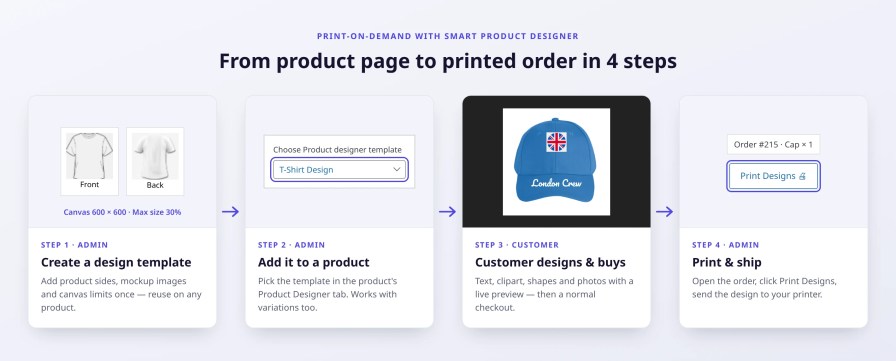
Multi-Side Design Templates with Full Canvas Control: Add multiple sides to any template (Front, Back, Sleeve, and more), each with its own mockup image and design settings. Every side can be fully configured with its own canvas size, zoom controls, and element size limits, and can also be set up differently for each product and variation.
Canvas size, zoom controls, and maximum element sizes per template
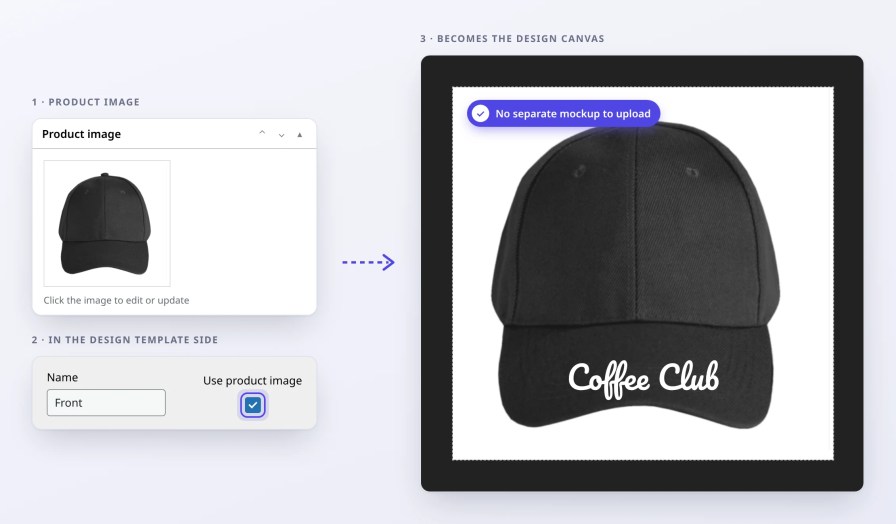
Use your existing product or variation image as the design canvas background automatically
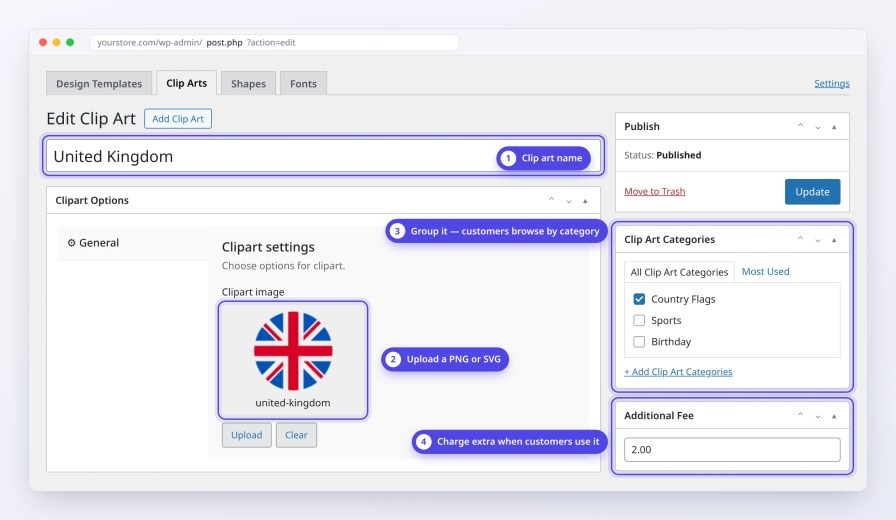
Custom Fonts, Cliparts, and Shapes: Upload your own fonts and build a library of cliparts and shapes for customers to use. Organize them into categories and set an additional fee for premium elements, turning your design library into a revenue stream.
Dynamic pricing: Set base prices and add-on costs for premium elements. Charge extra when customers add cliparts, shapes, or multiple design elements. Pricing updates automatically.
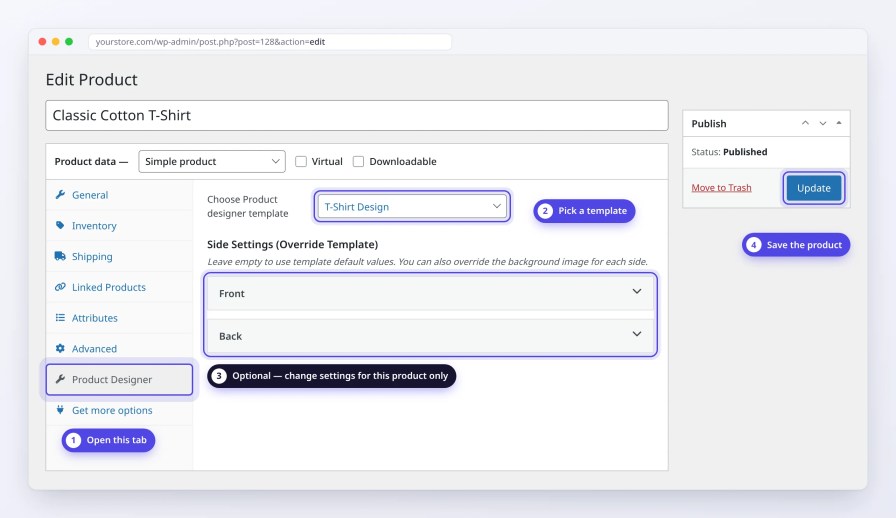
Product-Level and Variation-Level Template Settings: Assign a design template to any product or variable product. Override template settings, including canvas background image or design options at the product or variation level for full flexibility across your catalog.Change the background, canvas size or image for one product, the template stays unchanged.
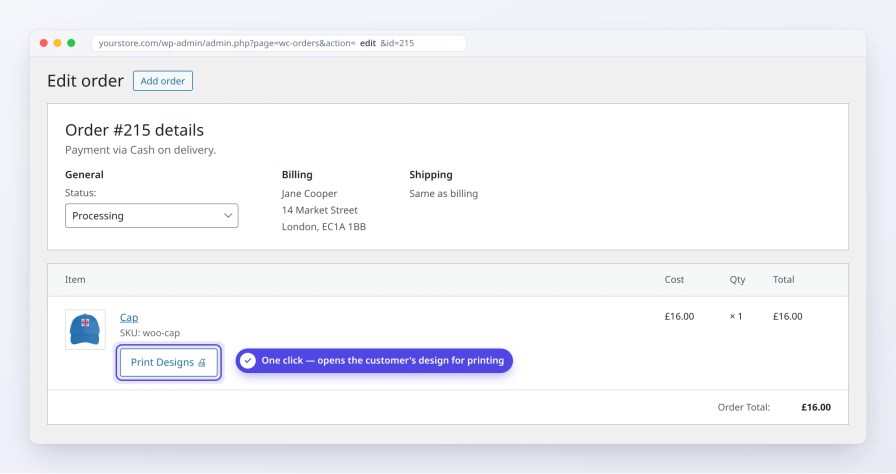
Print-Ready PDF Downloads from Every Order: View and download print-ready design PDFs directly from the order screen in WooCommerce. No manual file prep, no back-and-forth just click and send to your print supplier.
Who Is This For?
Smart Product Designer is built for store owners who want to offer product personalization without complexity, whether you run a print-on-demand store, a local print shop, a corporate merchandise store, or sell custom gifts and event merchandise.
If you sell products people want to make their own, this plugin is for you.
Coming Soon
We are actively building new features based on real store owner needs. Here’s what’s coming next:
Request a Quote for Custom Designs
Let customers submit their design for a quote before placing an order, ideal for bulk orders, complex prints, or corporate merchandise where pricing needs approval before checkout.
Product Size and Print Area Based Pricing
Automatically adjust the product price based on the print area size or product dimensions. Charge more for a full-front print than a pocket print, pricing that reflects the real cost of the job.
Restrict and Resize the Design Area on Product Sides
Define exact boundaries for where customers can place design elements on each product side. Restrict the design area to a specific zone, keeping designs within your printable area and reducing print errors.
Frequently asked questions
Can I use my product/variation image as the design canvas background?
Yes. Smart Product Designer lets you use the product's own image or the variation image for variable products as the canvas background. No separate mockup upload needed. This keeps your product images and design canvas always in sync.
What types of products can I use this plugin with?
The plugin works with any WooCommerce product type including T-shirts, mugs, phone cases, business cards, caps, posters, and more. It supports both simple and variable products.
Can I see what customers designed before printing?
Yes, you can view and print customer designs directly from the WooCommerce order edit screen.
Can customers design multiple sides of a product (front/back)?
Yes, the plugin supports multi-side customization. You can create design templates with multiple product sides (e.g., front, back, sleeves).
Can I restrict customization to specific products or variations only?
Yes. For example, you can enable the designer only on your "Custom Design" t-shirt product, while your other t-shirt products stay as regular, you decide which ones get it.
Great Support, very responsive and helpful!
They even implemented one of the features we were needing within a couple of days.
Plugin setup is easy enough; and the server is able to handle it, unlike a different plugin that would freeze.
Thank you!!
Rated 5 out of 5
daveralph2012·United Kingdom (UK)·Apr 29, 2026
Had a number of questions before I bought the plugin which were answered quickly - also asked for the possibility of new features being added and they have been so helpful and pro-active - can't recommend this plugin or this company enough - brilliant and really helpful and has helped my solution work better than I imagined, and there is more to come - so thankful for their help
Thank you!
Rated 5 out of 5
Dawson·United Kingdom (UK)·Apr 14, 2026
Great plugin and amongst the best support we have ever had. The plugin is very easy to use and the setup process was simple. The team quickly understood our requirements and added useful features like product and variation level design settings. They also helped resolve setup issues on our end and were very responsive throughout. Highly recommended.
Rated 3 out of 5
leontebrandon·United States (US)·Mar 3, 2026
Thought product would come with some clip art
Codeyweb·India·Mar 18, 2026
Hello there, Thank you for taking out time to share your experience with the Smart Product Designer plugin.
Regarding clip arts, we don't include predefined ones by default as every business configures these based on their own design needs and use cases. If you have thoughts on specific categories or types of clip arts you'd like to see bundled with the plugin, we'd love to hear them, it's definitely something we're considering as an addon.
On another note, the good news is that the two features you requested are now live in v1.3.0 (released 16 March 2026):
Custom font upload — upload and use your own fonts directly in the designer
Canvas zoom — scroll to zoom in and out on the design canvas
Please update to v1.3.0 and let us know how it goes. We'd love to turn this into a 5-star experience!
In future, If you face any issues, kindly reach out to our support team.
We and our partners process your personal data (such as browsing data, IP Addresses, cookie information, and other unique identifiers) based on your consent and/or our legitimate interest to optimize our website, marketing activities, and your user experience.