WooCommerce Bulk Quantity Discounts & Tiered Pricing
Increase your average order value and encourage customers to buy more with Bulk Quantity Discount Manager for WooCommerce. Create flexible WooCommerce bulk discounts, quantity-based pricing, tiered pricing, and volume discounts for simple and variable products — without coding.
Set different prices for different quantities, create quantity breaks, configure Min-Max quantity ranges, and display your offers with professional pricing tables, cards, and quantity buttons directly on your product pages. Give customers a clear reason to buy more and automatically apply the correct bulk price when they increase their quantity.
Why Use WooCommerce Bulk Quantity Discounts?
Turn larger quantities into larger orders with a simple, flexible pricing strategy. Offer customers a better price as they buy more while keeping your pricing rules easy to manage.
- Increase sales and Average Order Value: Encourage customers to purchase higher quantities by showing attractive bulk pricing directly on product pages.
- Create flexible quantity breaks: Set different prices for different quantity ranges such as 5+, 10+, 20+, or any quantity tiers that fit your store.
- WooCommerce tiered pricing: Create multiple pricing levels and automatically apply the appropriate price based on the customer’s quantity.
- Volume discounts: Reward customers with better prices when they purchase larger quantities.
- Min-Max quantity selection: Give shoppers convenient quantity buttons based on your defined From/To ranges.
- Per-item or fixed total pricing: Choose whether a tier price is multiplied by quantity or used as a fixed total price for the selected range.
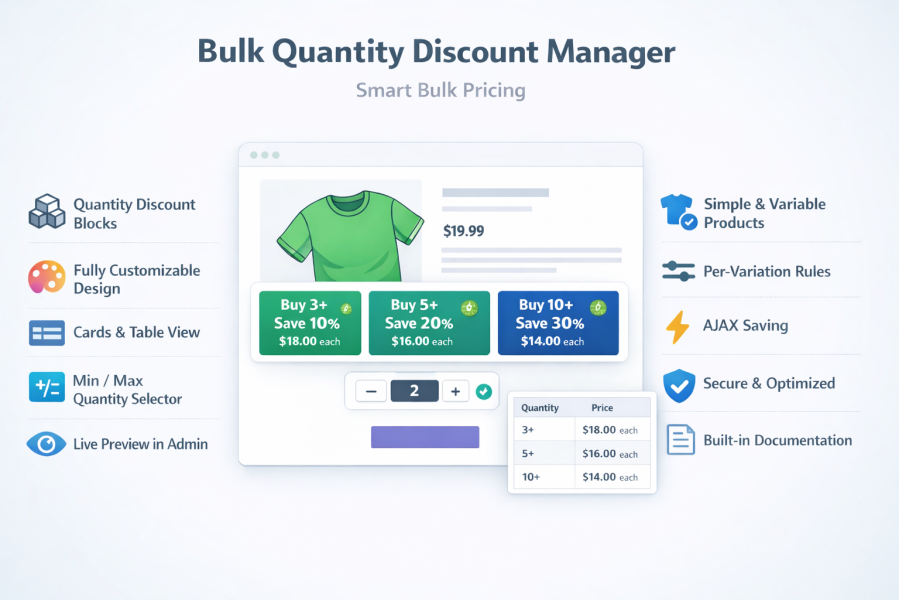
- Professional pricing displays: Show quantity offers using Cards View or Table View to make your discounts easy to understand.
- Customizable design: Match discount cards, tables, buttons, labels, borders, colors, fonts, and badges to your store design.
Key Features
- WooCommerce bulk quantity discounts for simple products
- Variable product quantity discounts with individual pricing rules for each variation
- WooCommerce tiered pricing with multiple quantity-based price levels
- Quantity breaks with customizable From/To ranges
- Volume pricing for customers purchasing larger quantities
- Min-Max quantity selector with dynamic quantity buttons
- Live price updates when customers change their quantity
- Cards View for attractive bulk discount offers
- Table View for clear quantity pricing comparisons
- Custom discount labels and badges including Best Value offers
- Per-item and fixed-total pricing options
- Mobile-responsive design for phones, tablets, and desktops
- Cart-ready pricing so the selected quantity and applicable discount are correctly reflected in the cart
- Real-time design preview for discount blocks and quantity buttons
- No coding required
How WooCommerce Bulk Pricing Works
- Create quantity pricing tiers: Open a product and use the Quantity Discounts settings to define your quantity ranges and prices.
- Set quantity breaks: Add From/To quantities such as 1–4, 5–9, and 10–20 and assign the appropriate price to each range.
- Choose your pricing method: Use per-item pricing when the tier price should apply to every item, or use fixed total pricing when the defined amount should represent the total price for the selected range.
- Configure variable products: Create different bulk pricing rules for individual variations, making it easy to offer quantity discounts based on size, color, pack, or other variation options.
- Display your offers: Show your quantity discounts as cards, a pricing table, or Min-Max quantity buttons directly on the product page.
- Let WooCommerce apply the correct price: When customers increase or decrease their quantity, the applicable pricing tier is automatically used.
WooCommerce Quantity Discount Display Options
Cards View
Display each quantity offer as an attractive discount card. Highlight the quantity, price, discount, description, and Best Value option to help customers quickly choose the right deal.
Table View
Show your WooCommerce tiered pricing in a clean pricing table so shoppers can easily compare quantity ranges and see how much they can save.
Min-Max Quantity Buttons
Make quantity selection easier with dynamic Min-Max buttons based on your pricing ranges. Customers can quickly select a quantity and see the applicable price update in real time.
Perfect for Bulk, Wholesale & B2B Pricing
Bulk Quantity Discount Manager is ideal for stores that want to reward customers for purchasing more products.
- Wholesale and B2B stores: Offer quantity-based pricing for larger orders.
- Retail and D2C stores: Create Buy More, Save More promotions.
- Manufacturers and suppliers: Offer better prices for larger quantities.
- Pack and multi-pack sellers: Encourage customers to purchase larger quantities.
- Variable product stores: Create different quantity pricing rules for individual variations.
- Bulk product sellers: Use quantity breaks and volume pricing to increase order sizes.
Boost Average Order Value with Quantity-Based Pricing
Instead of offering the same price for every quantity, give customers a clear incentive to purchase more.
For example:
- 1–4 items: Regular price
- 5–9 items: 10% quantity discount
- 10–19 items: 15% quantity discount
- 20+ items: 20% quantity discount
Customers can immediately see the value of buying more, helping you encourage larger orders while keeping your pricing strategy simple and transparent.
Why Choose Bulk Quantity Discount Manager?
- Built specifically for WooCommerce: Integrates directly with WooCommerce products and pricing.
- Simple and flexible: Create quantity pricing rules without complicated configuration.
- Works with simple and variable products: Build bulk pricing strategies for different product types.
- Conversion-focused displays: Present discounts clearly on product pages to encourage larger purchases.
- Mobile-friendly: Quantity discount displays work across desktop, tablet, and mobile devices.
- Customizable: Adjust colors, fonts, borders, hover states, labels, and badges to match your store.
- No coding required: Configure your WooCommerce bulk pricing directly from the product settings.
- WooCommerce-ready pricing: The selected quantity and applicable discount are reflected correctly in the cart.
Frequently Asked Questions
What is a WooCommerce bulk quantity discount?
A WooCommerce bulk quantity discount gives customers a better price when they purchase a larger quantity of a product. You can create multiple quantity ranges and assign a different price or discount to each tier.
Can I create tiered pricing in WooCommerce?
Yes. Bulk Quantity Discount Manager lets you create multiple quantity-based pricing tiers so customers can receive different prices as their order quantity increases.
Can I create quantity breaks for WooCommerce products?
Yes. You can define From/To quantity ranges and assign pricing rules to each quantity break.
Does it support WooCommerce variable products?
Yes. You can create quantity discount rules for variable products and configure pricing rules for individual variations.
Can I show bulk discounts on the product page?
Yes. Display your quantity pricing using customizable Cards View, Table View, or Min-Max quantity buttons directly on product pages.
Can I use bulk discounts for wholesale or B2B customers?
Yes. The plugin is suitable for wholesale and B2B stores that want to offer better prices based on the quantity purchased.
Can I set a different quantity discount for each product variation?
Yes. Variable products can have individual bulk pricing rules for their variations, making it possible to create different quantity offers for different options.
Start Offering WooCommerce Bulk Discounts Today
Give customers a reason to buy more with WooCommerce bulk quantity discounts, tiered pricing, quantity breaks, and volume pricing.
With flexible pricing rules, Min-Max quantity selection, customizable discount tables, Cards View, and support for simple and variable products, Bulk Quantity Discount Manager gives you the tools to create a professional quantity-based pricing strategy without coding.
Start increasing order quantities and Average Order Value with flexible WooCommerce bulk pricing today.