

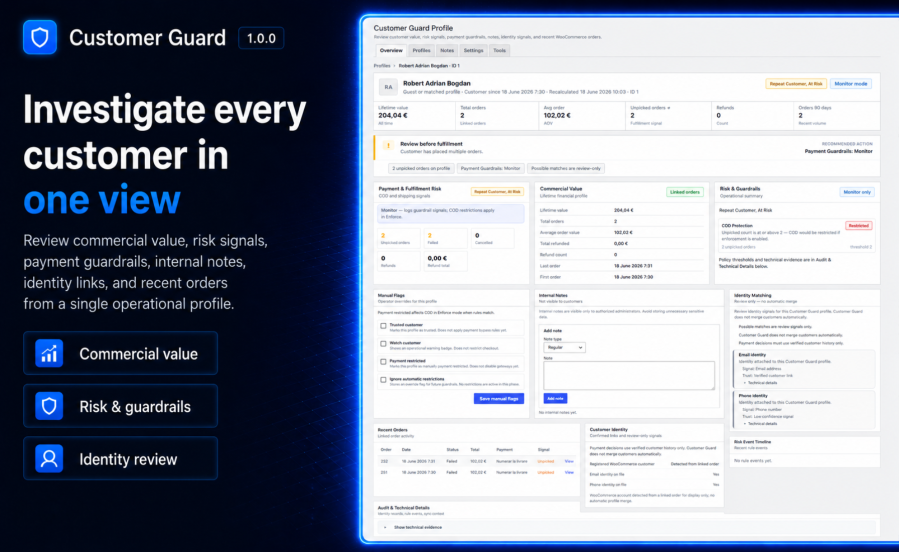
Subscription includes
Support
Customer Guard for WooCommerce is an operational admin layer for WooCommerce. It gives your team a dedicated workspace to review linked customer history, operational risk labels, internal notes, and COD-focused payment guardrails without leaving wp-admin.
Use it when you need context before shipping, before accepting Cash on Delivery, or before escalating a repeat customer issue.
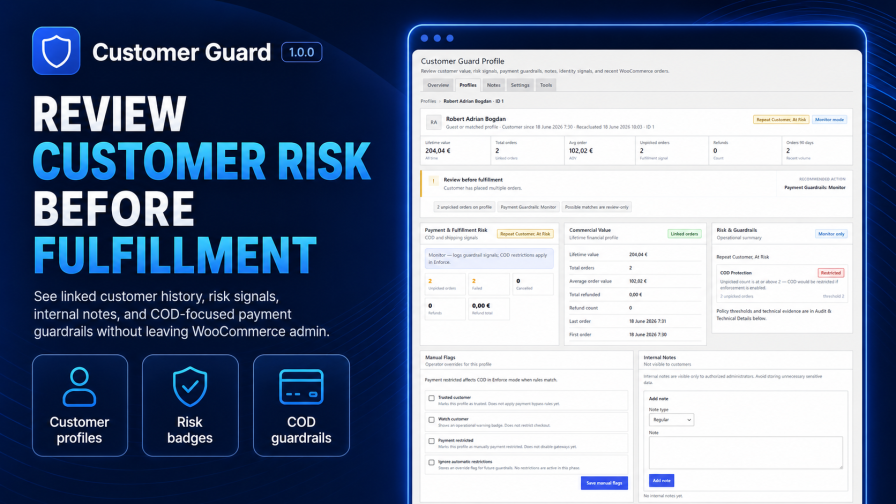
Each Customer Guard profile summarizes order activity, commercial signals, identity review context, recent orders, and team notes. Profiles are separate from WordPress users and are built from WooCommerce order data.
Risk labels appear on the WooCommerce Orders list so operators can spot repeat customers, VIP customers, refund patterns, unpicked orders, and other configured signals at a glance.
Payment Guardrails help you monitor or enforce Cash on Delivery restrictions based on verified customer history and configured rules. Start in Monitor mode to review decisions before checkout behavior changes.
Add team-only internal notes on customer profiles. Notes are for staff workflows and are not shown to shoppers on the storefront.
Automatic order sync keeps profiles updated for new orders, status changes, and refund events on new installs. Historical orders can be synced manually from Tools when you need full store history.
Customer Guard lives under WooCommerce > Customer Guard with native admin patterns, HPOS compatibility, order list badges, and a compact order snapshot on single order screens.
Customer Guard profiles consolidate operational context for a customer: order counts, spend signals, risk labels, identity review, manual flags, internal notes, and recent linked orders. Open a profile from the profile browser or from WooCommerce order workflows.
Configured risk rules surface as badges on the WooCommerce Orders list. Badges are reference signals for staff review. They do not replace your fulfillment policies or manual judgment.
On the WooCommerce order edit screen, a Customer Guard metabox shows a compact snapshot: risk status, key metrics, payment guardrail mode, and a link to open the full profile in a new tab.
Store staff with the correct permissions can add, edit, pin, and delete internal notes on profiles. The Notes overview page summarizes store-wide note activity; profile-level note management happens on the profile screen.
Customer Guard shows confirmed and review-only identity signals, such as email and phone matches, to help staff understand possible links between orders. Customer Guard does not merge customer profiles automatically.
Payment Guardrails focus on Cash on Delivery in this release. Choose Off, Monitor, or Enforce:
Manual flags such as Trusted, Watch, Payment restricted, and Ignore automatic restrictions interact with guardrail evaluation according to your settings.
Use Tools for first-time historical sync, single-order sync, queue operations, metrics preview and rebuild, recovery actions, and diagnostics. Destructive maintenance actions stay in a separate danger zone and require typed confirmation.
Diagnostics panels show sync queue health, schema status, and operational snapshots without exposing raw customer PII in routine admin views. Recovery tools help replay or rebuild sync-related work when jobs stall.
No. Customer Guard helps staff review customer history and signals. Payment Guardrails may hide Cash on Delivery in Enforce mode when configured rules match verified customer history. Other outcomes depend on your settings and manual review.
Yes. Payment Guardrails are designed for Cash on Delivery workflows in this release, including monitor and enforce modes.
Not as a general payment gateway blocker in v1.0.0. Guardrail enforcement focuses on Cash on Delivery according to your settings.
No. Customer Guard does not perform automatic customer merging. Identity matching provides review-only signals unless confirmed links exist in your data model.
Yes. Internal notes are team-only and managed on Customer Guard profiles for users with the correct capabilities.
Yes. The extension declares compatibility with WooCommerce High-Performance Order Storage (HPOS) when supported by your WooCommerce version.
Yes. Monitor mode lets you review guardrail decisions before Enforce mode changes Cash on Delivery availability at checkout.
Categories
Quality Checks
Countries







