Product Icon

LWN Multi-Step Checkout for WooCommerce

Guided WooCommerce multi-step (or multistep) checkout—from 2-step to full flow, on classic and block checkout. No code needed.

Subscription includes

  • Product updates and improvements
  • Customer support
  • 30-day money-back guarantee

Give customers one thing to do at a time

Your customer already decided to buy. Then they land on a page with twenty fields and a scrollbar, and the momentum drains away.

Checkout complexity is one of the top reasons carts get abandoned — breaking that page into short, guided steps keeps that momentum alive.

LWN Multi-Step Checkout for WooCommerce breaks that page into short, guided steps. One question at a time, with a visible finish line.

It works on both WooCommerce checkouts — the classic shortcode and the newer block checkout.
  • One long form becomes a few short screens
  • Show customers exactly where they are with a visible progress bar
  • Every field, gateway and tax rule keeps working

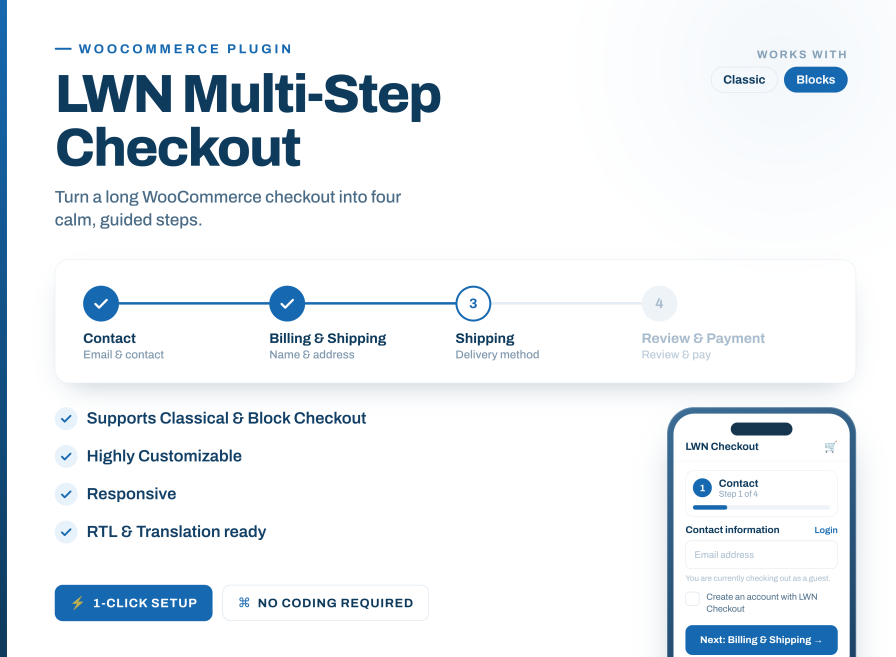
LWN Multi-Step Checkout WooCommerce plugin banner showing 4-step checkout progress bar, mobile responsive design, and compatibility with Classic and Block checkout.

Built for both classic and block checkouts

This WooCommerce checkout steps plugin supports both the classic shortcode checkout and the newer Checkout block.

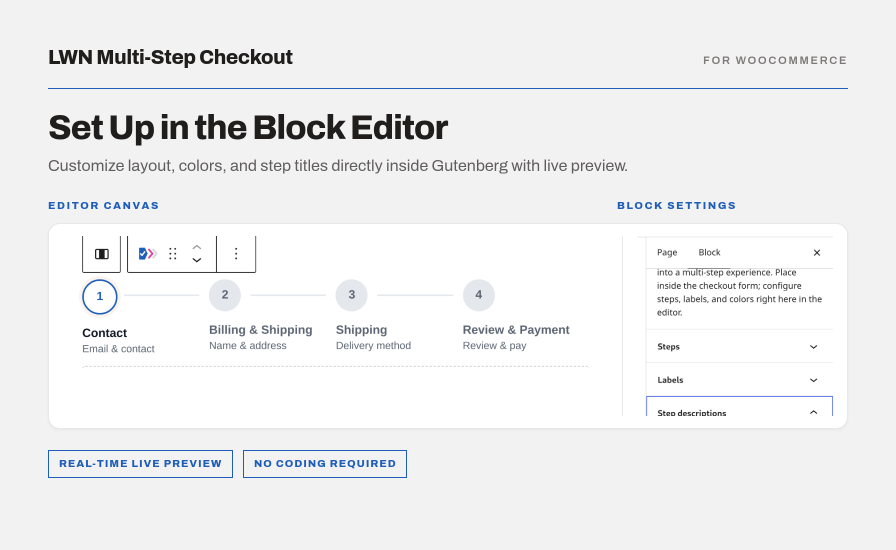
On the block checkout you configure it in the editor, with a live preview of the real checkout beside you. Change a label, style or color and it updates as you type.

Activating changes nothing on a block checkout. One button on the Block Checkout tab adds the steps, another removes them.
  • Both checkouts, one plugin
  • Configure the block version in the editor, with a live preview
  • Nothing changes until you add it

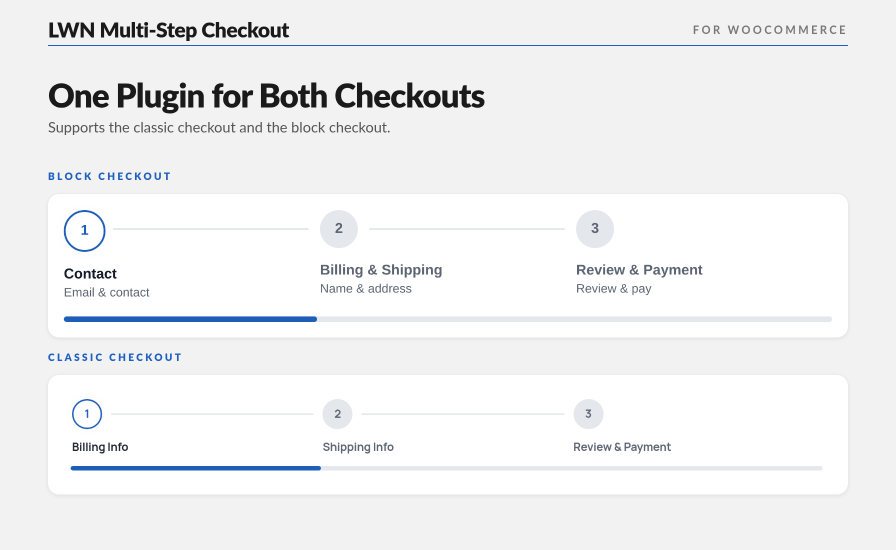
LWN Multi-Step Checkout for WooCommerce showing a 3-step flow with a progress bar on both the block checkout and the classic checkout.

LWN Multi-Step Checkout WordPress block editor interface showing real-time live preview and sidebar settings for steps, labels, and descriptions.

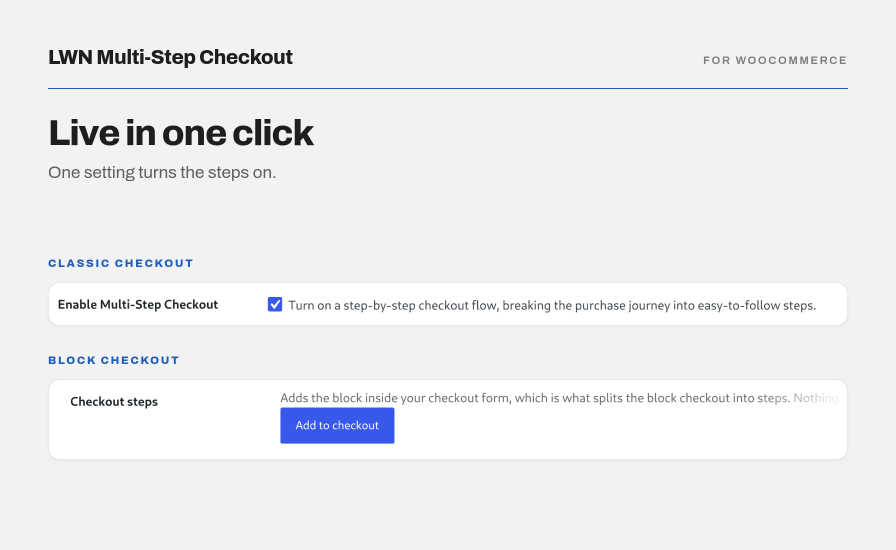
LWN Multi-Step Checkout admin settings interface showing 1-click activation toggle for Classic Checkout and Add to Checkout button for Block Checkout.

Catch mistakes before the final step

Nothing kills a purchase like reaching the end and being sent back to fix a field you filled in four minutes ago.

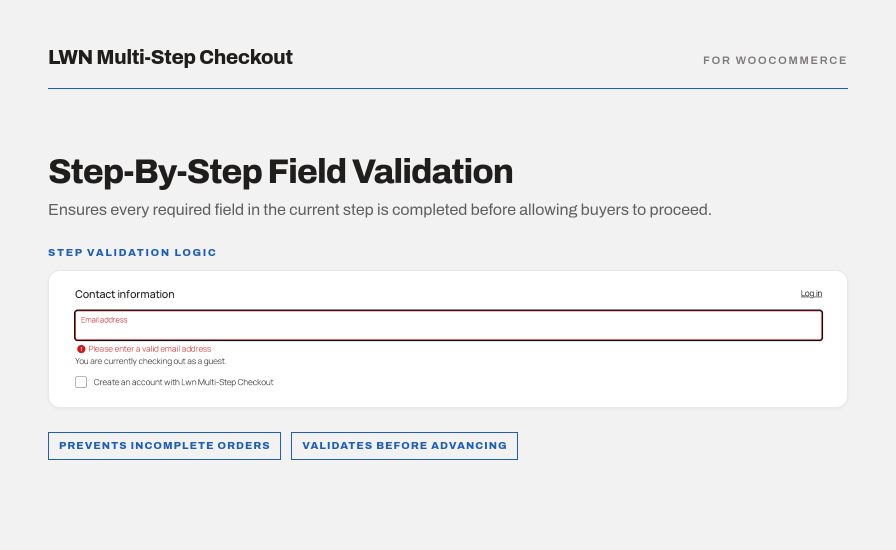
Each step checks itself before the customer moves on. A missing postcode is flagged on the step that asks for it — not after the card details.
  • Errors appear on the step that caused them
  • Theme and extension fields are checked too
  • Nothing is lost moving back and forward

LWN Multi-Step Checkout step-by-step field validation preview displaying real-time inline email error message for required inputs.

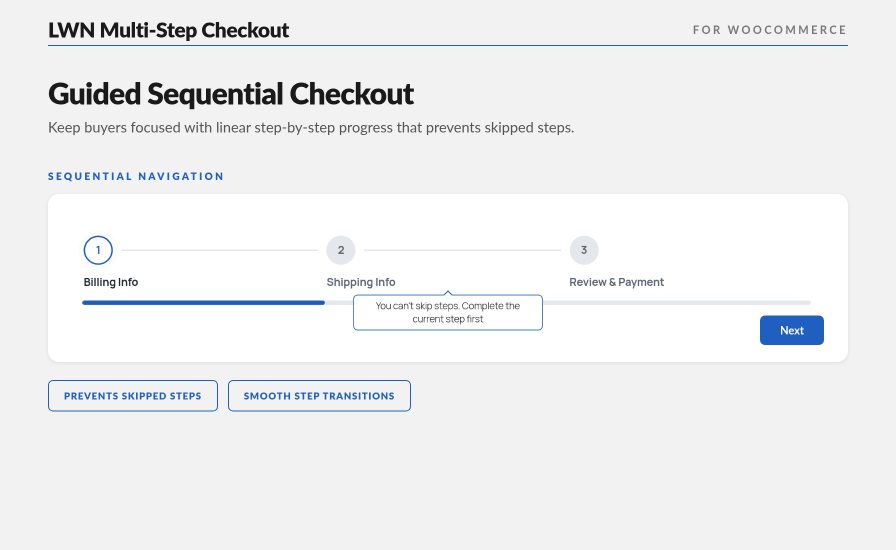
LWN Multi-Step Checkout for "WooCommerce blocking a skipped step, with a tooltip reading "You can't skip steps. Complete the current step first."

Nobody starts over

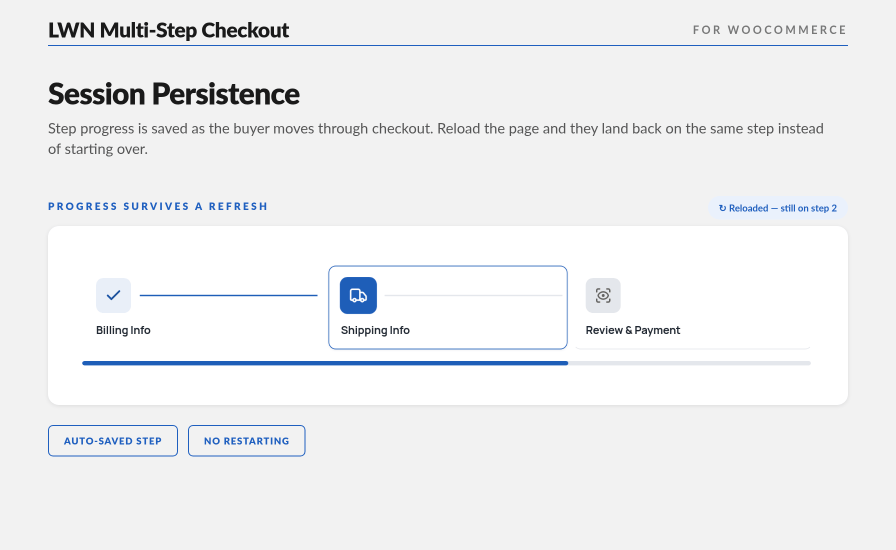
A customer refreshes, or gets pulled away mid-checkout. They come back to the step they were on, not the first one.
  • The active step survives a page reload
  • Completed steps stay marked as done
  • On the classic checkout, progress is kept in the WooCommerce session and lasts beyond the tab

LWN Multi-Step Checkout for WooCommerce still on step 2, Shipping Info, after a page reload, with the progress bar filled to match.

Match your branding without touching code

The checkout should look like it belongs to you, not like a plugin bolted on top.

Text contrast is set automatically, so nothing comes out unreadable.

  • Pick one accent color and everything follows it
  • Rename every step, button and message
  • Three step indicator styles, with a live preview
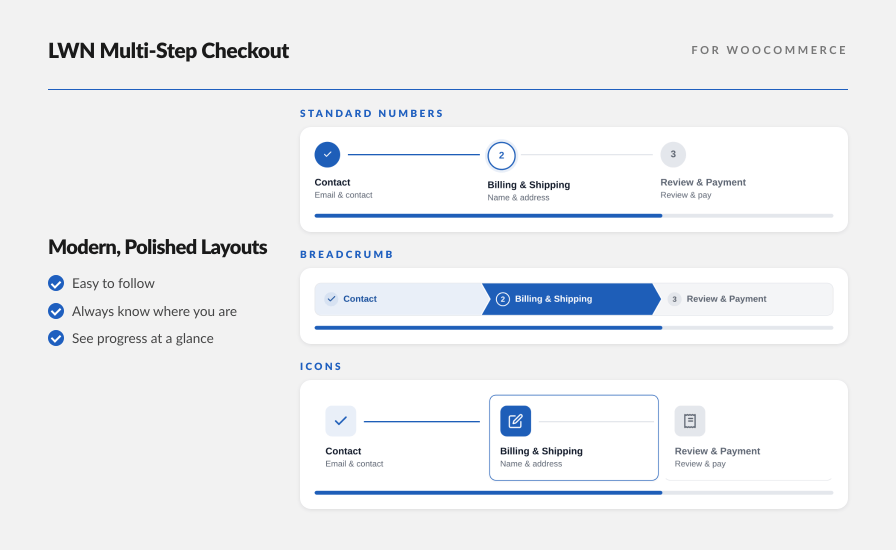
LWN Multi-Step Checkout displaying three checkout progress layouts: standard numbered steps, breadcrumb navigation, and icon-based steps for contact, billing and shipping, and review and payment.

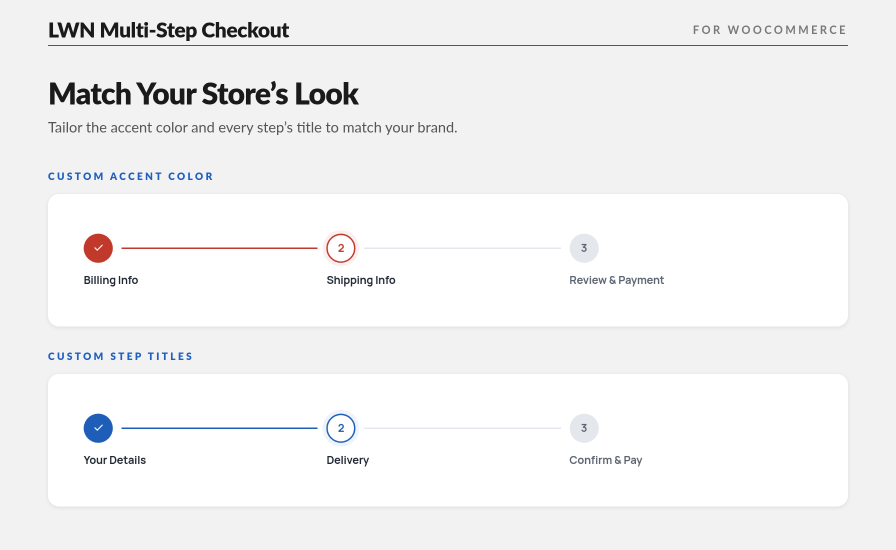
LWN Multi-Step Checkout for WooCommerce with a custom red accent color applied to the whole stepper, and with custom step titles like "Your Details" and "Confirm & Pay".

Built for the phone your customers are using

Most checkouts happen on a phone, on a small screen, one-handed. Short steps suit that better than one long form.
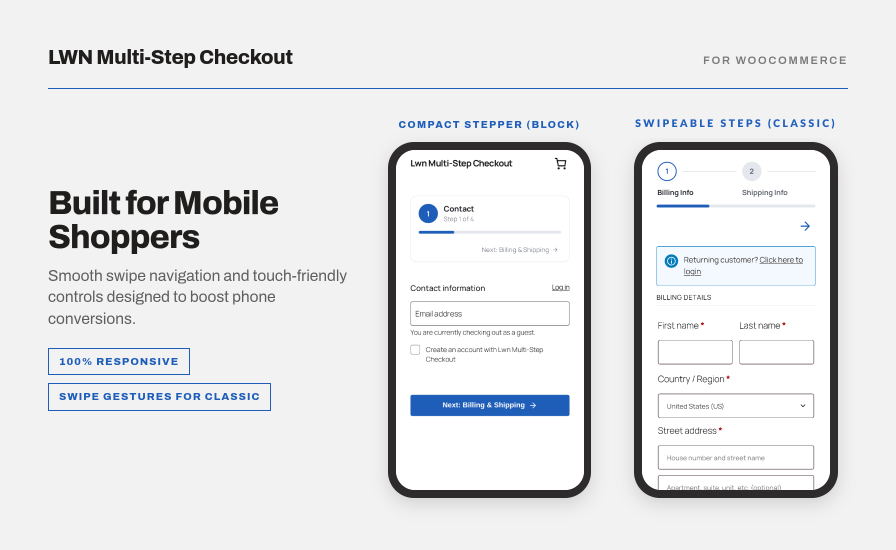
  • Buttons sized for thumbs, not cursors
  • The step indicator scrolls sideways instead of squeezing
  • On the classic checkout, the step indicator is swipeable

LWN Multi-Step Checkout for WooCommerce on a phone: a compact step card on the block checkout and a scrollable step indicator with a progress bar on the classic checkout.

Fit the checkout to how you sell

Selling downloads? The shipping step disappears on its own. Repeat customers or running promotions? On the classic checkout, login and coupon codes can each get their own screen.

You decide which steps exist and what they are called. No code, no template files, no developer.
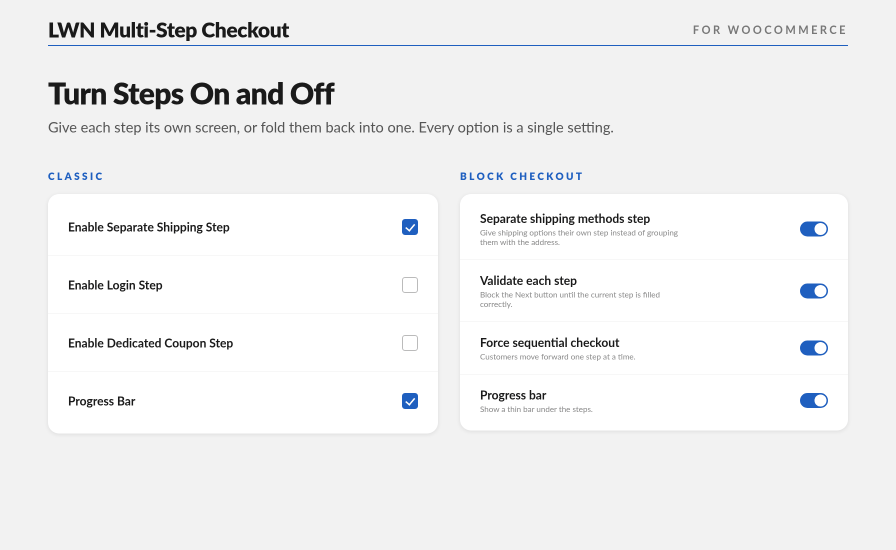
  • Turn any step on or off with a single setting, on both checkouts
  • Keep shipping separate from billing, or combine them
  • Split order review from payment, or leave them together

LWN Multi-Step Checkout for WooCommerce settings on the classic checkout and the block checkout, with separate shipping, login, coupon, and progress bar controls for each.

Right-to-left and translation ready

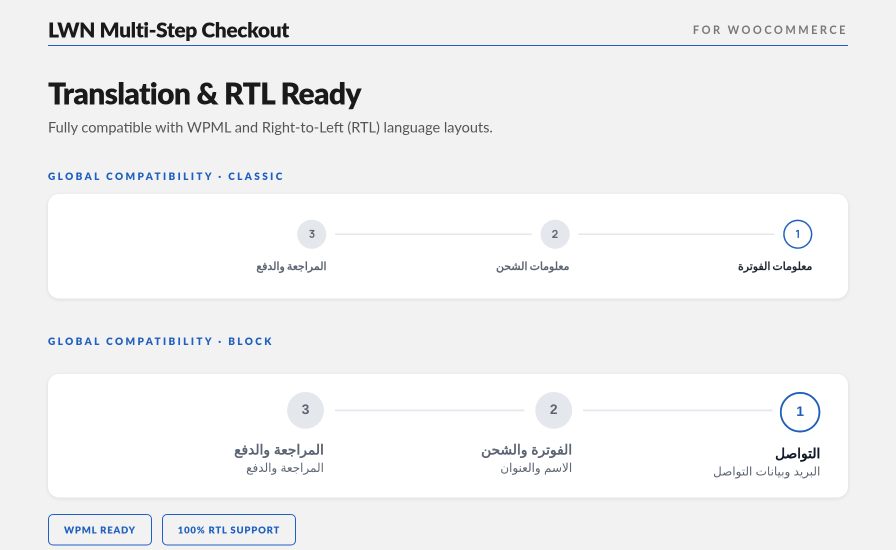
Arabic, Persian, Urdu — the steps, the indicator and the navigation all mirror properly, not just the text direction.
  • Every label and message is translatable
  • Tested with WPML
  • Full RTL layout on both checkouts

LWN Multi-Step Checkout for WooCommerce mirrored right-to-left in Arabic, on both the classic checkout and the block checkout.

A multi-step checkout that works with the WooCommerce you already have

This reorganizes your checkout. It does not rebuild it. Payment gateways, taxes, shipping rules, and order data are untouched, because everything runs through standard WooCommerce hooks.

Custom checkout fields added by other extensions stay in the step they belong to.

  • Overrides no WooCommerce templates, so your theme customizations stay intact
  • Dedicated compatibility for 12 popular themes, including Astra, GeneratePress, Storefront and Kadence
  • Deactivate and your checkout returns to the WooCommerce default, with nothing left behind

How to get started

Classic checkout

  1. Install and activate. Your checkout is already multi-step.
  2. Open WooCommerce → Settings → Multi-Step Checkout.
  3. Tick the steps you want, pick a style, save.
  4. You’re ready to go.

Block checkout

  1. Install and activate. Nothing changes yet.
  2. Open WooCommerce → Settings → Multi-Step Checkout → Block Checkout and click Add to checkout.

  3. Edit the Checkout template. Select the LWN Checkout Steps block and set labels, style and color in the sidebar.
  4. You’re ready to go.

Changed your mind? Deactivate it and your checkout returns to the WooCommerce default straight away, with no cleanup.

Questions before you start? Full setup walkthroughs and settings docs live in the LWN pro knowledge base.


Frequently asked questions

Does it work with the WooCommerce block checkout?

Yes, since version 1.1.0. Both checkouts are supported.

On the block checkout you click Add to checkout on the Block Checkout tab, then configure it in the editor.

What does a multistep checkout change for my customers?

One long form becomes short guided steps — Billing, Shipping, Review and Payment. Steps switch without a page reload and progress survives a refresh. On the classic checkout you can add a Login step and a dedicated Coupon step too.

Will it work with my theme?

Yes, in most cases. It uses standard WooCommerce hooks and overrides no templates, so it stays out of the way of theme customizations. Dedicated compatibility for 12 popular themes: Astra, GeneratePress, Storefront, Kadence, Blocksy and OceanWP among them.

Can I match it to my store's branding?

Yes. Pick one accent color and the stepper, buttons and highlights all follow it, with text contrast set automatically so nothing comes out unreadable. Three step-indicator designs, and every step name and button is editable on both checkouts. No CSS required.

Does the checkout work on mobile?

Yes. The layout is fully responsive with touch-sized navigation buttons, and the step indicator scrolls horizontally on small screens. On the classic checkout, the step indicator is swipeable too.

Is it compatible with HPOS?

Yes. High-Performance Order Storage compatibility is formally declared.

Will it slow down my store?

No. Assets load only on the checkout page, and there are no third-party dependencies.

Does it support multilingual and RTL stores?

Yes — translation-ready with WPML compatibility, full RTL support, and an Arabic translation included.

Extension information

  • PHP version required: 7.4
  • Tested with WordPress: 7.1
  • Tested with WooCommerce: 11.1.1
  • Requires at least WordPress: 6.8
  • Requires at least WooCommerce: 9.6

Countries

  • Worldwide

Related Products

Price $279 annually
Rated 3.9 out of 5 stars
Price $79 annually
Rated 3.4 out of 5 stars
Price $59 annually
Rated 3.1 out of 5 stars
Price $109 annually
Rated 2.7 out of 5 stars
Price $49 annually
Rated 4.1 out of 5 stars
Price $109 annually
Rated 2 out of 5 stars
Price $109 annually
Rated 2.3 out of 5 stars
Price $39 annually
Rated 2.8 out of 5 stars
Price $109 annually
Rated 2.6 out of 5 stars
Use of your personal data
We and our partners process your personal data (such as browsing data, IP Addresses, cookie information, and other unique identifiers) based on your consent and/or our legitimate interest to optimize our website, marketing activities, and your user experience.