

Subscription includes
Support
What it does
WooCommerce uses Processing for orders that are paid and awaiting fulfillment, and Completed for orders that are fulfilled. For a physical product shipped once, that is exactly right: you ship the order, you mark it as completed, and the customer gets their parcel.
Time-based services do not work that way. A digital subscription, a daily or weekly publication, recurring access to software: no single shipment ends the order. A renewal order pays for a period of service, not a parcel. Left alone, those orders stay in Processing forever, even after you have fully delivered the service for their period.
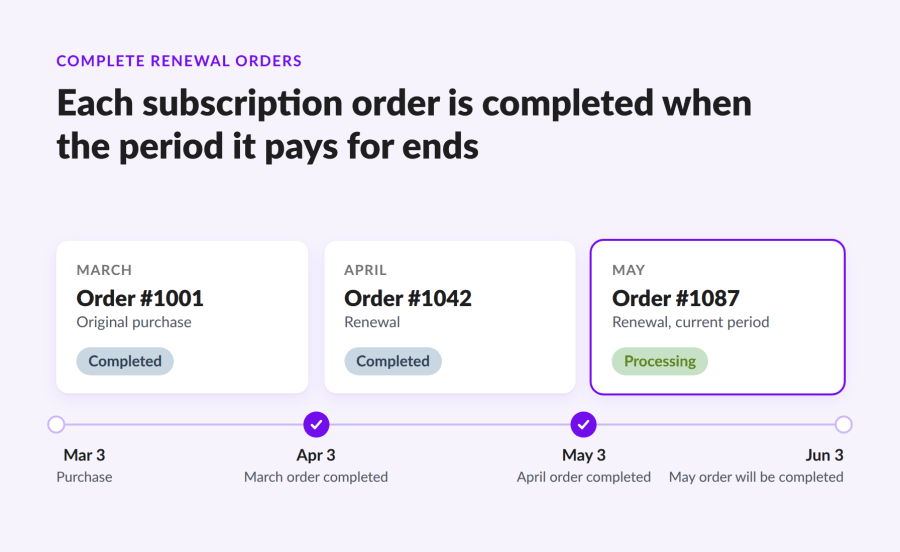
Complete Renewal Orders completes each order at the moment the period it pays for ends.
As soon as a subscription reaches its next payment date, the period paid for by the previous order has ended, so the extension marks that order as completed. On the very first renewal, that is the original purchase that created the subscription.
This happens whether the next payment succeeds, fails, or is never attempted on a manual renewal. What matters is that the period paid for by the previous order is over.
When a subscription is canceled or expires, the extension completes its last order once the prepaid period runs out.
Yes, if you sell:
No, if you sell subscription boxes where each renewal ships a tracked product, such as a monthly snack box, a quarterly bottle of wine, or a curated parcel. Keep the usual WooCommerce flow and mark each renewal as completed when you ship it. If you sell both, exclude the boxes in the settings.
Installing the extension does not change your order history. The “Complete historical orders” action finds the orders already sitting in Processing whose period is over. It always starts with a dry run that lists them, and nothing changes until you confirm. It works through large stores in batches in the background.
WooCommerce Subscriptions, WooCommerce 11.0 or later, WordPress 7.0 or later, and PHP 8.2 or later. It is compatible with High-Performance Order Storage (HPOS).
No. It only runs when WooCommerce Subscriptions processes a renewal, cancellation, or expiration, and it adds no scheduled tasks of its own. Historical orders are completed in small batches in the background.
Yes. The extension completes the previous order on the next payment date, whether or not the customer pays the new invoice on time.
Yes. You can exclude specific products or whole categories in the settings, for example subscription boxes you ship by hand.
Each order it completes gets an order note starting with "Auto-completed by Complete Renewal Orders for WooCommerce".
Categories
Quality Checks
Countries







