
Subscription includes
Support
Recurring Reports brings your WooCommerce subscription and membership data into one reporting dashboard. Filter records, customize report columns, inspect customer details, and export results as CSV—all from your WordPress admin.
Designed for stores using WooCommerce Subscriptions, WooCommerce Memberships, or both, the plugin adapts its columns and filters to the extensions you have installed. Dedicated Overview, Reports, and Exports tabs help you move from a broad view of your data to individual records and downloadable reports.
Find the records you need
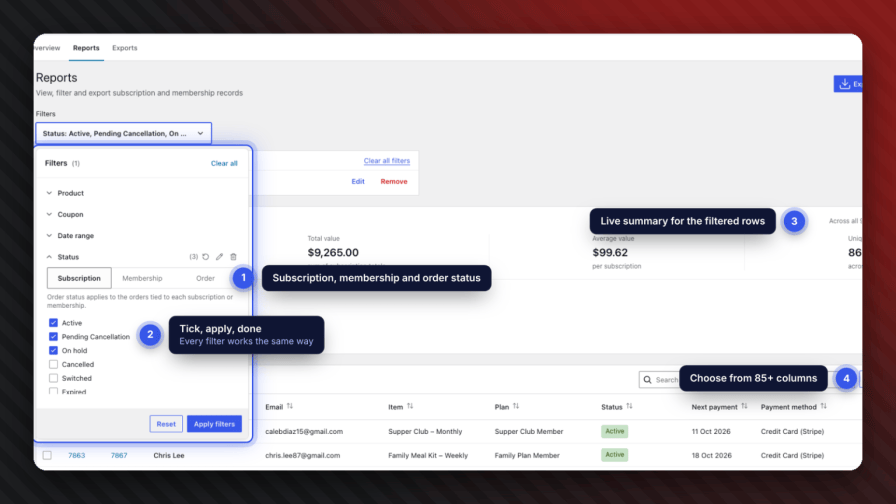
Narrow your reports by product, coupon code, status, date range, payment method, or membership plan. Additional filters include billing and shipping state, manual renewal, billing period, membership type, and membership profile fields. Combine filters to focus on the subscriptions, memberships, or customer groups relevant to your work.
Customize your reports
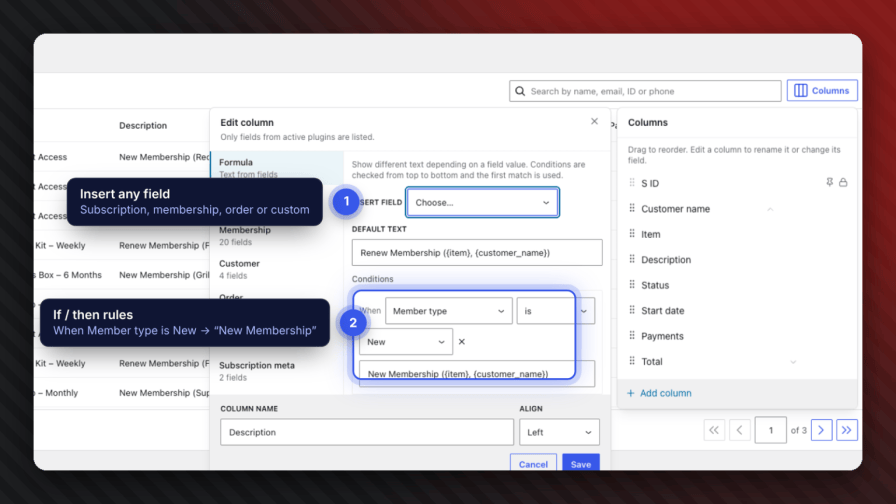
Choose columns that fit your reporting needs, including customer names and email addresses, subscription, and membership IDs, products, statuses, start dates, next payment dates, expiration dates, and shipping addresses. Add more detail with renewal methods, company information, tax, discounts, currency, trial information, transactions, and membership profile fields. Custom and formula columns provide further flexibility.
Inspect individual records
Open a record’s detail panel to review its overview, subscription, membership, and customer information. When a membership is tied to a subscription, the report displays the associated membership so you can understand the relationship between the records.
Export and share results
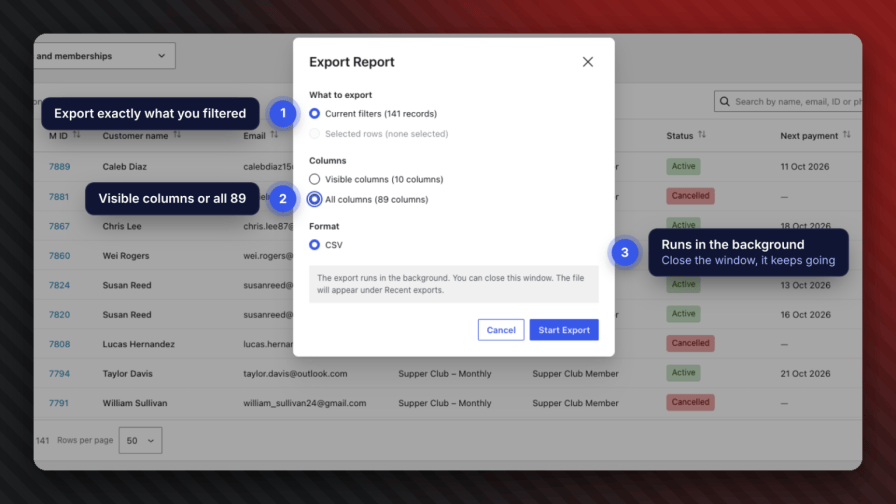
Generate CSV exports in the background and download completed files from the export history. You can also email exports to site users who have permission to view reports. Export files are automatically removed after seven days.
Built for the WooCommerce admin
Recurring Reports follows familiar WordPress and WooCommerce admin styling and supports both High-Performance Order Storage (HPOS) and legacy order storage. Its scripts and styles load only on its reporting screens, and the plugin is translation-ready.
Requirements: WordPress 6.5+, PHP 7.4+, and WooCommerce 8.0+, with WooCommerce Subscriptions 5.0+ and/or WooCommerce Memberships 1.25+. These extensions are sold separately; either one is sufficient to use the plugin.
Yes. Open the live demo, with no install or card needed. You’re also covered by a 30-day money-back guarantee.
You can get a first report out of AI quickly. Getting it right is the hard part: matching each membership to the subscription that pays for it, counting every status, and exporting large stores without timeouts. Recurring Reports has already solved those, and keeps them solved as WooCommerce changes.
No. It only loads on its own admin page and never touches your storefront. Dashboard numbers are pre-computed in the background and exports run through Action Scheduler in small batches.
Nowhere. Everything runs inside your WordPress install, with no third-party account. Exported CSV files are kept in a private folder in your uploads directory, need report permission to download, and are deleted automatically after 7 days.
Get in touch and we’ll answer it. Support is included with your licence for a full year.
No. The plugin works with either one on its own, or both together. Columns, filters and the menu label adapt to whatever is active — and with both, you also get the links between memberships and the subscriptions that pay for them.
Yes. It supports both HPOS and the legacy posts storage, and declares HPOS compatibility to WooCommerce.
No. It is a reporting tool — it reads your data and never edits subscriptions, memberships or orders. Row actions simply link to the normal WooCommerce edit screens.