Product Icon

Quantity Buttons for WooCommerce

Add Customizable Quantity Increment Buttons to your Store. Set Minimum/Maximum quantity limits, define steps, and add a Quantity Range Slider to Sell More.
Choose a billing option
$29
Save 20%
$58 $46.40

Subscription includes

  • Product updates and improvements
  • Customer support
  • 30-day money-back guarantee

Quantity Button – Min/Max Quantity Features

  • Add +/- Buttons: Add Quantity plus and minus buttons to your store.
  • Set Min/Max Quantity: Define the minimum and maximum quantities for placing an order.
  • Increment/Decrement Steps: Define steps for increasing or decreasing product quantity, such as 2, 4, 6,…..
  • Rule-Based Management: Create rules to control the display of quantity buttons.
  • Quantity Range Slider: Display a quantity range slider for easy quantity selection.
  • Button Design Style: Choose the button style as classic or modern to match your store.
  • Button Customization: Customize the color, border, radius, font, width, and hover color of the quantity button.
  • Supports Custom CSS: Add Custom CSS styling to match the buttons to your store’s theme.
  • Display on Checkout: Option to display the quantity button on the checkout page.

Quantity Increment Buttons – Min/Max Quantity

Make it easy for customers to choose the right quantity without frustration. Quantity Buttons for WooCommerce replaces the default number field with clear plus and minus buttons, quantity range sliders, and smart quantity controls directly on your shop, product, and cart pages.

With full customization options, you can set minimum and maximum quantity limits, define increment steps, and apply rules to specific products or categories. Encourage larger orders, manage stock more effectively, and deliver a smoother, more user-friendly shopping experience with powerful quantity controls built for WooCommerce.

Display Quantity Buttons on Multiple Pages

The WooCommerce Quantity Plus Minus plugin allows you to replace the default quantity selector with a customizable quantity plus minus button. Display the button on the product, shop, cart, and checkout pages.

This slideshow requires JavaScript.

Set Minimum and Maximum Quantity

Increase average order value by setting the minimum and maximum quantity required for placing an order. The WooCommerce Quantity Increment plugin allows store owners to set a minimum or maximum product order quantity and customize the error messages for quantity limits. This encourages customers to purchase products in larger quantities.
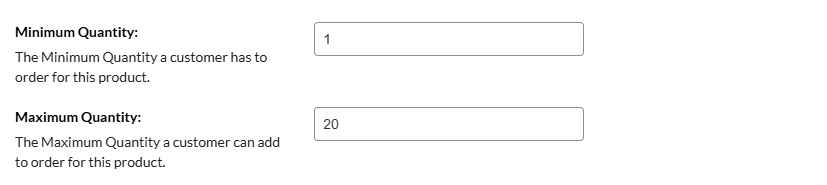
Set Minimum and Maximum Quantity

Set Custom Increment Steps

The WooCommerce Quantity Plus Minus plugin lets you define how quantities increase for specific products. For example, set the step value to 5 to let customers purchase in multiples like 5, 10, 15, and more, making it perfect for products sold in sets or bulk quantities.
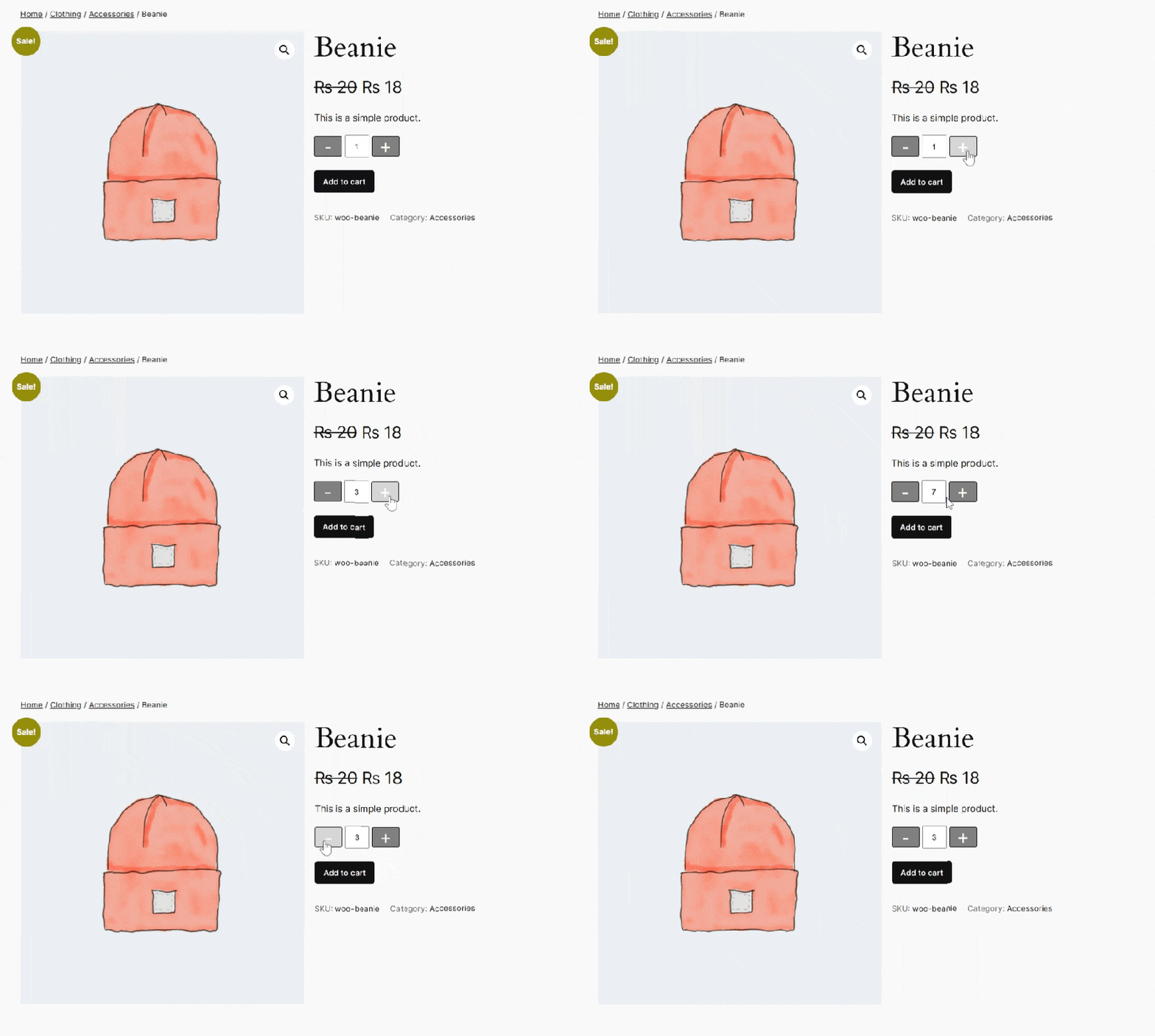
Set Custom Increment Steps

Create Rules to Manage Display of the Button

The WooCommerce Quantity Buttons plugin allows you to create multiple rules to manage the display of the quantity increment button. By creating rules, you can control:
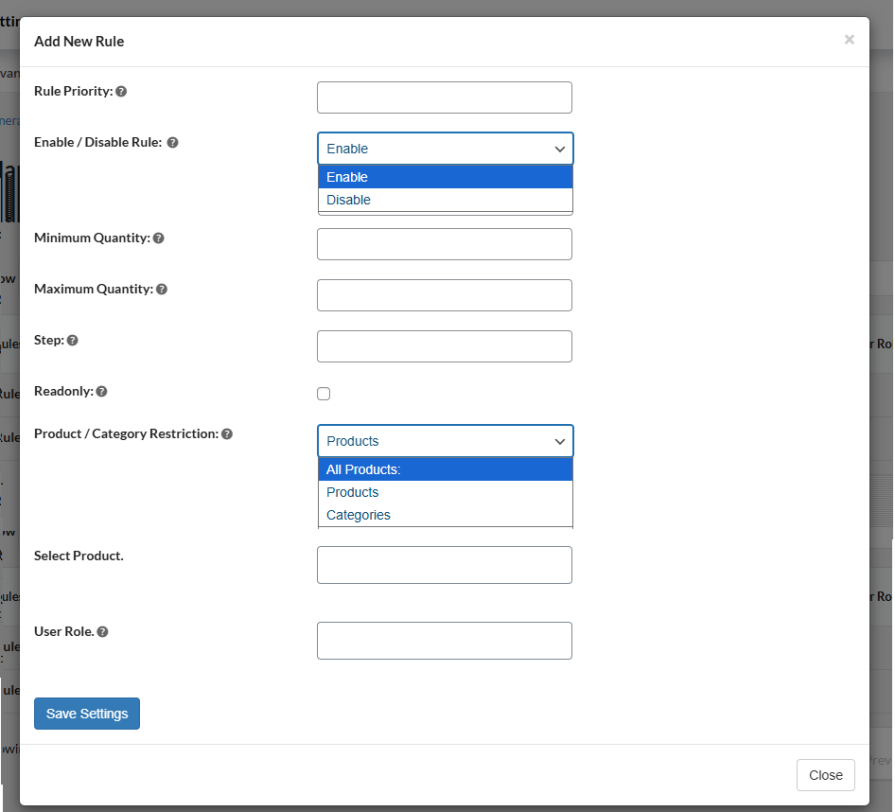
  • Min/Max Quantity: Set the maximum and minimum quantity allowed for each rule.
  • Display for Product or Category: Apply the rule to specific products or categories, or all products.
  • Control by User Role: Control the display of quantity buttons based on user roles.
  • Increment Steps: Configure the increment steps for each rule.

Create Rules to Manage Display of the Button

Customize the Quantity Button

Personalize the quantity increment button to match your store’s theme. You can choose the button style as Classic or Modern. Easily customize the color of the quantity button, font, hover, and border. Also, customize the border width, radius, font size, and field width.

This slideshow requires JavaScript.

Display a Quantity Range Slider

Add a quantity slider next to or instead of the plus and minus buttons, allowing customers to adjust quantities quickly and smoothly. Use both the buttons and slider together, or enable only one option based on your store’s needs.
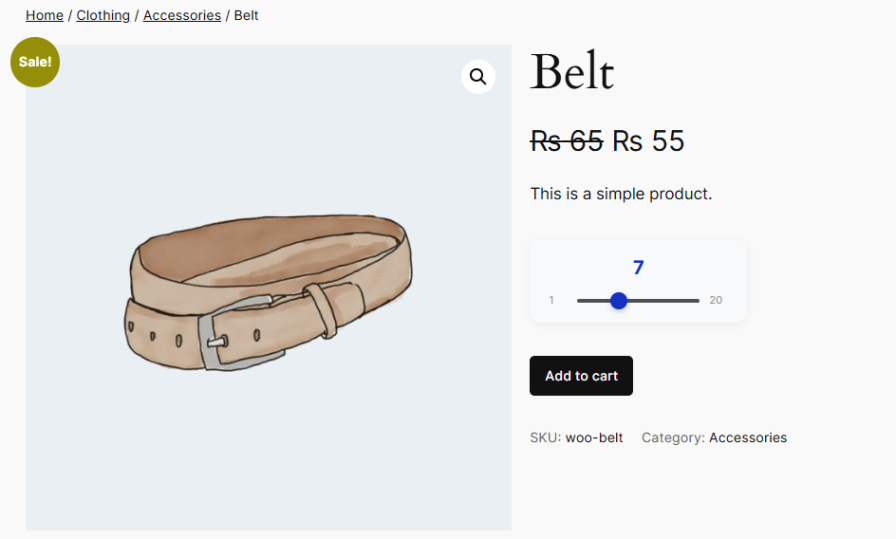
Display a Quantity Range Slider

Add Custom CSS Styling

The WooCommerce Quantity Plus Minus Plugin allows store owners extensive customization by adding custom CSS. You can add your own custom CSS styling to apply to the whole store. This way, you can have a more personalized user experience.
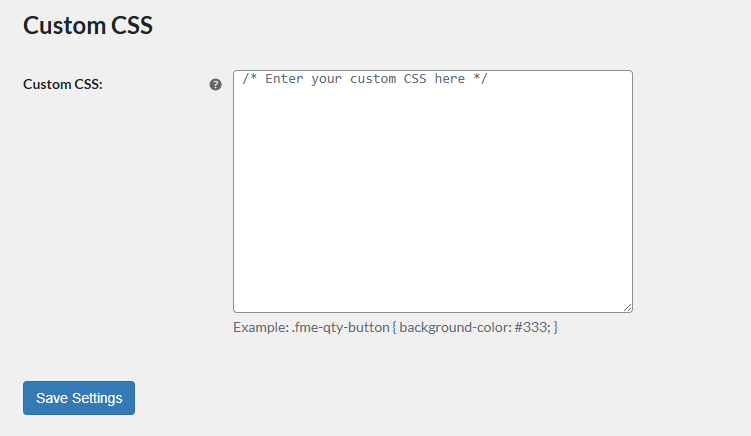
Add Custom CSS Styling


Frequently asked questions

Can I display the quantity buttons only on specific products or categories?

Yes! The plugin allows you to create rules to show the quantity buttons only for selected products, categories, or all products. You can even control which user roles see them.

Can I set different minimum or maximum quantities for different products?

Absolutely. You can define min/max quantities for each product, category, or rule. You can also customize the error message when a customer tries to exceed the limits.

Can I set custom quantity steps for my products?

Yes! You can define how quantities increase for each product or category. For example, setting a step of 5 lets customers buy 5, 10, 15, and so on—perfect for products sold in sets or bulk.

Can I combine the plus/minus buttons with a quantity slider?

Yes. You can use both together or choose only one option, giving customers an easy and flexible way to select quantities.

Can I customize the look of the quantity buttons?

Yes! You can choose between Classic or Modern styles and customize colors, borders, font, radius, hover effects, and field width to match your store theme.

Will this work on all pages, including cart and checkout?

Yes. The plugin can display quantity buttons on product pages, shop pages, cart pages, and even the checkout page.

Can I add my own CSS for further customization?

Definitely. The plugin supports custom CSS so you can style the quantity buttons exactly how you want.

Customer reviews

Average rating 4.3
14 reviews
5 stars, 69% of reviews
4 stars, 8% of reviews
3 stars, 15% of reviews
2 stars, 0% of reviews
1 star, 8% of reviews
14 reviews
  • DigitalEssence
    Rated 5 out of 5
    Support
    Apr 24, 2025
    Support
    Support were fab. Really quick to respond and sorted the issue for me. I do think the functionality (not show the buttons on WooCommerce archive pages and only on individual product pages) should be configurable from the Dashboard but happy with the support.
    • FmeAddons
      Apr 24, 2025
      Thank you for your feedback !!
  • Jennifer Counts
    Rated 4 out of 5
    Functionality
    Oct 22, 2024
    Functionality
  • Jan Rust
    Rated 3 out of 5
    Feb 15, 2024
    Doesn't work with blocks
    Updated - support did get back to us after a nudge, and tried to help. However, the plugin doesn't work with blocks basket and checkout so doesn't really do what we need. Hopefully it will at some point.
    • FmeAddons
      Feb 14, 2024
      Hello, Thank you for the purchase and sorry to hear that you are having this issue with our plugin. We will try to resolve it for you as soon as possible. Unfortunately, we haven't received an email from your end but we can work on your case asap and get it solved ! Please log a ticket At support@fmeaddons.com so we can check the issue and fix it ASAP. We will try to resolve it for you as soon as possible. Thank you
  • parlanialexis
    Rated 5 out of 5
    Jan 24, 2024
    Amazing Product!
    Great product to use! My business only has a few items that can be bought/rented in specific quantities so this made it superrr easy to manage!
    • FmeAddons
      Jan 24, 2024
      Thank you for your feedback !!
  • mikee431a10066f
    Rated 3 out of 5
    Aug 21, 2023
    It's okay, it's not great
    It would be great if there is more out-of-the-box customization. It works well for what I need it for but like I said, not great.
    • FmeAddons
      Aug 22, 2023
      Hello, We apologize for the issues or lack of functionality in our plugin and any inconvenience it may have caused. We can assist you with customization, that is not a problem. Please contact us over support@fmeaddons.com and we will assist you right away. Thank you

Extension information

  • WordPress version required: 4.6
  • WooCommerce version required: 2.6.0
  • PHP version required: 7.4.0
  • Tested with WordPress: 6.8.*
  • Tested with WooCommerce: 10.*.*
  • Requires at least WordPress: 5.0
  • Requires at least WooCommerce: 4.0.0

Countries

  • Worldwide

Languages

English (United States)

Related Products

Price $79 annually
Rated 3.4 out of 5 stars
Price $59 annually
Rated 3.1 out of 5 stars
Price $49 annually
Rated 4.1 out of 5 stars
Price $109 annually
Rated 2.8 out of 5 stars
Price $109 annually
Rated 2 out of 5 stars
Price $109 annually
Rated 2.3 out of 5 stars
Price $109 annually
Rated 2.6 out of 5 stars
Price $109 annually
Rated 2 out of 5 stars
Price $109 annually
Rated 2.3 out of 5 stars




