This is part one of a three-part series on WooCommerce MCP. This post covers what MCP is, how it works, and how to get started with the built-in Abilities. Part two covers building your first Custom Abilities. Part three goes deeper with advanced demos and production considerations.
I’ve been deep diving into something really exciting in WooCommerce: the Model Context Protocol integration (MCP). MCP first shipped as a beta in 10.3 and has been maturing across releases. Now, with WooCommerce 10.7 and WordPress 6.9+, the stack is solid enough to build some seriously useful things on top of it. So, I went ahead and did exactly that.
Picture this: we’re chatting with an AI assistant, and we say something like “Show me my low-stock products” or “Create a product called Winter Hoodie for $39.99.” Our WooCommerce store responds, does the work, and gives back the results. No clicking through the WordPress Dashboard, no manual REST API calls. Just natural conversation turning into real store actions.
That’s what MCP enables. Throughout this post, I’ll be using Claude Code as the AI assistant, but MCP works with any compatible client: Cursor, VS Code, or anything else that speaks the MCP protocol. Use whatever works best for you.
Let’s explore it together!
What is MCP?
↑ Back to topThink of MCP as a universal translator between AI tools and our WooCommerce store. Normally, if we want AI to interact with our store, we’d need to:
- Build custom REST API integrations.
- Handle authentication ourselves.
- Write a bunch of code to parse responses.
MCP changes all that. It’s an open-source standard that lets AI assistants like Claude, Cursor, or VS Code talk directly to systems like WooCommerce using natural language.
With MCP:
- AI can discover what our store can do.
- AI can perform those actions safely.
- Everything works within our existing permissions.
So when we say, “List all products under $20 USD,” MCP translates that into something WooCommerce understands, runs it securely, and brings back the results.
How does WooCommerce MCP work?
↑ Back to topThree pieces work together to make this happen, and they all build on existing WooCommerce security.
The building blocks
WordPress Abilities API
The WordPress Abilities API is a way for WordPress plugins to register “Abilities”, basically things they can do. Think of it like a menu: WooCommerce tells WordPress, “Here’s everything I can do”, and AI assistants can read that menu and pick what they need. Each ability has a name like:
woocommerce/products-list: list all productswoocommerce/orders-create: create a new order
The Abilities API shipped in WordPress 6.9 as a core feature. It provides a standardized registry that any plugin can hook into, so WooCommerce no longer needs to bundle it separately. For those building Custom Abilities, they’re registered on the wp_abilities_api_init hook (more on this in the part two of the series).
WordPress MCP Adapter
The MCP Adapter is the translator. It takes MCP messages from AI assistants and converts them into something WordPress understands. Think of it as the middleman that speaks both “AI protocol” and “WordPress.”
WooCommerce REST API
The current MCP Abilities bridge to existing REST API endpoints. This means the existing REST API permissions still control everything, and the security stays exactly the same.
In the future, Abilities might go beyond REST and do even more powerful things. But for now, this gives us a solid, secure foundation.
The flow of communication
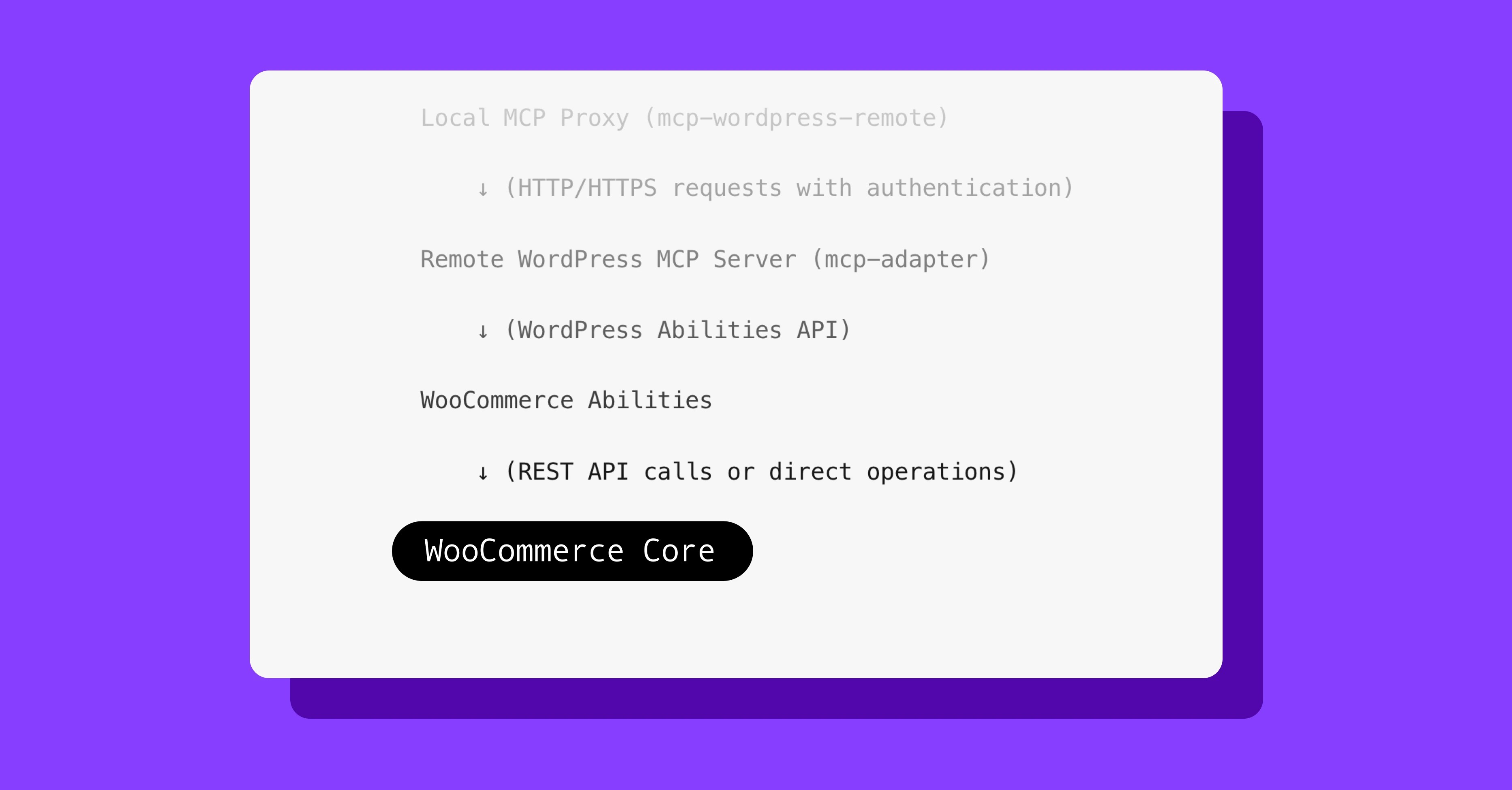
When we type “list all products” in Claude Code, here’s what happens step by step:
AI Client (Claude, etc.)

    ↓ (MCP protocol over stdio/JSON-RPC)

Local MCP Proxy (mcp-wordpress-remote)

    ↓ (HTTP/HTTPS requests with authentication)

Remote WordPress MCP Server (mcp-adapter)

    ↓ (WordPress Abilities API)

WooCommerce Abilities

    ↓ (REST API calls or direct operations)

WooCommerce Core
In plain terms, Claude Code sends a message to a small proxy tool running on our machine. The proxy converts it to a secure web request and sends it to our WordPress site’s MCP endpoint. The MCP Adapter looks up which ability to run, the ability’s callback executes (querying orders, products, etc.), and the result flows back the same way.
The local proxy (@automattic/mcp-wordpress-remote) is a small Node.js tool we install once during setup and then forget about. Its job is to translate between the way AI clients communicate (stdio) and the way WordPress works (HTTP).
Where things stand today
↑ Back to topMCP landed as a beta in WooCommerce 10.3 with product and order Abilities. The update since then was the MCP Adapter v0.3.0 migration in 10.4, which updated the transport layer. Since then, the MCP surface has been stable through 10.5, 10.6, 10.6.1, and 10.7, which is what we’re building on.
MCP is still in developer preview, so the built-in Abilities are limited to product and order CRUD (create, read, update, delete). But the foundation is solid, and that’s where Custom Abilities come in.
What can we do with WooCommerce MCP right now?
↑ Back to topOut of the box, WooCommerce ships with nine MCP Abilities:
Products:
woocommerce/products-listproducts-getproducts-createproducts-updateproducts-delete
Orders:
woocommerce/orders-listorders-getorders-createorders-update
This is already powerful enough to build some really cool workflows. But where it gets really interesting is Custom Abilities, and that’s what we’ll dive into in part two of this series.
Prerequisites
- A staging site (WooCommerce MCP is in developer preview)
- WooCommerce 10.7 (or 10.3+)
- WordPress 6.9+ (for the core Abilities API)
- Node.js 22+ (required by the latest
mcp-wordpress-remote) - REST API key with read_write permissions
- An MCP client (I’ll use Claude Code). Note: Claude Code requires a Claude Pro or Max plan ($20/mo+) or Anthropic API credits. It’s not available on the free tier.
Enabling MCP
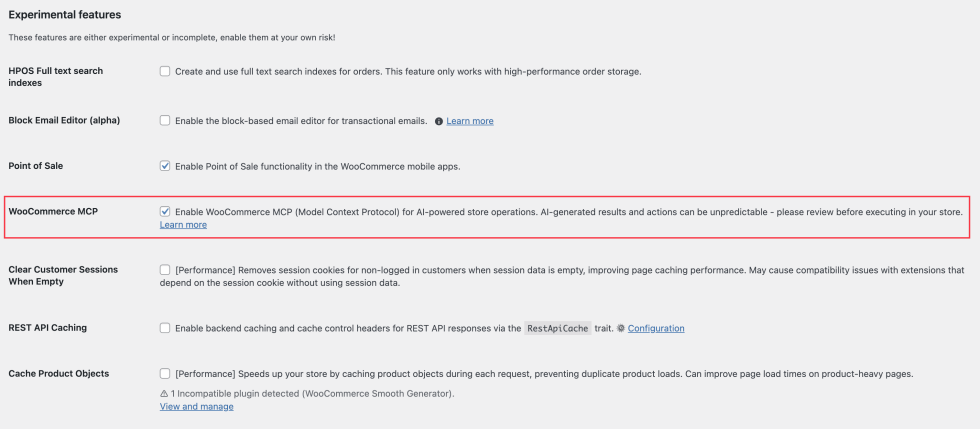
Option 1: Head over to WP Admin > WooCommerce > Settings > Advanced > Features and enable WooCommerce MCP.
Option 2: Enable via WP-CLI
wp option update woocommerce_feature_mcp_integration_enabled yes
Setting up the connection
Create an API key
- In your store’s WP Admin dashboard, go to WooCommerce > Settings > Advanced > REST API.
- Click Add Key.
- Set permissions to Read/Write.
- Save the consumer key and secret.
Configure Claude Code
Open the Terminal and run:
claude mcp add woocommerce_mcp \

  --env WP_API_URL=https://yourstore.com/wp-json/woocommerce/mcp \

  --env CUSTOM_HEADERS='{"X-MCP-API-Key": "YOUR_CONSUMER_KEY:YOUR_CONSUMER_SECRET"}' \

  -- npx -y @automattic/mcp-wordpress-remote@latest
Important:
- Replace
yourstore.comwith the actual staging site URL. - Replace the
YOUR_CONSUMER_KEY:YOUR_CONSUMER_SECRETpart with the actual API credentials. - Restart Claude Code to load the new configuration.
For local development with HTTP: For testing locally without HTTPS, add this filter:
add_filter( 'woocommerce_mcp_allow_insecure_transport', '__return_true' );Demo 1: Built-in WooCommerce Abilities
↑ Back to topLet’s explore the default Abilities that come with WooCommerce. These work right away with zero custom code.
List all products
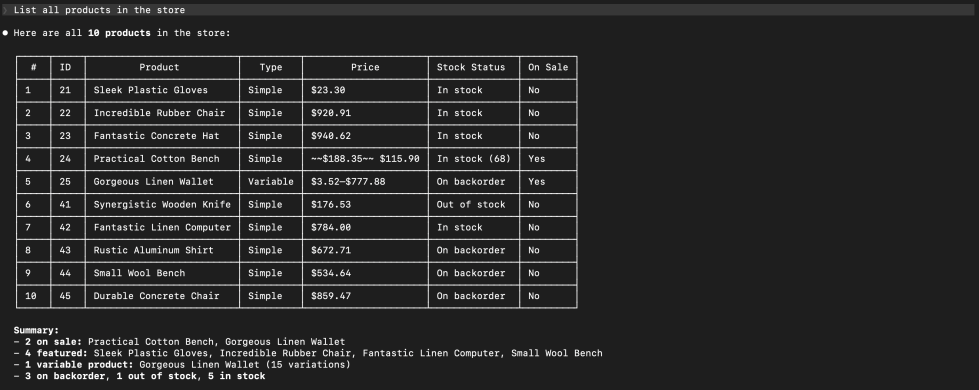
Ask AI client: “List all products in the store.”
What happens behind the scenes:
- MCP calls the ability:
woocommerce/products-list - Returns product data with names, prices, stock status, etc.
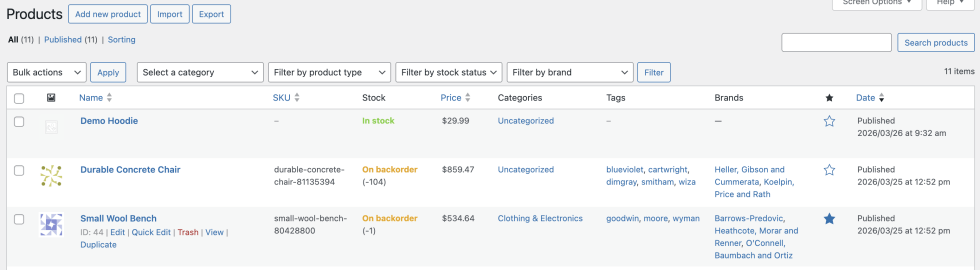
Create a product
Try this: “Create a product named ‘Demo Hoodie’ priced at $29.99.”

MCP calls:
- Ability:
woocommerce/products-create - Result: A new product appears in the store!
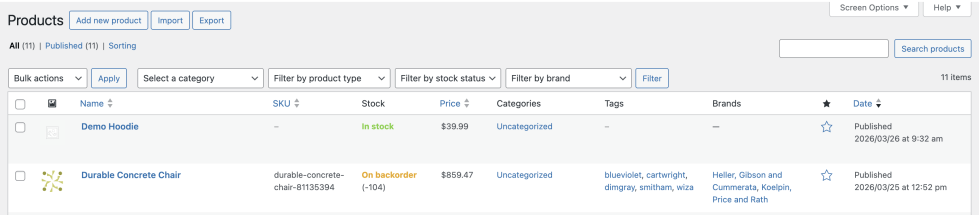
Update a product
Say: “Update the Demo Hoodie price to $39.99.”
MCP calls:
- Ability:
woocommerce/products-update - The price changes instantly!
Create an order
Try: “Create an order for product ID 56 with quantity 2.”
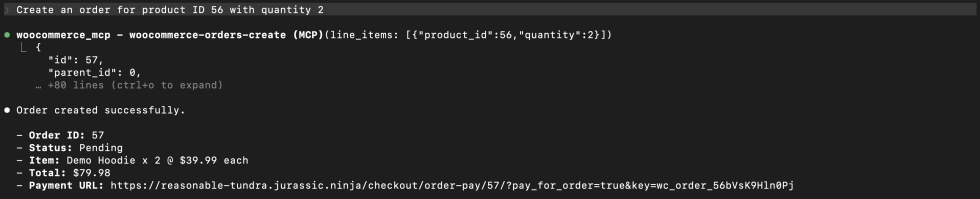
MCP calls:
- Ability:
woocommerce/orders-create - A new order is created!
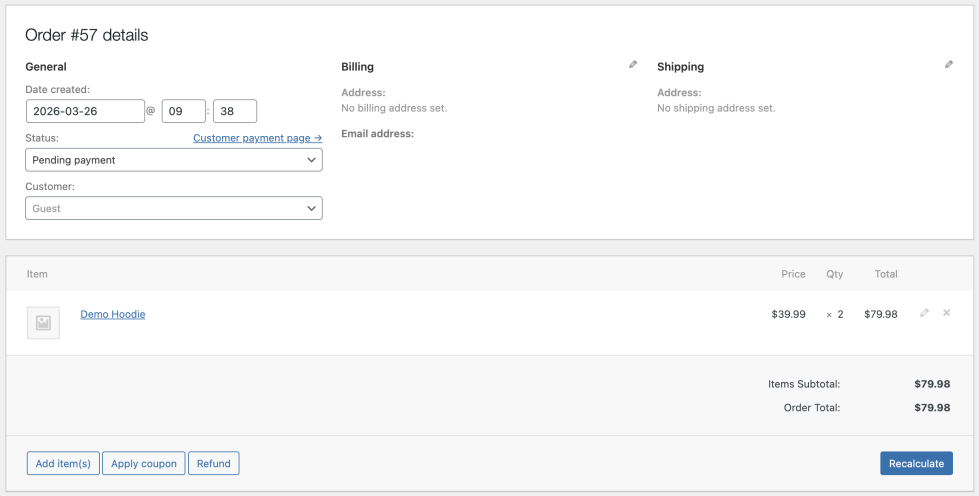
Pretty amazing, right? These built-in Abilities make AI-assisted store management feel natural. And this is just the beginning!
In part two, we’ll go beyond the built-ins and build Custom Abilities from scratch — including a Today’s Sales Analytics dashboard, a Low Stock Alert, and a Customer Lookup tool. See you there!


About