Aktive Installationen
100K+
Product comparison
Das Abonnement beinhaltet
Support
Kannst du garantieren, welchen Umsatz dein Shop diesen Monat machen wird? Das ist mit dem Angebot von abonnementbasierten Produkten durchaus möglich.
Mit WooCommerce Subscriptions kannst du Produkte mit wiederkehrenden Zahlungen erstellen und verwalten – Zahlungen, mit denen du Residualeinkommen erzielst, das du nachverfolgen und fest einplanen kannst.
WooCommerce Subscriptions ermöglicht dir die Einführung verschiedener Abonnements für physische oder virtuelle Produkte und Dienste. Erstelle monatliche Abonnement-Boxen, wöchentliche Dienstabonnements oder auch Softwarepakete mit jährlicher Abrechnung. Füge Anmeldegebühren hinzu, biete Gratis-Tests an oder richte Ablauffristen ein.
Mit einem abonnementbasierten Modell kannst du mehr Residualeinkommen erzielen – du musst dafür lediglich die Bestellungen versenden.
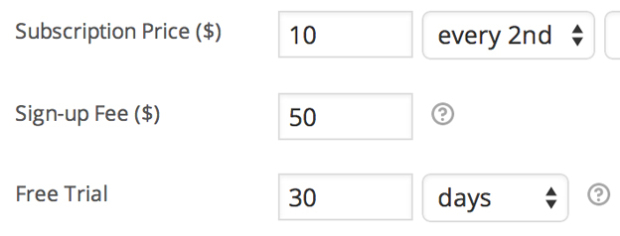
Füge jedem Abonnement-Produkt Anmeldegebühren und einen kostenlosen Testzeitraum hinzu, um Kostenaufwand für Kundeneinrichtungen zu kompensieren oder Kunden die Möglichkeit zu geben, ein Produkt kostenlos zu testen.
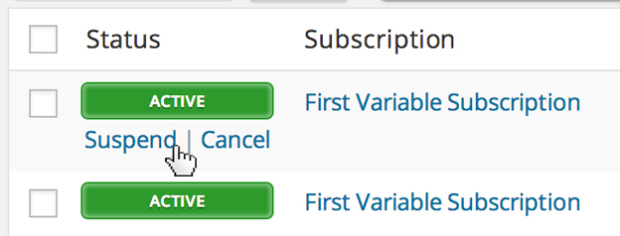
Shop-Besitzer können über die Administrationsseite WooCommerce > Abonnement bearbeiten auf eine umfassende Abonnementverwaltung zugreifen. Du kannst ein Abonnement aussetzen oder kündigen, das Ablaufdatum des Testzeitraums ändern, Artikel, Versand, Gebühren oder Steuern zum Abonnement hinzufügen oder die wiederkehrende Gesamtsumme für zukünftige Zahlungen ändern.
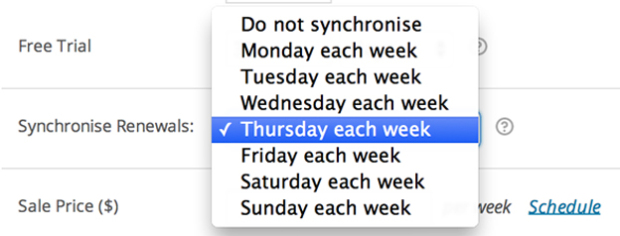
Wenn du nur an bestimmten Tagen im Monat versenden oder für alle Kunden dieselbe jährliche Mitgliedschaftsdauer einrichten möchtest, kannst du hierfür die WooCommerce-Subscriptions-Funktion zur Verlängerungssynchronisierung nutzen. Du kannst sogar für einen synchronisierten Abonnement-Kauf die erste Zahlung anrechnen.
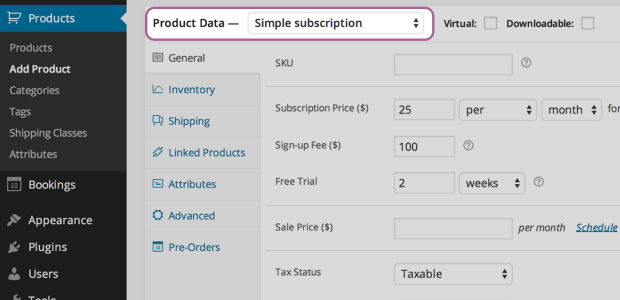
Beim Erstellen eines Abonnement-Produkts kannst du das Produkt virtuell oder physisch herunterladbar machen, Verlängerungszahlungen wöchentlich, monatlich oder jährlich berechnen, das Produkt auf eines pro Kunde begrenzen und sogar die Versandkosten nur für die Erstbestellung berechnen.
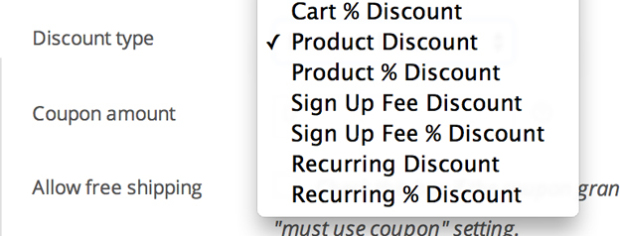
Biete Kunden einen Rabatt auf ihre monatlichen Zahlungen oder nur auf die Anmeldegebühr. Subscriptions beinhaltet sowohl Gutscheine für wiederkehrende Rabatte als auch Gutscheine für die Anmeldegebühr.
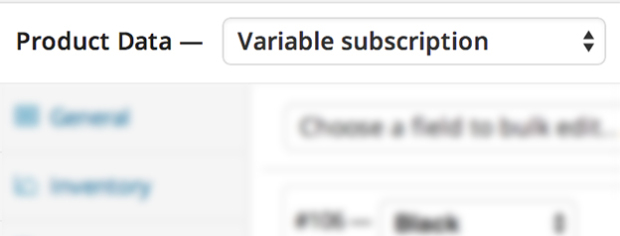
Erstelle variable Abonnement-Produkte, sodass deine Kunden ein passendes Abonnement für sich auswählen können. Du kannst Kunden sogar erlauben, ihren Zahlungszyklus selbst zu wählen.

Deine Kunden können ihre Abonnements auch selbst verwalten. Auf der Seite Mein Konto > Abonnement ansehen können Abonnenten ein Abonnement aussetzen oder stornieren, Lieferadresse oder Zahlungsmethode für zukünftige Verlängerungen ändern oder Upgrades oder Downgrades ihres Abonnements durchführen.
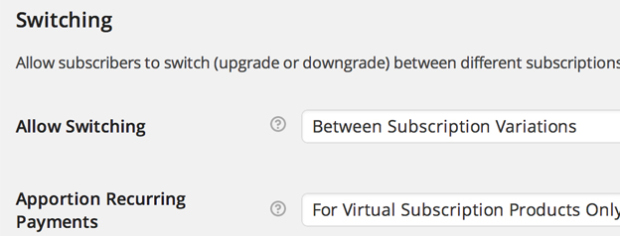
Ermögliche Kunden, zwischen verschiedenen Abonnement-Produkten ein Upgrade, Downgrade oder Crossgrade vorzunehmen. Mit flexiblen Anrechnungsoptionen für den wiederkehrenden Betrag, die Anmeldegebühr und die Dauer kannst du auch die Kosten für den Wechsel zu einem neuen Abonnement-Produkt an die Anforderungen deines Shops anpassen.

Deine Kunden können auch verschiedene Abonnement-Produkte innerhalb derselben Transaktion kaufen. Subscriptions gruppiert dann diese Produkte, um die Gebühren für das Zahlungs-Gateway und den logistischen Aufwand für zukünftige Verlängerungen zu reduzieren.
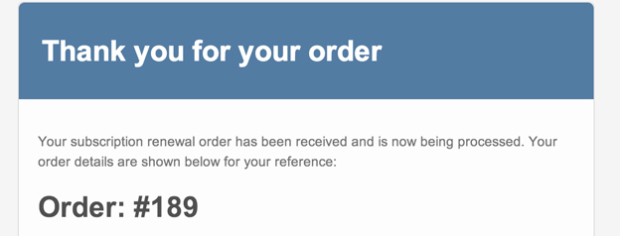
Benachrichtige Kunden mithilfe der integrierten Abonnement-E-Mails automatisch, wenn eine Verlängerungszahlung für ein Abonnement verarbeitet oder ein Abonnement gekündigt wird oder wenn ein Abonnement abgelaufen ist.
Es spielt keine Rolle, ob du jeden Monat ein Überraschungs-Produktpaket an treue Kunden versenden oder ihnen eine persönliche Dienstleistung deines Kleinunternehmens in Rechnung stellen möchtest. Mit WooCommerce Subscriptions kannst du dieses essenzielle Residualeinkommen erheblich stressfreier erzielen.
Du kannst nachverfolgen, wie viele Abonnenten du hast, wann ihre Rechnungen gestellt werden und wie viele Einnahmen du generierst. Du weißt also immer, mit wie vielen Einnahmen dein Shop rechnen kann, während du dein Geschäft ausbaust.
WooCommerce Subscriptions is a recurring payments extension for WooCommerce that lets you sell products and services billed on a repeating schedule. You can charge customers weekly, monthly, or annually, and you can apply it to physical, virtual, or downloadable products. Common examples include product-of-the-month clubs, weekly service subscriptions, and yearly software billing plans.
WooCommerce Subscriptions is designed to help you turn one-time sales into recurring revenue you can count on. Instead of relying on repeat manual purchases, customers sign up once and are billed automatically on their schedule, which can help stabilize cash flow. Built-in reports let you track recurring revenue and the number of active subscribers, so you have a clearer view of what your store can expect month to month.
WooCommerce Subscriptions integrates with over 25 payment gateways for automatic recurring payments, including WooPayments, Stripe, PayPal Payments, and PayPal Braintree. If you prefer to accept manual renewal payments, those can be processed through any WooCommerce payment gateway, with automatic email invoices and receipts. For the full breakdown of which gateways support automatic versus manual renewals, see the Subscriptions payment gateways guide.
No. While you can use Stripe and many other gateways with WooCommerce Subscriptions for automatic recurring payments, the subscriptions themselves are created and managed on your own site, not inside your payment gateway. This means you manage billing schedules, renewals, and subscription changes from your WordPress dashboard rather than logging in to a separate provider account.
Yes. WooCommerce Subscriptions lets you add a free trial so customers can try before they buy, and you can charge an initial sign-up fee to cover setup costs. You can combine both on the same product, or use each on its own. This gives you flexible pricing options that can lower the barrier to signing up while still covering upfront costs.
Yes. From the My Account area, subscribers can suspend or cancel a subscription, update their shipping address or payment method for future renewals, and upgrade or downgrade their plan. Letting customers handle these changes on their own can reduce the number of support requests your team needs to answer.
Yes. WooCommerce Subscriptions supports upgrades, downgrades, and cross-grades between subscription products. It includes flexible proration options for the recurring amount, sign-up fee, and length, so you can control how switching costs are calculated. This is useful if you offer tiered plans and want customers to move between them without starting over.
WooCommerce Subscriptions includes an automatic failed payment retry system that can rebill a failed recurring payment, which helps you avoid losing revenue from a single declined charge. The retry system is a setting you turn on, and it applies to payments that fail after it is enabled. You can learn more in the failed payment retry documentation.
Yes. The renewal synchronization feature lets you align renewals to a specific day, such as the first of the month or a set weekday, which is helpful if you only ship on certain days or want all customers on the same billing term. You can also prorate the first payment so customers are charged fairly for the partial period before their first synchronized renewal.
Yes. With variable subscriptions, you can offer several options under one product and let customers choose the plan that suits them, including their own billing schedule. This works well when you sell the same service at different tiers, such as basic, standard, and premium plans, each with its own price.
Yes. WooCommerce Subscriptions adds two coupon types beyond standard WooCommerce coupons: a recurring product discount and a sign-up fee discount. You can use recurring discounts to create limited coupons that apply to only a set number of payments, which gives you control over promotions without discounting the plan forever.
Yes. Customers can purchase different subscription products in a single transaction, and WooCommerce Subscriptions groups them to reduce payment gateway fees and simplify future renewals. If you enable mixed checkout, shoppers can also buy subscription and non-subscription products together in the same order.
Yes. WooCommerce Subscriptions includes a gifting option that lets shoppers purchase a subscription for another person. This can help you reach new customers and grow recurring revenue, since the recipient becomes a subscriber on your store.
Yes. WooCommerce Subscriptions includes built-in emails that notify you and your customers when a renewal payment is processed, when a subscription is cancelled, and when a subscription expires. These automatic messages help keep customers informed so there are fewer surprises around billing.
WooCommerce Subscriptions lets you create dedicated subscription products, and you can also offer customers a choice between a one-time purchase and a subscription on your existing products.
They solve different problems and are often used together. WooCommerce Subscriptions handles recurring billing: payment schedules, renewals, and failed payment retries. WooCommerce Memberships handles access control: restricting content or products to members. If you want members billed on a recurring cycle with free trials, upgrades, or the ability to pause, the two extensions integrate so Subscriptions manages payments while Memberships manages access.
No. If your goal is simply to bill customers on a repeating schedule for products or services, WooCommerce Subscriptions handles that on its own. You would add WooCommerce Memberships only if you also need to restrict access to gated content, courses, or member-only products. For recurring memberships that combine billing and access, the two work together.
WooCommerce Subscriptions is designed for stores that sell ongoing value and want automated, recurring billing. It suits subscription box businesses, service providers billing retainers for work like maintenance or consulting, software and SaaS billing, and any store turning repeat purchases into recurring plans. If you need flexible billing schedules, free trials, and customer self-service, it is a strong fit.
WooCommerce Subscriptions is built for recurring billing, so it is not the right tool if your store only sells one-time purchases with no repeating payments. If your main need is restricting access to content or products rather than charging on a schedule, WooCommerce Memberships is a better starting point.
WooCommerce Subscriptions is built for recurring billing, which is the core of any subscription box or repeat-shipment model. You can set weekly, monthly, or annual schedules, sync renewals to a shipping day, and charge shipping in a way that fits your fulfillment.
Yes. Store owners get full subscription management from the Edit Subscription screen in the WordPress dashboard. You can suspend or cancel a subscription, change the trial expiration, add items, shipping, fees, or taxes, and modify the recurring total for future payments. This gives you hands-on control when a customer's needs change.
Kategorien
Extension information
Quality Checks
Kompatibilität
Länder