Collab Cart for WooCommerce allows your WooCommerce store users to participate in a collaborative group purchase. This documentation is to help you with each step of the configuration.
- Downloadthe .zip file from your WooCommerce account.
- Go to: WordPress Admin > Plugins > Add New and Upload Plugin with the file you downloaded with Choose File.
- Install Now andActivate the extension.
More information is available at:
Install and Activate Plugins/Extensions.
- Cart admin – user who created the shared cart
- Cart contributor – user contributing to cart
Users can create or add to a shared cart from the
Cart page or
Single product page. The user who creates the shared cart comes cart admin. A user becomes cart contributor by shared cart admin invitation (clicking on share URL will add a shared cart to the user-contributor shared carts section. User-contributors are not the owner of the shared cart).
Cart admin can:
- see all items and their details in shared cart
- add/remove/edit/lock own items in shared cart
- remove contributor items in shared cart
- select items to checkout (independent of item lock property)
- check out selected shared cart items
- change cart name/description
- change cart privacy
- share cart URL
- save cart changes
- delete cart
Cart contributor can:
- see all items and their details in shared cart
- add/remove/edit/lock own items in shared cart
- save cart changes
Users can add products to the shared cart from the single product & cart page.


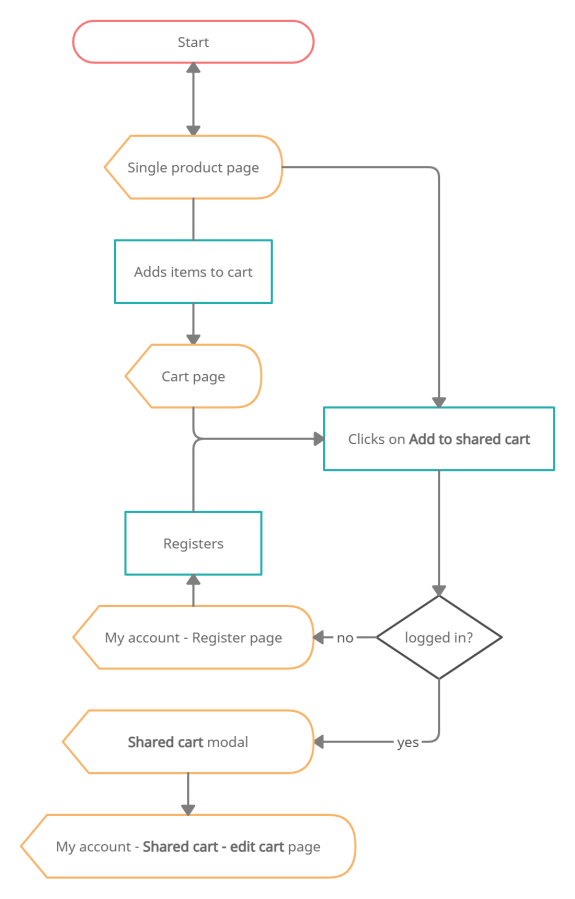
Users can choose to add to an existing or create a new cart.

Admin can set shared cart privacy. When set to
Shared, contributors can join via cart URL or social media. When set to
Private, new contributors are no longer able to join, existing contributors remain. Admin can remove existing contributors by removing their items.

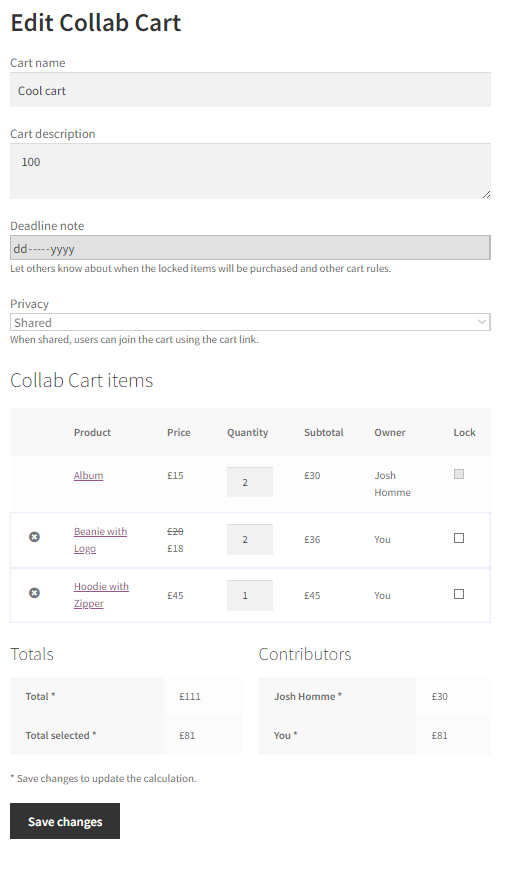
User has access to it’s shared carts through
My Account – Collab Cart page. The page lists all the shared carts he contributes to or is an admin of. Admins can delete their carts from here – contributors lose access. Contributors can leave shared carts from here, their items will be removed form shared cart upon leaving.


