
The Cart template is the layout in your store that the customers see when they click on their cart, and it’s designed to show everything they need before moving to checkout. This makes it easy for customers to review their order and feel confident before completing their purchase.
Access the Cart Template
↑ Back to topYou can access this template from your WordPress Dashboard by going to:
- Appearance > Editor.
- Click Templates > WooCommerce, and then select “Page: Cart”.
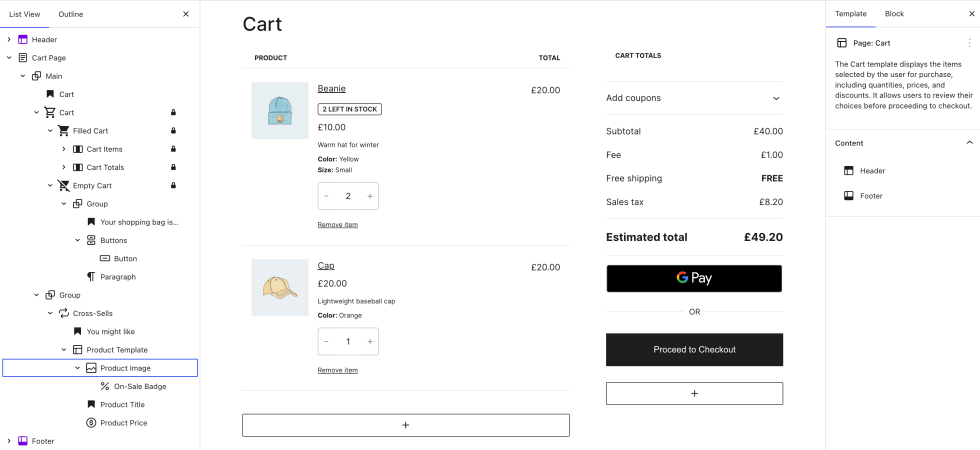
Cart Block
↑ Back to topThe Cart block is the main component of the Cart template. It combines multiple WooCommerce blocks to display products currently in the cart, along with order totals, discounts, shipping, and checkout options. When the cart is empty, it automatically switches to an Empty Cart view with a message and product suggestions.
You can learn more about the Cart Block here.
Reverting to Classic Cart
↑ Back to top- If using a block theme, go to Appearance > Editor > Template > WooCommerce and select Cart.
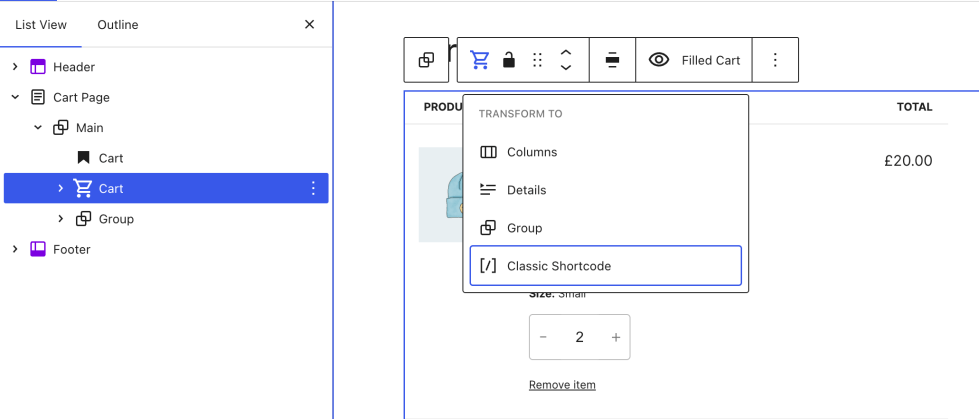
If you are using a non-block theme, go to Pages > All Pages and locate and edit the Cart page. - Open the List View and select the Cart block.
- Click the “Transform” button, which is leftmost in the block toolbar.
- Choose “Classic Shortcode”.
- The block will be transformed into a Classic Shortcode placeholder block.
- Save your changes by clicking the Save button in the top bar.
Questions and support
↑ Back to topDo you still have questions and need assistance?
This documentation is about the free, core WooCommerce plugin, for which support is provided in our community forums on WordPress.org. By searching this forum, you’ll often find that your question has been asked and answered before.
If you haven’t created a WordPress.org account to use the forums, here’s how.
- If you’re looking to extend the core functionality shown here, we recommend reviewing available extensions in the WooCommerce Marketplace.
- Need ongoing advanced support or a customization built for WooCommerce? Hire a Woo Agency Partner.
- Are you a developer building your own WooCommerce integration or extension? Check our Developer Resources.
If you weren’t able to find the information you need, please use the feedback thumbs below to let us know.