
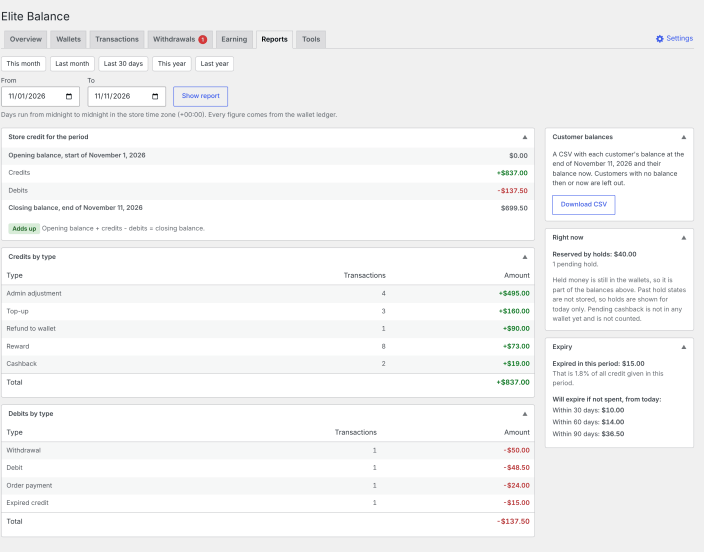
The Reports tab answers the questions your accountant asks about store credit: how much you owed customers on a given date, what came in and went out in a period, whether it all adds up, and what is about to expire. It also downloads each customer’s balance as a CSV file. Everything on the tab is read from the wallet ledger and nothing on it changes a balance.
Open it at WooCommerce > Elite Balance > Reports. Staff who can manage wallets (administrators and shop managers by default) can see it.
Choose a period
↑ Back to topClick one of the presets, This month, Last month, Last 30 days, This year or Last year, or enter two dates under From and To and click Show report. The tab opens on This month.
- Days run from midnight to midnight in your store’s time zone (Settings > General). The range includes both days.
- If customers hold wallets in more than one currency, a currency choice appears. Each report covers one currency.
Store credit for the period
↑ Back to topThe first card is the summary:
| Line | What it is |
|---|---|
| Opening balance, start of (first day) | The store credit you owed customers when the period started: the total of every wallet at that moment. |
| Credits | Everything added to wallets during the period. |
| Debits | Everything taken from wallets during the period. |
| Closing balance, end of (last day) | What you owed customers when the period ended. |
Under it, Adds up confirms that opening balance + credits – debits = closing balance. If it ever says Does not add up, the report shows the closing balance the movements give: run wp rb-elbal reconcile or contact support with the report.
To find out what you owed customers on one particular date, choose a period that ends on that date and read the closing balance.
Credits and debits by type
↑ Back to topTwo tables split the period’s credits and debits by type, with the number of transactions and the amount for each, for example Refund to wallet, Top-up, Cashback, Reward and Admin adjustment on the credit side, and Order payment, Withdrawal, Debit and Expired credit on the debit side. A type without movement in the period is left out. Subscription renewals paid from the wallet are counted as Order payment.
Customer balances (CSV)
↑ Back to topDownload CSV in the Customer balances card downloads a file with each customer’s balance at the end of the period’s last day and their balance now. Customers with no balance then or now are left out. The file is named elite-balance-customer-balances-<date>.csv.
| Column | Contents |
|---|---|
wallet_id, user_id |
The wallet and the customer’s account. |
user_login, user_email, display_name |
Who the customer is. |
balance_end_of_<date> |
The balance at the end of the period’s last day. |
balance_now |
The balance when you downloaded the file. |
currency |
The wallet’s currency. |
wallet_status |
active or locked. |
expiring_within_30_days |
Credit in that wallet that will expire within 30 days if it is not spent. |
Important: The file contains customers’ email addresses. Treat it as personal data.
Right now
↑ Back to topThe Right now card shows the money reserved by holds today (for unpaid orders and withdrawal requests). Held money is still in the wallets, so it is part of the balances above. Past hold states are not stored, so holds are shown for today only. Pending cashback is not in any wallet yet and is not counted anywhere on this tab.
Expiry
↑ Back to topThe Expiry card shows while store credit expiry is on, or while any credit with a date exists:
- Expired in this period, with its share of all credit given in the period;
- Will expire if not spent, from today: the store-wide totals within 30, 60 and 90 days, for your store’s main currency.
From the command line
↑ Back to topwp rb-elbal report prints the same summary for any period, as a table, CSV or JSON, and wp rb-elbal report --customers writes the per-customer CSV. See WP-CLI Commands.
Questions
↑ Back to topDoes the report include orders paid by card? No. It only covers store credit: money in your customers’ wallets. Your sales are in WooCommerce’s own Analytics.
Why does the opening balance not match last month’s closing balance? It always should, for the same currency: the opening balance of a day is the closing balance of the day before. If it does not, run wp rb-elbal reconcile and contact support with both reports.
Can I report on one customer? Download the CSV for that period, or open the customer’s wallet screen, where the history shows the balance after each transaction and Export CSV downloads it.