Display sale price with variation monster plugin settings

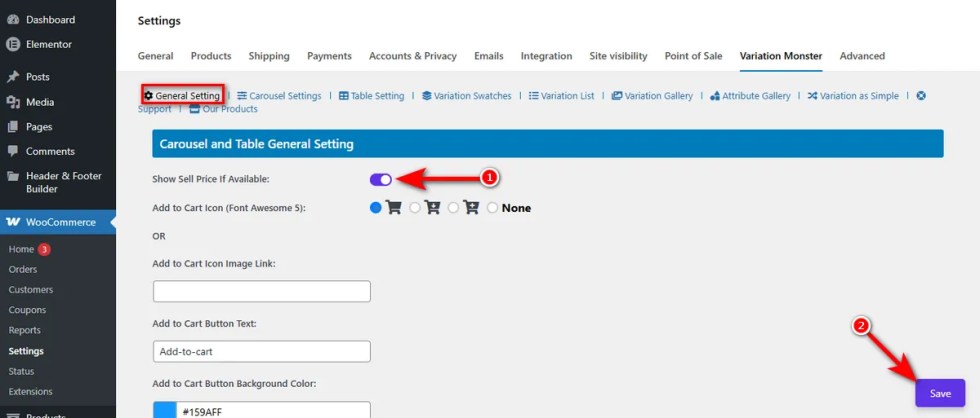
This toggle switch controls the visibility of sale prices within your variation tables and carousels.

By turning it on and clicking the ‘Save’ button, you can display the discounted price next to the regular price when a product variation is on sale.
Doing so helps you create urgency and let wholesale customers use the Variation Table and see the value they are getting immediately.
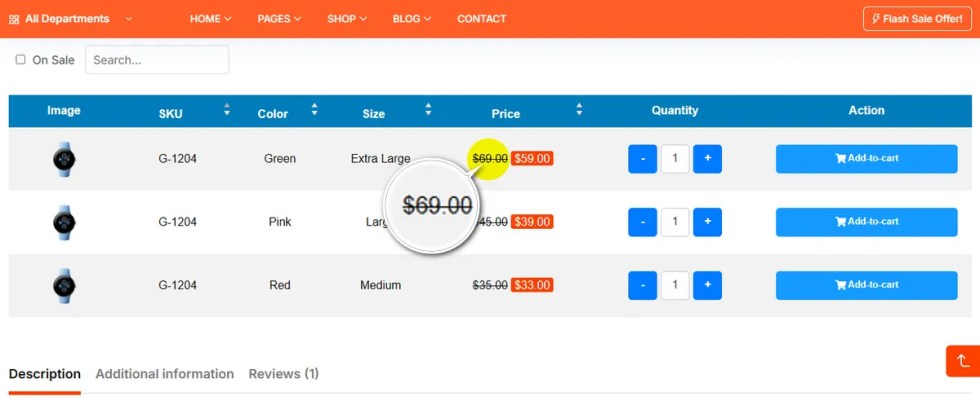
Note: To see the table and sale price on a variable product’s detailed page, keep the Variation Table switch turned on.

Related Products

Offer add-ons like gift wrapping, special messages or other special options for your products.

WooCommerce Subscriptions is a WooCommerce extension that lets customers subscribe to your products or...

Use of your personal data
We and our partners process your personal data (such as browsing data, IP Addresses, cookie information, and other unique identifiers) based on your consent and/or our legitimate interest to optimize our website, marketing activities, and your user experience.