Product Icon

Customize My Account for WooCommerce

Customize the default WooCommerce My Account Page. Add unlimited menu tabs, manage endpoints and display personalized content in the customer dashboard. 
Choose a billing option
$59
Save 20%
$118 $94.40

Subscription includes

  • Product updates and improvements
  • Customer support
  • 30-day money-back guarantee

Customize My Account for WooCommerce is the best plugin to enhance the default customer dashboard.

The default WooCommerce My Account Page is pretty rigid – a basic design with tabs for orders, downloads, addresses, payment methods, and registration details.

You cannot modify these default tabs or add new ones for extra account details. This leaves your customers with a generic experience that doesn’t serve specific business needs.

Customize My Account for WooCommerce goes beyond this limitation. Add unlimited custom endpoints, reorder menu items with the drag and drop method, and personalize the dashboard content by modifying default content and adding your own.


Customize My Account Page Builder

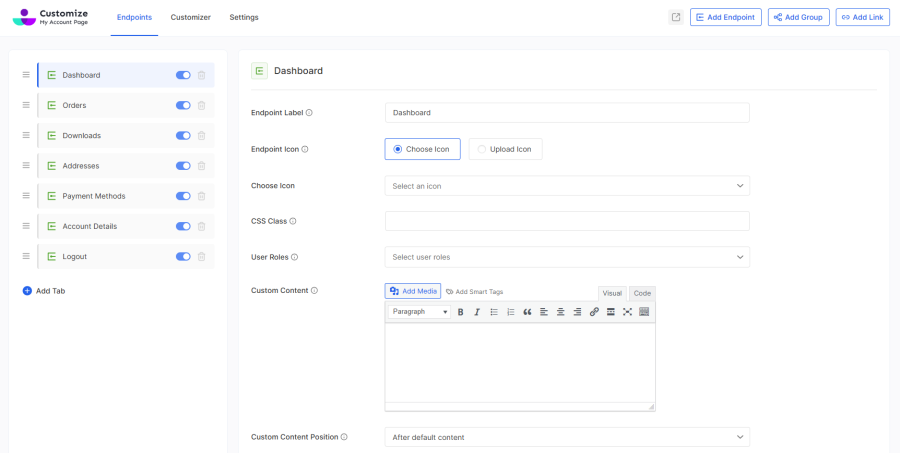
Modify Default WooCommerce Endpoints

Easily modify or disable default WooCommerce endpoints: Dashboard, Orders, Downloads, Addresses, Payment Methods, Account Details, and Logout.

Control which default WooCommerce endpoints are visible on the customer’s My Account Page with a toggle.
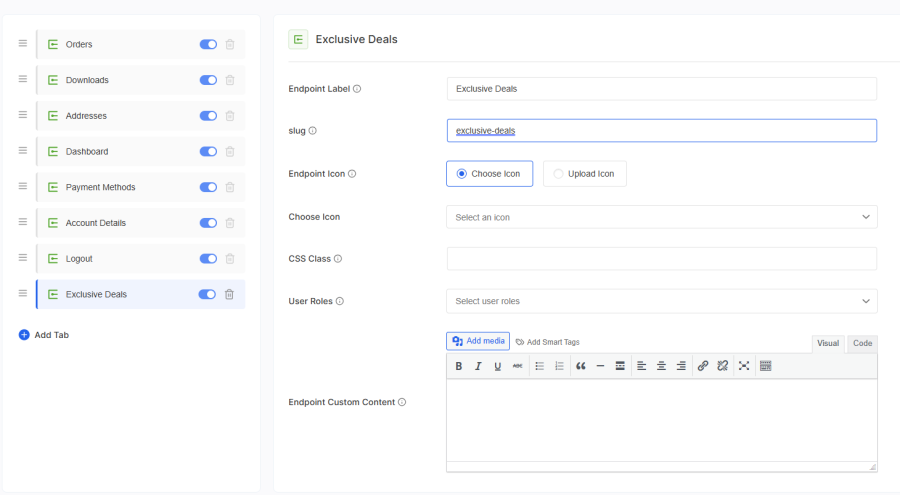
Add Custom Endpoints

Add unlimited custom endpoints using Customize My Account for WooCommerce. You can specify the label, slug, icon, and add content as you wish.
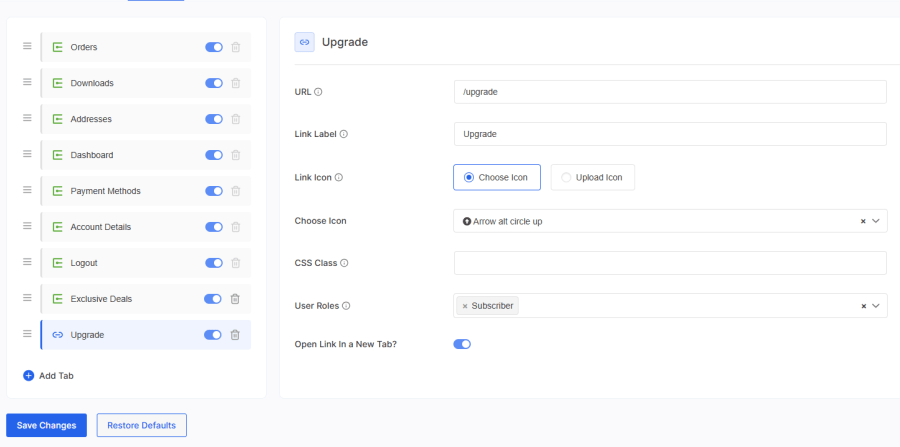
Create Unlimited Links

Add unlimited menu items redirecting users to other pages within your store or external websites. You can have the link open in the same tab or a new tab in the user’s browser.
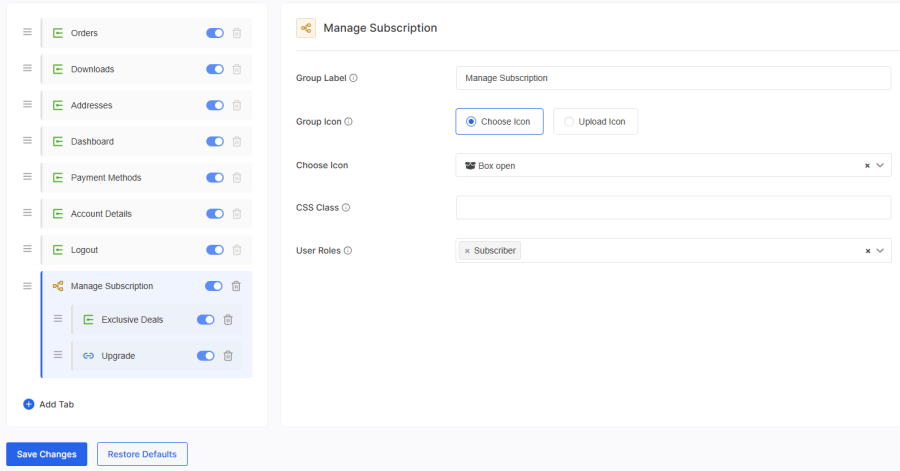
Groups for Related Endpoints

You can group similar endpoints and links together to keep your dashboard structured and organized. This helps your customers navigate you store better.
Drag and Drop Endpoints

Re-order endpoints and links within the My Account Page easily through the drag and drop interface. You can re-arrange both default and custom tabs using this method.
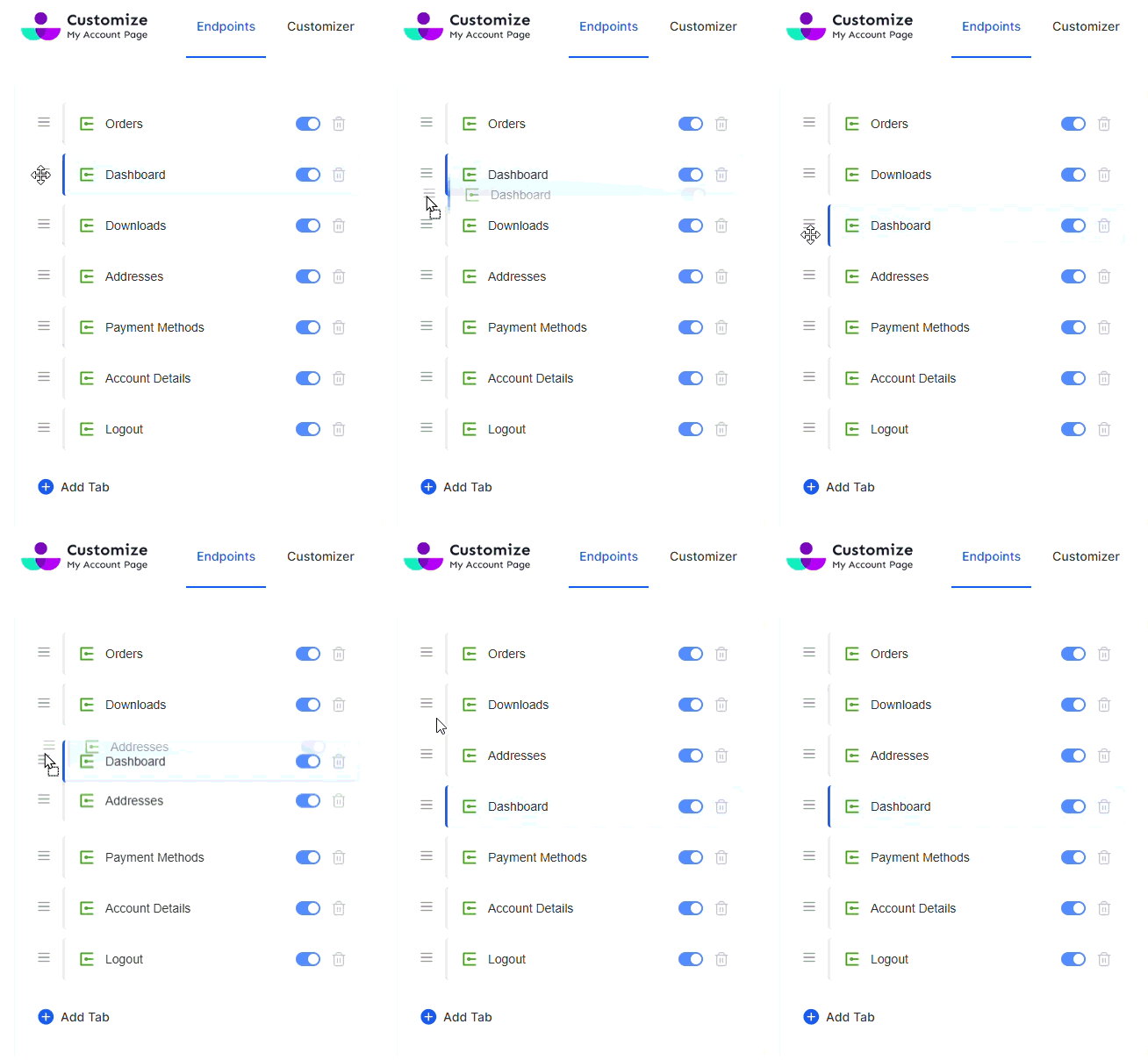
Customize My Account Page Customizer

Predefined Layouts, Styles, and Color Palette

Create stunning customer dashboard in seconds using the pre-built menu layouts, styles, and color palettes. You can extend default color palettes and create a custom one to match your brand.
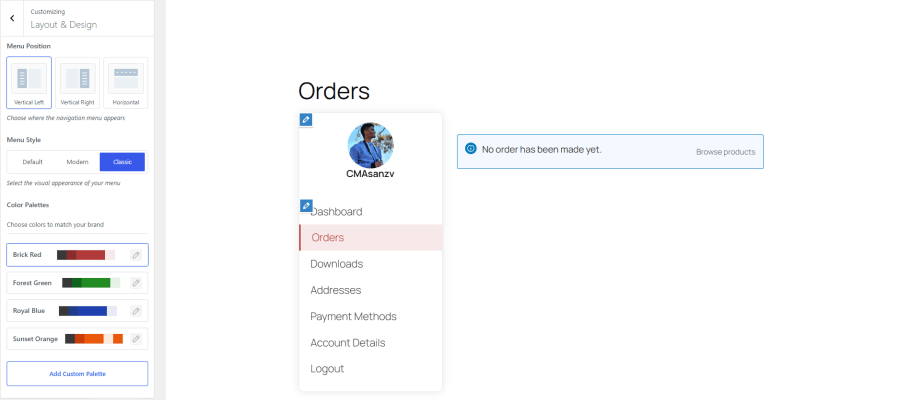
Built-in Customizer with Live Preview

Change colors to match your brand palette, adjust fonts to match your site typography, and modify spacing to create a cohesive experience that feels like part of your store. Preview the changes in real time before you hit the Save button. 
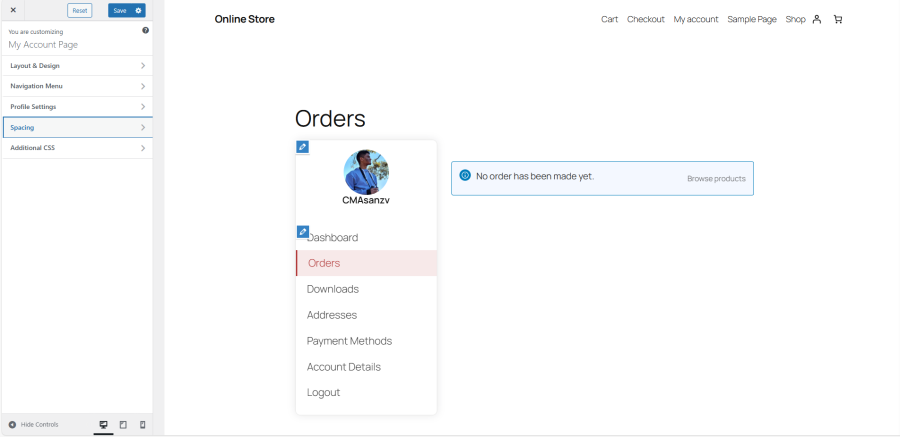
Visual Styling Options for Endpoints

Change the label and icon of individual endpoints to your liking. Choose from the available icons or upload your own. You can style the endpoint further using custom classes.

Profile Pictures

Allow customers to upload custom profile images for their account page. It supports png and jpg file types and default placeholders.
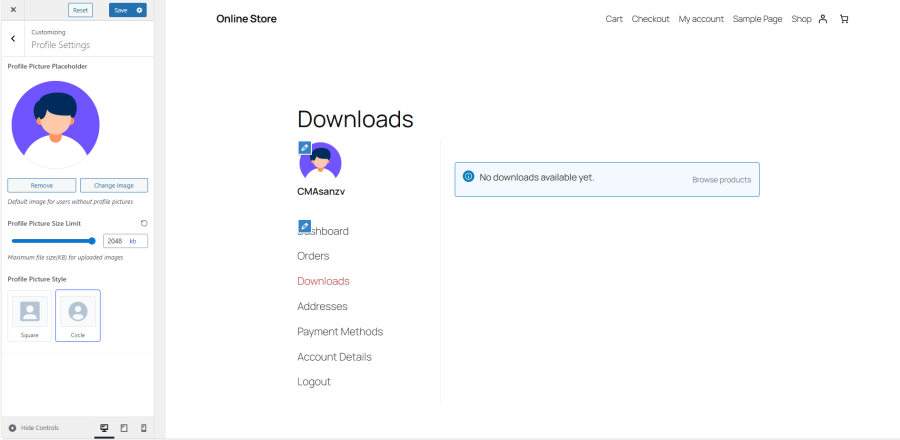
Personalization

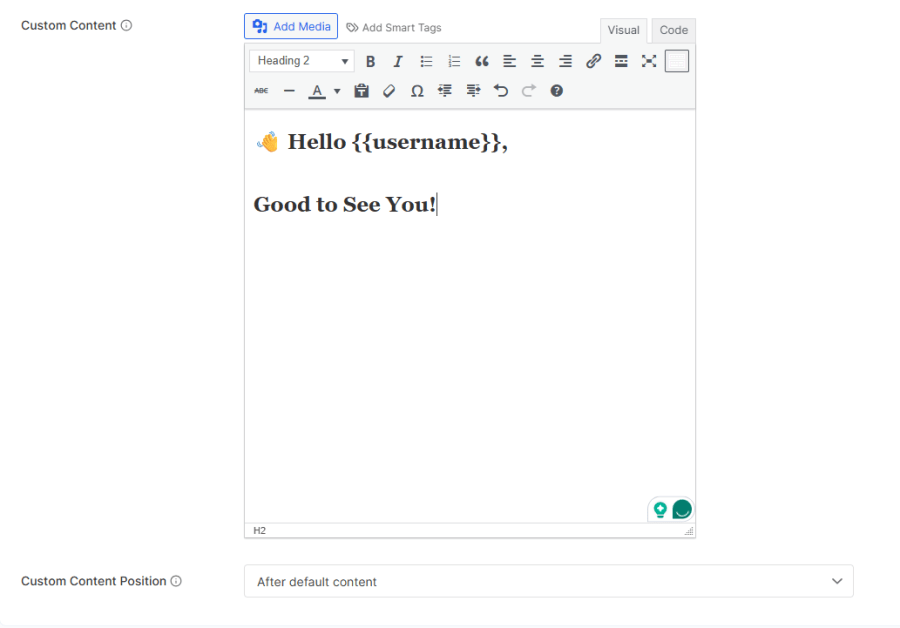
Custom Account Page Content

Customize content on the WooCommerce My Account page using our WYSIWYG editor. Add rich content with formatted text, media, and custom HTML code. You can also integrate content from your theme and plugins through shortcodes.
User Role Specific Endpoints

By default, endpoints are visible to all users. However, you can configure conditions for endpoints to appear only for specific user roles.

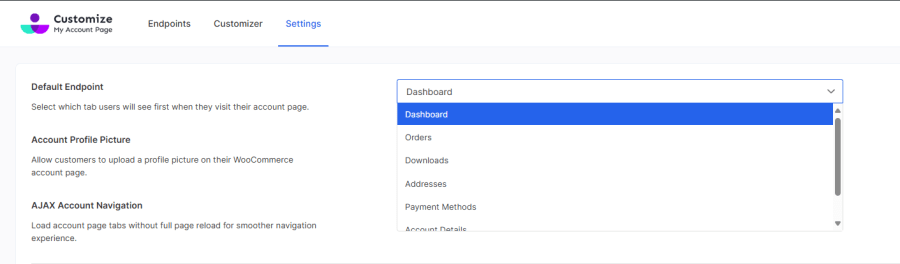
Default Endpoint

Choose which tab is displayed first whenever a customer visits their My Account Page.
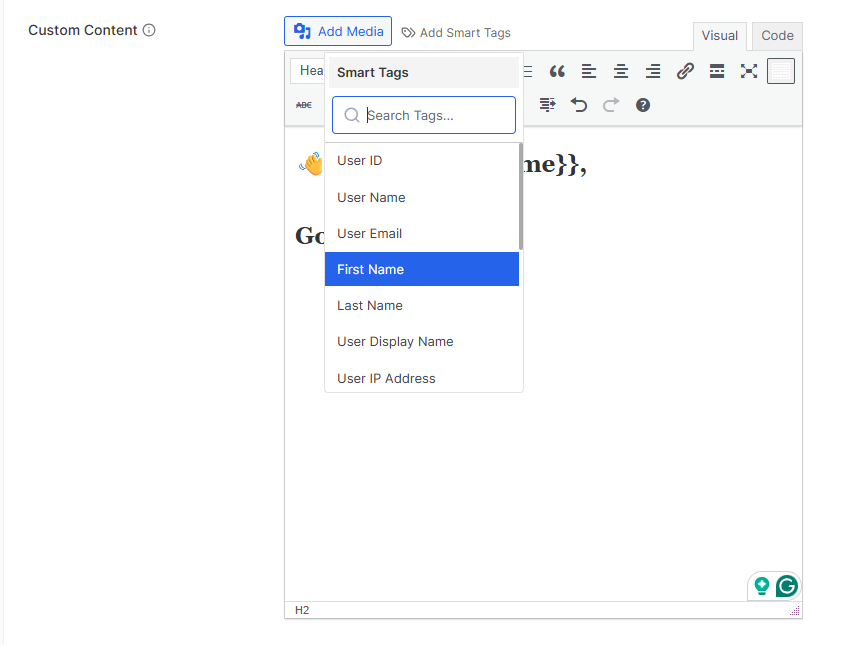
Smart Tags for Personalized Content

Personalize content for your customers by using smart tags: User ID, User Name, User Email, First Name, Last Name, User Display Name, User IP Address, Site Name, Site URL, Page URL, Current Date, Current Time, Billing Address, Billing Company, Shipping Address, and Shipping Company.
Translation Ready

Customize My Account for WooCommerce is translation-ready out of the box, allowing you to reach local audiences in their native languages. Supported translation plugins:
  • WPML (The WordPress Multilingual Plugin)
  • Polylang

Developer Options

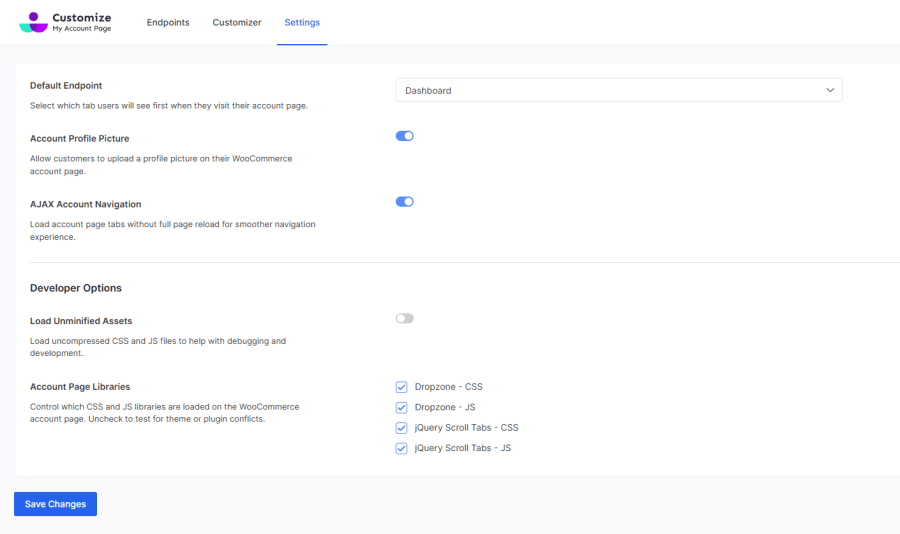
AJAX Account Navigation

Ensure a smooth customer experience by avoiding full-page reloads during navigation.

Account Page Libraries

Control which CSS and JS libraries are loaded on the WooCommerce account page.

Compatibility with third-party WooCommerce plugins

Currently, the plugin is by default compatible with the following plugins

  1. WooCommerce Bookings
  2. WooCommerce Subscription Downloads
  3. WooCommerce Subscriptions
  4. WooCommerce Memberships by SkyVerge

For more information, please refer to our documentation.

You can also check out this detailed article on How to customize My Account Page for WooCommerce step-by-step plugin implementation.


Customer reviews

Average rating 3.6
7 reviews
5 stars, 43% of reviews
4 stars, 14% of reviews
3 stars, 14% of reviews
2 stars, 14% of reviews
1 star, 14% of reviews
7 reviews
  • Multimedia Designs, LLC
    Rated 2 out of 5
    Functionality
    Dec 19, 2025
    Functionality
    Worse than the default. Spaces menu items out, creating a long long menu with no ability to modify. On a mobile devices it does not even display all the menu items because of this. I had added menu items via code and while it display on a computer, not on a mobile. . The colorization and layout types was a nice theory, but less important the spacing and size control, which does not exist. The arrow to open the menu only worked within the first number of items and was difficult to see on smaller mobile devices. This makes mobile accessibility almost impossible to understand, at least for my clients. You have to be a geek and understand technology to adapt. Waste of money, not recommended. .
  • tknilsen29
    Rated 5 out of 5
    Support
    Jul 14, 2025
    Support
    Plugin is what I need. Support is very responsive. I submitted a (relevant) ticket and they included the fix in the next version two days later. I even got an early link to the complete new version.
  • Dod Work
    Rated 1 out of 5
    Ease of use
    Jul 5, 2024
    Ease of use
    Bad Plugin , Do not buy this plugin. You will not receive helping when you got issue. The most plugin of WooCommerce no update long time. Price very high but the value was less. Should find another provider.
    • ThemeGrill
      Aug 1, 2024
      Hi there, Thank you for your feedback. We sincerely apologize for any inconvenience you've experienced with our plugin. We are committed to continuous improvement and regularly update our plugins to ensure compatibility and performance. We would like to address your specific issues and assist you further. Please contact our support team directly at help@themegrill.com, and we will do our best to resolve any problems you are facing. Thank you for bringing this to our attention. Warm Regards!
  • jumpjetwp
    Rated 4 out of 5
    May 20, 2024
    Image Placement in Dashboard Page
    Insertion of Images into the Dashboard Page is difficult to control in terms of placement and responsiveness. NK
  • fintechx
    Rated 5 out of 5
    Jan 7, 2024
    My review
    It works well and is able to display a form in the content of the endpoints. However, it didn't update the icons I selected. Still, I give it a 5-star rating for solving a problem that another extension couldn't solve.

Extension information

  • WordPress version required: 5.0
  • WooCommerce version required: 3.5.0
  • PHP version required: 5.6
  • Tested with WordPress: 6.8.2
  • Tested with WooCommerce: 10.0.4
  • Requires at least WordPress: 4.5
  • Requires at least WooCommerce: 3.5.0

Countries

  • Worldwide

Languages

English (United States)

Related Products

Price $279 annually
Rated 3.2 out of 5 stars
Price $199 annually
Rated 4 out of 5 stars
Price $49 annually
Rated 2.7 out of 5 stars
Price $29 annually
Rated 3.5 out of 5 stars
Price $49 annually
Rated 3.8 out of 5 stars
Price $99 annually
Rated 4.7 out of 5 stars
Price $109 annually
Rated 4.6 out of 5 stars
Price $79 annually
Rated 4.2 out of 5 stars
Price $149 annually
Rated 4.8 out of 5 stars

