Product Icon

Anti-Fraud for WooCommerce

Stop Card Testing Attacks, Fake Orders and Fraud Before They Cost You Sales
Choose a billing option
$139
Save 20%
$278 $222.40

Subscription includes

  • Product updates and improvements
  • Customer support
  • 30-day money-back guarantee

Anti-Fraud for WooCommerce helps store owners identify suspicious orders, reduce card testing activity, and create fraud prevention workflows that fit their business.

Use configurable rules, risk checks, and automated actions to help protect your store from:

  • Card testing attacks
  • Stolen credit card attempts
  • Checkout bots
  • Fake customer accounts
  • High-risk orders
  • Chargeback risk

Built for WooCommerce, Anti-Fraud for WooCommerce gives merchants more control over how suspicious activity is detected, reviewed, and handled.
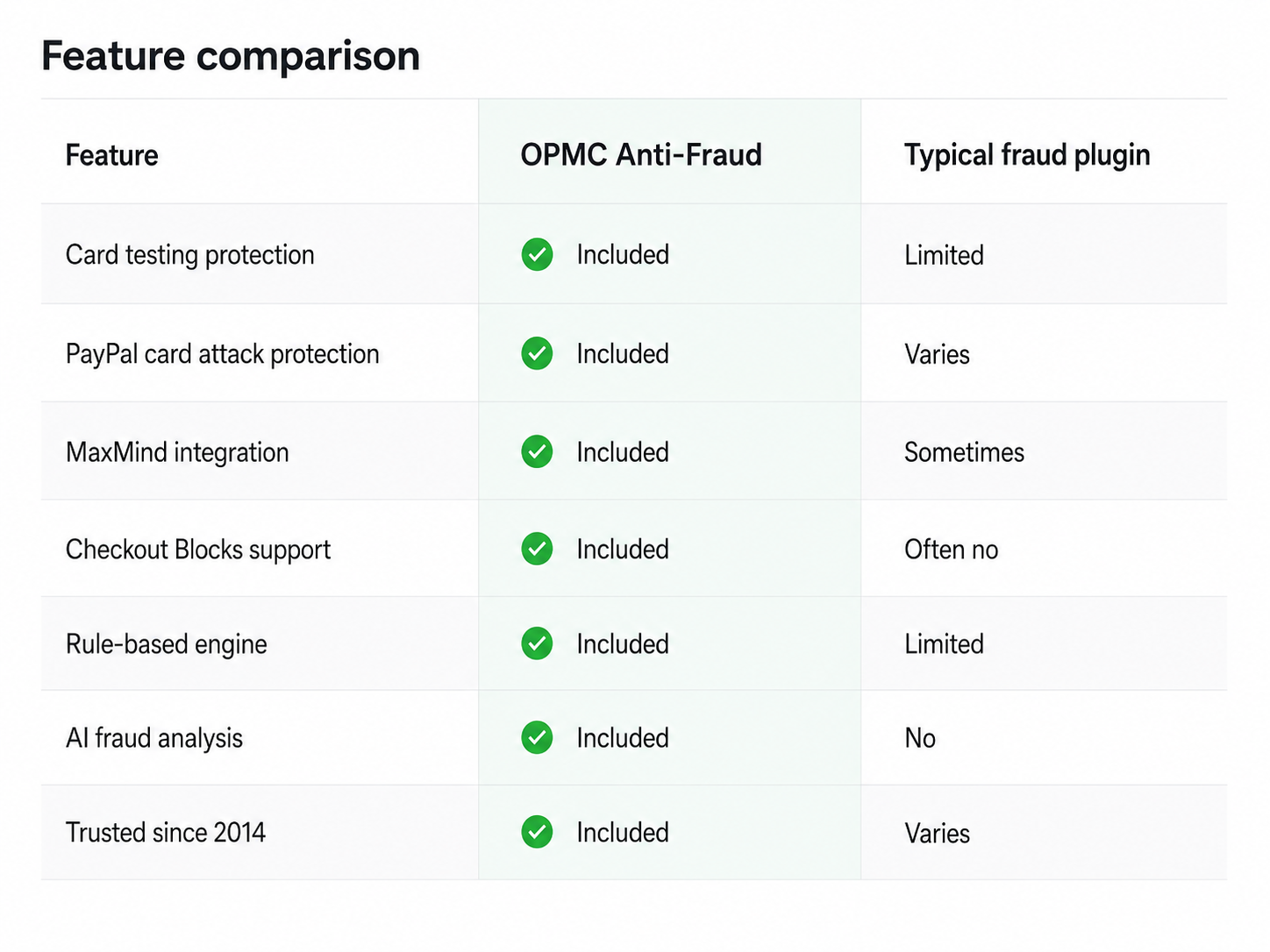
Feature comparison of Anti-Fraud for WooCommerce and typical fraud plugins.

Whether you are dealing with fake orders, card testing attempts or suspicious customer behavior, Anti-Fraud for WooCommerce helps you decide when to approve, review, cancel or block an order.


Card Testing Attacks Are One of the Fastest Growing Threats to WooCommerce Stores

Fraudsters use automated bots to test stolen credit card numbers against online stores.

A card testing attack may lead to:

  • Payment gateway restrictions
  • Higher processing risk
  • Chargebacks
  • Store downtime
  • Loss of customer trust

How OPMC Anti-Fraud Helps

  • Detects rapid order attempts
  • Flags suspicious activity patterns
  • Restricts high-risk customers
  • Applies automated rules
  • Integrates with reCAPTCHA and MaxMind

Anti-Fraud for WooCommerce helps reduce this risk with velocity checks, order risk rules, IP controls, and automated actions.

Why use Anti-Fraud for WooCommerce?

Fraud Protection Built Specifically for WooCommerce

Unlike generic fraud tools, Anti-Fraud was built specifically for WooCommerce and has been protecting stores since 2014.

Fraud prevention works best when it combines multiple signals. Anti-Fraud for WooCommerce uses a layered approach to help you evaluate order risk and take action before suspicious orders become costly problems.

The extension includes tools for:

  • AI-assisted fraud analysis
  • Velocity attack protection
  • Custom fraud rules
  • IP and country restrictions
  • Proxy and VPN detection
  • MaxMind minFraud integration
  • Automated actions and review workflows

Built-in controls for suspicious orders

Different stores have different risk tolerances. Anti-Fraud for WooCommerce lets you configure how strict your fraud prevention rules should be, so you can balance protection with a smooth customer experience.

Available controls include:

  • Customer whitelisting
  • Bulk whitelisting
  • Rule tuning
  • Manual review workflows
  • Risk thresholds
  • Custom order actions

You can configure the extension to help decide when orders should be:

  • Approved
  • Held for review
  • Cancelled
  • Blocked

This gives you more control over false positives while still helping protect your store from suspicious activity.

Recent improvements

Anti-Fraud for WooCommerce is actively maintained to support current WooCommerce stores and evolving fraud prevention needs.

Recent enhancements include:

  • Improved IP geolocation accuracy
  • Enhanced MaxMind integration
  • New whitelisting management tools
  • Improved performance for larger stores
  • Ongoing WooCommerce compatibility updates
  • Expanded fraud rule controls
  • User interface improvements

Best practices and limitations

No fraud prevention extension can guarantee that every fraudulent order will be detected. Fraud tactics change over time, and some suspicious activity may bypass automated checks.

For best results, we recommend:

  • Using multiple fraud indicators
  • Enabling MaxMind minFraud, where available
  • Reviewing high-risk orders before fulfillment
  • Keeping fraud rules up to date
  • Combining store-level fraud controls with payment gateway protections
No fraud prevention solution can guarantee complete protection against every fraudulent order. Use Anti-Fraud for WooCommerce alongside payment gateway protections and regular order review processes.

Is Anti-Fraud for WooCommerce right for your store?

Anti-Fraud for WooCommerce helps with

  • Detecting suspicious orders
  • Reducing card testing activity
  • Lowering chargeback risk
  • Automating fraud review workflows
  • Creating custom rules for your store

Anti-Fraud for WooCommerce does not

  • Guarantee that every fraudulent order will be detected
  • Replace your payment gateway security tools
  • Manage chargeback disputes on your behalf
  • Remove the need for secure store management practices

Why Merchants Trust OPMC

OPMC has been developing WooCommerce extensions since 2014 and supports merchants around the world.

Our plugins are used by businesses ranging from small online stores to larger WooCommerce deployments. We actively maintain our products, release updates, and provide support from the team that builds the software.
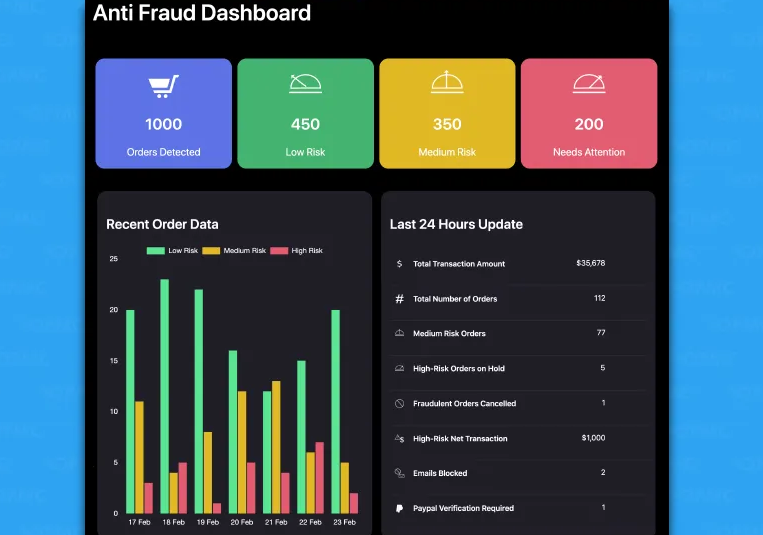
Analytics dashboard

WooCommerce Anti-Fraud analytics dashboard

The analytics dashboard gives you a central view of recent fraud activity and order risk information.
  • Discover recent fraudulent activity
  • View trends from the past week
  • Review risk scores and order statuses
  • See the number of blocked emails in the past 24 hours
  • Identify PayPal accounts that may require verification
  • Review fraud activity information in one place

Handle suspicious orders automatically

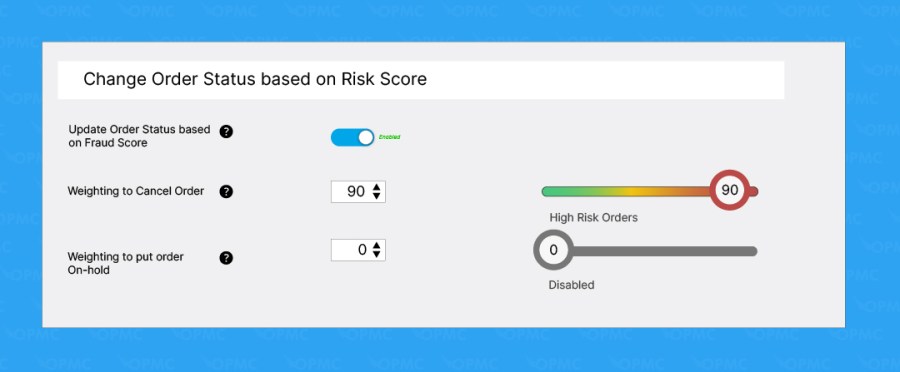
Settings to hold or cancel high-risk orders

When a potentially fraudulent transaction is detected, Anti-Fraud for WooCommerce can automatically take action based on your configuration.

You can configure the extension to:

  • Cancel suspicious orders automatically
  • Place suspicious orders on hold
  • Email the admin about a suspected order without changing the order status
  • Blocklist suspicious emails and order details
  • Prevent payment gateway access before payment is processed

Preconfigured rules

Anti-Fraud for WooCommerce includes default rules that help assess and score transactions without requiring additional setup.

These preconfigured rules are suitable for many online stores. You can also customize them to match your store’s needs and adjust the importance of specific risk factors.

Customize the importance of each risk factor

Anti-Fraud for WooCommerce lets you assign a risk weight to each risk factor. This helps you decide how much each risk should influence the overall order risk score.

The higher the risk weight, the more impact that factor has when calculating the order’s risk score.
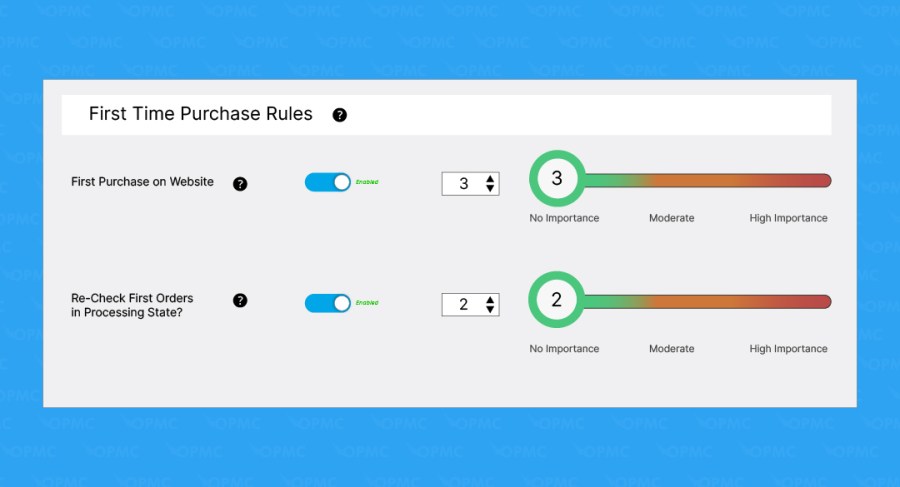
First-time purchase rules

First-time purchase rule settings

Identify first-time customers or first-time processing orders. These rules can help you review new customers while allowing trusted repeat customers to move through checkout more easily.
MaxMind minFraud integration

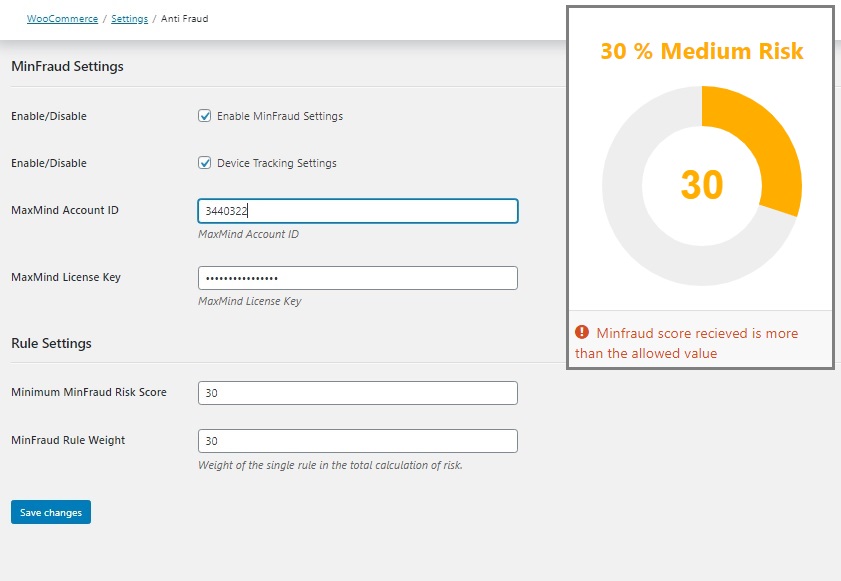
MaxMind minFraud integration settings

Anti-Fraud for WooCommerce includes an integration with MaxMind minFraud Score.

This integration combines existing fraud rules with real-time risk scoring for each order. When enabled, you can receive order risk information when the score exceeds the threshold set in your minFraud settings.
Order quantity and amount checks

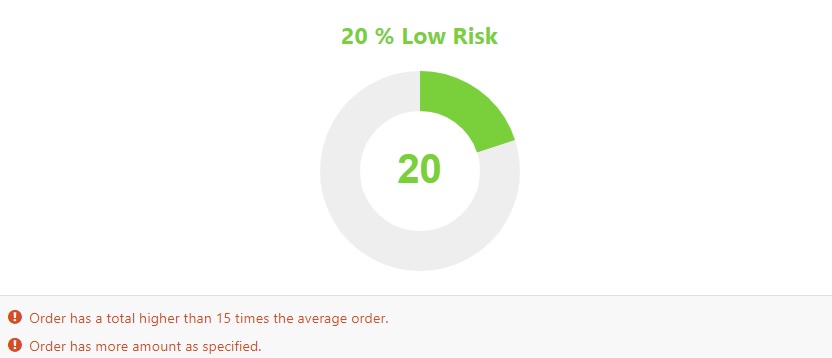
Order quantity and amount rule settings

Order quantity and amount checks can help you identify suspicious purchases based on the number of products ordered, the order total, or the types of products being purchased.

Access ecommerce fraud prevention support

Get support from OPMC’s team for ecommerce fraud prevention questions, including more complex fraud prevention needs and store-specific challenges.

Check the risk of each order

Anti-Fraud for WooCommerce assigns a risk score to each order on a scale from 1 to 100. A higher score indicates a higher level of risk.
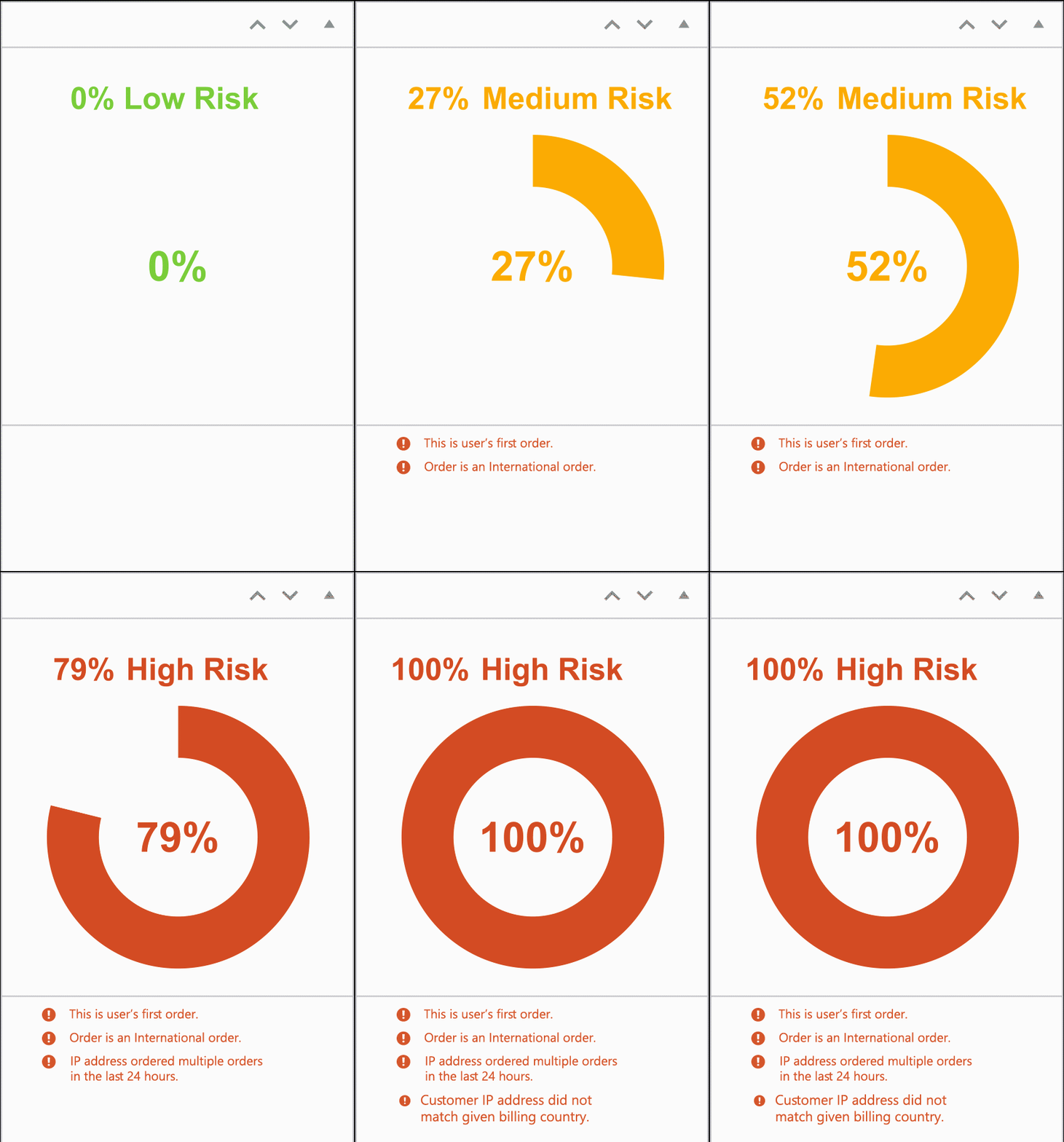
Anti-Fraud order risk score in WooCommerce admin


You can use the risk score to evaluate the transaction and decide which action to take. The risk score and related advice are available directly in the WooCommerce admin panel.

Users can also review warnings linked to the order. For example, a warning may appear if the customer’s IP address does not match the billing country.

Anti-Fraud order risk rating

Whitelist user roles, payment methods, and emails

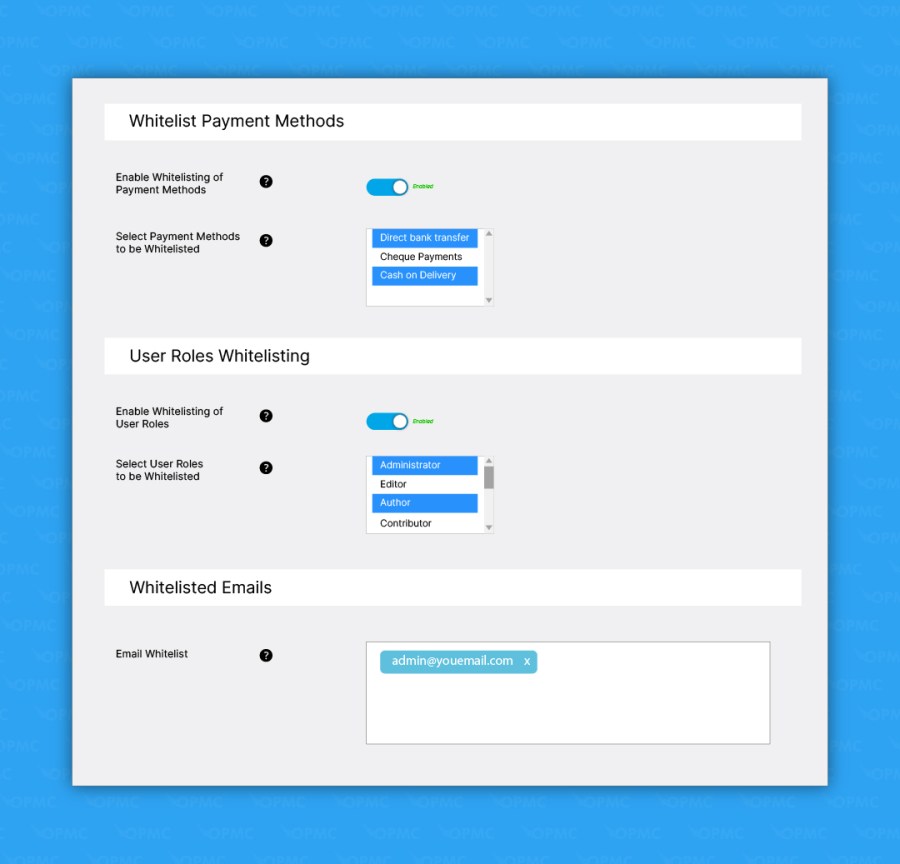
Settings to whitelist user roles, payment methods, and emails

Bypass selected user roles, payment methods, and email addresses from fraud rules by adding them to your whitelist.
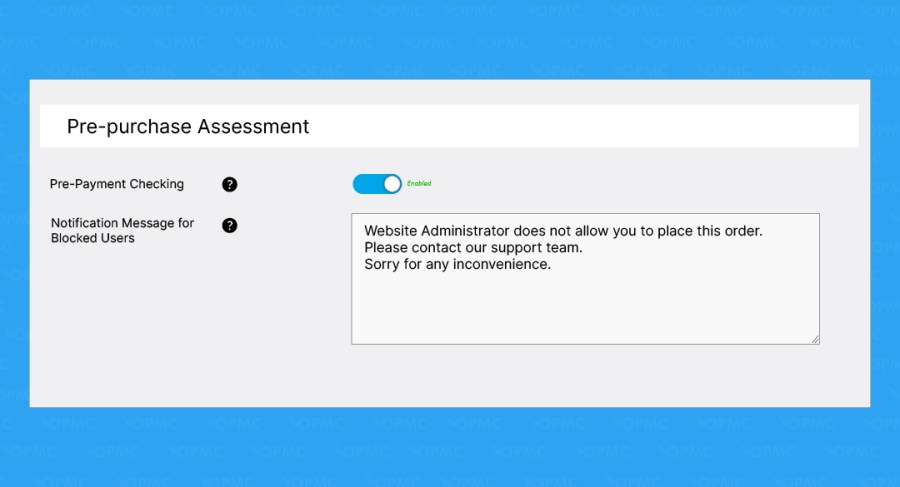
Assess risk before purchase

Pre-purchase risk assessment settings

Evaluate customers before they complete payment through your payment gateway.

Pre-payment verification can help when your payment gateway or bank has warned you about high levels of fraudulent activity.

If the risk score reaches your high-risk threshold, the order can be denied before payment. You can also display a custom checkout message that explains why the order was denied.

IP, billing, and shipping address rules

Identify potential risks using IP address, geolocation, phone number, proxy, billing address, and shipping address data.
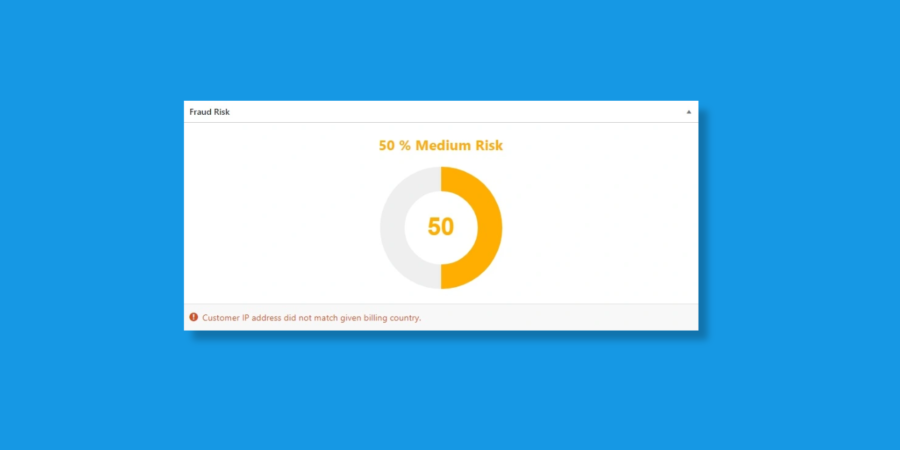
Anti-Fraud medium risk score

  • Physical address and IP address comparison rules
  • Billing and shipping address mismatch rules
  • Geolocation and billing or shipping address comparison rules
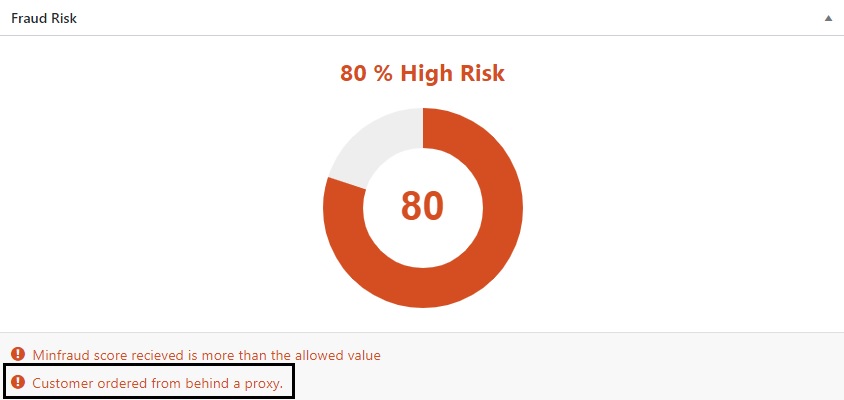
  • Proxy detection

Proxy check fraud risk score

Expand fraud prevention with integrations

Anti-Fraud for WooCommerce includes optional integrations with third-party services that can enhance order screening and security. Some services require separate accounts or API keys.

  • ChatGPT: Adds optional AI-assisted insights to order reviews and helps identify suspicious customer behavior.
  • MaxMind minFraud: Adds machine-learning risk scoring to support fraud detection with additional intelligence signals.
  • TrustSwiftly Identity Verification: Enables customer verification using methods such as ID checks, SMS, and device validation.
  • Google reCAPTCHA v2 and Cloudflare Turnstile: Add bot protection to checkout to help reduce automated card testing and velocity-based attacks.
  • PayPal Fraud Controls: Adds risk-screening and card attack protection for merchants processing payments through PayPal.
  • QuickEmailVerification: Validates customer email addresses in real time and helps identify disposable, fraudulent, or high-risk addresses.

Optional enhanced data sources

  • BigDataCloud: Improves IP-to-location and address-related checks when configured with your own API key.

Frequently asked questions

Why did a fraudulent order receive a Safe rating?

Fraud scoring is based on available risk indicators and no automated system can identify every fraudulent transaction. We recommend combining scoring with custom rules, MaxMind and manual review for high-value orders.

Can Anti-Fraud conflict with other security plugins?

While Anti-Fraud is compatible with most WooCommerce extensions, some security, checkout or CAPTCHA plugins may require additional configuration. Our support team can help identify and resolve conflicts.

Will Anti-Fraud block legitimate customers?

No. The plugin includes configurable thresholds, whitelisting tools and review workflows to help minimize false positives.

Can I customize how Anti-Fraud handles suspicious orders?

Yes. OPMC Anti-Fraud gives you complete control over how your store responds to potential fraud. Create custom rules based on customer details, IP address, country, order value, products, payment method, and more. Depending on the risk, you can automatically approve, hold for review, cancel, or block orders to match your business's risk tolerance.

Does Anti-Fraud work alongside my payment gateway's fraud protection?

Absolutely. OPMC Anti-Fraud is designed to complement—not replace—the fraud detection provided by payment gateways such as PayPal Payments and Stripe. By combining gateway protections with customizable WooCommerce fraud rules, AI-assisted analysis, and MaxMind integration, you create multiple layers of defence against evolving fraud tactics.

How long does it take to configure Anti-Fraud?

Most merchants can have Anti-Fraud protecting their store in just a few minutes. The plugin includes sensible default settings, allowing you to start with basic protection immediately. As your business grows, you can fine-tune advanced rules, integrations, and automation to match your specific fraud prevention strategy.

Will Anti-Fraud slow down my WooCommerce store?

No. Anti-Fraud is designed to analyze orders efficiently without impacting your customers' shopping experience. Fraud checks occur during the checkout and order process, and we've continually optimized performance to ensure compatibility with both small stores and high-volume WooCommerce sites.

What support is available if I need help?

Our support team works directly with the developers who build the plugin, ensuring complex technical questions and bug reports are resolved as quickly as possible.

Customer reviews

Average rating 3.7
65 reviews
5 stars, 52% of reviews
4 stars, 9% of reviews
3 stars, 8% of reviews
2 stars, 12% of reviews
1 star, 18% of reviews
65 reviews
  • Holly Nelson
    Rated 1 out of 5
    Support
    May 26, 2026
    Support
    This plugin cannot accurately identify a fraudulent order. I reported the bug on 4-21-26. It's now 5-26-26 and OMPC support has not responded helpfully. About two weeks ago I brought Woo into the ticket got a little action on off-topic issues, but never a response that actual deals with the issue. I have a low trust at this point, which is ironic considering the topic of anti-fraud. I should have read all of the other reviews that mentioned the lack of support. Why this product continues to be sold under Woo's banner is a wonder. Is Woo actually for the user, or just there to collect their percentage?
  • Paul Slusher
    Rated 1 out of 5
    Functionality
    Apr 2, 2026
    Functionality
    Email Blacklist does NOT work at all
    The email blacklist function does not work at all. Not even a little bit. The developers told me they would fix the email blacklist function (the ONLY reason I want to use this plug in - to blacklist folks who treat us poorly or try to rip us off). Anyway, the update was released, I updated and the function still does not work. Very poor development and so beware of this plug in. We never tested the "scoring" system since we don't need it. But who knows if that works either. If you are wanting a blacklist, forget about it. Ain't happening.
    • Jacqueline
      Apr 14, 2026
      Hi Paul — thank you for taking the time to share your feedback. For context, the issue mentioned here was originally raised with our support team in 2023 and the last update in that support conversation was in June 2023. Since then, both the plugin and WooCommerce have changed considerably. In current versions, blacklist behavior may also be influenced by configuration details, including whether the blacklist feature is enabled, whether whitelist rules are taking precedence and which checkout flow is being used. So while there was a legitimate issue in an older release, this review is based on a much earlier point in time and may not reflect the plugin in its current form. That being said, i...
  • Martin Preston
    Rated 5 out of 5
    Support
    Mar 5, 2026
    Support
    As a small business I manage all of my wordpress installation without benefit of a developer. Keeping my site secure and functional amidst all of todays threats is a tricky business for an amateur. Hence, excellent and persistent assistance from support such as I have received from OPMC is an absolute boon. They were happy to drill down on my problems beyond the point at which things were just functional and well into the territory of getting them just right.
    • Jacqueline
      Mar 6, 2026
      Thank you Martin and dawn for your glowing review! We're so glad we've been able to help. Please always feel free to reach out. We are here for you! Best of success with your store, Jacqueline
  • eernette
    Rated 1 out of 5
    Functionality
    Feb 16, 2026
    Functionality
    Conflict with a major security plugin preventing it from working properly.
    • Jacqueline
      Feb 18, 2026
      Hi eernette, Thanks for leaving a review. One-line feedback is tough to act on, so we’d really appreciate a bit more context. Sometimes Anti‑Fraud can interact with other security plugins, caching tools, or custom checkout scripts, which can affect how it works. A few things to check: reCAPTCHA or bot-blocking features, firewall settings, caching/optimization plugins, or any custom code on your checkout. If you can share which security plugin you’re using and what isn’t working by opening a support ticket, our support team can help figure it out and get everything running smoothly. Best wishes, Jacqueline
  • forky
    Rated 2 out of 5
    Functionality
    Feb 2, 2026
    Functionality
    Can't block by country as it claims
    A bloated mess of options, this plugin crams too many things in you'll never need, then charges a stupidly high price for all those things you don't use. Does it slow down site performance? Probably. Does it work as advertised? Not always, I have seen numerous fraudulent transactions get through. If you enable all features, it's a bad experience for legit customers and slows them down. Not sure if they fixed the "whitelist" exploit, where the fraudster somehow tricks the plugin into thinking its email is on a "whitelist" when I wasn't using that feature. Anti-fraud measures should be built into WooCommerce, not some unknown plugin author - I mean who are the developers? Nobody knows who they...
    • Jacqueline
      Feb 3, 2026
      Hi There, this reply is from a real human on the team 🙂 Thanks for taking the time to share your experience. I’m sorry the plugin hasn’t been a good fit for your store and I appreciate you explaining what didn’t work for you. That being said, Anti-fraud includes optional features to address different needs for different stores and I understand that more choices can feel like a lot to manage. Please know your feedback is genuinely valuable as it helps us improve the user experience. We truly understand the customer point-of-view is paramount in keeping OPMC successful. Because fraud prevention is always evolving, we're constantly updating the plugin to stay ahead of new fraud patterns. And to...
    • opmcsupport
      Oct 2, 2024
      Hi Aalhyster, Thank you for your feedback, and we're sorry to hear about the trouble you're having with the plugin. We completely understand your concerns and appreciate your review. Please get in touch with our support team: support@opmc.co We are be happy to show you how to block the countries, and also look into the persistent notice issue you reported.

Related Products

Price $279 annually
Rated 3.2 out of 5 stars
Price $29 annually
Rated 3.6 out of 5 stars
Price $109 annually
Rated 4.6 out of 5 stars
Price $119 annually
Rated 3.5 out of 5 stars
Price $199 annually
Rated 4 out of 5 stars
Price $49 annually
Rated 2.7 out of 5 stars
Price $79 annually
Rated 4.2 out of 5 stars
Price $99 annually
Rated 4.7 out of 5 stars
Price $79 annually
Rated 4 out of 5 stars
Use of your personal data
We and our partners process your personal data (such as browsing data, IP Addresses, cookie information, and other unique identifiers) based on your consent and/or our legitimate interest to optimize our website, marketing activities, and your user experience.

