Active installs
10K+
Subscription includes
Support
According to Webcredible*, 1 in 10 people who abandon their cart do so because the checkout process is too long. Reduce cart abandonment by offering the entire purchase process on a single page, with WooCommerce One Page Checkout.
One Page Checkout makes it possible to turn any page into a checkout page. It also makes it easier for your customers to buy from these custom checkout pages by displaying both product selection and checkout forms on a single page.
Customers can add or remove products from their cart and complete payment without leaving the page and waiting for a new page to load.
Checkout fields can also be displayed on a single product’s page, or you can add the field to custom landing pages for unique promotions. It’s easy to create a single page checkout, and once you do, it’s even easier for your customers to purchase the products on that page.

One Page Checkout displays product selection and checkout forms on a single page. Customers can add products to an order (or remove them) and complete payment without leaving the page.

Create unique landing pages for special events, promotions or select customers. Add the shortcode to any page (or post) and add your content above the shortcode to display unique sales copy before the purchase process.

One Page Checkout integrates with more than a dozen extensions, so you can sell subscriptions, bookings, bundles and many other unique product types.

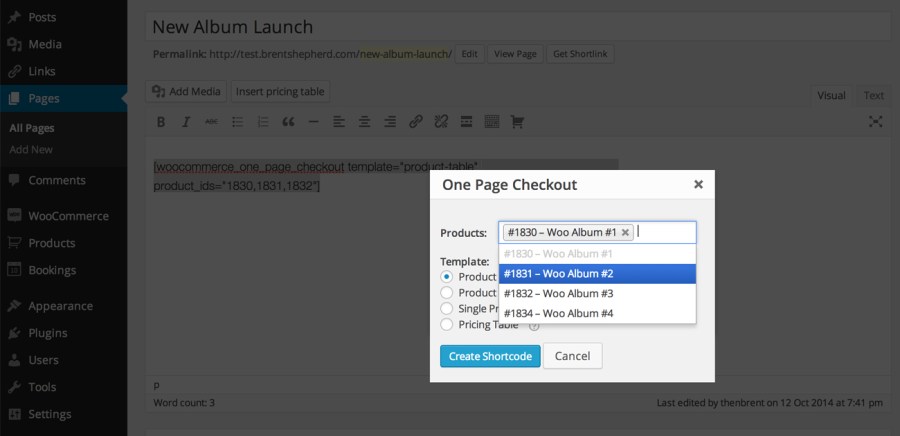
Checkout pages can be created using the graphical interface added to the classic WordPress editor. Each Product page can also become a checkout page by clicking a single checkbox.

You choose the products to display on each checkout page. Create a page for just the one featured product, a few related products for a promotion, or your store’s entire catalog if your store has just a few products.

One Page Checkout includes several built-in templates, including a simple pricing table and list of products. Choose the template most suited to your page or, if the built-in templates don’t fit your needs, create a custom template.
Whether you’re selling services, like personal training, or physical goods, like a monthly candy subscription box, if you’re selling with WooCommerce, One Page Checkout can help you sell more.
Allowing your customers to purchase on a single page gives them a faster checkout experience, with less interruption. That means more sales, and more happy customers for your business.
* Based on a poll of 1,200 online shoppers conducted by Webcredible.
WooCommerce One Page Checkout is a cart and checkout extension that displays product selection and checkout forms together on a single product, post, or page. Customers can add products to their order, remove them, and complete payment without leaving the page or waiting for a new page to load. It turns any page into a checkout page, so you can build focused buying experiences around the products you want to feature.
Yes, that is one of the main reasons stores use it. A long or multi step checkout is a common reason shoppers drop off before paying. By presenting product selection and the checkout form on one page, One Page Checkout shortens the purchase path and gives customers a faster, less interrupted way to buy, which can help recover sales that a longer flow might lose.
Yes. You can add the One Page Checkout shortcode to any page or post, then place your own sales copy, event details, or promotional content above it. This makes it well suited to campaign and landing pages where you want customers to read a pitch and then buy in the same place, without being sent off to a separate cart and checkout flow.
No. You can turn any product page into a checkout page by ticking a single checkbox in the product data panel. For pages and posts, there is a graphical interface in the classic WordPress editor that helps you pick products and a template and then generates the shortcode for you. If you prefer, you can also add the shortcode manually and set its attributes yourself.
Yes. You decide which products display on each One Page Checkout page. You can feature a single product, group a few related products together for a promotion, display products from selected categories, or show your whole catalog if your store carries only a few items. You also control the order in which products appear.
One Page Checkout includes several built-in templates so you can match the layout to the products you are selling. The Product table template suits a small set of products where images help the choice. The Product list template shows products with radio buttons when descriptions or photos are not needed. The Single product template mirrors your standard product page, including the description, images, and gallery. There is also a pricing table template. If none of these fit, you can create a custom template.
Yes. One Page Checkout integrates with more than a dozen WooCommerce extensions, so you can sell subscriptions, bookings, product bundles, and other product types on a single page checkout. If you want to sell recurring products this way, see WooCommerce Subscriptions. For appointment or reservation based products, see WooCommerce Bookings, and for grouped offers, see Product Bundles.
Yes. The Single product template is the option that displays the selection boxes shoppers use to choose a variation of a variable product, so they can pick their options and check out in one place. Other templates display each variation as a separate item rather than through variation dropdowns.
It is designed to work with any WooCommerce payment gateway extension that uses the standard WooCommerce payment section. That means your existing checkout payment options can carry over to your One Page Checkout pages without a separate setup.
No. Your store still needs the standard WooCommerce Cart and Checkout pages in place. The checkout page continues to handle order confirmation and the receipt after purchase. One Page Checkout adds a streamlined buying experience on the pages you choose, and you can point menu links or promotions to those pages, but it works alongside your existing checkout rather than removing it.
It is built to support that goal. Whether you sell services like personal training or physical goods like a monthly subscription box, letting customers buy on a single page gives them a faster experience with less interruption, which can lead to more completed purchases. It gives you tools to build focused, distraction light buying pages around the products you most want to move.
It is a strong fit for stores that want to sell a focused set of products quickly: single product sales, curated promotions, event or campaign landing pages, and stores with a small catalog. It works across product types, including subscriptions, bookings, and bundles, so service businesses and product sellers alike can use it to create a shorter path to purchase.
It is designed around curated, focused buying pages rather than large scale catalog browsing. If your main goal is to give shoppers a big catalog to browse, filter, and search across many categories before deciding, a full storefront flow will serve that better. One Page Checkout shines when you already know which products you want to feature and want customers to select and pay in one place.
Categories
Extension information
Countries