

Product comparison
Subscription includes
Support
Hotel Booking fits any property that takes date-based reservations, from a single guesthouse to a multi-property rental business.
From setting up a room to welcoming the guest, the whole process runs in one flow.
Hotel Booking turns WooCommerce into a reservation system for hotels, motels, homestays, and rental properties. Because every booking is a WooCommerce order, you keep the payment gateways, tax rules, and reporting you already trust, instead of running a separate booking tool alongside your store.
Set daily pricing to charge more on weekends and less midweek, or seasonal pricing to raise rates for peak season and lower them in the off-season. Reward longer stays with length-of-stay discounts, for example, $50/night for 3–5 nights and a lower rate for 6–10 nights, without creating duplicate room listings.
Occupancy limits and extra-guest pricing stop rooms from being oversold. Shape exactly when guests can book with rules such as:
The front-end and back-end calendars stay in sync with every rule, so what guests see is what you actually have.
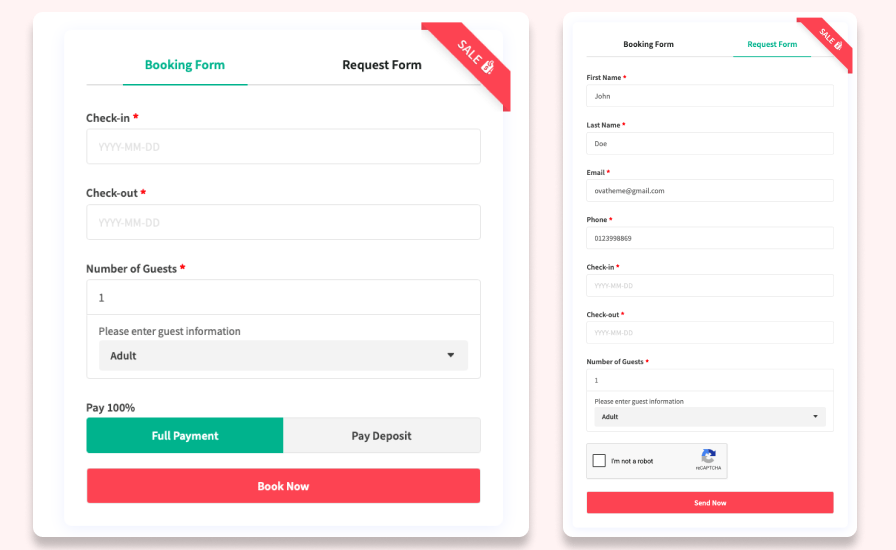
Guests can pay in full or reserve with a deposit, fixed or percentage-based. Once the deposit is in, the plugin emails the guest an invoice for the remaining balance with a payment link, so collecting the rest doesn’t depend on someone remembering to follow up.
Define guest types, such as adults and children, each with its own pricing and information fields. Sell add-on services like airport transfers, breakfast, or spa packages, priced per guest type. Eleven custom checkout field types, including text, checkbox, select, file upload, phone, and email, mean the booking form asks for exactly what your property needs, nothing more.
Some guests want to book and go; others need approval first. Offer an instant booking form for the former and a request form for the latter, so the same plugin fits a boutique guesthouse and a fully automated rental operation.
Automatic reminder emails cut down on no-shows, and admins get an instant alert the moment a booking is canceled. Cancellation rules set a minimum notice period and a cutoff for accepting cancellations at all, so a high-value booking can’t be pulled at the last minute. reCAPTCHA keeps both the booking and request forms free of spam.
Phone, email, and walk-in reservations get recorded manually, with details auto-filled for repeat guests. From there, every booking, online or offline, lives in one dashboard: edit details in a popup and filter by customer, product, date, or status to find what you need in seconds.
Guests see guest information, extra services, and totals with taxes throughout the cart and checkout, so there’s nothing to dispute after the booking is confirmed.
Adjust colors, font sizes, weights, and heights for headings, text, borders, buttons, and labels, so the booking form matches your site instead of looking bolted on.
Explore the full plugin in a free, no-signup sandbox before you decide.

It works alongside it. Bookings become standard WooCommerce orders, and the plugin supports both the WooCommerce Cart and Checkout blocks and the classic checkout.
Yes. Set deposits per room as a fixed amount or a percentage. Once paid, guests automatically receive an invoice and payment link for the remaining balance.
Yes. Daily pricing, seasonal pricing, and length-of-stay discounts can all run on the same room at the same time.
It works for any property that takes date-based reservations, including motels, homestays, villas, and serviced apartments.
Yes. Manual booking creation records offline reservations and manages them in the same dashboard as online bookings.
Booking scripts and styles load only on pages with booking forms or room products, keeping the impact on the rest of your store minimal.
Documentation covers setup and configuration in full, and support is available through the Marketplace support channel.
Extension information
Quality Checks
Countries







