Jetpack Search 3.0 adds product-aware filters to WooCommerce stores. Traditional keyword searches match queries to text, potentially forcing high-intent customers to comb through a wall of results to find what they want. Product-aware search helps them find the right product faster by sorting by price range, stock status, color, size, and rating. You can set it up through the block editor, with no custom code required, and the filter blocks inherit your theme’s styling.
What your customers get
↑ Back to topFilters that match how they shop
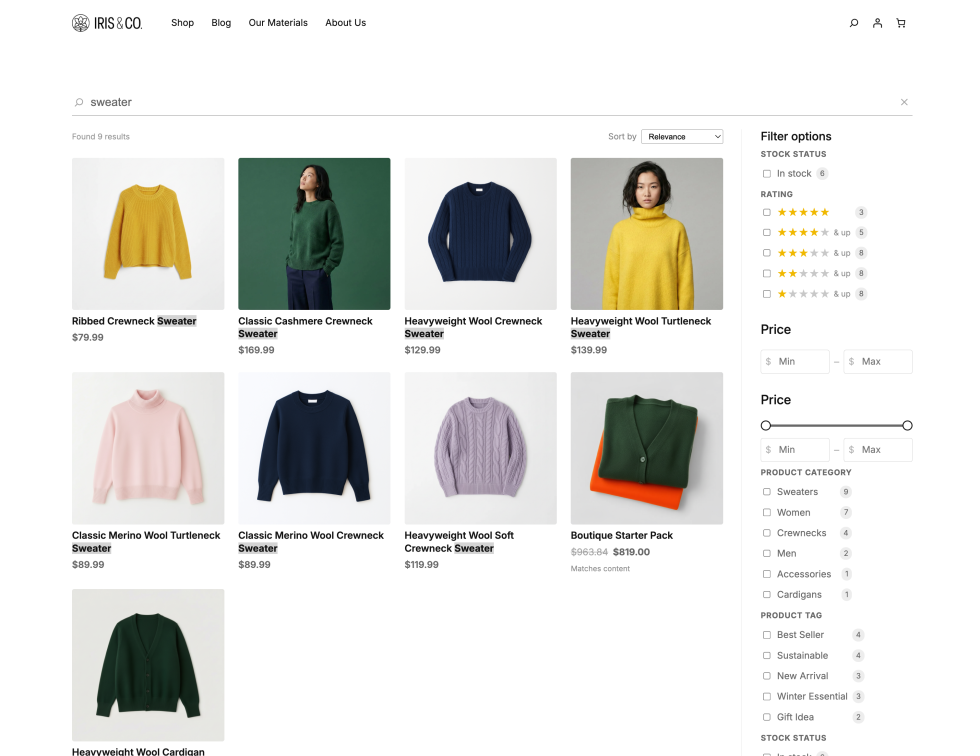
Jetpack Search adds product-specific filter blocks to your store automatically:
- Price range: Customers set a budget and results update instantly. A dismissable chip shows their active price filter, so adjusting it takes one click.
- Rating: Filter by star rating to surface your highest-reviewed products.
- Stock status: Hide out-of-stock products from results. No dead ends, no frustration.
- Product attributes: Size, color, material, whatever you’ve configured. Customers filter by the product details that drive their decision.
- Category, tag, and brand: Your existing product taxonomies, wired directly into search.
Instead of requiring separate plugins or code to bolt these onto a search tool, they’re built into the search experience.
Results that look like products
Search results display as product cards, showing images, prices, and other attributes without clicking into each result. Your search page looks like your store rather than a list of titles.
Sort by what drives purchases
Customers can re-sort results by price (low to high, high to low) and average rating. The default keyword-relevance sort is still there, but shoppers can prioritize the factors that influence buying decisions.
How to set it up
↑ Back to topEvery filter ships as a WordPress block. You add them the same way you add any block — through the editor, into your search page sidebar or widget area.
- Make sure Jetpack is installed and enabled on your WooCommerce store.
- If it isn’t, you can install Jetpack from your admin and select a plan. (Note: Jetpack Search is free for sites with under 5,000 records or 500 search requests per month.) Once installed, navigate to Jetpack → Settings → Performance, scroll to the Search section and toggle on Enable Search.
- Open the block editor on your search results page.
- The WooCommerce-specific blocks (Price Filter, Rating Filter, Stock Status, Product Attributes, Product Filters) appear in your inserter automatically.
- Drop the filters you want into your sidebar.
- Customers see them immediately.
No custom code or developer needed. The blocks inherit your theme’s styling, so they look right without CSS overrides.
Availability
↑ Back to topJetpack Search 3.0 with WooCommerce features ships with Jetpack 15.9, and is available now. If you’re already running Jetpack Search on a WooCommerce store, the new blocks appear automatically — just add them to your search layout.


About