
Product Icon

Google reCaptcha for WooCommerce

Protect your website from spam and bot attacks by adding reCaptcha to your WordPress & WooCommerce checkout, login, registration, reset password and other pages.
Choose a billing option
$29
Save 20%
$58 $46.40

Subscription includes

  • Product updates and improvements
  • Customer support
  • 30-day money-back guarantee

Protect Your Site With reCaptcha

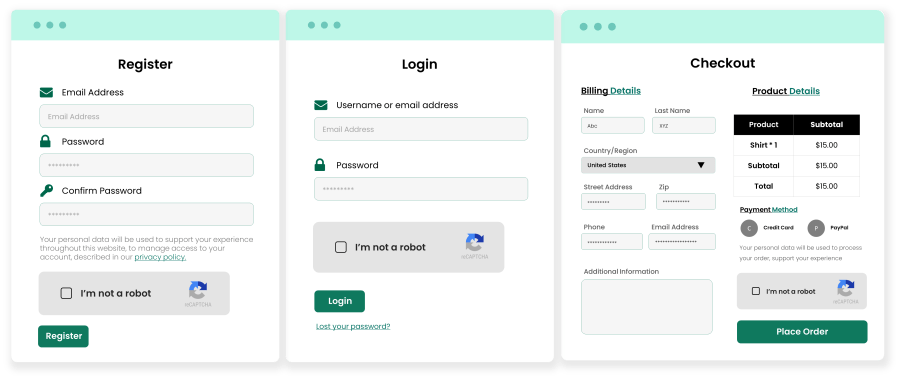
With the WooCommerce reCaptcha extension, you can add Google reCaptcha to WordPress and WooCommerce login, registration, password pages, checkout, comments, and more. You can also add reCaptcha on any page using the shortcode. The extension supports v2 and v3 versions of Google Invisible captcha.

With increased spam and hacking attempts, the extension can act as an extra security gate to block bot traffic from making login attempts, checkouts, card checking, password resets, spam comments, and more. 

By using the invisible reCaptcha v3 version, you ensure that the captcha only appears to suspicious visitors and remains hidden from your valuable and real customers. You can also customize the spam score of V3 reCaptcha as per your website’s needs.

Attention!
To prevent your WooCommerce stores from the ongoing surge in carding attacks and fraudulent transactions, it is highly advised to use Anti-Fraud Shield in Combination with Google reCaptcha for WooCommerce.

google recaptcha for woocommerce

Now with Checkout Rate Lmiter – Ultimate Solution for Carding Attacks (New)

Limit manual carding testing attacks in your WooCommerce store using checkout rate-limiting technology. While reCaptcha stops bot-based carding attempts by recognizing the repeating patterns, the rate limiter will now complement reCaptcha by restricting users from making multiple checkout attempts within a specified period. This makes Google reCaptcha for WooCommerce the ultimate solution for all sorts of carding attempts. With the checkout rate limiter’s enhanced settings, you can:

  • Add rate limiter limits
  • Add time for which the place order button will be disabled when all attempts are exhausted
  • Add an error message to show when the rate limiter is triggered
  • Add IPs for which rate limiter will be disabled
  • Add IPs for which the place order button will be disabled
  • Add emails for which the place order button will be disbaled
  • Add user roles for which rate limiter will be disabled

recaptcha for woocommerce

Features of WooCommerce reCaptcha:

    • Supports v2 and v3 versions
    • Activate reCaptcha individually on certain pages
    • Customize reCaptcha sizes
    • Choose between dark and light reCaptcha themes
    • Disable reCaptcha for specific countries
    • Excludes a specific IP range
    • Add reCaptcha anywhere using shortcode
    • Customize spam score for V3 recaptcha
    • Activate reCaptcha on the following WooCommerce pages: 
      • WooCommerce Registration
      • WooCommerce Login
      • WooCommerce Lost Password 
      • WooCommerce Checkout
      • Payment Method 
      • Pay for the Order 
      • Product Review 
  • Enable reCaptcha on the following WordPress pages: 
      • WordPress Registration 
      • Lost WordPress Password 
      • WordPress Comments
  • Multilingual translation ready
  • Expands captcha options with support for reCaptcha.net

google recaptcha for woocommerce

Supports V2 and V3 reCaptcha

With Google reCaptcha for WooCommerce, you can add V2 and V3 reCaptcha to your store – providing a strong solution for authenticating and validating customers who visit your online store. 

V2 recaptcha remains visible for everyone, whereas the V3 recaptcha appears only when suspicious traffic is detected and remains hidden for your real customers.

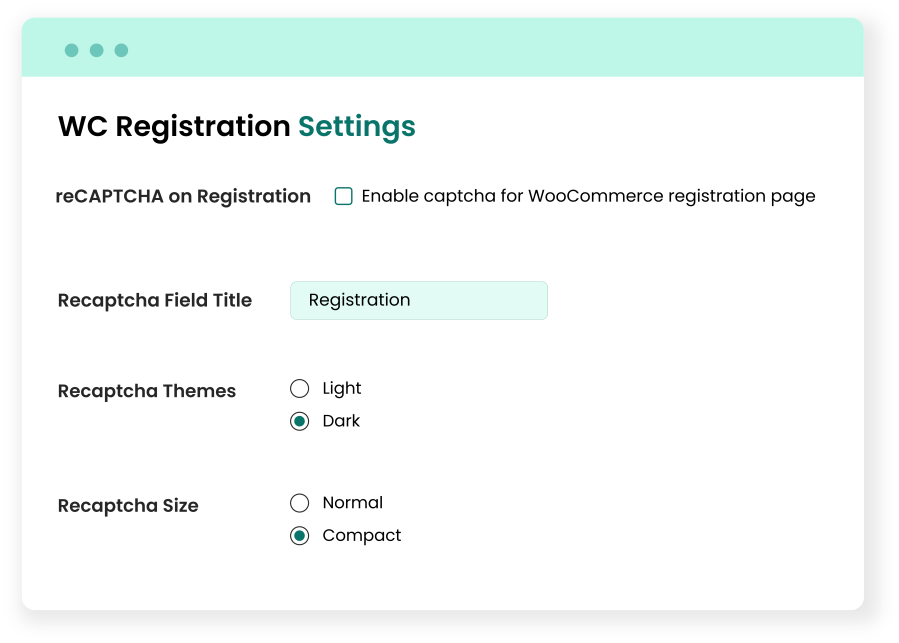
Customize reCaptcha for each WooCommerce and WordPress Page

  • The extension allows you to enable reCaptcha on specific WooCommerce and WordPress pages. You can also customize the following reCaptcha options for each page:
    • Field Title
    • Themes (light or dark)
    • Size (normal or compact

Add reCaptcha using Shortcode

Integrating Google reCaptcha into your website is made even more versatile with the inclusion of a shortcode feature. By enabling the Shortcode reCaptcha option, you can make any page of your website secure by reCaptcha by adding a shortcode [captcha_shortcode] on any desired page.

Supports reCaptcha.net

This WooCommerce reCaptcha extension provides advanced security measures and customization options for online stores. You can choose between Google.com and reCaptcha.net as the preferred reCAPTCHA type. The reCaptcha.net is preferable for countries where Google is blocked. The “No-Conflict Mode” ensures seamless integration by removing other CAPTCHA occurrences on that page to avoid site-breaking conflicts. 

General Settings

With additional customization options such as Recaptcha Field Title and a choice between Light and Dark themes, as well as Normal or Compact size, website administrators can seamlessly align reCaptcha with their site’s aesthetics and user experience preferences. 

The plugin allows the exclusion of specific countries and the option to disable reCAPTCHA for designated IP ranges, offering a tailored and robust security solution for WooCommerce websites.

Why Google reCaptcha for WooCommerce?

google recaptcha for woocommerce

Requirements

Minimum PHP version: 5.6


Customer reviews

Average rating 4.3
19 reviews
5 stars, 68% of reviews
4 stars, 5% of reviews
3 stars, 16% of reviews
2 stars, 5% of reviews
1 star, 5% of reviews
19 reviews
  • fadsnetops
    Rated 1 out of 5
    Functionality
    Feb 17, 2026
    Functionality
    doesn't seem to work. I added the v2 recaptcha and for some reason it makes it a v3 recaptcha. added the recaptcha shortcode and it adds the checkbox, but not checking the box doesn't stop the payment from happening. just doesn't work.
  • kellytca
    Rated 2 out of 5
    Functionality
    Dec 10, 2025
    Functionality
    The plugin integrates reCAPTCHA v3 on WooCommerce and works on the frontend, but it does not send the required “assessment” requests that Google now mandates for full protection. As a result, keys remain “Incomplete” and “Unprotected” in Google Cloud Console. Support confirmed this feature is not available and there is no ETA for an update. If you need compliance with Google’s new security standards, consider alternatives until this plugin is updated.
    • KoalaApps
      Dec 10, 2025
      Thank you for sharing your feedback, and we sincerely apologize for the inconvenience. We have tested the reported scenario on our end and were unable to reproduce the issue, we’ve already shared a video demonstration with you. We also released an update to the extension yesterday, so please ensure you’re using the latest version. Additionally, we’ve emailed you with further details; kindly reply there so we can assist you on priority and resolve any remaining concerns. - Team Koala
  • Smallholder Central Ltd t/a English Country Life
    Rated 5 out of 5
    Support
    Dec 8, 2025
    Support
    The plug in worked really well until an update on our shop meant we were unable to access the settings. The Koala team were incredibly helpful and resolved the issue very quickly. I highly recommend the app and the customer service.
    • KoalaApps
      Dec 10, 2025
      Thank you for the great feedback! We're glad that you liked our product and to hear that you had a good experience with our support. - Team Koala
  • swindondesign
    Rated 5 out of 5
    Support
    Oct 30, 2025
    Support
    A great plugin with lots of capability - does the job well and excellent support :-)
    • KoalaApps
      Oct 30, 2025
      Thank you for the great feedback! We're glad to hear that you've had a good experience with our support. - Team Koala
  • hobbydistillersassoc
    Rated 5 out of 5
    Support
    Jul 3, 2025
    Support
    We had one small issue when first installing the plugin, but this was quickly resolved as soon as we reached out. The plugin works as expected, and support is excellent.
    • KoalaApps
      Jul 7, 2025
      Thank you for your kind words! We're glad the issue was resolved quickly and that the plugin is working well for you. Always here if you need anything! - Team Koala

Extension information

  • WordPress version required: 4.6
  • WooCommerce version required: 3.0.0
  • PHP version required: 7.4
  • Tested with WordPress: 6.*.*
  • Tested with WooCommerce: 10.*.*
  • Requires at least WordPress: 6.5
  • Requires at least WooCommerce: 4.0

Compatibility

  • Cart & checkout blocks

Countries

  • Worldwide

Languages

English (United States)

Related Products

Price $29 annually
Rated 3.5 out of 5 stars
Price $279 annually
Rated 3.2 out of 5 stars
Price $119 annually
Rated 3.5 out of 5 stars
Price $109 annually
Rated 4.6 out of 5 stars
Price $49 annually
Rated 2.7 out of 5 stars
Price $199 annually
Rated 4 out of 5 stars
Price $79 annually
Rated 4.2 out of 5 stars
Price $49 annually
Rated 3.8 out of 5 stars
Price $99 annually
Rated 4.7 out of 5 stars

