Product Icon

Products and Orders Sync for WooCommerce

Effortlessly sync your WooCommerce products and orders across unlimited stores with our Products and Orders Sync extension. This extension ensures seamless management of products, categories, images, and orders, to enhance efficiency and keep your business running smoothly.
Choose a billing option
$59
Save 20%
$118 $94.40

Subscription includes

  • Product updates and improvements
  • Customer support
  • 30-day money-back guarantee

Effortlessly manage your WooCommerce store products and orders across multiple websites with our Products and Orders Sync extension for WooCommerce. Keep your product listings up to date by syncing specific categories and tags. This powerful WooCommerce sync plugin enables you to create and sync products, ensuring that all essential details such as prices, SKUs, short and long descriptions, attributes, and categories are accurately transferred to your destination sites.

In addition to product sync for WooCommerce, the extension ensures smooth order sync between WooCommerce stores. All order details, including items, billing, and shipping information, are automatically synced across your sites, managing your workflow and improving efficiency.

Top Features:

  • Automate the synchronizations for products and orders.
  • Sync multiple WooCommerce stores, supporting business growth and scalability.
  • Sync products between stores including:
    • Prices
    • SKU
    • Categories
    • Tags
    • Variations
    • Gallery images
    • Featured image
    • Short and long descriptions
  • Consistently sync variations, attributes, pricing, and inventory details across stores, ensuring accuracy.
  • Granular Control: Sync only selected products to specific stores.
  • Automatically create and sync categories and tags to maintain a well-structured store hierarchy.
  • Automatically create and sync shopper’s orders using filtering by customer name or order number including:
    • Billing details
    • Shipping details
    • Order items
    • Create product
  • Product Metadata Sync: Now syncs all product metadata to destination sites.

General sync settings

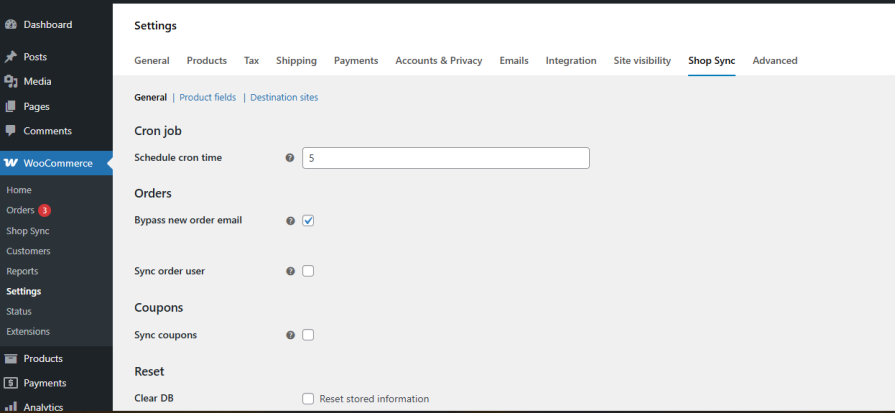
  • Set the cron interval time to ping the destination site. By default, the extension will ping every 5 minutes to sync the data.

  • Set the product’s status (Publish, Draft, Private) at the destination store during synchronization.

  • Choose to create only parent products or include product variations.

General settings for Shop sync

Product Field Sync: Choose specific product fields to sync with your destination site and define their statuses.

Product fields setting


Destination Site Setup: Enter the destination shop address, ensuring it matches the one specified in the Custom Shop Sync tab.

destination site setup

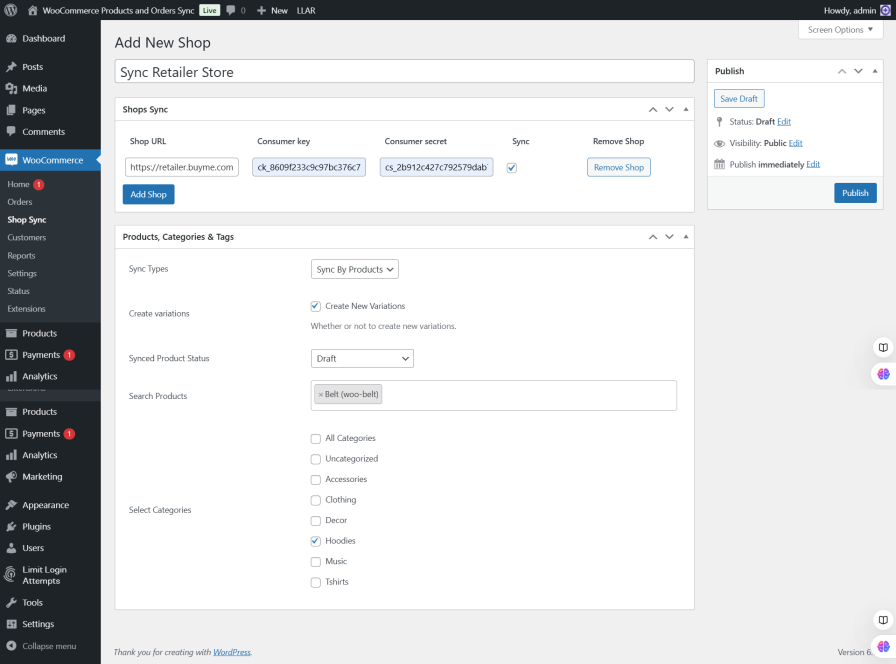
Sync products to a destination store

You have complete control to sync numerous WooCommerce site to create the same products and all the details to your destination stores. You can select the desired categories/tags or products by filtering their name or SKU to sync at next store.
Sync orders to a destination store

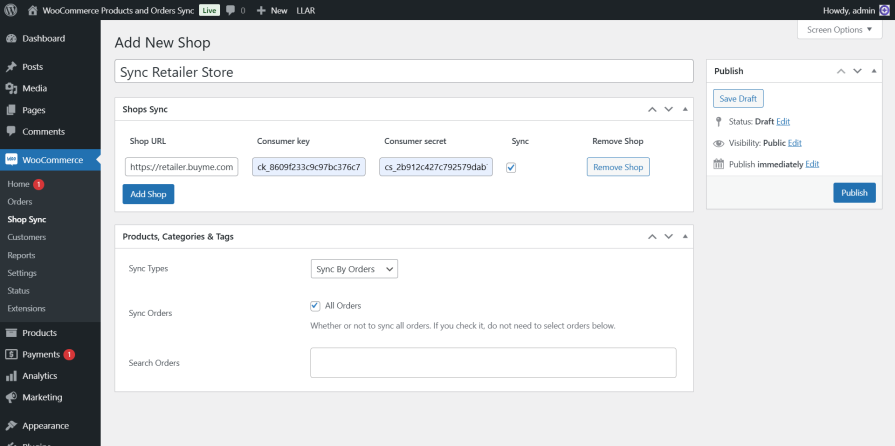
You can create the same orders to quickly sort them to your destination stores. You can select all the orders or filter by customer name or order number for synchronization.
Enhanced Order Synchronization Settings:
  • Select all orders or filter by customer name or order number for more precise synchronization.
  • Sync order’s shipping details.
  • Syncs order’s fee details.
  • Syncs order’s coupon details.
  • Syncs order’s tax/VAT details.
  • Sync Order Metadata details.Order Sync Settings

Customer Synchronization:

  • Sync all customers to the destination sites.
  • Sync customer’s metadata to the destination sites.
  • Sync customer’s billing details to the destination sites.
  • Sync customer’s shipping details to the destination sites.
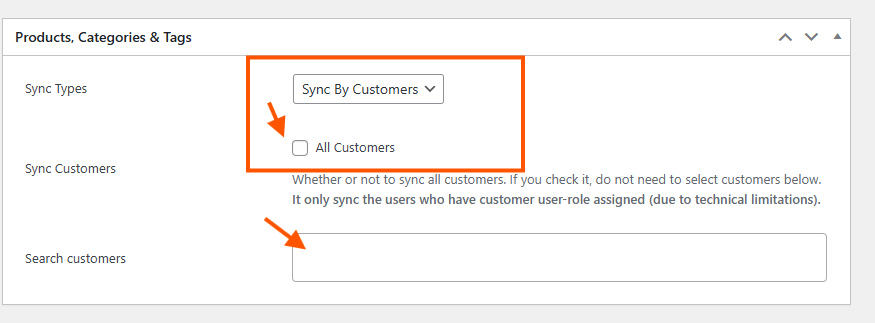
  • Sync only specific customers automatically who placed an order.Customer Sync

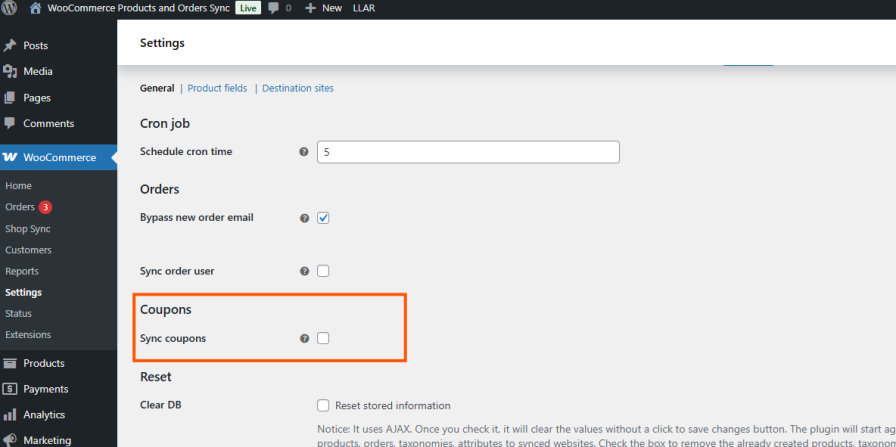
Coupon Synchronization:

  • Sync all created coupons, including linked products and customers.


Frequently asked questions

What types of products can I sync using this extension?

You can sync all WooCommerce product types, including simple, grouped, virtual, external/affiliate, and variable products.

Can I sync specific products, or do I have to sync everything?

Yes, you can sync specific products by selecting them individually or by category. You also have the flexibility to sync all products if needed.

How frequently does synchronization occur by default?

By default, synchronization is set to occur every 5 minutes. You can modify this interval by going to WooCommerce > Settings > Shop Sync and adjusting the cron job interval as needed.

Is it possible to sync orders along with products?

Yes, our extension first checks if the order items already exist on the destination site. If any product is missing, the extension will automatically create that product along with all its associated data. Once the products are successfully created, the extension will proceed to generate the order, including all purchased items, ensuring that the entire order and its details are properly synchronized.

Can I sync product images and galleries?

Yes, this extension ensures that product images and galleries are created and sync across all connected stores. 

Why are duplicate products still being created even after using this plugin?

In some cases, duplicate products may still appear due to server or sync-related issues outside the plugin’s control. This commonly happens when the destination website responds slowly, experiences downtime, or fails to process requests correctly during product syncing.

When a sync request times out or does not receive a proper response from the destination server, the same request may be sent again, which can result in duplicate product creation.

What can help prevent this issue?

  1. Increase the cron job interval, such as running sync every 15 minutes instead of very frequently
  2. Check if the destination website is slow, overloaded, or experiencing downtime
  3. Use a hosting/server environment that can handle multiple requests reliably
  4. Sync products in smaller batches or category-wise instead of syncing the entire catalog at once
  5. Review server limits such as execution time, memory usage, and request handling capacity

Our plugin helps detect and clean duplicate products, but server performance and third-party sync behavior can still affect how products are created.

If you need assistance diagnosing the issue, please contact our support team at help.additions@gmail.com or create a support ticket through WooCommerce support.

Customer reviews

Average rating 4.0
12 reviews
5 stars, 75% of reviews
4 stars, 0% of reviews
3 stars, 0% of reviews
2 stars, 0% of reviews
1 star, 25% of reviews
12 reviews
  • vipfanauctions
    Rated 5 out of 5
    Support
    May 28, 2026
    Support
    We purchased the Product and Order Sync plugin to copy products from our main website to our archive site. During the testing phase, we received prompt replies from the team, who helped us address all the cases and questions we had. The responses were always fast and professional. Before going live, we also had a call with the team, and they even connected to our site to help us set everything up and verify that everything was working correctly. Highly recommended. What I appreciate the most is their responsiveness and genuine willingness to help.
  • nikiiliev9609
    Rated 5 out of 5
    Functionality
    Feb 27, 2026
    Functionality
    I am extremely satisfied with the functionality of the Products and Orders Sync plugin by Additions Store. The plugin works reliably and does exactly what I need for syncing products and orders between my stores. It has significantly improved my workflow and saved me a lot of time in managing my business. I am especially impressed with the support team. They are responsive, professional, and truly helpful. Every time I had a question or needed assistance, they provided clear guidance and effective solutions. Highly recommended for anyone who needs a stable and efficient syncing solution. Thank you for the excellent work!
    • Additions
      Mar 4, 2026
      Thank you very much for your wonderful feedback. We’re truly glad to hear that the Products and Orders Sync plugin is helping streamline your workflow and support your business efficiently. Your kind words about our support team mean a lot to us. We’re always here to provide reliable and professional assistance whenever needed.
  • jparsonsd3e2f209a4
    Rated 5 out of 5
    Support
    Sep 19, 2025
    Support
    Excellent Support! The team is prompt and assists with you to make sure the plugin is working as expected.
    • Additions
      Sep 19, 2025
      Thank You! Your satisfaction means a lot to us, and we’ll continue doing our best to provide quick and reliable assistance whenever you need it.
  • noboxsolutions
    Rated 1 out of 5
    Functionality
    Sep 19, 2025
    Functionality
    Doesnt work as intended. Doesnt sync correct data. Syncs products that should not be synced. Fast support but doesnt give correct answers.
  • fahadbinkhalidpk
    Rated 5 out of 5
    Support
    Sep 3, 2025
    Support
    Excellent, quick, and competent support team!

Extension information

  • WordPress version required: 6.0
  • WooCommerce version required: 7.0.0
  • PHP version required: 7.0
  • Tested with WordPress: 6.8.1
  • Tested with WooCommerce: 10.1.1
  • Requires at least WordPress: 6.0
  • Requires at least WooCommerce: 7.0

Compatibility

  • Cart & checkout blocks
  • High performance order storage (HPOS)

Countries

  • Worldwide

Requirements

  • WooCommerce

Related Products

Price $79 annually
Rated 3.4 out of 5 stars
Price $279 annually
Rated 3.2 out of 5 stars
Price $59 annually
Rated 3.1 out of 5 stars
Price $109 annually
Rated 2.8 out of 5 stars
Price $49 annually
Rated 4.1 out of 5 stars
Price $109 annually
Rated 2 out of 5 stars
Price $109 annually
Rated 2.3 out of 5 stars
Price $109 annually
Rated 2.6 out of 5 stars
Price $109 annually
Rated 2.3 out of 5 stars
Use of your personal data
We and our partners process your personal data (such as browsing data, IP Addresses, cookie information, and other unique identifiers) based on your consent and/or our legitimate interest to optimize our website, marketing activities, and your user experience.