


Subscription includes
Support
The Admin Order Modifier extension for WooCommerce increases the functionality of the admin order edit screen. It adds automatic calculation and inclusion of taxes such as VAT when prices change. Using the extension, admins can avoid calculation errors when they make line-item changes and easily view those changes. Admins can also toggle additional line-item information and apply regular or sale pricing to a line item without leaving the edit screen. The Admin Order Modifier extension is also compatible with WooCommerce High-Performance Order Storage (HPOS).
Admin Order Modifier augments what WooCommerce does so well adding interface enhancements. It works with line items, custom fees, shipping items, and refunds. Have confidence that your changes are correct with Admin Order Modifier.
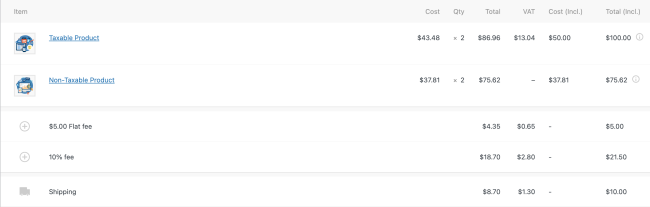
With improved line item viewing and editing you can:
Change prices quickly
View line items quickly
Configure settings
Save time and effort and avoid calculation errors—augment your admin order edit screen now with Admin Order Modifier.
Yes, the Admin Order Modifier is fully compatible with WooCommerce HPOS and traditional custom post type storage.
To keep your dashboard clean, settings are integrated directly into WooCommerce > Settings > Tax > Admin Order Modifier
Absolutely. The plugin adds "Cost (Incl.)" and "Total (Incl.)" columns to the order edit screen, allowing you to enter the final price. The plugin then automatically calculates the base price and tax for you.
Yes. You can drag and drop line items to change their sort order. This order is preserved in customer emails, invoices, and the admin view, which is helpful for organizing shipments.
Yes, you can enable the modifier for product line items, custom fees, and shipping items to ensure tax-inclusive editing across the entire order.
Next to the price input, there is a "Quick Apply" button. Clicking this allows you to select either the current Regular or Sale price of that product from your catalog without leaving the order page.
Yes, this plugin allows you to view item discounts as a percentage and also set discounts as a percentage.
You can toggle the modifier on or off for specific line items. If an item is non-taxable or zero-rated, the plugin can be configured to skip those calculations to avoid confusion.
Yes this plugin is designed to work with your WooCommerce tax configuration, including multiple tax rates.
Yes, this plugin shows the correct tax calculations when using refunds.
The modifier requires at least one tax rate to be active on the order. If no tax is applied to the order yet, a notice will appear reminding you to add a tax line item first.
The plugin modifies pricing and display order; it does not interfere with WooCommerce’s standard inventory reduction logic when items are added or removed.
Extension information
Quality Checks
Compatibility
Countries







